1. Introducció
The OREI UHD-EX165H-K HDMI Extender allows you to extend a 4K@60Hz HDR or non-HDR video signal up to 164 feet (50 meters) over a single Cat6 or Cat7 Ethernet cable. This kit includes a sender unit and a receiver unit, designed for reliable and high-quality video transmission over long distances. It is compliant with HDMI 2.0 and HDCP 2.2 standards, supporting resolutions up to 4K@60Hz RGB/YCbCr 4:4:4 or YCbCr 4:2:2.
Característiques clau
- Extends 4K@60Hz HDR or non-HDR video signal up to 164 feet (50 meters) using Cat6/Cat7 cable.
- Compatible amb HDMI 2.0 i HDCP 2.2.
- Supports maximum input/output resolution: up to 4K@60Hz RGB/YCbCr 4:4:4 or YCbCr 4:2:2.
- One-way IR control for source management from the remote display.
- EDID management option to copy EDID signal from transmitter's loop-out display or receiver's display.
- Compact and lightweight design with heavy-duty metal enclosure.
- Easy Plug & Play setup without complex installation.
Contingut del paquet
- 1 x OREI UHD-EX165H-K Sender Unit (Transmitter)
- 1 x OREI UHD-EX165H-K Receiver Unit
- 1 x Worldwide Voltage Adaptador de corrent
- 1 x IR Blaster Cable (IR Tx)
- 1 x IR Receiver Cable (IR Rx)
- 1 x Manual d'instruccions (aquest document)
Nota: HDMI cables and Cat6/Cat7 Ethernet cables are no inclòs i s'ha de comprar per separat.

2. Informació de seguretat
Please read and follow these safety instructions carefully before operating the device to ensure proper functionality and prevent damage.
- No exposeu aquesta unitat a l'aigua, la humitat o una humitat excessiva.
- No col·loqueu la unitat a prop de fonts de calor com ara radiadors, registres de calor, estufes o altres aparells que produeixin calor.
- Use only the power adapter supplied with the unit. Using unauthorized power adapters may damage the device and void the warranty.
- Assegureu-vos una ventilació adequada al voltant de la unitat per evitar el sobreescalfament.
- Do not attempt to open or service the unit yourself. Refer all servicing to qualified service personnel.
- Mantingueu la unitat allunyada de camps electromagnètics forts.
- Desconnecteu l'alimentació durant tempestes amb llamps o quan no es faci servir durant períodes prolongats.
3. Configuració i connexió
Follow these steps to properly set up your OREI HDMI Extender.
Abans de començar
- Ensure all devices (source, display, extender units) are powered off before making connections.
- Prepare the necessary cables: HDMI cables for source and display connections, and a single Cat6/Cat7 Ethernet cable for connecting the transmitter and receiver units. For optimum performance, we recommend shielded (STP) round Cat6 cable.
- Note that this extender does not support 2K (2560x1440) resolution.
Diagrama de connexió
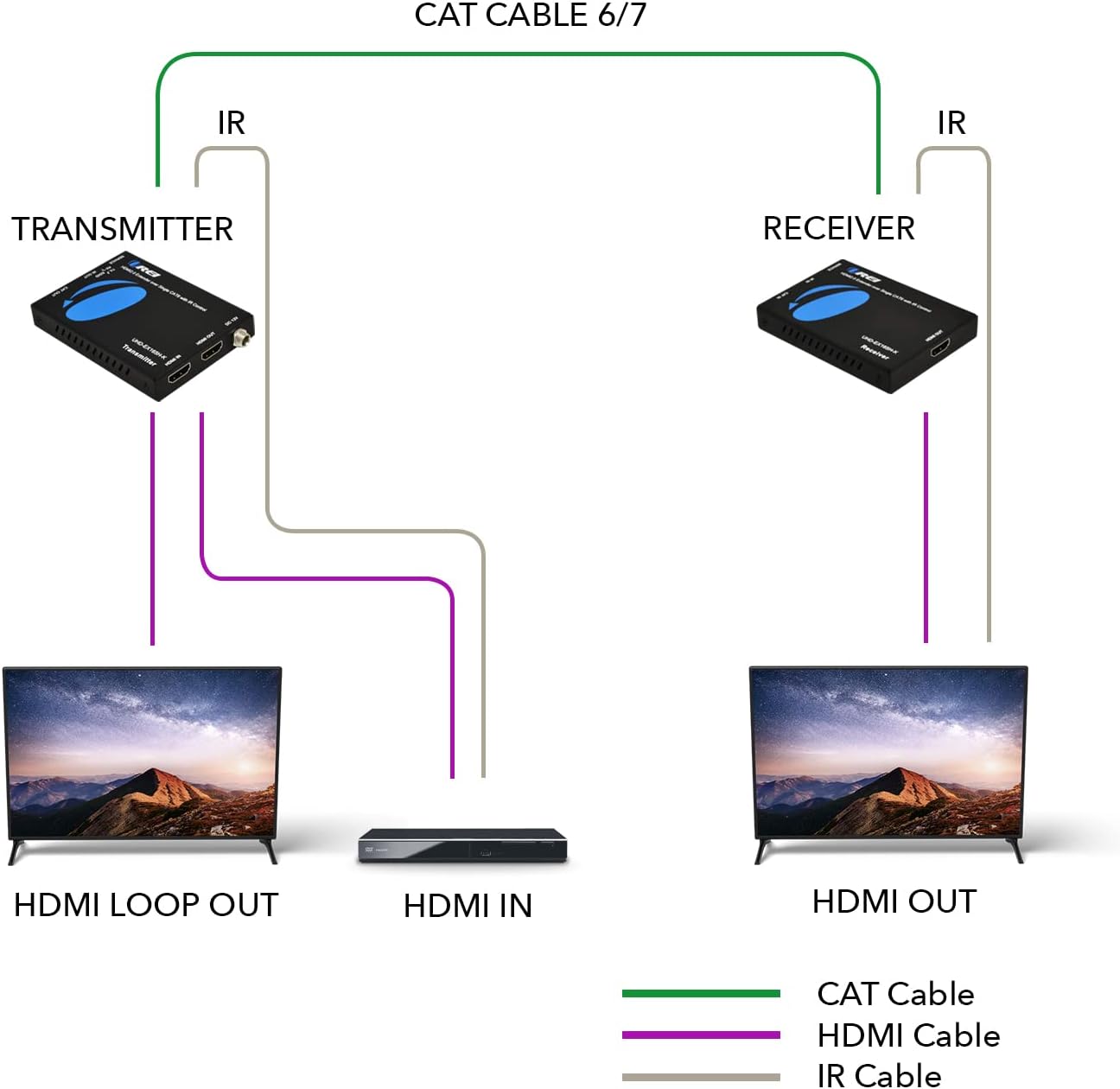
Instal·lació pas a pas
- Connect your HDMI source device (e.g., Blu-ray player, gaming console, PC) to the Entrada HDMI port al Emissor unit using an HDMI cable.
- If you wish to have a local display, connect an HDMI cable from the SORTIDA HDMI LOOP port al Emissor unit to your local display.
- Connect one end of a Cat6/Cat7 Ethernet cable to the CAT FORA port al Emissor unitat.
- Connect the other end of the Cat6/Cat7 Ethernet cable to the CAT IN port al Receptor unitat.
- Connecteu un cable HDMI des del SORTIDA HDMI port al Receptor unit to your remote display (e.g., TV, projector).
- For IR control, connect the IR Blaster (IR Tx) cable to the IR OUT port al Emissor unit and position the IR emitter near the IR sensor of your source device.
- Connect the IR Receiver (IR Rx) cable to the IR IN port al Receptor unit and position the IR receiver in a location where it can receive signals from your remote control.
- Connecteu l'adaptador d'alimentació inclòs al DC 12V port on either the Transmitter or Receiver unit. This unit requires only one power adapter to work due to Power over Cable (PoC) support.
- Power on all connected devices (source, displays, extender units).

4. Funcionament
Funcionament bàsic
Once all connections are made and devices are powered on, the extender will automatically detect the HDMI signal and transmit it to the remote display. The system is designed for plug-and-play functionality, requiring no additional software or complex configuration.
Control IR
The one-way IR control feature allows you to control your HDMI source device from the location of your remote display. Simply point your source device's remote control at the IR Receiver (IR Rx) connected to the extender's receiver unit. The signal will be transmitted back to the IR Blaster (IR Tx) connected to the transmitter unit, which will then relay the command to your source device.

Gestió EDID
The extender provides an option to copy the EDID (Extended Display Identification Data) signal. This allows the source device to recognize the capabilities of either the local display connected to the transmitter's loop-out or the remote display connected to the receiver. This ensures optimal video and audio compatibility.
5. Cura i Manteniment
To ensure the longevity and optimal performance of your OREI HDMI Extender, follow these maintenance guidelines:
- Neteja: Use a soft, dry cloth to clean the exterior of the units. Do not use liquid cleaners or aerosol cleaners, as they may damage the device.
- Emmagatzematge: Quan no l'utilitzeu durant períodes prolongats, guardeu la unitat en un lloc fresc i sec, allunyat de la llum solar directa i de temperatures extremes.
- Manipulació: Handle the units with care. Avoid dropping or subjecting them to strong impacts.
- Ventilació: Ensure that the ventilation openings on the units are not blocked to prevent overheating.
6. Guia de resolució de problemes
If you encounter issues with your OREI HDMI Extender, please refer to the following table for common problems and their solutions.
| Problema | Causa possible | Solució |
|---|---|---|
| No video output on remote display. | Loose cable connections, incorrect power, incompatible resolution, faulty Cat cable. | Check all HDMI and Cat6/Cat7 cable connections. Ensure the power adapter is securely connected and providing power. Verify that the source resolution is supported (not 2K). Test with a different Cat6/Cat7 cable. |
| Poor video quality (flickering, distorted image). | Low quality or damaged Cat cable, excessive cable length, interference. | Use a high-quality Cat6/Cat7 cable, preferably shielded (STP). Ensure cable length does not exceed 164 feet (50 meters). Minimize electromagnetic interference by keeping cables away from power lines. |
| El control per infrarojos no funciona. | IR cables incorrectly connected, IR emitter/receiver not positioned correctly, remote control issues. | Ensure IR Tx is connected to the Transmitter's IR OUT and IR Rx to the Receiver's IR IN. Adjust the position of the IR emitter to directly face the source device's IR sensor. Ensure the IR receiver is in line of sight of your remote control. Check remote control batteries. |
| Sense àudio. | Audio format not supported, loose HDMI cable. | Verify that the audio format is supported by both the extender and the display. Check HDMI cable connections. |
| El LED d'alimentació està apagat. | Sense corrent, adaptador de corrent defectuós. | Ensure the power adapter is securely plugged into a working power outlet and the extender unit. Try a different power outlet. If possible, test with another compatible power adapter. |
7. Especificacions tècniques
Detailed specifications for the OREI UHD-EX165H-K HDMI Extender.
| Característica | Especificació |
|---|---|
| Número de model | UHD-EX165H-K |
| Compatibilitat amb HDMI | HDMI 2.0 |
| Compliment HDCP | HDCP 2.2 |
| Resolucions suportades | Up to 4K@60Hz RGB/YCbCr 4:4:4 or YCbCr 4:2:2 (Does not support 2560x1440) |
| Distància de transmissió | Up to 164 feet (50 meters) over single Cat6/Cat7 cable |
| Control IR | One-way IR control |
| Gestió EDID | Admet |
| Font d'alimentació | DC 12V (PoC support, only one adapter needed) |
| Dimensions del producte | 6 x 4 x 2 polzades (aproximadament per a una unitat) |
| Pes de l'article | 1.2 pounds (total for both units) |
| Color | Negre |
| Material de tancament | Heavy Duty Metal |

8. Garantia i suport tècnic
OREI stands behind the quality of its products and offers comprehensive support.
Garantia del fabricant
This OREI HDMI Extender comes with a Garantia del fabricant de 12 mesos des de la data de compra. Aquesta garantia cobreix els defectes de materials i de fabricació en condicions d'ús normal. Conserveu el comprovant de compra per a reclamacions de garantia.
Suport tècnic
OREI provides Suport tècnic de per vida for this product. If you encounter any issues or have questions regarding the setup, operation, or troubleshooting of your HDMI extender, please do not hesitate to contact OREI's technical support team. Contact information can typically be found on the OREI official weblloc web o a través de la vostra plataforma de compra.


