1. Instruccions de seguretat importants
Please read all instructions carefully before using the UNIC UC28+ projector. Keep this manual for future reference.
- Font d'alimentació: Use only the specified power adapter. Ensure the power outlet voltage coincideix amb els requisits del projector.
- Ventilació: Do not block ventilation openings. Ensure adequate space around the projector for proper airflow to prevent overheating.
- Calor: El projector lamp generates heat. Avoid touching the lens or ventilation areas immediately after use.
- Humitat: Do not expose the projector to rain, moisture, or immerse it in water. Keep liquids away from the device.
- Neteja: Unplug the projector before cleaning. Use a soft, dry cloth. Do not use liquid or aerosol cleaners.
- Seguretat ocular: No mireu directament a la lent del projector quan estigui encès.amp està encès. La llum brillant pot causar lesions oculars.
- Col·locació: Place the projector on a stable, flat surface. Avoid placing it in direct sunlight or near heat sources.
- Manteniment: No intenteu atendre aquest producte vosaltres mateixos. Consulteu tots els serveis a personal de servei qualificat.
2. Producte acabatview
The UNIC UC28+ is a portable LED projector designed for home cinema and entertainment. It supports a native resolution of 1920x1080 and offers multiple input options for versatile connectivity.
2.1 Components del projector

Imatge 1: A dalt view of the UNIC UC28+ projector. This image displays the manual control buttons located on the top panel, including 'ENTER', navigation arrows, 'INPUT' for source selection, and 'ESC' for exiting menus. The focus ring is also visible at the front.

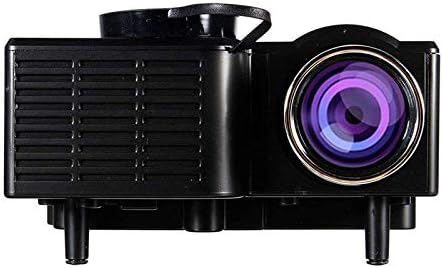
Imatge 2: Davant i lateral view of the UNIC UC28+ projector. This image highlights the main projection lens and the ventilation grilles on the side, essential for heat dissipation during operation.
Imatge 3: lateral view of the UNIC UC28+ projector. This image clearly shows the various input ports available: HDMI, USB, AV, SD card slot, and VGA, providing multiple options for connecting external devices.
3. Configuració
3.1 Contingut del paquet
- UNIC UC28+ LED Projector
- Adaptador d'alimentació
- Control remot
- Cable AV
- Manual d'usuari
3.2 Col·locació del projector
Position the projector on a stable, flat surface. Ensure the projection surface (screen or wall) is clean and smooth. The optimal projection distance will vary based on desired screen size. Adjust the projector's angle to achieve a rectangular image.
3.3 Connexió d'alimentació
- Connecteu l'adaptador de corrent al port d'entrada d'alimentació del projector.
- Connecteu l'adaptador d'alimentació a una presa de corrent adequada.
- L'indicador lluminós d'engegada del projector s'il·luminarà.
3.4 Connexió de dispositius d'entrada
The UC28+ supports various input sources:
- HDMI: Connect a device (e.g., laptop, Blu-ray player, gaming console) using an HDMI cable to the HDMI port.
- USB: Inseriu una unitat flaix USB al port USB per reproduir contingut multimèdia files directament.
- DE: Use the provided AV cable to connect older devices (e.g., DVD player, VCR) to the AV port.
- Targeta SD: Insert an SD card into the SD card slot to play media files.
- VGA: Connect a computer or laptop using a VGA cable to the VGA port.

Imatge 4: Connectivity diagram for the UNIC UC28+ projector. This illustration demonstrates how various external devices such as computers, gaming consoles, smartphones, and media players can be connected to the projector using its multiple input options.
3.5 Ajust del focus
After powering on and selecting an input source, rotate the focus ring located around the lens until the projected image appears clear and sharp.
4. Instruccions de funcionament
4.1 Engegada/apagada
- Encès: Press the power button on the projector or the remote control. The projector will start up, and the lamp il·luminarà.
- Apagar: Press the power button again. The projector will initiate a shutdown sequence. Allow the projector to cool down completely before unplugging or moving it.
4.2 Selecció de la font d'entrada
Press the 'INPUT' button on the projector or remote control to cycle through available input sources (HDMI, USB, AV, SD, VGA). Select the source corresponding to your connected device.
4.3 Navegació de menús
Use the navigation arrows on the projector or remote control to move through menu options. Press 'ENTER' to confirm a selection and 'ESC' to go back or exit the menu.
4.4 Configuració bàsica
- Mode d'imatge: Ajusta la brillantor, el contrast, el color i la nitidesa.
- Relació d'aspecte: Select between 16:9, 4:3, or Auto to match your content.
- So: Adjust volume or mute the audio output.
5. Manteniment
Un manteniment regular garanteix un rendiment òptim i allarga la vida útil del projector.
- Neteja de lents: Use a soft, lint-free cloth or lens cleaning paper to gently wipe the lens. Avoid abrasive materials or excessive pressure.
- Neteja del cos del projector: Wipe the exterior of the projector with a soft, dry cloth. Do not use harsh chemicals or solvents.
- Ventilació: Periodically check and clean the ventilation grilles to prevent dust buildup, which can impede airflow and cause overheating. Use a soft brush or compressed air.
- Emmagatzematge: When not in use for extended periods, store the projector in a cool, dry, dust-free environment. Use the original packaging or a protective case.
6. Solució De Problemes
Si teniu problemes amb el projector, consulteu els problemes i solucions més comuns següents:
| Problema | Causa possible | Solució |
|---|---|---|
| Sense poder | Cable d'alimentació desconnectat, problema amb la presa de corrent | Comproveu la connexió del cable d'alimentació. Proveu una altra presa de corrent. |
| Sense imatge | Incorrect input source, cable not connected, device not powered on | Select correct input source. Ensure all cables are securely connected. Power on the source device. |
| Imatge borrosa | Focus not adjusted, incorrect projection distance | Adjust the focus ring. Reposition the projector for optimal distance. |
| Sense so | Volume too low, audio cable disconnected, source device muted | Increase projector volume. Check audio cable connections. Unmute source device. |
| Avís de sobreescalfament | Blocked ventilation, prolonged use | Ensure ventilation openings are clear. Allow the projector to cool down. |
7. Especificacions
| Característica | Detall |
|---|---|
| Marca | UNIC |
| Número de model | UC28+ |
| Tipus de visualització | LED |
| Resolució nativa | 1920 x 1080 píxels |
| Resolució de visualització màxima | 1920 x 1080 píxels |
| Brillantor | 400 lúmens |
| Tecnologia de connectivitat | HDMI, USB, AV, SD, VGA |
| Factor de forma | Portàtil |
| Tipus de muntatge | Muntatge de taula |
| Consum d'energia | 70 watts |
8. Garantia i Suport
For warranty information or technical support, please refer to the warranty card included with your product or contact the retailer where the product was purchased. Keep your proof of purchase for warranty claims.


