1. Introducció
This manual provides detailed instructions for the Linsoul KZ APTX-HD Bluetooth 5.0 Module Upgrade Cable. This module is designed to convert compatible KZ in-ear monitors into wireless earphones, offering high-fidelity audio transmission via Bluetooth 5.0 with APTX-HD support. It features a B PIN connector type, suitable for KZ-ZST, KZ-ZS10, KZ-AS10, KZ-BA10, KZ-AS06, KZ-ES4, and KZ-ZSR earphones.
Key features include a CSR8675 chip, Bluetooth 5.0, aptX HD audio, CVC noise reduction, AAC audio coding, IPX5 waterproof rating, and approximately 8 hours of playback time.

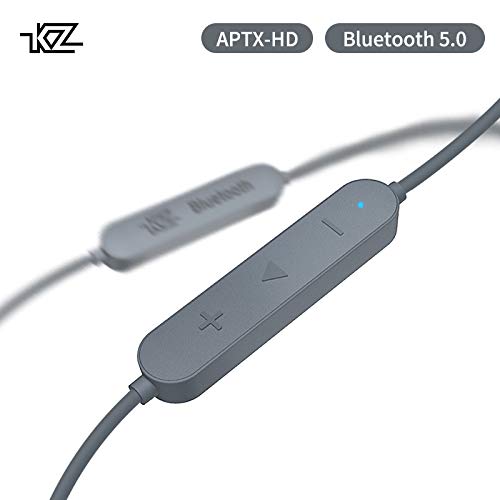
Imatge 1.1: acabatview of the KZ APTX-HD Bluetooth 5.0 Module Upgrade Cable, showing the main unit with control buttons and the B PIN connectors for earphones.
2. Configuració
2.1 Charging the Module
Before initial use, fully charge the Bluetooth module. Connect the module to a USB power source using the provided charging cable. The LED indicator will show charging status. A full charge typically takes approximately 2 hours.

Image 2.1: Illustration of battery capacity (130 mAh), 8 hours battery life, 100 hours standby, and 2 hours fast charging.
2.2 Connecting to Earphones
Identify the correct B PIN connectors on your KZ earphones. Carefully align the pins of the Bluetooth module with the earphone sockets and push them in until they are securely connected. Ensure the left (L) and right (R) connectors of the module match the respective earphone units.
Imatge 2.2: Primer pla view of the B PIN connectors on the Bluetooth module, ready for attachment to compatible KZ earphones.
2.3 Vinculació amb un dispositiu
- Encès: Press and hold the power button (usually the middle button on the control module) when the device is off. The blue LED will flash, and a voice prompt will indicate power on.
- Introduïu el mode de vinculació: From the off state, press and hold the power button until the red and blue LEDs flash alternately. A voice prompt will confirm pairing mode.
- Connecteu-vos mitjançant Bluetooth: On your smartphone or other Bluetooth-enabled device, go to the Bluetooth settings and search for available devices. Select "KZ APTX-HD" (or similar name) from the list to connect.
- Confirmació: Once successfully paired, the blue LED will flash periodically, and a voice prompt will confirm the connection.

Image 2.3: Diagram illustrating the line control buttons and their functions, including power on and pairing instructions.
3. Instruccions de funcionament
3.1 Encès/Apagat
- Encès: Press the power button (middle button) when the module is off. The blue LED will flash, and a voice prompt will sound.
- Apagar: Press and hold the power button for approximately 3 seconds. The red LED will flash once, and a voice prompt will confirm power off.
3.2 Reproducció de música
- Reproduir/pausa: Press the power button once to play or pause music playback.
- Augment de volum: Press the '+' button. A sound prompt will indicate when maximum volume is reached.
- Disminució del volum: Press the '-' button. Continue pressing to decrease volume until muted.
- Cançó anterior: Long press the '-' button to skip to the previous track.
- Següent cançó: Premeu llargament el botó '+' per saltar a la pista següent.

Imatge 3.1: Detallada view of the control module, showing the '+', '-', and power/multi-function buttons, along with the red LED indicator.
3.3 Gestió de trucades
- Respondre/Finalitzar la trucada: Press the power button once to answer an incoming call or end an ongoing call.
- Rebutja la trucada: Long press the power button to reject an incoming call.
4. Manteniment
- Neteja: Use a soft, dry cloth to wipe the module and cables. Avoid using harsh chemicals or abrasive materials.
- Emmagatzematge: Store the module in a cool, dry place away from direct sunlight and extreme temperatures.
- Cura de la bateria: To prolong battery life, avoid fully discharging the battery frequently. Charge the module regularly, even if not in use for extended periods.
- Resistència a l'aigua: The module has an IPX5 waterproof rating, meaning it is resistant to splashing water and light rain. Do not submerse the module in water.
5. Solució De Problemes
| Problema | Causa possible | Solució |
|---|---|---|
| No es pot encendre | Bateria baixa | Charge the module fully. |
| No es pot emparellar amb el dispositiu | Module not in pairing mode; Bluetooth off on device; device too far. | Ensure module is in pairing mode (red and blue LEDs flash alternately). Turn on Bluetooth on your device. Move device closer to the module. Try restarting both devices. |
| Sense so o àudio intermitent | Volume too low; module not properly connected to earphones; interference; device out of range. | Increase volume on both module and connected device. Check earphone connections. Move away from sources of interference. Ensure device is within Bluetooth range (up to 10 meters). |
| Durada de la bateria curta | Bateria no completament carregada; bateria envellida. | Ensure module is fully charged before use. Battery performance may degrade over time. |
6. Especificacions
- Model: KZ APTX-HD
- Versió Bluetooth: 5.0 + EDR
- Xip Bluetooth: CSR8675
- Còdecs d'àudio: APTX-HD, AAC
- Reducció de soroll: Reducció de soroll CVC
- Classificació impermeable: IPX5
- Capacitat de la bateria: Polímer de liti de 130 mAh
- Durada de la bateria: Approximately 8 hours playback
- Temps d'espera: Aproximadament 100 hores
- Temps de càrrega: Aproximadament 2 hores
- Auriculars compatibles: KZ-ZST, KZ-ZS10, KZ-AS10, KZ-BA10, KZ-AS06, KZ-ES4, KZ-ZSR (B PIN connector)
- Dimensions del paquet: 5.12 x 3.94 x 0.39 polzades
- Pes: 0.48 unces

Image 6.1: Visual summary of the module's features, including CSR8675 chip, aptX HD, Bluetooth 5.0, low delay, AAC audio coding, CVC noise reduction, IPX5 waterproof, and 8 hours play time.

Image 6.2: Explanation of Bluetooth 5.0 + EDR benefits, highlighting 30% lower power consumption, further connection distance, faster signal transmission, and more stable connection performance.
7. Garantia i Suport
This Linsoul product is covered by a standard manufacturer's warranty. For specific warranty terms and conditions, please refer to the documentation provided with your purchase or contact the seller directly.
For technical support, troubleshooting assistance, or warranty claims, please contact Linsoul customer service through their official website or the platform where the product was purchased. Please have your purchase details and product model number (KZ APTX-HD) ready when contacting support.


