SENTRY Bluetooth® Wireless Stereo Earbuds with Mic - Model BT879
Manual d'usuari oficial
Introducció
Gràcies per la compraasing the SENTRY Bluetooth® Wireless Stereo Earbuds with Mic, Model BT879. These earbuds are designed to provide a high-quality audio experience with the convenience of wireless connectivity. This manual will guide you through the setup, operation, and maintenance of your new earbuds.
Per a un rendiment i una longevitat òptims, llegiu aquest manual detingudament abans d'utilitzar-lo i conserveu-lo per a futures consultes.
Informació important de seguretat
ADVERTIMENT:
This product contains chemicals known to the State of California to cause cancer and birth defects or other reproductive harm. Please handle with care and dispose of responsibly.
- Do not expose the earbuds to extreme temperatures, moisture, or corrosive materials.
- Do not disassemble or attempt to repair the earbuds yourself. This may void the warranty and cause damage.
- Mantenir fora de l'abast dels nens i mascotes.
- Eviteu escoltar a volums elevats durant períodes prolongats per evitar danys auditius.
Què hi ha a la caixa
Your SENTRY Bluetooth® Wireless Stereo Earbuds package should contain the following items:
- SENTRY Bluetooth® Wireless Stereo Earbuds (Model BT879)
- Deluxe travel friendly carry pouch
- Cable de càrrega USB
- Manual d'usuari

Image: The SENTRY BT879 earbuds displayed in their retail packaging, showcasing the earbuds, in-line controls, and the included deluxe carry pouch.
Guia de configuració
1. Càrrega dels auriculars
Before first use, ensure your earbuds are fully charged. The earbuds are equipped with a Lithium-ion battery.
- Locate the charging port on the in-line control unit.
- Connect the provided USB charging cable to the earbuds and plug the other end into a USB power source (e.g., computer USB port, wall adapter).
- An indicator light will typically show the charging status. Refer to the light behavior for full charge indication (e.g., light turns off or changes color).

Image: Close-up of the SENTRY BT879 earbuds, highlighting the in-line control unit which houses the charging port and control buttons.
2. Vinculació amb un dispositiu Bluetooth
The SENTRY BT879 earbuds are compatible with devices that have Bluetooth capabilities and microphone support.
- Assegureu-vos que els auriculars estiguin carregats i apagats.
- Press and hold the power button on the in-line control unit until the indicator light begins to flash, indicating pairing mode. (Typically blue/red flashing).
- Al dispositiu (telèfon intel·ligent, tauleta, ordinador), aneu a la configuració de Bluetooth.
- Cerca available devices. The earbuds should appear as "SENTRY BT879" or similar.
- Seleccioneu els auriculars de la llista per iniciar l'emparellament.
- Once successfully paired, the indicator light on the earbuds will typically stop flashing and remain solid blue, or turn off. A voice prompt may also confirm the connection.
L'abast del Bluetooth és d'aproximadament 10 metres (33 peus).
Instruccions de funcionament
The in-line control unit allows for easy management of your audio and calls.
Botons de control a sobreview
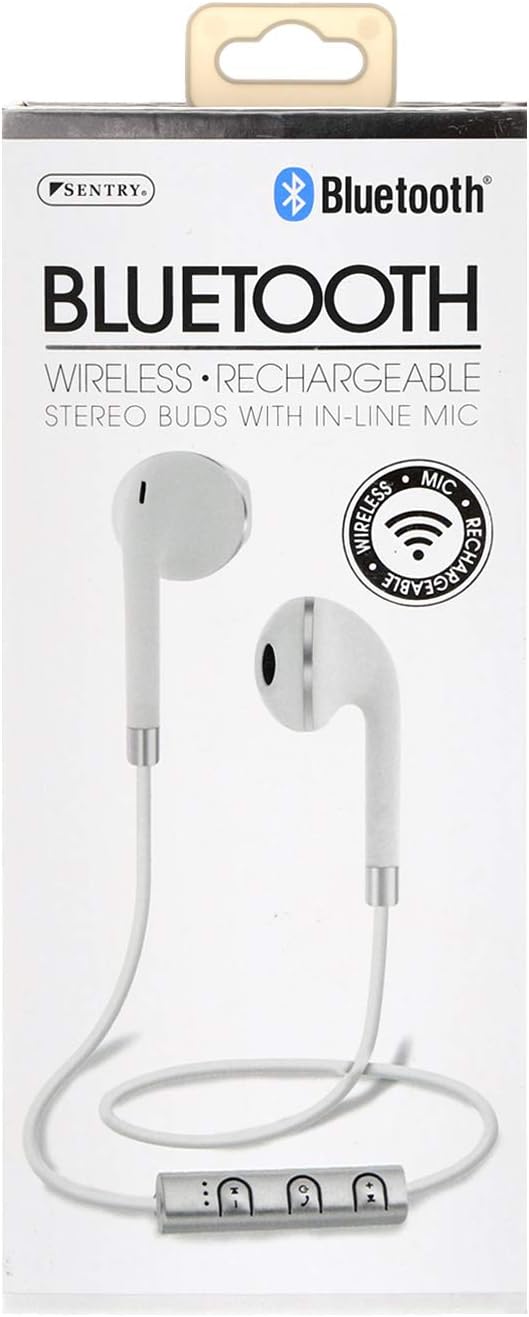
Imatge: Una imatge detallada view of the SENTRY BT879 in-line control unit, showing the various buttons for power, volume, and track control.
In-Line Control Functions| Botó/Acció | Funció |
|---|
| Botó d'engegada (centre) | - Premeu i manteniu premut: Engegueu/apagueu, entreu al mode d'emparellament
- Single Press (Music): Play/Pause
- Single Press (Call): Answer/End Call
- Double Press (Call): Redial Last Number
- Press and Hold (Call): Reject Incoming Call
|
| Puja el volum (+) | - Premsa única: Augmenta el volum
- Premeu i manteniu premut: Pista següent
|
| Baixar el volum (-) | - Premsa única: Disminueix el volum
- Premeu i manteniu premut: Pista anterior
|
Reproducció de música
- A reproduir o fer una pausa música, premeu la tecla Botó d'engegada una vegada.
- Per saltar a següent pista, manteniu premut el botó Puja el volum (+) botó.
- Per anar a la pista anterior, manteniu premut el botó Baixar el volum (-) botó.
- A ajustar el volum, premeu Puja el volum (+) or Baixar el volum (-) botons breument.
Fer i rebre trucades
- A respondre a una trucada entrant, premeu Botó d'engegada una vegada.
- A finalitzar una trucada activa, premeu Botó d'engegada una vegada.
- A rebutjar una trucada entrant, manteniu premut el botó Botó d'engegada durant aproximadament 2 segons.
- A tornar a marcar l'últim número, premeu dues vegades el botó Botó d'engegada.
- El incorporat micròfon en línia allows for clear hands-free communication.
Cura i Manteniment
Proper care will ensure the longevity and optimal performance of your SENTRY earbuds.
- Neteja: Use a soft, dry, lint-free cloth to clean the earbuds. Do not use abrasive cleaners, alcohol, or chemical solvents. Gently wipe the ear tips and the body of the earbuds.
- Emmagatzematge: When not in use, store the earbuds in the provided deluxe travel friendly carry pouch to protect them from dust, dirt, and physical damage.
- Temperatura: Avoid exposing the earbuds to extreme temperatures (hot or cold) as this can affect battery life and internal components.
- Humitat: Keep the earbuds dry. Do not immerse them in water or expose them to excessive moisture.
Resolució de problemes
If you encounter issues with your earbuds, please refer to the following common problems and solutions:
| Problema | Possible causa/solució |
|---|
| Els auriculars no s'encenen. | - Battery is depleted. Charge the earbuds fully.
- Power button not held long enough. Press and hold the power button until the indicator light appears.
|
| No es pot emparellar amb el dispositiu. | - Earbuds are not in pairing mode. Ensure the indicator light is flashing (e.g., blue/red).
- Bluetooth is off on your device. Enable Bluetooth in your device's settings.
- Earbuds are already connected to another device. Disconnect from the previous device or turn off Bluetooth on that device.
- Distance too far. Ensure earbuds are within 10 meters of your device.
- Interference. Move away from other wireless devices or strong electromagnetic fields.
- Prova d'oblidar-te del dispositiu al telèfon i de tornar-lo a emparellar.
|
| Sense so o amb un volum baix. | - Volume on earbuds or device is too low. Increase volume using the '+' button on the earbuds and on your device.
- Earbuds are not properly connected. Re-pair the earbuds with your device.
- Audio output setting on your device is incorrect. Ensure audio is routed to the Bluetooth earbuds.
|
| La qualitat del so és deficient o intermitent. | - Distance from device is too far or there are obstacles. Reduce distance and remove obstructions.
- Low battery. Charge the earbuds.
- Interference from other wireless devices. Move to an area with less interference.
|
| El micròfon no funciona. | - Ensure the earbuds are properly connected and selected as the audio input device on your phone/computer.
- Check for any mute functions on your device or in the application you are using.
|
Especificacions tècniques
| Característica | Especificació |
|---|
| Model | BT879 |
| Connectivitat | Bluetooth sense fil |
| Interval Bluetooth | 10 metres |
| Unitat de Conductor | 15 mm |
| Resposta de freqüència | 20 Hz - 20 kHz |
| Impedància | 32 ohms |
| Sensibilitat | 100 dB +/- 3 dB |
| Tipus de bateria | Ió de liti |
| Tipus de control | In-line Control Buttons |
| Micròfon | Sí (en línia) |
| Material | Metall, Plàstic, Silicona |
| Color | Blanc |
| Col·locació de l'orella | A l'orella |
| Factor de forma | A l'orella |
| Conector d'auriculars | Sense Jack |
| Dimensions del producte | 3.5 x 6.75 x 3.8 polzades |
| Pes de l'article | 5.4 unces |
| Fabricant | Centinela |
| UPC | 080068548799, 800685487994 |
Garantia i Suport
SENTRY Industries is committed to customer satisfaction. While specific warranty details are not provided in this manual, most SENTRY products come with a limited warranty against defects in materials and workmanship.
For warranty claims, technical support, or further assistance, please visit the official SENTRY website or contact their customer service department. Keep your proof of purchase for any warranty-related inquiries.
Podeu trobar més informació i suport a SENTRY Store on Amazon.
