Instruccions importants de seguretat
Please read these instructions carefully before using your Coredy R650 Ultra Robot Vacuum and retain them for future reference. Failure to follow these instructions may result in electric shock, fire, or serious injury.
- Aquest aparell el poden utilitzar nens a partir de 8 anys i persones amb capacitats físiques, sensorials o mentals reduïdes o amb manca d'experiència i coneixements si han rebut supervisió o instruccions sobre l'ús de l'aparell d'una manera segura i entenen els perills que comporta. .
- Els nens han de ser supervisats per assegurar-se que no juguin amb l'aparell.
- La neteja i el manteniment dels usuaris no els han de fer els nens sense supervisió.
- Només feu servir l'adaptador de corrent original proporcionat pel fabricant.
- No utilitzeu el robot aspirador en ambients humits ni a prop de l'aigua.
- Remove all loose cables, small objects, and fragile items from the floor before operation to prevent entanglement or damage.
- Do not operate the robot vacuum in areas with open flames or flammable materials.
- Assegureu-vos que la base de càrrega estigui col·locada sobre una superfície plana contra una paret, amb un espai lliure suficient al seu voltant.
- Do not carry the robot vacuum by its handle when it is powered on.
- Turn off the robot vacuum and unplug the charging base before performing any maintenance or cleaning.
Contingut del paquet
Verifiqueu que tots els components siguin presents i en bon estat en desembalar-los.
- 1x Coredy R650 Ultra Robotic Vacuum Cleaner
- 1 moll de càrrega
- 1x 500ml Dust Bin (pre-installed)
- 2x Side Brushes (one pair)
- 1x Filter (pre-installed)
- 1x comandament a distància
- 1x adaptador de corrent
- 1x Eina de neteja
- 1 x manual d'usuari

Image: The Coredy R650 Ultra Robot Vacuum, its remote control, and a smartphone displaying the Coredy app interface.
Producte acabatview
Components de robot aspirador
- Portada superior: Houses the power button and Wi-Fi indicator.
- Botó d'encesa: Initiates or pauses cleaning, powers on/off.
- Polvorí: Collects debris, located at the rear of the robot.
- Raspalls laterals: Two rotating brushes on the front sides for edge and corner cleaning.
- Pinzell principal: V-shaped roller brush located underneath for deep cleaning.
- Rodes motrius: Two large wheels for movement across various surfaces.
- Roda universal: Front wheel for navigation.
- Contactes de càrrega: Two metal strips on the bottom for connecting to the charging base.
- Sensors de caiguda: Located on the bottom to prevent falls.
- Sensors infrarojos: Front-facing sensors for obstacle detection.
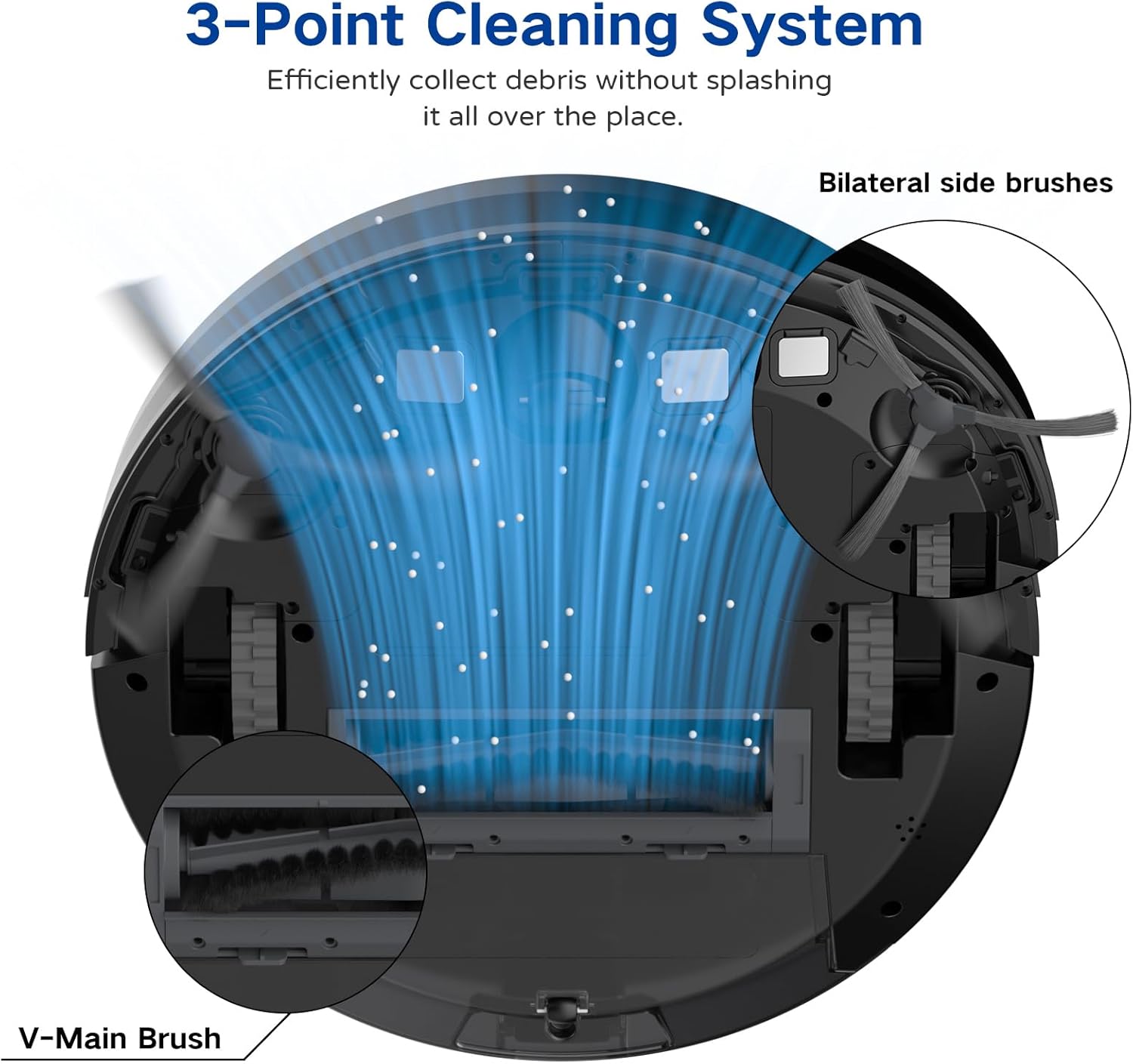
Image: A diagram illustrating the robot vacuum's 3-Point Cleaning System, showing bilateral side brushes and the V-main brush efficiently collecting debris.
Components de la base de càrrega
- Pins de càrrega: Connect with the robot's charging contacts.
- Indicador d'alimentació: Mostra l'estat de càrrega.
- Port d'alimentació: Es connecta a l'adaptador de corrent.
Configuració
1. Positioning the Charging Base
Place the charging base on a hard, level surface against a wall. Ensure there is at least 3 feet (1 meter) of clear space to the front and 1.5 feet (0.5 meters) to each side of the charging base to allow the robot to dock properly. Plug the power adapter into the charging base and then into a wall outlet.
2. Càrrega inicial
Place the robot vacuum onto the charging base, ensuring the charging contacts align. The robot will begin charging automatically. For first-time use, charge the robot for at least 5-6 hours until the indicator light turns solid green, indicating a full charge.
3. Instal·lació dels raspalls laterals
Attach the two side brushes to the posts on the bottom of the robot by pressing them down until they click into place. Ensure they are securely fastened.
4. Connecting to the Coredy App
- Download the 'Coredy' app from the App Store (iOS) or Google Play Store (Android).
- Registreu un compte i inicieu sessió.
- Follow the in-app instructions to add your R650 Ultra robot vacuum to your account. This typically involves connecting your phone to a 2.4GHz Wi-Fi network and then connecting the robot to the same network.

Image: A hand interacting with a smartphone showing the Coredy app, which displays a real-time map of the robot's cleaning path and offers control options.
5. Integració de l'assistent de veu (Alexa/Assistent de Google)
Once connected to the Coredy app, you can link your robot vacuum to Amazon Alexa or Google Assistant for voice control.
- Obre l'aplicació Alexa o Google Home.
- Navegueu fins a la secció "Habilitats i jocs" (Alexa) o "Funciona amb Google" (Google Home).
- Cerca the 'Coredy' skill/service and enable it.
- Log in with your Coredy app account credentials when prompted.
- Discover devices. You can now use voice commands like "Alexa, turn on Coredy R650 Ultra" or "Hey Google, start cleaning with Coredy R650 Ultra."

Image: The Coredy R650 Ultra Robot Vacuum positioned near its charging dock, with an Amazon Echo Dot in the background, illustrating voice control capabilities.
Funcionament del robot aspirador
Inici/aturada de la neteja
- Inici manual: Press the power button on the robot or the 'Clean' button on the remote control.
- Control de l'aplicació: Use the Coredy app to start or stop cleaning.
- Control de veu: Use compatible voice assistants (e.g., "Alexa, start Coredy R650 Ultra").
- Pausa: Press the power button on the robot or the 'Clean' button on the remote during operation to pause. Press again to resume.
Modes de neteja
The R650 Ultra offers various cleaning modes to suit different needs:
- Neteja automàtica: The robot automatically cleans in a Z-shaped path, adjusting to different floor types.
- Neteja de punts: The robot intensely cleans a specific small area in a spiral pattern.
- Neteja de vores: El robot neteja les parets i les vores dels mobles.
- Control manual: Use the remote control or app to direct the robot manually.

Image: The Coredy R650 Ultra Robot Vacuum cleaning a hard floor, illustrating its Gyroscopic Dynamic Navigation and Z-shaped cleaning path for thorough coverage.
Scheduling Cleaning
You can schedule cleaning times using the Coredy app or the remote control. Refer to the app's interface or the remote control section of this manual for detailed instructions on setting schedules.
Ajust de potència d'aspiració
The R650 Ultra features adjustable suction power, with a maximum of 2200 Pa. It also includes an Auto Carpet Boost feature that automatically increases suction when carpet is detected.
Recàrrega automàtica
When the battery level is low or a cleaning cycle is complete, the robot will automatically return to its charging base to recharge.
Manteniment
Un manteniment regular garanteix un rendiment òptim i allarga la vida útil del teu robot aspirador.
1. Buidar la paperera
It is recommended to empty the dustbin after each use.
- Premeu el botó d'alliberament del contenidor de pols i traieu-lo.
- Open the dustbin cover and empty the contents into a trash bin.

Image: The Coredy R650 Ultra Robot Vacuum on a wooden floor, with its 500ml dustbin detached and placed beside it, highlighting its capacity.
2. Neteja del filtre
Clean the filter weekly, or more frequently if you have pets or high usage.
- Traieu el filtre del contenidor de pols.
- Tap the filter gently to remove loose dirt.
- Rinse the filter under running water. Ensure it is completely dry before reinstalling.
3. Neteja del raspall principal
Clean the main brush weekly.
- Gireu el robot i retireu la coberta del raspall principal.
- Aixequeu el raspall principal.
- Use the provided cleaning tool to remove hair and debris wrapped around the brush.
- Torneu a instal·lar el raspall principal i la coberta.
4. Neteja dels raspalls laterals
Check side brushes regularly for tangled hair or debris.
- Gently pull the side brushes upwards to remove them.
- Traieu qualsevol cabell o residu.
- Reattach the side brushes, ensuring they click into place.
5. Neteja dels sensors i dels contactes de càrrega
Wipe the drop sensors, infrared sensors, and charging contacts on both the robot and the charging base with a clean, dry cloth monthly.
Resolució de problemes
If you encounter issues with your Coredy R650 Ultra, refer to the table below for common problems and solutions.
| Problema | Causa possible | Solució |
|---|---|---|
| El robot no s'encén | Bateria baixa; interruptor apagat | Carregueu el robot; assegureu-vos que l'interruptor d'alimentació estigui encès. |
| El robot no carrega | Charging contacts dirty; Charging base unplugged | Netegeu els contactes de càrrega; assegureu-vos que la base de càrrega estigui connectada. |
| El robot s'enganxa sovint | Obstacles on floor; Robot stuck under furniture | Clear floor of cables/small items; Use boundary strips or block off low-clearance areas. |
| Mal rendiment de neteja | Cubell de les escombraries ple; raspalls enredats; filtre obstruït | Empty dustbin; Clean main and side brushes; Clean or replace filter. |
| No es pot connectar a la Wi-Fi/aplicació | Incorrect Wi-Fi password; 5GHz Wi-Fi network; Robot too far from router | Verify password; Ensure 2.4GHz Wi-Fi; Move robot closer to router. |
Especificacions
Technical specifications for the Coredy R650 Ultra Robot Vacuum.
| Característica | Detall |
|---|---|
| Marca | Coredy |
| Nom del model | Coredy R650 Ultra Robotic Vacuum Cleaner |
| Potència d'aspiració | Fins a 2200 Pa |
| Durada de la bateria | Fins a 120 minuts |
| Capacitat de la paperera | 500 mil·lilitres |
| Dimensions del producte | 12.7 cm de llargada x 12.7 cm d'amplada x 2.76 cm d'alçada |
| Mètode de control | App, Remote Control, Voice Control |
| Dispositius compatibles | Amazon Echo, Google Home, telèfons intel·ligents |
| Tipus de filtre | Cartutx (HEPA) |
| Tipus de navegació | Gyroscopic Dynamic Navigation |

Image: A technical drawing illustrating the top and side dimensions of the Coredy R650 Ultra Robot Vacuum, showing its 12.7-inch diameter and 2.72-inch height.
Garantia i Suport
For warranty information, please refer to the warranty card included in your product packaging or visit the official Coredy website. If you require technical support or have questions not covered in this manual, please contact Coredy customer service through the contact information provided on their weblloc web o a la documentació de la compra.


