Introducció
Thank you for choosing the Criacr 7 in 1 Phone Camera Lens Kit. This comprehensive kit is designed to enhance your mobile photography experience, offering a variety of lenses to capture unique perspectives and details. This manual provides detailed instructions on how to set up, operate, and maintain your lens kit to achieve optimal results.
Contingut del paquet

Image: All components of the Criacr 7 in 1 Phone Camera Lens Kit, including various lenses, clips, and accessories.
Si us plau, verifiqueu que tots els elements que s'enumeren a continuació estiguin inclosos al vostre paquet:
- 1 x 120° Wide Angle Lens
- 1 x 210° Fisheye Lens
- 1 x 2.0X Teleconverter Lens
- 1 x 25X Macro Lens
- 1 x CPL Filter Lens
- 1 x 6 Kaleidoscope Lens
- 1 x Starlight Filter Lens
- 1 x Manual (aquest document)
- 1 x Wiping Cloth
- 1 x Universal Clip
- 1 x Ganxo
- 1 x EVA Storage Bag
- 7 x Front Lens Caps
- 7 x Rear Lens Caps
Producte acabatview

Imatge: Un cop mésview of the Criacr 7 in 1 Phone Camera Lens Kit, showing the universal clip attached to a phone and individual lenses with their respective types.
The Criacr 7 in 1 Phone Camera Lens Kit includes a universal clip and seven distinct lenses, each designed for specific photographic effects:
- 210° Fisheye Lens: Creates a wide, hemispherical image with a strong barrel distortion, ideal for artistic effects and capturing expansive scenes.
- Lent gran angular de 120°: Expands the field of view, allowing you to capture more of the scene, perfect for landscapes, architecture, and group photos.
- 25X Macro Lens: Designed for extreme close-up photography, revealing intricate details of small subjects like insects, flowers, or textures.
- 2X Telephoto Lens: Magnifies distant subjects, bringing them closer without digital zoom, useful for portraits or wildlife.
- Starburst Lens: Adds a star-like flare effect to bright light sources in your photos, creating a dazzling visual.
- Filtre CPL (polaritzador circular): Reduces glare and reflections from non-metallic surfaces (like water or glass) and enhances color saturation and contrast in skies and foliage.
- 6 Kaleidoscope Lens: Multiplies and distorts the image into a kaleidoscopic pattern, offering unique and abstract photographic possibilities.
- Universal Clip: Securely attaches the lenses to your smartphone's camera.
Guia de configuració

Image: The universal lens clip demonstrated on various smartphone models, showing its adaptability.
Follow these steps to set up your Criacr lens kit:
- Prepara el teu telèfon: For optimal results, it is recommended to remove your phone case before attaching the lens. This ensures the clip sits flush and the lens is perfectly aligned with your phone's camera.
- Attach the Universal Clip: Open the universal clip and carefully position it over your phone's main camera lens. Ensure the clip's aperture is centered directly over your phone's camera.
- Screw in the Desired Lens: Select the lens you wish to use. Screw it clockwise into the threaded opening on the universal clip until it is securely fastened.
- Ajustar l'alineació: Open your phone's camera app and check the live view. Make minor adjustments to the clip's position until the lens is perfectly centered and there is no vignetting (dark corners) in the image.
Nota: The wide-angle lens and macro lens are often screwed together upon arrival. To use the macro lens, unscrew the wide-angle lens from the macro lens. The macro lens can then be used independently.
Instruccions de funcionament
Each lens offers a unique photographic effect. Experiment with different lenses to achieve your desired creative vision.
Using the 120° Wide Angle Lens

Image: Top shows a close-up of a flower before and after using the 25X Macro lens. Bottom shows a landscape before and after using the 120° Wide Angle lens.
The wide-angle lens is ideal for capturing broader scenes. It is suggested that the Wide Angle Lens be used in a wide-open area to get better photos. Ensure the clip aims at the right camera for proper alignment.
Using the 25X Macro Lens
The macro lens allows you to capture extreme close-ups with incredible detail. To use it effectively:
- Proximitat: You need to place the camera extremely close to the subject, typically 1-3 cm away, to achieve focus.
- Estabilitat: Avoid handshaking. Use a tripod or stabilize your phone for sharper images due to the very shallow depth of field at such close distances.
Using the 210° Fisheye Lens

Image: Top shows a scene before and after using the 210° Fisheye lens, creating a circular, distorted view. Bottom shows a subject before and after using the 2X Telephoto lens, demonstrating zoom.
The fisheye lens produces a unique 180-degree circular image with a "fish-bowl" effect. This is great for creative shots, capturing wide landscapes with a distinct artistic distortion, or emphasizing a central subject within a broad context.
Using the 2X Telephoto Lens
The telephoto lens allows you to optically zoom in on distant subjects. It shortens the "distance" from the object, presenting the distant scenery clearly. This is useful for capturing details from afar without losing image quality, such as in portraits or when photographing wildlife.
Using the CPL, Starburst, and Kaleidoscope Lenses
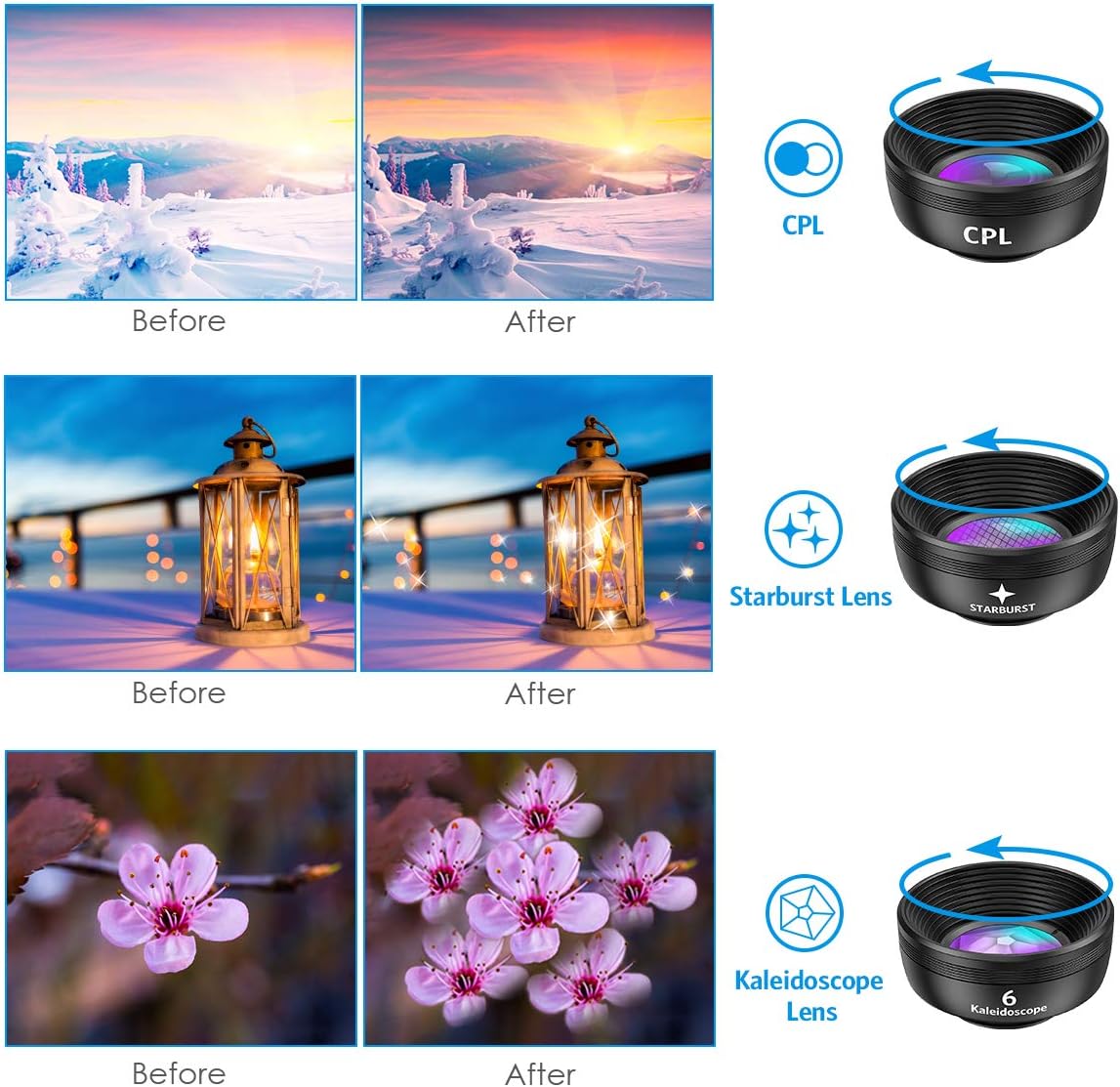
Image: Top shows a landscape before and after using the CPL filter. Middle shows a lantern before and after using the Starburst lens. Bottom shows flowers before and after using the Kaleidoscope lens.
- Filtre CPL: Rotate the outer ring of the CPL filter while looking through your phone's camera. You will observe reflections disappearing or colors becoming more vibrant. Adjust until the desired effect is achieved.
- Starburst Lens: Position your camera to include bright light sources (e.g., streetlights, sun glints) to see the starburst effect.
- Kaleidoscope Lens: Point the lens at any scene to create unique, fragmented, and multiplied patterns. Experiment with different subjects and angles for varied artistic outcomes.
Manteniment
Proper care will extend the life and performance of your Criacr lens kit:
- Neteja: Use the provided wiping cloth or a soft, lint-free microfiber cloth to gently clean the lens surfaces. Avoid using abrasive materials or harsh chemicals.
- Emmagatzematge: Always place the front and rear lens caps on the lenses when not in use. Store the lenses and clip in the EVA storage bag to protect them from dust, scratches, and impacts.
- Manipulació: Handle lenses by their barrels, not by the glass elements, to avoid fingerprints and smudges.
- Medi ambient: Avoid exposing the lenses to extreme temperatures, humidity, or direct sunlight for prolonged periods.

Image: Two individuals hiking with backpacks, one of whom has the compact Criacr lens kit case clipped to their bag, demonstrating its portability.
Resolució de problemes
If you encounter issues while using your lens kit, please refer to the following common solutions:
| Problema | Possible causa/solució |
|---|
| Dark corners (vignetting) or blurry edges in photos. | - Ensure the lens is perfectly centered over your phone's camera.
- Remove your phone case before attaching the lens.
- Check if the lens is screwed in completely and securely.
|
| Cannot focus with Macro Lens. | - The macro lens requires very close proximity to the subject (1-3 cm). Move your phone closer.
- Ensure the wide-angle lens has been unscrewed from the macro lens.
- Minimize camera shake.
|
| Image quality is not as expected. | - Clean the lens surfaces and your phone's camera lens with the provided wiping cloth.
- Ensure the lens is correctly aligned and securely attached.
- Remember that lenses enhance effects but cannot change the original pixel quality of your phone's camera.
|
| Clip does not fit or scratches phone. | - The clip is designed with PVC to avoid scratching. Ensure proper placement.
- Verify compatibility with your phone model (see Compatibility section).
|
Especificacions
| Característica | Detall |
|---|
| Marca | Criacr |
| Model de referència | CP57X1-CC-AMUS-FT |
| Construcció de lents | High-class glass |
| Recobriment de la lent | HD Coating (reduces flare & ghosting) |
| Dimensions del paquet | 14.3 x 11.1 x 4.9 cm |
| Pes | 190 g |
| Lens Types Included | 210° Fisheye, 120° Wide Angle, 25X Macro, 2X Telephoto, Star Lens, CPL, 6 Kaleidoscope |
Compatibilitat
The Criacr 7 in 1 Phone Camera Lens Kit features a universal clip design, making it compatible with a wide range of smartphones and tablets. This includes, but is not limited to:
- iPhone 13, 12 Pro Max, 12 Pro, 12, 11, XS MAX, XS, XR, X, 8 Plus, 8, 7 Plus, 7, 6 Plus, 6, 5S, SE
- Samsung Galaxy S9, S8, S7, S6 Edge, A51
- Google Pixel 5
- Most other Android phones and iPads
The clip's design ensures higher lens clarity with minimal vignetting or micro distortion across compatible devices.
Garantia i Suport
Criacr is committed to providing high-quality products. For any questions, technical support, or warranty inquiries regarding your Criacr 7 in 1 Phone Camera Lens Kit, please refer to the contact information provided with your purchase or visit the official Criacr support channels. Please retain your proof of purchase for warranty claims.
For more information about Criacr products, you may visit the Criacr brand page on Amazon.