Introducció
Gràcies per la compraasing the Artlii Stone Full HD 1080P Projector. This manual provides essential information for setting up, operating, and maintaining your projector to ensure optimal performance and longevity. Please read this manual thoroughly before using the product and keep it for future reference.
The Artlii Stone projector delivers a native 1080P resolution, supporting 4K content, with 7200L brightness and an 8000:1 contrast ratio. It features a 75%-100% zooming function, a 300-inch projection screen capability, and a HIFI level built-in speaker. Connectivity options include dual HDMI, VGA, and USB inputs, making it versatile for various home theater and presentation needs.
Informació de seguretat
Per evitar incendis o descàrregues elèctriques, no exposeu aquest aparell a la pluja ni a la humitat. Per evitar descàrregues elèctriques, no obriu la carcassa. Demaneu el manteniment només a personal qualificat.
- No mireu directament a la lent del projector quan estigui encès.amp està activat.
- Assegureu-vos que hi hagi una ventilació adequada al voltant del projector. No bloquegeu les obertures de ventilació.
- Feu servir només l'adaptador de corrent que s'inclou amb el projector.
- Mantingueu el projector allunyat de l'aigua o de qualsevol líquid.
- Desendolleu el projector de la presa de corrent durant tempestes o quan no l'utilitzeu durant períodes prolongats.
- Do not attempt to repair this product yourself. Contact qualified service personnel for assistance.
Contingut del paquet
Verifiqueu que tots els elements estiguin inclosos al vostre paquet:

The image displays the Artlii Stone projector along with its standard accessories. These include the projector unit, a remote control (batteries not included), a power cable, an AV cable, an HDMI cable, and the instruction manual.
- Artlii Stone Projector
- Cable d'alimentació
- Comandament a distància (piles no incloses)
- Cable AV
- Cable HDMI
- Manual d'instruccions
Producte acabatview
Familiarize yourself with the main components and ports of your Artlii Stone projector.

This image shows the front and top view of the Artlii Stone projector, highlighting its sleek design, the main projection lens, and the focus/keystone adjustment dials located on the top surface.

The rear panel of the Artlii Stone projector is displayed, detailing the various connectivity ports. These include an SD Card slot, two HDMI ports, a USB port, and a VGA port, along with an audio output jack.
Components clau:
- Lent de projecció: Emet la imatge a la pantalla.
- Anell de focus: Ajusta la claredat de la imatge projectada.
- Correcció Keystone: Corrects trapezoidal distortion of the image.
- Tauler de control: Botons per a la navegació i la configuració bàsiques.
- Ports d'entrada: HDMI (x2), USB, VGA, Audio Output, Micro SD.
- Obertures de ventilació: Per a la dissipació de calor.
- Altaveu integrat: Proporciona sortida d'àudio.
Configuració
1. Col·locació i mida de projecció
Position the projector on a stable, flat surface. The distance from the projector to the screen will determine the size of the projected image. Refer to the diagram below for recommended projection distances and corresponding screen sizes.

This diagram illustrates the relationship between projection distance and screen size. For example, a distance of 1.7m yields a 50-inch screen, 2.6m for an 80-inch screen, and up to 9.2m for a 300-inch screen.
- Minimum Projection Distance: 2 meters (approx. 50 inches)
- Maximum Projection Distance: 9 meters (approx. 300 inches)
2. Connexió d'alimentació
Connect the supplied power cable to the projector's power input port and then plug the other end into a wall outlet (AC 90-240V, 50-60Hz).
3. Connexió de dispositius d'entrada
The Artlii Stone projector supports various input sources. Choose the appropriate cable and port for your device.

This image illustrates the wide range of devices compatible with the Artlii Stone projector. It shows connections for game consoles, Blu-ray/DVD players, home cinema systems, TV boxes, iPads/Tablets, streaming devices (like Roku, Chromecast), USB drives, and SD cards.
- HDMI: Connect Blu-ray players, game consoles, laptops, TV sticks, etc., using an HDMI cable. The projector has two HDMI ports.
- USB: Inseriu una unitat flash USB per reproduir contingut multimèdia files directament.
- VGA: Connecteu ordinadors o portàtils més antics amb un cable VGA.
- Micro SD: Insert a Micro SD card to play media files.
- DE: Use the supplied AV cable to connect devices with RCA outputs.
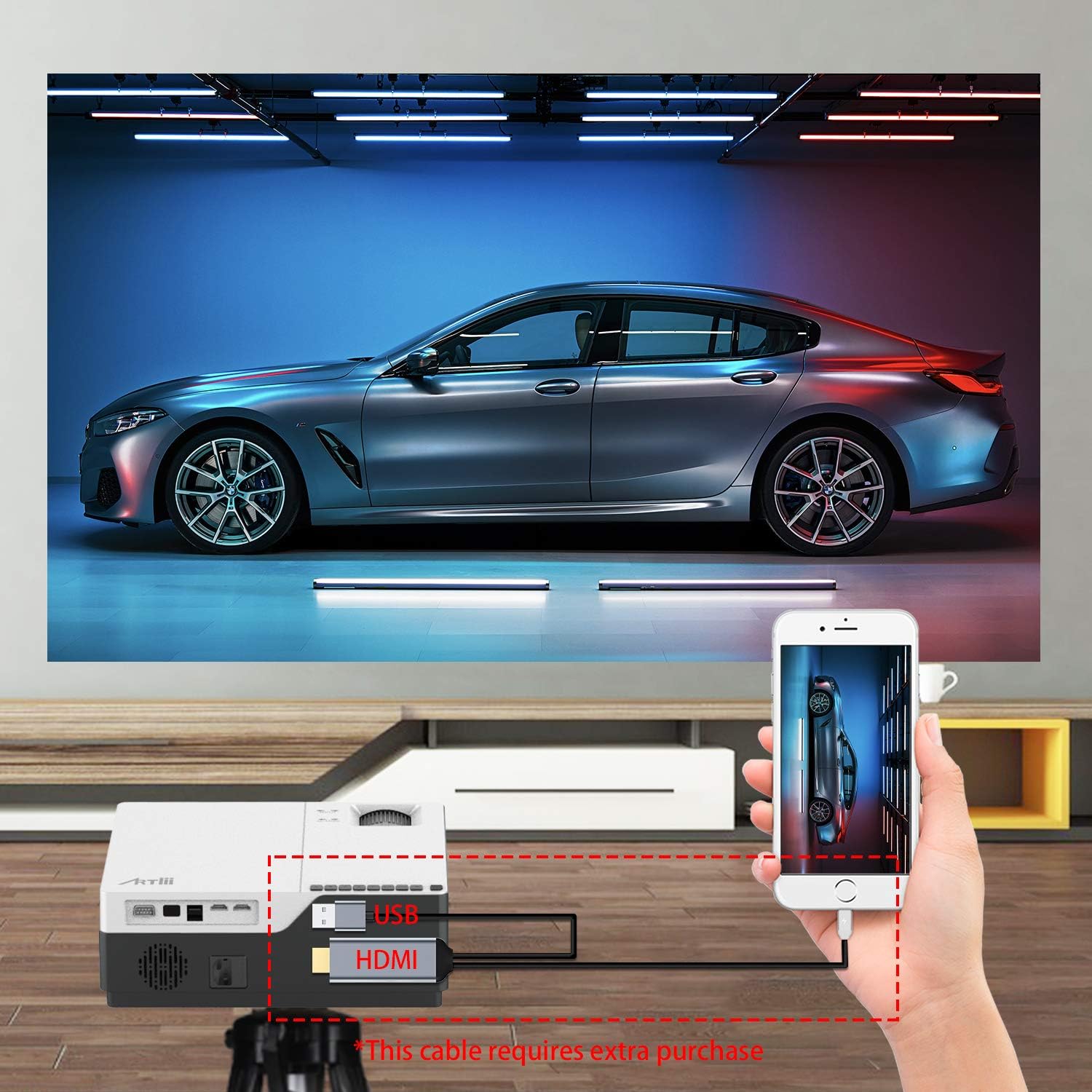
This image demonstrates connecting a smartphone to the projector. Note that an additional cable (not included) may be required for smartphone connectivity, typically an MHL to HDMI adapter or a USB-C to HDMI adapter, depending on the phone model.
4. Ajust de l'enfocament i la distorsió trapezoidal
After powering on and selecting an input source, adjust the image for clarity and shape.
- Focus: Gireu l'anell d'enfocament de la lent del projector fins que la imatge aparegui nítida i clara.
- Correcció Keystone: If the projected image appears trapezoidal (wider at the top or bottom), use the keystone correction dial to adjust it into a perfect rectangle. The projector supports ±15 degrees keystone correction.
En funcionament
1. Encendre/apagar
- Encès: Premeu el botó d'encesa del projector o del comandament a distància.
- Apagar: Press the power button again. The projector will go into standby mode.
2. Navegació del menú
Use the buttons on the projector's control panel or the remote control to navigate the on-screen menu. Select input sources, adjust picture settings (brightness, contrast, color), and sound settings.
3. Funció de zoom
The Artlii Stone projector features a digital zoom function, allowing you to adjust the screen size without moving the projector.

This image illustrates the projector's zoom capability, allowing the user to reduce the screen size from 100% down to 75% using the remote control, providing flexibility in screen fitting without physical repositioning.
- Access the zoom setting through the projector's menu.
- Adjust the zoom factor between 75% and 100% to fit your screen or wall.
4. Sortida d'àudio
The projector has a built-in HIFI level speaker. For external audio, connect speakers or a sound system to the Audio Output port.
Manteniment
- Neteja de lents: Feu servir un drap suau i sense borrissol dissenyat específicament per a lents òptiques per netejar suaument la lent del projector. No utilitzeu productes de neteja ni draps abrasius.
- Eliminació de pols: Regularly clean the projector's exterior with a soft, dry cloth. Use a small brush or compressed air to clear dust from ventilation openings.
- Emmagatzematge: Quan no l'utilitzeu durant períodes prolongats, guardeu el projector en un lloc fresc i sec, protegit de la pols i de les temperatures extremes.
Resolució de problemes
| Problema | Causa possible | Solució |
|---|---|---|
| No hi ha imatge a la pantalla | Cable d'alimentació fluix; Font d'entrada incorrecta; Dispositiu no connectat correctament. | Check power connection; Select correct input source (HDMI, USB, VGA); Ensure device is connected securely. |
| La imatge és borrosa | Enfocament no ajustat; Projector massa a prop/lluny de la pantalla. | Ajusteu l'anell d'enfocament; Ajusteu la distància de projecció. |
| La imatge és trapezoïdal | Clave trapezoidal no ajustada. | Ajusteu el dial de correcció de la distorsió trapezoidal. |
| Sense so | Volume too low; Muted; External speakers not connected/powered. | Increase volume; Unmute; Check external speaker connections and power. |
| El comandament a distància no funciona | Piles mortes/inserides incorrectament; Obstrucció entre el comandament a distància i el projector. | Canvieu les piles; assegureu-vos que la línia de visió amb el receptor d'infrarojos estigui clara. |
Especificacions
| Característica | Detall |
|---|---|
| Sistema operatiu | Linux |
| Tecnologia de projecció | LCD TFT |
| Distància de projecció | 2-9 m |
| Mida de projecció | 50-300 polzades |
| Resolució nativa | 1920x1080 pixels (Full HD) |
| Lamp Tipus | LED |
| LED Lamp La vida | 55,000 hores |
| Relació de llançament | 1.35 |
| Relació de contrast | 8000:1 |
| Factor de zoom | 75%-100% |
| Correcció de pedra clau | ±15 graus |
| Mode de projecció | Front projection, Rear projection, Lifting |
| Material | Metall + ABS |
| Altaveu incorporat | Sí |
| Entrada Voltage | CA 90-240V, 50-60Hz |
| Connectors | HDMI x2, USB, Audio Output, Micro SD |
| Pes | 5.7 lliures (2.59 kg) |
| Mides (L x A x A) | 9.1 x 12.1 x 4.1 polzades (23.1 x 30.7 x 10.4 cm) |
Nota: Les especificacions estan subjectes a canvis sense previ avís.
Garantia i Suport
The Artlii Stone Projector comes with a comprehensive warranty and support:
- Money Back Policy: 1-month 100% Money Back Policy.
- Factory Policy: 1-year factory policy.
- Certificacions: FCC, RoHS, and CE certified.
- Local Maintenance: Artlii provides a local maintenance center with professional engineers to assist you.
For any inquiries or technical assistance, please refer to the contact information provided on the Artlii official weblloc web o la documentació de la compra.


