1. Instruccions de seguretat importants
Before beginning any exercise program, consult with your physician. This is especially important for individuals over the age of 35 or those with pre-existing health conditions. Read all instructions carefully before using the exercise bike.
- Mantenir els nens i les mascotes lluny de l'equip.
- Col·loca la bicicleta estàtica sobre una superfície plana i estable. Fes servir una estora protectora si cal.
- Assegureu-vos que tots els cargols i femelles estiguin ben ajustats abans de cada ús.
- Porteu roba i calçat esportius adequats. Eviteu la roba ampla que es pugui enganxar a les parts mòbils.
- No supereu el pes màxim de l'usuari de 120 kg.
- Si experimenteu marejos, nàusees, dolor al pit o qualsevol altre símptoma anormal, interrompeu l'entrenament immediatament i consulteu un metge.
- Feu el manteniment regular tal com es descriu en aquest manual.
2. Contingut del paquet
Carefully unpack all components and verify that you have received all parts listed below. If any parts are missing or damaged, contact customer support.
- Marc principal
- Estabilitzadors davanters i posteriors
- Pedals (esquerra i dreta)
- Tija de seient i seient
- Tija i manillar
- Monitor/Display Console
- Water Bottle Holder and Water Bottle
- Assembly Hardware (bolts, washers, nuts, tools)
- Manual d'usuari
3. Instruccions de muntatge
Follow these steps to assemble your Physionics Indoor Exercise Bike. It is recommended to have two people for assembly.
- Connecteu els estabilitzadors: Fixeu els estabilitzadors davanter i posterior al bastidor principal amb els cargols i les volanderes proporcionats. Assegureu-vos que estiguin ben fixats per garantir l'estabilitat.
- Instal·lar pedals: Identifica els pedals esquerre (E) i dret (R). Els cargols del pedal esquerre es cargolen en sentit antihorari i els del pedal dret en sentit horari. Assegura't que estiguin ben ajustats per evitar que es destripin.
- Mount Seat and Handlebars: Insert the seat post into the main frame and secure it at your desired height. Attach the seat to the seat post. Similarly, insert the handlebar post and attach the handlebars.
- Connecta el monitor: Connect the sensor wires from the main frame to the monitor console. Mount the monitor onto the handlebar post. Insert batteries (not included) into the monitor.
- Adjuntar accessoris: Install the water bottle holder and any other accessories.

Figure 3.1: Fully assembled Physionics Indoor Exercise Bike. This image shows the complete structure including the frame, seat, handlebars, pedals, and display console.
4. Instruccions de funcionament
4.1. Using the Display Console
The display console tracks your workout data. Insert two AAA batteries (not supplied) into the battery compartment on the back of the monitor.

Figure 4.1: Close-up of the display console showing various metrics. The display shows Time, Speed, Calories, Distance, Odometer, and Pulse.
- Botó MODE: Press to cycle through different display functions (Time, Speed, Distance, Calories, Odometer, Pulse). Press and hold to reset values.
- ESCANEAR: Automatically cycles through all functions every few seconds.
- HORA: Mostra la durada del teu entrenament.
- VELOCITAT: Mostra la teva velocitat actual.
- DISTÀNCIA: Displays the distance covered during your current workout.
- CALORIES: Estima les calories cremades durant l'entrenament.
- ODÒMETRE: Mostra la distància total acumulada.
- IMPULS: Shows your heart rate when holding the pulse sensors on the handlebars.
4.2. Ajust de la resistència
The exercise bike features an adjustable resistance system to vary your workout intensity.

Figure 4.2: Diagram illustrating the resistance and brake system. Turning the red knob controls the resistance level, while pressing it activates the emergency brake.
- Augmenta la resistència: Turn the resistance knob clockwise to increase the workout intensity.
- Disminució de la resistència: Turn the resistance knob counter-clockwise to decrease the workout intensity.
- Fre d'emergència: Premeu fermament el botó de resistència per activar el fre d'emergència i aturar el volant d'inèrcia immediatament.
4.3. Característiques especials

Figura 4.3: Mésview of additional features including the phone holder, water bottle, and foot straps. These features enhance user convenience during workouts.
- Titular del telèfon: A convenient holder is integrated into the handlebars to secure your smartphone or tablet during your workout.
- Porta ampolles d'aigua: A dedicated holder keeps your water bottle within easy reach for hydration.
- Corretges per als peus: Adjustable foot straps on the pedals ensure your feet remain securely in place during intense cycling.
5. Ajustaments
L'ajust correcte del seient i del manillar és crucial per a la comoditat i un exercici eficaç.

Figure 5.1: Illustration showing the adjustable seat and handlebars. The seat can be adjusted horizontally and vertically, and the handlebars vertically.
- Alçada del seient: Loosen the adjustment knob on the seat post. Raise or lower the seat until your leg has a slight bend at the knee when the pedal is at its lowest point. Tighten the knob securely.
- Posició horitzontal del seient: Loosen the adjustment knob under the seat. Slide the seat forward or backward to find a comfortable position relative to the handlebars. Tighten the knob securely.
- Alçada del manillar: Loosen the adjustment knob on the handlebar post. Raise or lower the handlebars to a comfortable height that allows for a relaxed upper body posture. Tighten the knob securely.
6. Manteniment
Un manteniment regular garanteix la longevitat i el funcionament segur de la teva bicicleta estàtica.
- Neteja: Netegeu la bicicleta amb un anunciamp drap després de cada ús per eliminar la suor i la pols. Eviteu productes de neteja abrasius.
- Comproveu les connexions: Periodically check all bolts, nuts, and screws to ensure they are tight. Tighten any loose connections.
- Lubricació: Apply a small amount of silicone-based lubricant to moving parts (e.g., pedal axles, resistance mechanism) if you notice squeaking or stiffness.
- Emmagatzematge: Guarda la bicicleta en un lloc sec i fresc, allunyat de la llum solar directa i de temperatures extremes.

Figure 6.1: Image showing the transport wheels located at the front stabilizer. These wheels allow for easy relocation of the exercise bike.
To move the bike, tilt it forward onto the transport wheels and roll it to the desired location. Ensure the area is clear before moving.
7. Solució De Problemes
| Problema | Causa possible | Solució |
|---|---|---|
| La pantalla no funciona | Piles gastades, connexió fluixa | Replace batteries, check monitor cable connection. |
| Squeaking noise during use | Loose parts, lack of lubrication | Check and tighten all bolts. Apply lubricant to moving parts. |
| La resistència no canvia | Resistance knob mechanism issue | Ensure the resistance knob is properly engaged. Contact customer support if the issue persists. |
| La bicicleta sembla inestable | Uneven surface, loose stabilizers | Place on a flat surface. Check and tighten stabilizer bolts. |
8. Especificacions
- Marca: Física
- Nom del model: Vélo d'Appartement
- Dimensions (L x A x A): Aproximadament 105 cm x 46 cm x 100 cm
- Pes de l'article: 27.65 quilos
- Pes màxim de l'usuari: 120 quilos
- Pes del volant: 10 kg
- Material: Steel frame; Other: ABS plastic, PU leather, and foam
- Mecanisme de resistència: Aire
- Font d'alimentació (pantalla): Battery powered (batteries not included)
- Color: Negre, vermell

Figure 8.1: Diagram showing the dimensions of the exercise bike (105cm length, 47cm width, 100cm height) and highlighting the steel frame construction.
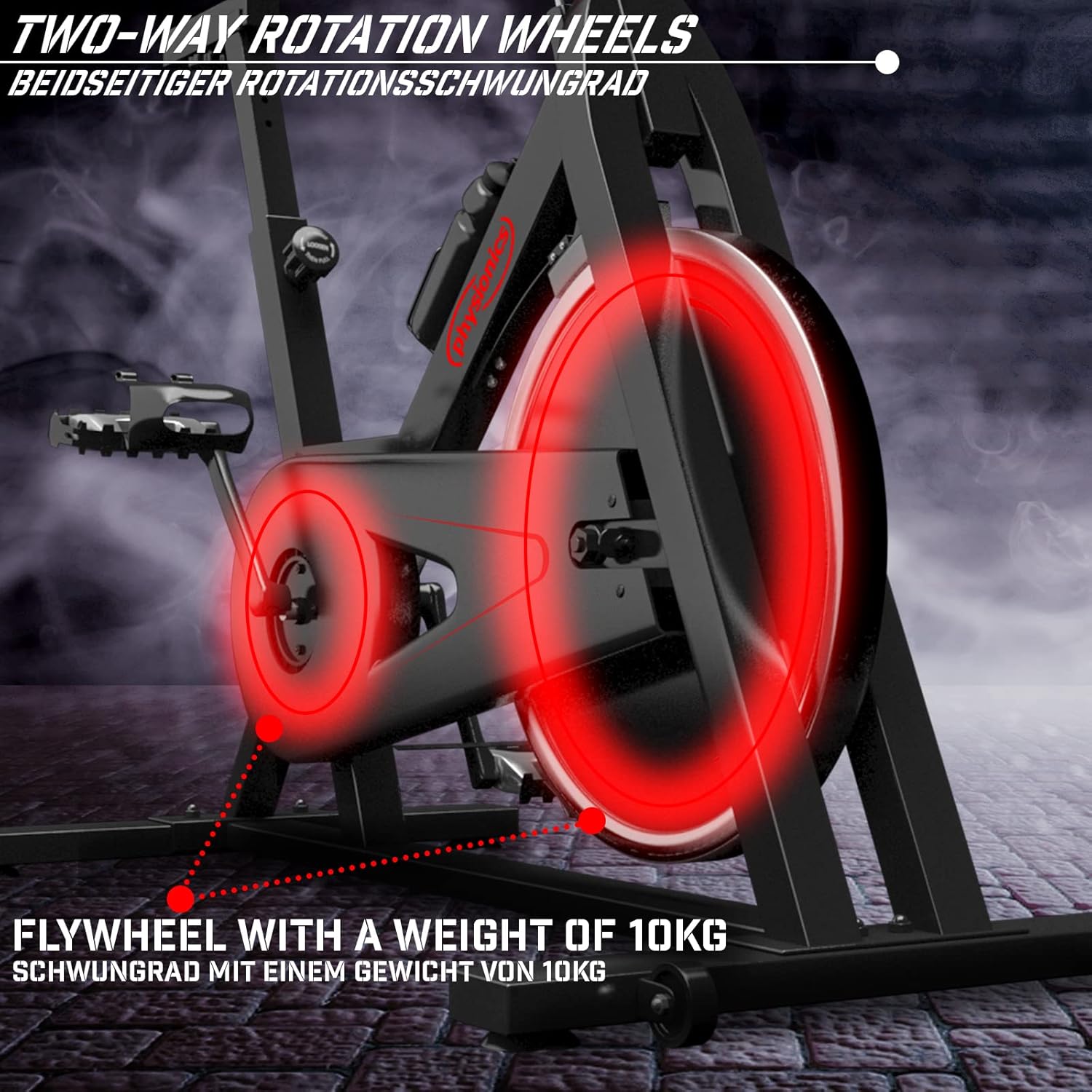
Figure 8.2: Close-up of the 10kg flywheel, indicating its two-way rotation capability.
9. Garantia i Suport
For warranty information or technical support, please refer to the documentation included with your purchase or contact Physionics customer service. Keep your proof of purchase for warranty claims.
For further assistance, please visit the official Physionics weblloc web o contacteu amb els seus canals d'atenció al client.


