Introducció
This manual provides instructions for the safe and efficient use of your KMC Smart Tap 4-Outlet Wi-Fi Smart Plug. Please read this guide thoroughly before operation and retain it for future reference.
Producte acabatview
Característiques clau
- 4-Outlet Design: One "always on" outlet and three individually controllable outlets.
- Connectivitat Wi-Fi: Requires a 2.4GHz Wi-Fi network.
- Comandament a distància: Manage devices via the KMC Smart app.
- Control de veu: Compatible amb Amazon Alexa i Google Home.
- Programació i temporitzadors: Automate power on/off for connected devices.
- Monitorització energètica: Track real-time and historical power consumption.
- Seguretat: ETL Certified, built-in thermal sensor.
Contingut del paquet
- KMC Smart Tap 4-Outlet Wi-Fi Smart Plug
- Manual d'instruccions
Diagrama del producte

Davant view of the KMC Smart Tap, showing the four outlets, the main power button, and Wi-Fi indicator.
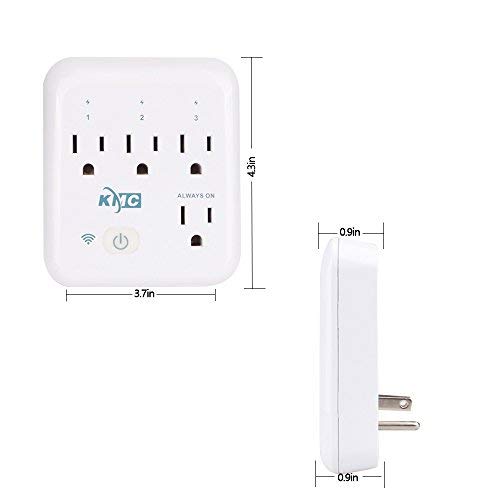
Diagram illustrating the dimensions of the KMC Smart Tap (3.7 inches width, 4.3 inches height, 0.9 inches depth).
Guia de configuració
Instal·lació
Plug the KMC Smart Tap into a standard 110V wall outlet. Ensure it is securely seated.
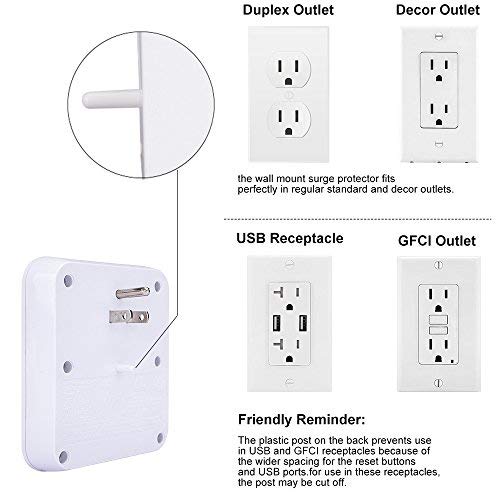
Image showing the KMC Smart Tap plugged into a duplex outlet, with a note about its compatibility and a reminder that the plastic post on the back prevents use in USB and GFCI receptacles due to wider spacing.
App Download and Account Creation
Download the "KMC Smart" or "Smart Life" app from your smartphone's app store (iOS or Android).
Registra't per obtenir un compte nou o inicia la sessió si ja en tens un.
Vinculació de dispositius
- Ensure your smartphone is connected to a 2.4GHz Wi-Fi network. The KMC Smart Tap requires a 2.4GHz network for initial setup and operation.
- Obriu l'aplicació i seguiu les instruccions a la pantalla per afegir un dispositiu nou.
- The device's Wi-Fi indicator light will blink during pairing.
- Un cop s'hagi emparellat correctament, l'indicador lluminós s'il·luminarà fixament.
Funcionament
Control manual
The main power button on the front of the KMC Smart Tap can be pressed to manually toggle power for all three individually controlled outlets simultaneously. The "Always On" outlet remains powered.
Control remot mitjançant App
Open the KMC Smart app on your smartphone.
Select the KMC Smart Tap device.
You can individually control the three switchable outlets (labeled 1, 2, 3) and monitor the "Always On" outlet status from anywhere with an internet connection.
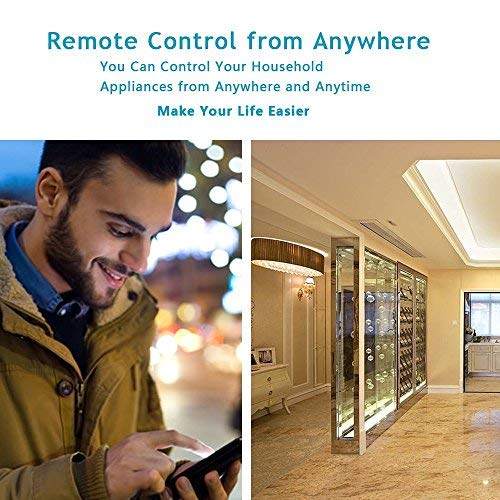
A person using a smartphone to remotely control household appliances, demonstrating the remote control feature of the smart plug.
Control de veu
The KMC Smart Tap is compatible with Amazon Alexa and Google Home.
To enable voice control, link your KMC Smart account within the Alexa or Google Home app.
For Amazon Alexa, you can name each individual outlet (1, 2, 3) to control them independently using voice commands (e.g., "Alexa, turn on Outlet 1").
For Google Home, overall control of the device is supported.
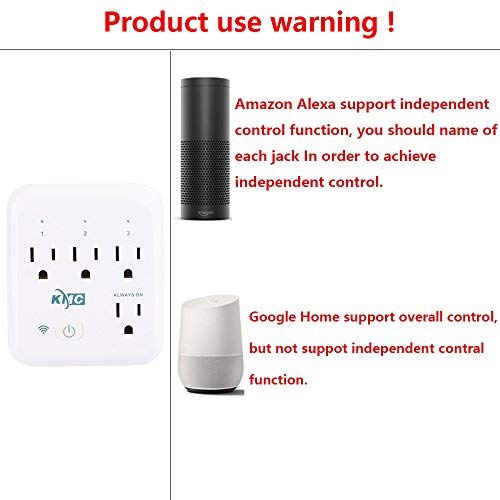
Image showing the KMC Smart Tap alongside Amazon Alexa and Google Home devices, indicating compatibility and control methods.
Programació i temporitzadors
Within the KMC Smart app, navigate to the device settings to set schedules and timers for your connected appliances.
You can program specific times for outlets to turn on or off automatically, enhancing convenience and energy efficiency.

An image depicting a child sleeping peacefully, illustrating how scheduling features can be used to manage device operation for routines, such as ensuring a restful environment.
Monitorització energètica
The KMC Smart app provides real-time and historical energy consumption data for devices connected to the Smart Tap.
Access the "Electricity Statistics" section in the app to view current usage (Current, Power, Voltage) and historical data (daily, monthly, yearly kWh).
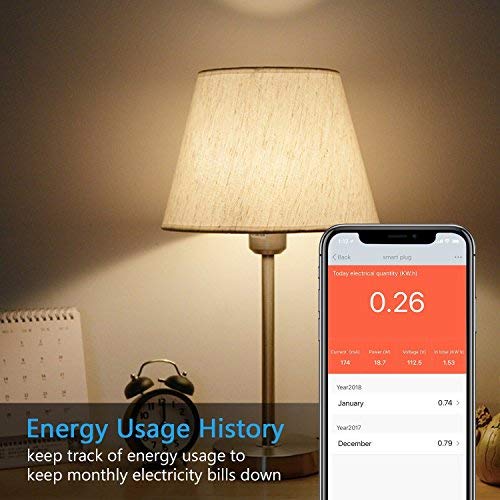
A smartphone screen displaying "Energy Usage History" with current electrical quantity (0.26 kWh) and monthly breakdowns for previous years, next to a lamp.
Manteniment
Neteja
- Disconnect the smart plug from the power outlet before cleaning.
- Use a dry, soft cloth to wipe the surface. Do not use liquid or aerosol cleaners.
Precaucions de seguretat
- No desmunteu ni modifiqueu el dispositiu.
- Avoid exposing the device to water or humid environments.
- Do not exceed the maximum load of 15A, 1875W.
- The built-in thermal sensor will automatically turn off overheating appliances.
Resolució de problemes
Device Not Connecting to Wi-Fi
- Assegureu-vos que la vostra xarxa Wi-Fi sigui de 2.4 GHz. Les xarxes de 5 GHz no són compatibles.
- Comproveu que la vostra contrasenya de Wi-Fi sigui correcta.
- Acosta l'endoll intel·ligent al teu encaminador Wi-Fi.
- Reset the smart plug by holding the power button for 5-10 seconds until the Wi-Fi indicator blinks rapidly, then attempt pairing again.
El control remot no funciona
- Verifiqueu que el vostre telèfon intel·ligent tingui una connexió a Internet activa.
- Ensure the smart plug is connected to your home Wi-Fi network (solid Wi-Fi indicator light).
- Comprova si hi ha actualitzacions de l'aplicació.
Problemes de control de veu
- Confirm that your KMC Smart account is correctly linked in the Alexa or Google Home app.
- Ensure the device names in the smart home app match your voice commands.
- Check the internet connection of your voice assistant device.
Especificacions
| Característica | Valor |
|---|---|
| Nombre de pols | 2 |
| Nombre de cables | 2 |
| Format endoll | Tipus A |
| Especificació Met | ETL |
| Ampedat | 15 Amps |
| UPC | 743267670332 |
| Fabricant | KT-KMC |
| Dimensions del paquet | 8.58 x 4.84 x 2.24 polzades |
| Pes de l'article | 14.9 unces |
| ASIN | B07SWZ2N4J |
| Data de primera disponibilitat | 10 de juny de 2019 |
| Marca | KMC |
| Color | Blanc |
| Voltage | 110 Volts |
| Material | Acrilonitril butadiè estirè (ABS) |
| Tipus de connector | Connecteu-vos |
Garantia i Suport
Informació de la garantia
The KMC Smart Tap includes a 30-day money-back guarantee and lifetime support.
Atenció al client
For technical assistance or warranty claims, please refer to the contact information provided on the KMC official website or within the KMC Smart app.


