1. Introducció
This manual provides detailed instructions for the setup, operation, maintenance, and troubleshooting of your ipega PG-9078 Universal Wireless Bluetooth Game Controller. Please read this manual carefully before use to ensure proper functionality and to extend the lifespan of your device. The PG-9078 is designed to provide a versatile gaming experience across multiple platforms including Android, iOS, Tablet, TV, and PC.

Figure 1.1: Package Contents - ipega PG-9078 Controller, detachable bracket, USB cable, and user manual.
2. Configuració
2.1. Càrrega del controlador
Before initial use, fully charge the controller. Connect the supplied USB cable to the Micro-USB port on the controller and the other end to a USB power source (e.g., computer USB port, USB wall adapter). The charging indicator light will illuminate during charging and turn off when fully charged.
2.2. Attaching the Phone Bracket
The PG-9078 comes with a detachable bracket for holding smartphones. To attach, align the bracket's base with the slot on the top of the controller and slide it into place until it clicks securely. To remove, gently press the release button (if present) or slide it off in the opposite direction.

Figure 2.1: Controller with Phone Bracket Attached.
2.3. Emparellament Bluetooth
The pairing process varies slightly depending on the operating system. Ensure the controller is charged before attempting to pair.
- Android/PC Mode: Press and hold the 'X' button + 'HOME' button simultaneously until the indicator light flashes rapidly. On your device, enable Bluetooth, search for "PG-9078" and select it to pair.
- Mode iOS: Press and hold the 'Y' button + 'HOME' button simultaneously until the indicator light flashes rapidly. On your iOS device, enable Bluetooth, search for "PG-9078" and select it to pair.
- Direct Play Mode (Android/iOS): For certain games, press and hold the 'A' button + 'HOME' button. This mode is designed for direct connection without mapping.
- PC Wired Mode: Connect the controller directly to your PC using the USB cable. The controller will be recognized as a standard gamepad.

Figure 2.2: Controller Paired with a Smartphone.
3. Instruccions de funcionament
3.1. Disseny del controlador
Familiarize yourself with the buttons and controls of the PG-9078 controller:
- Stick analògic esquerre: Movement control.
- D-Pad (coixinet direccional): Entrada direccional.
- Botó SELECCIÓ: Function varies by game/system.
- Botó HOME: Power on/off, pairing mode, return to home screen.
- Botó INICI: Function varies by game/system.
- Stick analògic dret: Control de càmera o moviment secundari.
- Botons d'acció (A, B, X, Y): Primary game actions.
- Botons d'espatlla (L1, R1): Top triggers.
- Trigger Buttons (L2, R2): Bottom triggers.
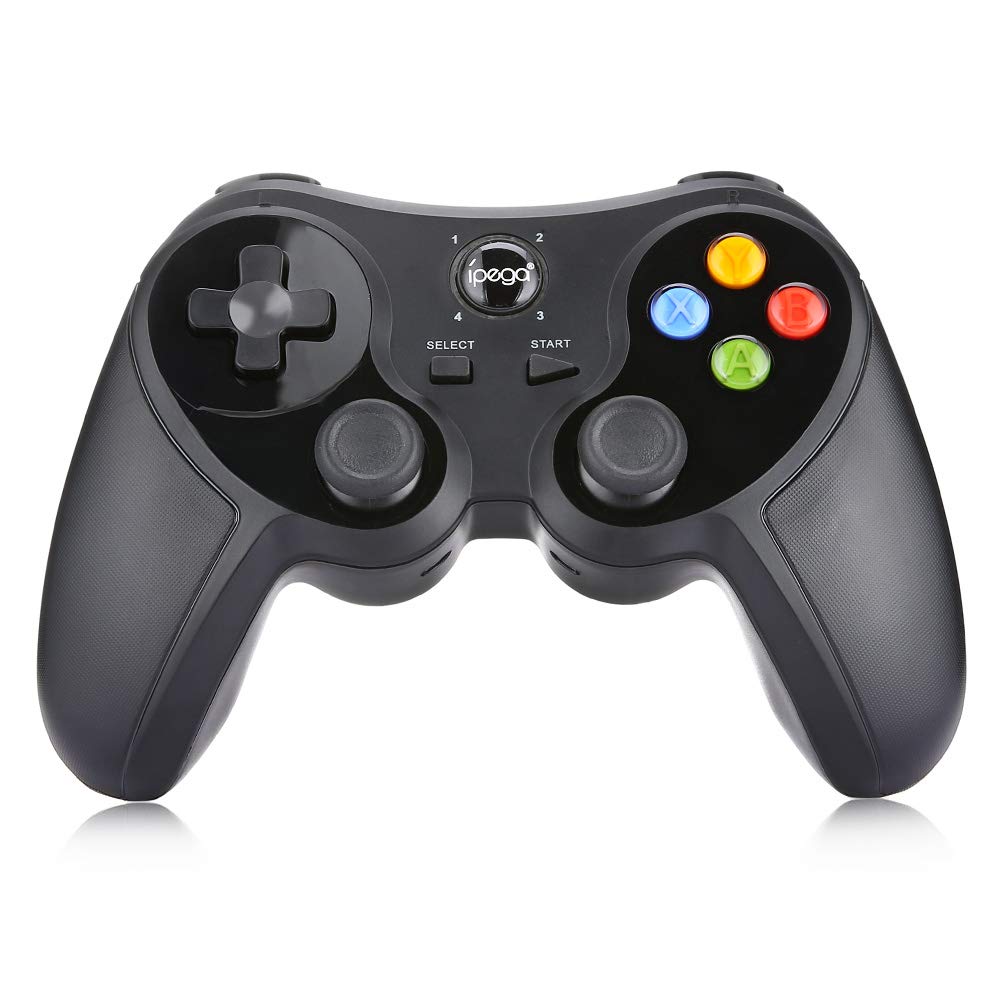
Figura 3.1: Frontal View del Controlador.
3.2. Experiència de joc
Once paired, the controller should be recognized by compatible games and applications. For optimal performance, ensure your device's operating system and game applications are up to date. Some games may require in-game controller settings adjustments.

Figure 3.2: Hands-on View of the Controller in Use.
4. Manteniment
- Neteja: Feu servir un drap suau i sec per netejar el controlador. Per a la brutícia resistent, feu servir un drap lleugerament sec.amp es pot fer servir un drap, però assegureu-vos que no entri humitat al dispositiu. No utilitzeu productes químics agressius ni netejadors abrasius.
- Emmagatzematge: Store the controller in a cool, dry place away from direct sunlight and extreme temperatures. If storing for extended periods, ensure the battery is partially charged (around 50%) to preserve battery health.
- Cura de la bateria: Avoid fully discharging the battery frequently. Recharge the controller when the low battery indicator appears. Do not attempt to replace the internal battery yourself.
5. Solució De Problemes
| Problema | Causa possible | Solució |
|---|---|---|
| El controlador no s'encén. | Bateria baixa. | Carregueu el controlador completament. |
| No es pot emparellar per Bluetooth. | Incorrect pairing mode; Bluetooth interference; device not discoverable. | Ensure correct pairing mode (Android/iOS) is selected. Turn off and on Bluetooth on your device. Move closer to the device. Try resetting the controller (if a reset button is available, usually a small pinhole). |
| Buttons are unresponsive or laggy. | Low battery; software conflict; distance from device. | Recharge the controller. Restart the game/device. Ensure no other Bluetooth devices are causing interference. |
| El controlador es desconnecta sovint. | Low battery; distance from device; interference. | Charge the controller. Stay within effective Bluetooth range. Reduce wireless interference. |
6. Especificacions
- Model: PG-9078
- Connectivitat: Bluetooth sense fil
- Compatibilitat: Android, iOS, Tablet, TV, PC
- Entrada Voltage: DC5V
- Corrent d'entrada: 500 mA
- Corrent de treball: 30 mA
- Fabricació: Fabricat a la Xina

Figure 6.1: Controller Back Panel with Specifications.
7. Garantia i Suport
Per obtenir informació sobre la garantia i assistència tècnica, consulteu la documentació proporcionada en el moment de la compra o poseu-vos en contacte amb el vostre distribuïdor. Conserveu el comprovant de compra per a qualsevol reclamació de garantia.


