1. Informació important de seguretat
Please read all instructions carefully before using the Xiaomi Mijia Electric Shaver 2. Retain this manual for future reference.
- Avoid submerging the shaver completely in water. While it is waterproof for rinsing, prolonged submersion is not recommended.
- Exercise caution when using the floating head to prevent cuts or skin irritation.
- Always clean and dry the shaver thoroughly after each use to prevent bacterial growth and maintain hygiene.
- Mantenir fora de l'abast dels nens.
- Do not disassemble or attempt to repair the shaver yourself. Contact authorized service for assistance.
- Use only the provided charging cable or a compatible USB-C cable for charging.
2. Producte acabatview
The Xiaomi Mijia Electric Shaver 2 is a compact, portable, and waterproof electric razor designed for men. It features two floating rotary heads for a smooth and comfortable shave, a durable stainless steel blade system, and a rechargeable battery for cordless operation.
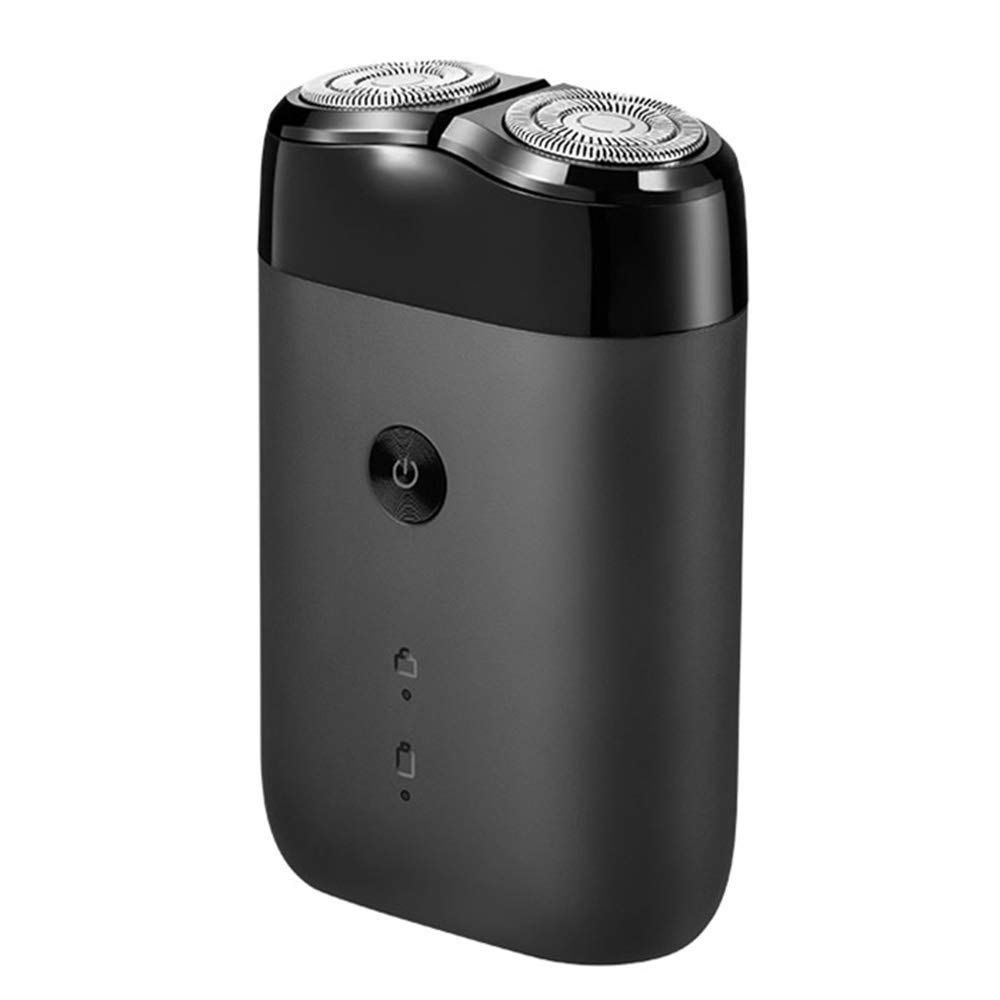
Figura 2.1: global view of the Xiaomi Mijia Electric Shaver 2, showcasing its compact, black design with two floating rotary heads and a power button on the front.
Característiques principals:
- Dual Floating Heads: Adapts to facial contours for a close shave.
- Disseny impermeable: Suitable for both wet and dry shaving, and easy to clean under running water.
- USB recarregable: Convenient charging via USB-C.
- Compacte i portàtil: Lightweight design (85 grams) ideal for travel.
- Bloqueig de viatge: Evita l'activació accidental durant el transport.
3. Configuració i càrrega
Càrrec inicial:
Before first use, fully charge the shaver. A full charge typically takes approximately 2 hours and provides up to 90 minutes of shaving time.
- Locate the USB Type-C charging port at the bottom of the shaver.
- Connect the provided USB-C charging cable to the shaver and the other end to a compatible USB power adapter (not included) or a computer USB port.
- The battery indicator lights on the shaver will illuminate to show charging progress. They will typically turn off or change color when fully charged.

Figura 3.1: Un angle view of the Xiaomi Mijia Electric Shaver 2, highlighting the power button, battery indicators, and the USB-C charging port located at the bottom.

Figura 3.2: Un primer pla view of the shaver's base, emphasizing the USB Type-C charging port and indicating long battery life with a 2-hour charge time for 90 minutes of use, alongside a diagram of the ECM Electrochemical Processing Technology for smooth blades.
4. Funcionament de l'afaitadora
Activació/desactivació:
- Per encendre l'afaitadora, premeu el botó d'encesa una vegada.
- To turn off the shaver, press the power button once again.
Tècnica d'afaitar:
- For best results, hold the shaver at a right angle to your skin.
- Mou l'afaitadora amb petits moviments circulars en la direcció contrària al creixement del pèl.
- Apply gentle pressure. The floating heads are designed to adapt to your facial contours.
- The shaver can be used for both dry shaving and wet shaving with foam or gel.
Funció de bloqueig de viatge:
The shaver features a double security protection travel lock to prevent accidental activation.
- To activate the travel lock, press and hold the power button for approximately 3 seconds until the lock indicator light appears.
- To deactivate the travel lock, press and hold the power button again for approximately 3 seconds until the lock indicator light disappears.

Figure 4.1: A composite image illustrating key features: a hand holding the shaver, demonstrating its portability; icons for double security protection (travel lock); a storage bag; and the battery indicator lights.
5. Manteniment i Neteja
Una neteja regular garanteix un rendiment i una higiene òptims de la teva afaitadora.
Neteja diària:
- Apagueu la màquina d'afaitar.
- Gently twist and pull off the shaver head assembly.
- Rinse the shaver head and the main body (where the hair collects) under running water to remove hair clippings and residue.
- Shake off excess water and allow both parts to air dry completely before reattaching the head.
Neteja profunda (periòdicament):
For a more thorough clean, you may use a small brush (if provided) to remove stubborn hair particles from the blades and inner components of the shaver head.
Cura de la bateria:
- Eviteu esgotar completament la bateria amb freqüència per allargar-ne la vida útil.
- If storing the shaver for an extended period, charge it to about 50% capacity.
- The battery indicator lights will show the remaining charge level. Recharge when the indicator shows low battery.
6. Solució De Problemes
If you encounter issues with your Xiaomi Mijia Electric Shaver 2, refer to the following common problems and solutions:
- Shaver does not turn on:
- Ensure the shaver is charged. Connect it to a power source and check the charging indicator.
- Check if the travel lock is activated. Deactivate it by pressing and holding the power button for 3 seconds.
- Mal rendiment d'afaitat:
- Clean the shaver head thoroughly to remove any accumulated hair or debris.
- Ensure the shaver is fully charged. Low battery can affect motor speed.
- For optimal performance, consider replacing the shaver heads if they are worn out (replacement parts sold separately, if available).
- Shaver makes unusual noise:
- Clean the shaver head. Hair or debris caught in the blades can cause unusual sounds.
- Ensure the shaver head is properly reattached after cleaning.
Si el problema persisteix després d'intentar aquests passos, poseu-vos en contacte amb l'atenció al client.
7. Especificacions
| Característica | Detall |
|---|---|
| Nom del model | MSX201 |
| Marca | Xiaomi |
| Font d'alimentació | Alimentat per bateria (recarregable per USB) |
| Característica especial | Rechargeable, Floating Head, Waterproof |
| Components inclosos | Shaver, Battery (internal) |
| Dimensions del paquet | 6.81 x 4.33 x 1.77 polzades |
| Pes de l'article | 3 unces (aproximadament 85 grams) |
| Fabricant | xiaomi |
8. Garantia i Suport
For information regarding product warranty, returns, or technical support, please refer to the warranty card included with your product packaging or visit the official Xiaomi weblloc. Els termes i condicions específics de la garantia poden variar segons la regió.
For further assistance, you may also contact the seller or retailer from whom you purchased the product.


