1. Introducció
This manual provides comprehensive instructions for the installation, operation, and maintenance of your DIGITUS Wireless Dual Band Mesh Kit (Model DN-7071). Please read this manual carefully before using the device to ensure proper functionality and to prevent damage.
The DIGITUS Wireless Dual Band Mesh Kit is designed to extend and enhance your Wi-Fi coverage, providing a seamless and stable network experience throughout your home or office. It supports dual-band operation (2.4 GHz and 5.8 GHz) with a combined speed of up to 1200 Mbps, and features WPS for easy setup, along with LAN and Wi-Fi connectivity.
2. Contingut del paquet
Verifiqueu que tots els elements siguin presents al vostre paquet:
- 1 x DIGITUS 1200 Mbps Dual Band Mesh System (3 pieces)
- 1 x Manual d'usuari
3. Producte acabatview
Familiarize yourself with the components and indicators of your DIGITUS Mesh Kit.
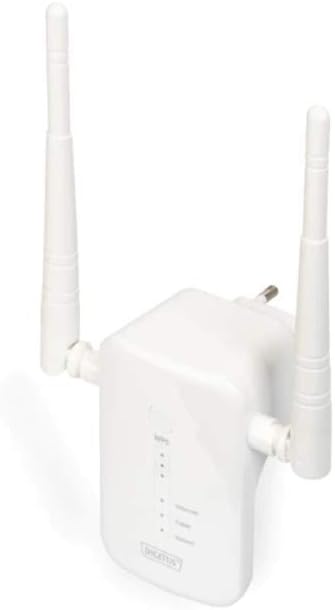
Figure 1: DIGITUS Wireless Dual Band Mesh Kit (DN-7071). This image displays the DIGITUS Wireless Dual Band Mesh Kit, a white rectangular device with two adjustable external antennas. The front panel features LED indicators for status, and a power plug is visible on the back, indicating direct wall-socket integration.
Indicadors LED:
- LED d'alimentació: Indica l'estat d'alimentació.
- LED Wi-Fi: Indica l'activitat del Wi-Fi i l'estat de la connexió.
- LED LAN: Indica l'activitat del port LAN.
- LED de força del senyal: Indicates the strength of the mesh connection.
Ports i botons:
- Port LAN: For wired connections.
- Botó WPS: For quick and secure connection setup.
- Botó de restabliment: To restore factory default settings (usually a small pinhole button).
4. Configuració
4.1 Col·locació inicial
Place the main mesh unit (router mode) near your internet modem/router. Subsequent mesh units should be placed strategically to cover dead zones, ensuring they are within range of another mesh unit or the main unit for optimal signal strength.
4.2 Encès
- Plug the main mesh unit into a power outlet.
- Wait for the Power LED to become stable.
- Repeat for the other mesh units.
4.3 Connecting to Your Existing Network
There are two primary methods for connecting the mesh system:
Mètode 1: WPS (configuració protegida per Wi-Fi)
- Press the WPS button on your existing router.
- Within two minutes, press the WPS button on the main DIGITUS mesh unit.
- The Wi-Fi LED on the mesh unit will blink during connection and become solid when successfully connected.
- Repeat for additional mesh units, pressing WPS on an already connected mesh unit or the main unit, then on the new unit.
Method 2: Manual Setup (via Web Interfície)
- Connect your computer to the LAN port of one of the mesh units using an Ethernet cable, or connect wirelessly to its default Wi-Fi network (SSID and password usually found on a sticker on the device).
- Obre a web navegador i introduïu l'adreça IP predeterminada (p. ex.,
192.168.1.1or192.168.0.1) o nom de domini (per exemple,http://digitusmesh.net) provided in the quick start guide. - Log in with the default username and password (e.g.,
admin/admin). - Follow the on-screen wizard to configure the mesh system, including network name (SSID), password, and operating mode (e.g., Router, Access Point, Repeater).
- Save your settings and restart the device if prompted.
5. Instruccions de funcionament
5.1 Connexió de dispositius
- Dispositius sense fil: Cerca the Wi-Fi network name (SSID) you configured and enter the password.
- Dispositius amb cable: Connect devices like computers, gaming consoles, or smart TVs to the LAN port of any mesh unit using an Ethernet cable.
5.2 Optimització del rendiment
- Col·locació: Ensure mesh units are not obstructed by large objects or placed near sources of interference (e.g., microwaves, cordless phones).
- Actualitzacions de firmware: Comproveu i instal·leu regularment si hi ha actualitzacions de firmware a través de web interfície per garantir un rendiment i una seguretat òptims.
- Banda dual: Utilize the 5 GHz band for devices requiring higher speeds (e.g., streaming, gaming) and the 2.4 GHz band for wider coverage and older devices.
6. Manteniment
- Neteja: Feu servir un drap suau i sec per netejar el dispositiu. No utilitzeu netejadors líquids ni aerosols.
- Ventilació: Ensure the mesh units have adequate ventilation and are not covered.
- Firmware: Keep the device firmware updated to the latest version for security and performance improvements.
- Restablir: If the device is not functioning correctly, a factory reset may resolve issues. Press and hold the reset button for 5-10 seconds until the LEDs flash. Note that this will erase all custom settings.
7. Solució De Problemes
- Sense energia: Ensure the power adapter is securely plugged into the unit and a working power outlet.
- Sense connexió a Internet:
- Check the connection between the main mesh unit and your modem/router.
- Verify your modem/router has an active internet connection.
- Restart your modem, router, and mesh units.
- Senyal Wi-Fi feble:
- Relocate mesh units closer to each other or to the main unit.
- Ensure there are no major obstructions.
- Comproveu si hi ha fonts d'interferència.
- No es pot accedir Web Interfície:
- Ensure your device is connected to the mesh unit's network.
- Verify the correct IP address or domain name is entered.
- Prova d'esborrar la memòria cau del navegador o utilitza un altre navegador.
- Perform a factory reset if necessary (note: this will erase all custom settings).
8. Especificacions
| Característica | Detall |
|---|---|
| Marca | DIGITS |
| Nom del model | DN-7071 |
| Color | Blanc |
| Tecnologia de connectivitat | WLAN |
| Comunicació sense fils estàndard | 802.11a, 802.11ac, 802.11b, 802.11g, 802.11n |
| Classe de banda de freqüència | Dual Band (2.4 GHz / 5.8 GHz) |
| Característiques especials | QoS, WPS |
| Dispositius compatibles | Smartphone (and other Wi-Fi enabled devices) |
| Ports | RJ-45 (LAN) |
| Pes de l'article | 117 grams |
| Components inclosos | 1 x 1200 Mbps Dual Band Mesh System (3 pieces), 1 x User Manual |
9. Garantia i Suport
For warranty information and technical support, please refer to the official DIGITUS website or contact their customer service. Details are typically available on the product packaging or the manufacturer's official support pages.
You can find more solutions and information on the official DIGITUS weblloc: DIGITUS Solutions


