1. Introducció
This manual provides detailed instructions for the safe and effective operation of your Walfront AR860 Ultrasonic Thickness Gauge. Please read this manual thoroughly before using the device to ensure proper function and to prevent damage.
The AR860 is designed for accurate measurement of material thickness using ultrasonic principles. It is suitable for materials that are good conductors of ultrasound, including metals, plastics, ceramics, and glass.
2. Característiques clau
- Alta precisió: Measures thickness based on sound velocity with automatic calibration for precise measurement results.
- Versatilitat del material: Suitable for good ultrasonic conductors like metal, plastic, ceramic, and glass.
- Sound Velocity Settings: Offers 12 preset sound velocities for various materials.
- Emmagatzematge de dades: Stores up to 12 sets of thickness measurement data for convenient analysis.
- Pantalla multifuncional: Includes coupling status indication, thickness alarm settings, low battery warning, and automatic power-off.
- Pantalla LCD retroil·luminada: Garanteix una llegibilitat clara fins i tot en condicions de poca llum.
- Disseny portàtil: Comes with a protective storage case for easy transport.
3. Components del producte
The Walfront AR860 Ultrasonic Thickness Gauge package typically includes the following items:
- AR860 Ultrasonic Thickness Gauge Unit
- Sonda ultrasònica
- Calibration Block
- Coupling Agent (may not be included, refer to packaging)
- Estoig d'emmagatzematge
- Manual d'usuari

Imatge 3.1: The Walfront AR860 Ultrasonic Thickness Gauge, probe, calibration block, and user manual neatly organized within its protective metal carrying case.

Imatge 3.2: Un primer pla view of the AR860 main unit, its connected ultrasonic probe, and a small circular calibration block. This image highlights the primary components used for thickness measurement.
4. Configuració i funcionament inicial
4.1 Instal·lació de la bateria
- Localitzeu el compartiment de la bateria a la part posterior del dispositiu.
- Feu lliscar la tapa de la bateria.
- Introduïu 3 piles AAA, assegurant-vos de la polaritat correcta (+/-).
- Tanqueu la tapa de la bateria amb seguretat.

Imatge 4.1: La part posterior view of the AR860 device with the battery compartment cover removed, showing the slots for AAA batteries. This illustrates where to insert the power source.
4.2 Connexió de la sonda
- Identify the two probe connectors on the top of the main unit.
- Connect the ultrasonic probe cable to these ports. Ensure a firm connection.
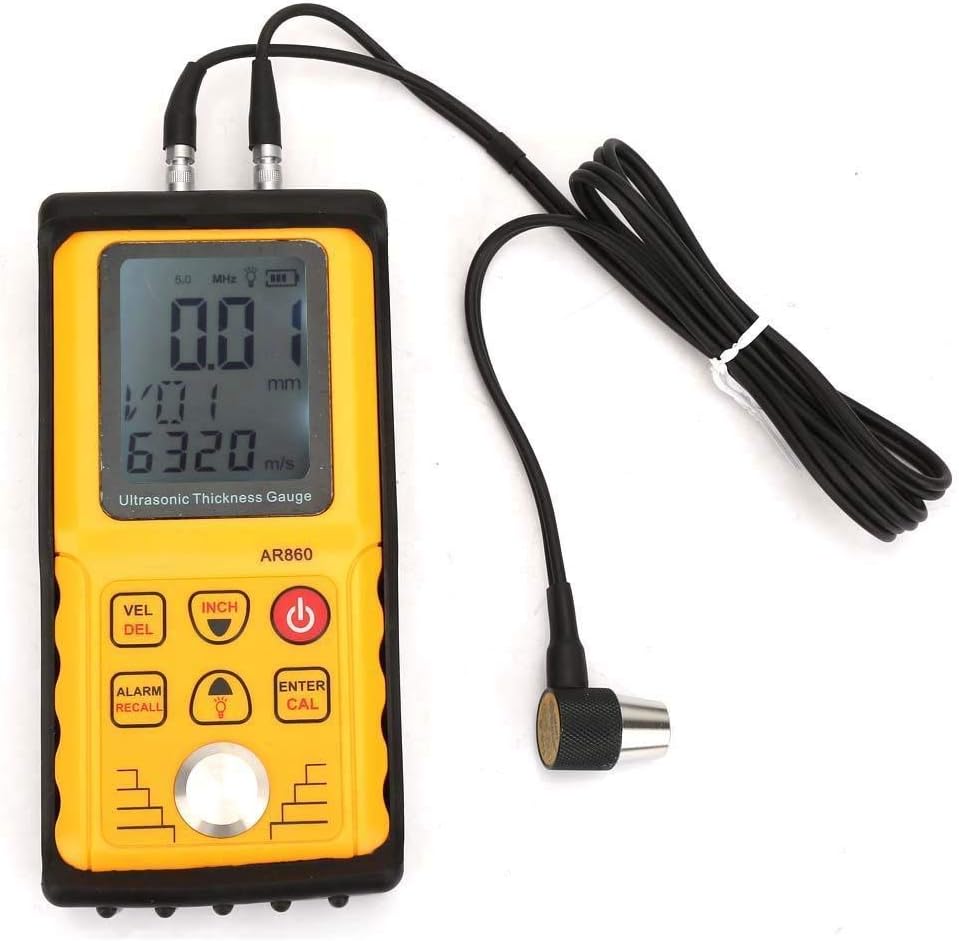
Imatge 4.2: The AR860 main unit with the ultrasonic probe securely connected to its top ports. This image demonstrates the correct way to attach the probe for measurement.
4.3 Engegada/apagada
- Premeu el botó Poder button (red button) to turn the device on.
- Per apagar, premeu i manteniu premut el botó Poder button, or the device will automatically shut down after 2 minutes of inactivity.
5. Instruccions de funcionament
5.1 Comprensió de la pantalla i els botons

Imatge 5.1: A detailed diagram illustrating the LCD display and the function of each button on the AR860 Ultrasonic Thickness Gauge. Key labels include LCD Display, The Probe, Sound Speed Adjustment, Select Function Entry and Thickness Storage Value Delete Key, Alarm Setting and Measurement Data Storage, Function Confirmation Key and Calibration Key, Power Switch, Speed of Sound Adjustment, Metric/Metric Conversion Key, and The Calibration Block.
- Pantalla LCD: Shows thickness readings, sound velocity, battery status, and other indicators.
- VEL/DEL Button: Adjusts sound speed or deletes stored data.
- INCH Button: Toggles between metric (mm) and imperial (inch) units.
- Botó d'encesa: Encén/apaga el dispositiu.
- ALARM/RECALL Button: Sets alarm limits or recalls stored data.
- Botó de llum: Toggles backlight on/off.
- ENTER/CAL Button: Confirms selections or initiates calibration.
- Fletxes amunt/avall: Navega pels menús i ajusta els valors.
5.2 Calibració de la velocitat del so
Accurate sound velocity calibration is crucial for precise measurements. If the thickness of a material is known, its sound velocity can be used to calibrate the device.
- Ensure the probe is clean and apply a small amount of coupling agent to the calibration block.
- Press the probe firmly onto the calibration block.
- Premeu el botó ENTER/CAL button to initiate calibration. The device will display the calibrated sound velocity.
- Alternatively, you can manually select from 12 preset sound velocities using the VEL/DEL botó.

Imatge 5.2: The AR860 display showing a sound velocity reading, indicating the device is ready for or undergoing calibration. The text emphasizes the importance of accurate sound velocity for precise thickness measurements.
5.3 Prendre una mesura
- Ensure the device is calibrated for the material you are measuring.
- Apply a small amount of coupling agent to the surface of the material to be measured.
- Press the probe firmly and perpendicularly onto the prepared surface.
- The thickness reading will appear on the LCD display.
- If the coupling status indicator shows an error, reapply coupling agent or adjust probe pressure.
5.4 Emmagatzematge i recuperació de dades
- To store a measurement, press the ALARM/RECALL button after a stable reading is obtained. The device can store up to 12 data sets.
- Per recuperar les dades emmagatzemades, premeu la tecla ALARM/RECALL button and use the Up/Down arrows to browse through the stored values.
- To delete stored data, use the VEL/DEL botó mentre viewemmagatzemar dades.
6. Manteniment
- Neteja: After each use, wipe the probe and the device's surface with a soft, dry cloth. Do not use abrasive cleaners or solvents.
- Emmagatzematge: Store the device in its protective case in a cool, dry place when not in use. Remove batteries if storing for extended periods to prevent leakage.
- Cura de la sonda: Ensure the probe's contact surface is free from scratches or damage, as this can affect measurement accuracy.
7. Solució De Problemes
| Problema | Causa possible | Solució |
|---|---|---|
| Sense lectura o lectura inestable |
|
|
| El dispositiu no s'encén |
|
|
| Lectures inexactes |
|
|
8. Especificacions
| Paràmetre | Valor |
|---|---|
| Model | AR860 |
| Interval de mesura | 1.00 - 300.0 mm (Steel) |
| Precisió | ±(1%H + 0.1) mm |
| Interval de velocitat del so | 1000 - 9999 m/s |
| Freqüència de funcionament | 5 MHz |
| Emmagatzematge de dades | 12 conjunts |
| Mostra | LCD amb llum de fons |
| Font d'alimentació | 3 piles AAA de 1.5 V |
| Apagat automàtic | Després de 2 minuts d'inactivitat |
| Dimensions (L x A x A) | 15.3 x 7.5 x 3.5 cm |
| Pes | Aprox. 998 g (amb piles) |
| Material | Plàstic |
| Temperatura de funcionament | De 0 °C a 40 °C (32 °F a 104 °F) |

Imatge 8.1: A diagram showing the physical dimensions of the AR860 Ultrasonic Thickness Gauge, indicating a length of 153mm and a width of 75mm.
9. Garantia i Suport
Per obtenir informació sobre la garantia i assistència tècnica, consulteu la documentació que s'inclou amb la compra o poseu-vos en contacte amb el vostre distribuïdor. Conserveu el rebut de compra com a comprovant de compra.

