1. Introducció
This manual provides detailed instructions for the installation, operation, and maintenance of your Aerocool Streak Mid-Tower ATX PC Gaming Case. Designed for both new and experienced PC builders, the Streak case offers a compact design with a polished aluminum front panel, vibrant RGB lighting, and a full tempered glass side panel to showcase your components. It supports various cooling configurations to ensure optimal performance for your system.
2. Informació de seguretat
Please read and understand all safety instructions before installing or operating the PC case. Failure to do so may result in personal injury or damage to the product.
- Always disconnect the power supply from the wall outlet before performing any installation or maintenance.
- Be aware of sharp edges inside the case. Handle components with care to avoid cuts.
- Mantingueu les peces petites i els cargols fora de l'abast dels nens.
- Assegureu-vos de posar a terra correctament per evitar descàrregues elèctriques.
- Do not expose the case to water or excessive humidity.
3. Contingut del paquet
Verifiqueu que tots els elements siguin presents al paquet:
- Aerocool Streak Mid-Tower ATX PC Gaming Case
- Accessory box (screws, standoffs, cable ties, etc.)
- Manual d'usuari (aquest document)
4. Components de la caixa més enllàview
Familiarize yourself with the various parts of your Aerocool Streak case.

Figura 4.1: En angle view of the Aerocool Streak PC case, showcasing the RGB front panel and tempered glass side panel.

Figura 4.2: Angle de dalt a baix view of the Aerocool Streak PC case, highlighting the top panel and front I/O ports.
4.1 Ports d'E/S frontals
The front I/O panel provides convenient access to essential connections.
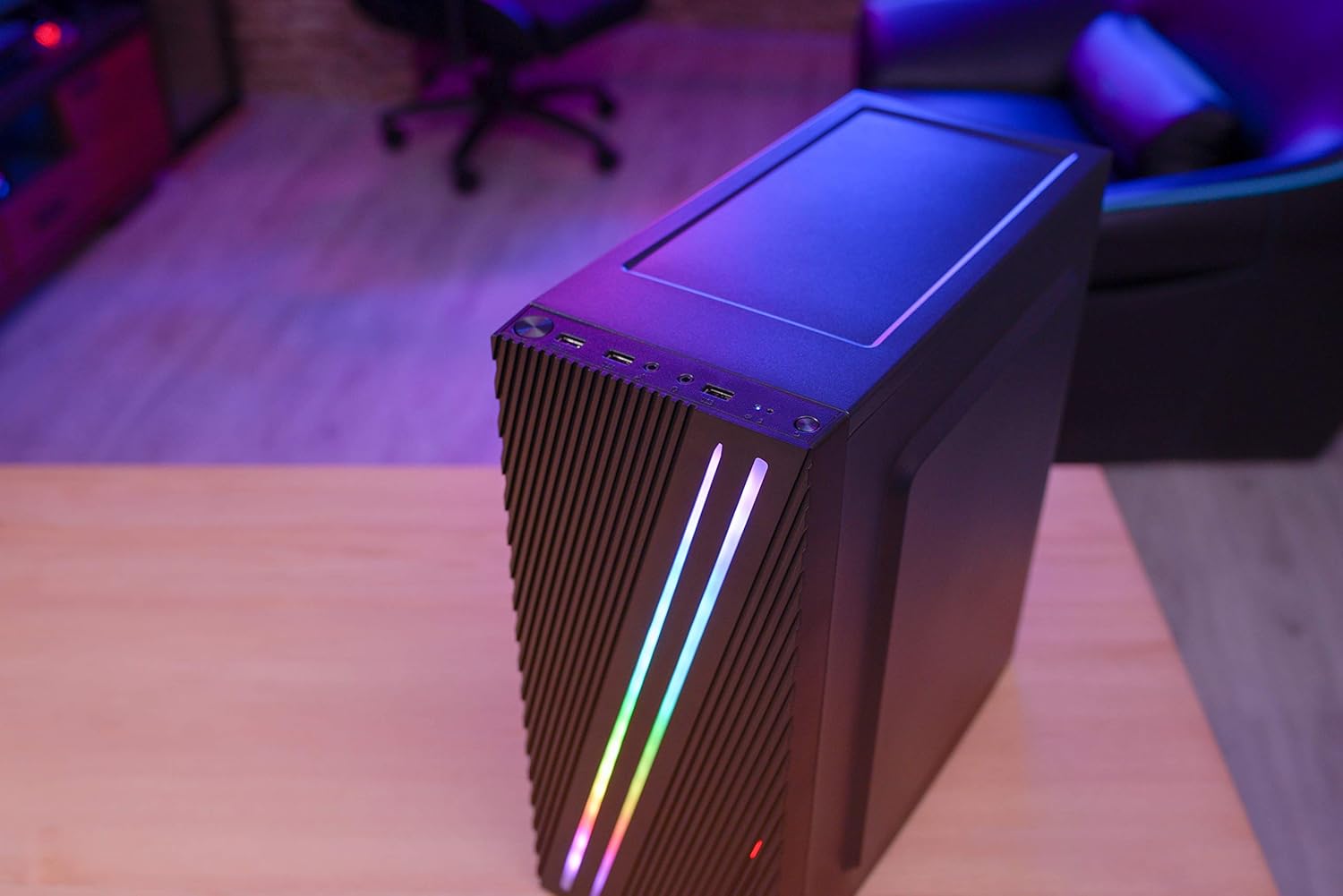
Figura 4.3: Close-up of the front I/O panel, showing the power button, LED control button, USB 3.0 port, two USB 2.0 ports, and HD audio/microphone jacks.
- Botó d'encesa: Per encendre/apagar el sistema.
- Botó de control LED: To cycle through RGB lighting modes.
- Port USB 3.0 (x1): Per a la transferència de dades d'alta velocitat.
- Ports USB 2.0 (x2): Per a dispositius USB estàndard.
- HD Audio & Mic Jacks: Per connectar auriculars i micròfons.
4.2 Distribució interior
The interior is designed for efficient component installation and cable management.

Figura 4.4: Interna view of the Aerocool Streak PC case, showing the motherboard tray, drive bays, and cable routing cutouts.
5. Configuració i instal·lació
Follow these steps to assemble your PC components within the Aerocool Streak case.
5.1 Preparació
- Desembaleu la caixa i traieu tots els materials d'embalatge.
- Col·loqueu la caixa sobre una superfície plana i estable.
- Gather necessary tools: Phillips head screwdriver, cable ties (included in accessory box).
- Remove the tempered glass side panel by unscrewing the four thumb screws.
5.2 Instal·lació de la placa base
The Aerocool Streak supports ATX, Micro-ATX, and Mini-ITX motherboards.

Figura 5.1: Diagram illustrating the compatible motherboard sizes (Mini-ITX, Micro-ATX, ATX) within the case.
- Install the necessary motherboard standoffs into the motherboard tray according to your motherboard's form factor.
- Place your motherboard carefully onto the standoffs, aligning the screw holes.
- Fixeu la placa base amb els cargols proporcionats.
5.3 Instal·lació de la unitat d'alimentació (PSU).
The case features a bottom-mount PSU design.
- Feu lliscar la font d'alimentació al compartiment corresponent a la part inferior posterior de la carcassa.
- Secure the PSU to the case rear with screws.
5.4 Instal·lació de la unitat d'emmagatzematge
Install your 2.5" SSDs and 3.5" HDDs.
- SSD de 2.5 polzades: Mount SSDs to the designated 2.5" drive trays or mounting points on the motherboard tray.
- Discs durs de 3.5 polzades: Install HDDs into the drive cage located beneath the PSU shroud.
5.5 Expansion Card Installation (Graphics Card, etc.)
The case supports high-end graphics cards up to 335mm in length.
- Traieu les cobertes de les ranures PCIe necessàries de la part posterior de la carcassa.
- Insert your expansion card into the corresponding PCIe slot on the motherboard.
- Fixeu la targeta amb un cargol.
5.6 Instal·lació del sistema de refrigeració
The Aerocool Streak supports both air and liquid cooling solutions.

Figura 5.2: Diagram showing air cooling options, including front 120mm fans (optional) and a rear 80mm fan (included).

Figura 5.3: Diagram illustrating liquid cooling support, specifically a 240mm radiator at the front (optional).
- Air Cooling: The case supports up to two 120mm fans at the front (optional) and includes one 80mm fan at the rear.
- Refrigeració líquida: A 240mm radiator can be installed at the front of the case (optional).
- Install fans or radiators into their respective mounting points and secure them with screws.
5.7 Gestió de cables
Utilitzeu els retalls de cablejat i els punts d'amarratge que hi ha darrere de la safata de la placa base per organitzar els cables i millorar el flux d'aire i l'estètica.
- Route all power and data cables through the designated cutouts.
- Use cable ties to bundle and secure cables neatly.
6. Instruccions de funcionament
6.1 Powering On Your System
- Ensure all components are correctly installed and all cables are securely connected.
- Connect the power cable to your PSU and then to a wall outlet.
- Gireu l'interruptor d'alimentació de la font d'alimentació a la posició "ON".
- Press the power button on the front I/O panel of the case to start your system.
6.2 Control d'il·luminació RGB
The Aerocool Streak features 18 distinct RGB lighting modes on its front panel.

Figura 6.1: The Aerocool Streak PC case with its vibrant RGB lighting illuminated on the front panel.
- Premeu el botó Botó de control de LED on the front I/O panel to cycle through the 18 available lighting modes.
- These modes include 11 RGB flow modes and 7 static color modes.
7. Manteniment
Un manteniment regular ajuda a garantir la longevitat i el rendiment òptim de la carcassa i els components del teu PC.
7.1 Cleaning the Case
- Exterior: Utilitzeu un suau, damp drap per netejar les superfícies exteriors. Eviteu productes de neteja abrasius.
- Interior: Periodically use compressed air to remove dust buildup from inside the case, especially around fans and heatsinks.
7.2 Dust Filter Maintenance
The case may include removable dust filters to prevent dust ingress. Clean these filters regularly.
- Locate and carefully remove any dust filters (e.g., top, bottom, front).
- Clean the filters with water and mild soap, or use compressed air.
- Assegureu-vos que els filtres estiguin completament secs abans de tornar-los a instal·lar.
8. Solució De Problemes
If you encounter issues with your Aerocool Streak case, refer to the following common problems and solutions.
- El sistema no s'encén:
- Check all power connections, including the PSU to the wall, PSU switch, and motherboard power cables.
- Ensure the front panel power switch cable is correctly connected to the motherboard.
- La il·luminació RGB no funciona:
- Verify that the RGB lighting cables are properly connected to the power supply or motherboard RGB header.
- Press the LED control button to cycle through modes, as it might be on a static black mode.
- Poor airflow/overheating:
- Assegureu-vos que tots els ventiladors de la caixa girin correctament.
- Clean any dust filters and internal components.
- Verify proper fan orientation for optimal airflow (intake/exhaust).
9. Especificacions
| Característica | Especificació |
|---|---|
| Nom del model | Ratxa |
| Número de model | ACCM-PV19012.11 |
| Tipus de cas | Mitjana Torre |
| Compatibilitat amb la placa base | ATX, Micro ATX, Mini ITX |
| Material | Tempered Glass (side panel) |
| Color | Negre |
| Ports d'E / S frontals | 1x USB 3.0, 2x USB 2.0, HD Audio, Mic, LED Control Button, Power Button |
| Il·luminació RGB | 18 Lighting Modes (11 flow, 7 static) |
| Liquidació del refrigerador de la CPU | Fins a 151 mm |
| Longitud de la targeta gràfica | Fins a 335 mm |
| Muntatge de la font d'alimentació | Muntatge inferior |
| Mètode de refrigeració | Aire, Aigua |
| Fans inclosos | 1x Ventilador posterior de 80 mm |
| Optional Fan Support | Davant: 2x 120mm |
| Suport del radiador | Front: 1x 240mm (optional) |
10. Garantia i Suport
The Aerocool Streak PC Gaming Case comes with a 2-year warranty on parts. For technical support, warranty claims, or further assistance, please contact your retailer or the official Aerocool support channels. Keep your proof of purchase for warranty validation.


