1. Introducció
This manual provides comprehensive instructions for the safe and efficient operation of your Bewinner 58mm Mini USB/Bluetooth Thermal Receipt Portable Printer. Please read this manual thoroughly before using the device and retain it for future reference.

Image: The Bewinner 58mm Mini USB/Bluetooth Thermal Receipt Portable Printer, a compact black device with a translucent blue cover, displaying a printed receipt.
2. Informació de seguretat
- Do not disassemble or modify the printer. Unauthorized modifications can lead to electric shock, fire, or damage to the device.
- Use only the provided power adapter and accessories. Using incompatible accessories may cause damage or malfunction.
- Keep the printer away from water, moisture, and extreme temperatures.
- Eviteu deixar caure la impressora ni sotmetre-la a impactes forts.
- Ensure proper ventilation around the printer during operation.
- Eliminar les bateries segons la normativa local.
3. Contingut del paquet
Si us plau, verifiqueu que tots els elements que s'enumeren a continuació estiguin inclosos al vostre paquet:
- Bewinner Thermal Receipt Printer
- Adaptador d'alimentació
- Cable USB
- CD del controlador
- Manual d'usuari (aquest document)

Image: The Bewinner thermal printer, power adapter, USB cable, and driver CD, representing the typical package contents.
4. Producte acabatview
Familiarize yourself with the various components and ports of your thermal printer.

Image: A detailed diagram labeling the external components of the printer, including the charging indicator, paper out/power indicator, electric capacity lights, power switch, feeding button, mode switch, DC 9V input, USB port, and COM port.
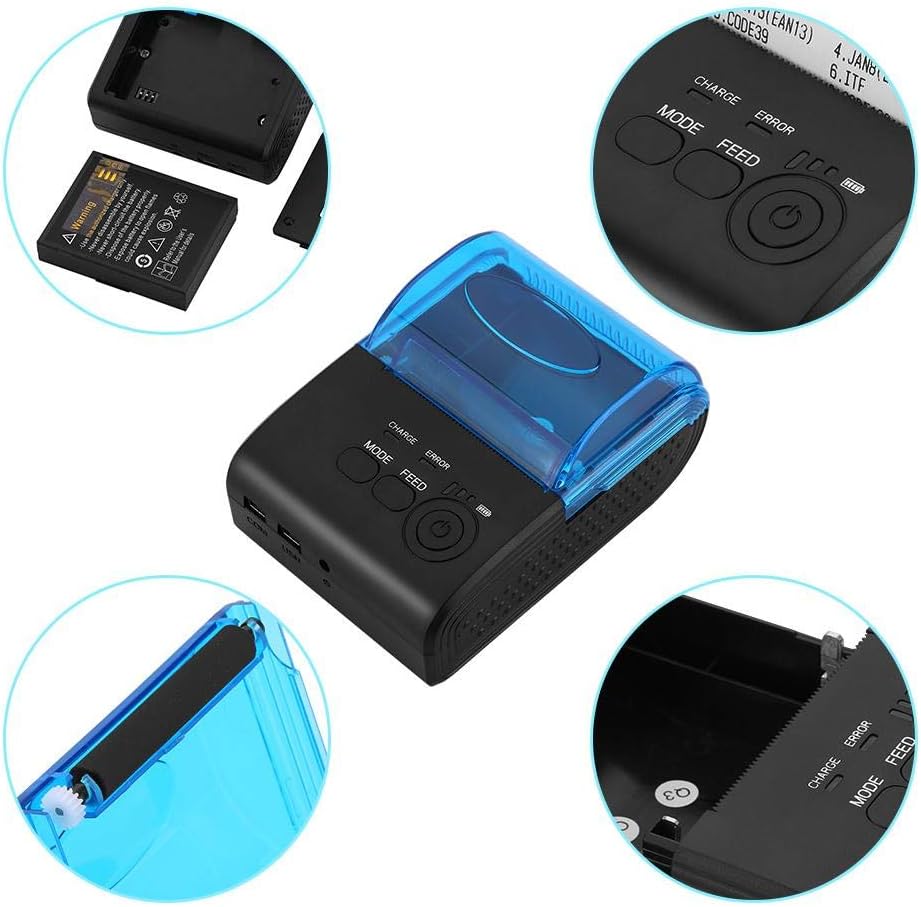
Image: A composite image showing close-up views of the printer's key areas: the battery compartment, the paper roll loading area, the control panel with MODE, FEED, and Power buttons, and the COM/USB ports.
5. Configuració
5.1 Instal·lació de la bateria
- Assegureu-vos que la impressora estigui apagada.
- Locate the battery compartment cover on the bottom of the printer.
- Feu lliscar o desenganxeu la tapa per obrir el compartiment.
- Insert the provided lithium battery, ensuring the contacts align correctly.
- Tanqueu bé la tapa del compartiment de la bateria.

Image: The underside of the printer with the battery compartment open, showing the battery and its slot.
5.2 Instal·lació del rotllo de paper
- Gently push the cover open button (if present) or lift the translucent blue cover to open the paper compartment.
- Insert a 58mm thermal paper roll into the compartment, ensuring the paper feeds from the bottom and the leading edge is straight.
- Pull a small amount of paper out past the print head.
- Tanqueu la tapa fermament fins que encaixi al seu lloc.

Image: The printer with its translucent blue cover open, revealing the paper roll compartment, ready for paper insertion.
5.3 Càrrega de la impressora
- Connect the provided power adapter to the DC 9V port on the side of the printer.
- Connecteu l'adaptador d'alimentació a una presa de corrent adequada.
- El llum indicador de càrrega s'il·luminarà durant la càrrega.
- Charge the printer fully before initial use.

Image: The Bewinner thermal printer shown alongside its power adapter, illustrating the charging connection.
5.4 Instal·lació del controlador
For USB connection with a computer, driver installation is required. The printer supports Windows, Vista, and Linux operating systems.
- Insert the provided Driver CD into your computer's CD-ROM drive.
- Seguiu les instruccions que apareixen a la pantalla per instal·lar els controladors de la impressora.
- If your computer does not have a CD-ROM drive, please visit the Bewinner support weblloc web per descarregar els controladors més recents.
6. Instruccions de funcionament
6.1 Engegada/apagada
- To power on: Press and hold the Power button (usually marked with a circle and a vertical line) until the indicator lights illuminate.
- To power off: Press and hold the Power button again until the indicator lights turn off.
6.2 Connexió mitjançant USB
- Assegureu-vos que els controladors de la impressora estiguin instal·lats a l'ordinador.
- Connecteu un extrem del cable USB al port USB de la impressora i l'altre extrem a l'ordinador.
- Your computer should recognize the printer. You can then select it as your default printer in your application settings.
6.3 Connexió mitjançant Bluetooth
The printer supports Bluetooth 4.0 and 2.0 for wireless connection with Android and iOS devices.
- Ensure the printer is powered on and within range of your mobile device.
- Al dispositiu mòbil, aneu a la configuració de Bluetooth i activeu el Bluetooth.
- Cerca available devices. The printer should appear as "Printer" or a similar name.
- Seleccioneu la impressora que voleu emparellar. Si us demana un PIN, introduïu "0000" o "1234".
- Once paired, you can use compatible printing applications on your device to send print jobs to the printer.
6.4 Imprimir una pàgina de prova
To confirm the printer is functioning correctly and to check its current settings:
- With the printer powered off, press and hold the "FEED" button.
- While holding "FEED", press and hold the "Power" button simultaneously.
- Release both buttons once the printer starts printing. A self-test page will be printed, showing firmware version, print method, and other settings.
Image: The Bewinner thermal printer actively printing a receipt, demonstrating its operational state.
7. Manteniment
7.1 Neteja del capçal d'impressió
La neteja regular del capçal d'impressió garanteix una qualitat d'impressió òptima i allarga la vida útil de la impressora.
- Ensure the printer is powered off and unplugged.
- Obriu la coberta del compartiment de paper.
- Gently wipe the thermal print head (the dark strip inside the cover) with a cotton swab lightly dampamb alcohol isopropílic.
- Deixeu que el capçal d'impressió s'assequi completament abans de tancar la tapa i engegar la impressora.
7.2 Cura de la bateria
- Per allargar la durada de la bateria, eviteu descarregar-la completament amb freqüència.
- If the printer will not be used for an extended period, charge it to about 50% and store it in a cool, dry place.
- Recarrega la bateria cada pocs mesos per evitar una descàrrega profunda.
7.3 Manipulació del paper
- Use only high-quality 58mm thermal paper.
- Store thermal paper in a cool, dry place away from direct sunlight and heat to prevent premature fading.
- Ensure the paper roll is inserted correctly to avoid paper jams.
8. Solució De Problemes
| Problema | Causa possible | Solució |
|---|---|---|
| La impressora no s'encén. | Bateria baixa o adaptador de corrent no connectat. | Charge the battery or connect the power adapter. Ensure the power button is pressed correctly. |
| No hi ha sortida d'impressió. | No paper, paper incorrectly loaded, or print head dirty. | Check paper roll and reload if necessary. Clean the print head. Verify connection (USB/Bluetooth) and driver installation. |
| Poca qualitat d'impressió. | Dirty print head or low battery. | Clean the print head. Ensure the battery is sufficiently charged. |
| No es pot connectar per Bluetooth. | Bluetooth not enabled on device, printer not in pairing mode, or incorrect PIN. | Ensure Bluetooth is enabled on your device. Restart the printer. Re-attempt pairing with PIN "0000" or "1234". |
| Emballament de paper. | Paper incorrectly loaded or foreign object in paper path. | Power off the printer. Open the paper compartment and carefully remove any jammed paper or obstructions. Reload paper correctly. |
9. Especificacions
| Característica | Detall |
|---|---|
| Model | Bewinnerxo7snryhi4-02 |
| Tecnologia d'impressió | Tèrmica |
| Amplada d'impressió | 58 mm |
| Velocitat d'impressió | Fins a 90 mm/s |
| Resolució | 203 DPI |
| Connectivitat | USB, Bluetooth 4.0/2.0 |
| Sistema operatiu compatible | Windows, Vista, Linux, Android, iOS |
| Bateria | 7.4V DC, 1500mAh Rechargeable Lithium Battery |
| Mode de càrrega | DC 9V/1.5A |
| Temperatura de treball | -10 ~ 50 ℃ |
| Humitat de treball | 10-90% |
| Dimensions | Aprox. 105 x 75 x 52 mm (4.13 x 2.95 x 2.04 polzades) |
| Pes de l'article | Approx. 0.4 kg (14.1 ounces) |

Image: The Bewinner thermal printer with its dimensions clearly marked: 105mm length, 75mm width, and 52mm height.
10. Garantia i Suport
This product comes with a limited warranty. For specific warranty terms and conditions, please refer to the documentation included with your purchase or contact Bewinner customer support.
If you encounter any issues or have questions not covered in this manual, please contact Bewinner customer support for assistance. Contact information can typically be found on the product packaging or the official Bewinner weblloc.


