1. Introducció
This manual provides detailed instructions for the safe and efficient operation of your Blackweb Portable Blu-ray/DVD Player, model SDVD1183-BW. Please read this manual thoroughly before using the device and retain it for future reference. This portable player features an 11.4-inch HD screen, USB and SD card slots for media playback, and supports both Blu-ray and DVD discs.
2. Informació de seguretat
- Font d'alimentació: Use only the provided AC adapter. Ensure the voltage coincideix amb els requisits especificats a l'adaptador.
- Seguretat de la bateria: The device contains a Lithium-Ion battery. Do not expose to extreme temperatures, puncture, or disassemble. Dispose of batteries according to local regulations.
- Ventilació: Do not block ventilation openings. Ensure adequate airflow around the device during operation.
- Aigua i humitat: Keep the device away from water, rain, and high humidity. Do not operate with wet hands.
- Neteja: Desconnecteu l'alimentació abans de netejar. Feu servir un drap suau i sec. Eviteu netejadors líquids o aerosols.
- Manipulació del disc: Handle discs by their edges. Avoid touching the playback surface. Keep discs clean and free from scratches.
- Temperatura: Operate the device within a temperature range of 5°C to 35°C (41°F to 95°F).
- Nens: This device is not a toy. Keep out of reach of small children.
3. Producte acabatview
Familiarize yourself with the components and controls of your portable Blu-ray/DVD player.

Figura 3.1: Davant view del Negreweb Portable Blu-ray/DVD Player (SDVD1183-BW) with the screen open. The 11.4-inch display is visible at the top, and the control panel with navigation buttons, volume controls, and disc tray area is at the bottom.
3.1 Front Panel Controls (Open View)
- Pantalla: 11.4-inch HD display.
- Safata de disc: Area for inserting Blu-ray or DVD discs.
- Botó d'encesa: Encén o apaga el dispositiu.
- MODE/SOURCE Button: Switches between input sources (Disc, USB, SD).
- Navigation Buttons (Left/Right/Up/Down/Enter): Per a la navegació i selecció de menús.
- Botó Reproduir/Pausa: Inicia o posa en pausa la reproducció.
- Botó d'aturada: Atura la reproducció.
- Botons d'avançament/rebobinat ràpid: Skips chapters or fast forwards/rewinds playback.
- Botó SETUP: Accedeix al menú de configuració del sistema.
- Botons VOL +/-: Ajusta el nivell de volum.
- Ponents: Altaveus estèreo integrats.
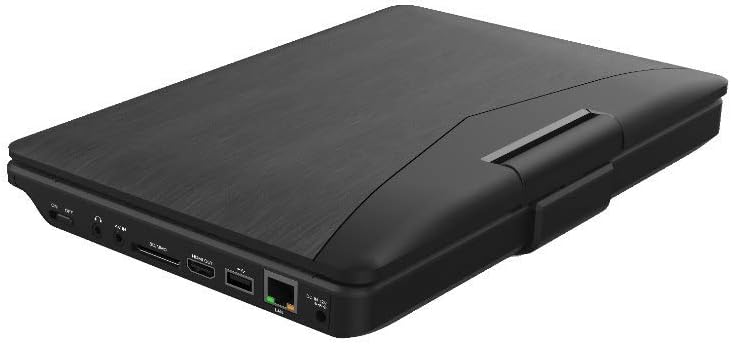
Figura 3.2: lateral view del Negreweb Portable Blu-ray/DVD Player (SDVD1183-BW) when closed, highlighting the various input/output ports. These include the DC IN port, USB port, SD card slot, HDMI OUT port, and LAN (RJ45) port.
3.2 Ports del panell lateral
- DC IN: Power input for the AC adapter.
- Port USB: Connecteu unitats flaix USB per reproduir contingut multimèdia.
- Ranura per a targeta SD: Insert SD memory cards for media playback.
- SORTIDA HDMI: Connect to an external display (TV, monitor) for larger viewing.
- LAN (RJ45) Port: For wired network connection (if applicable for online features, though not explicitly stated for this model).
- Auriculars Jack: 3.5mm audio output for private listening.
4. Configuració
4.1 Càrrega de la bateria
- Connecteu l'adaptador de corrent altern subministrat al port DC IN del reproductor.
- Connecteu l'altre extrem de l'adaptador de CA a una presa de corrent estàndard.
- The charging indicator light will illuminate, typically red, during charging. It will change color (e.g., green or off) when fully charged.
- Espereu aproximadament 4-6 hores per a una càrrega completa abans del primer ús.
4.2 Engegada/apagada
- Per encendre: Open the screen and press the PODER button. The screen will light up.
- Per apagar: Manteniu premut el botó PODER botó fins que la pantalla s'apagui.
5. Instruccions de funcionament
5.1 Playing Blu-ray/DVD Discs
- Assegureu-vos que el reproductor estigui encès.
- Obriu suaument la tapa de la safata del disc.
- Place a Blu-ray or DVD disc onto the spindle with the label side facing up. Press down gently until it clicks into place.
- Close the disc tray cover. The player will automatically detect the disc and begin playback or display the disc menu.
- Feu servir els botons de navegació i ENTRAR to select options from the disc menu.
- Utilitza el REPRODUCCIÓ/PAUSA, STOP, FF, i REW botons per controlar la reproducció.
5.2 Playing Media from USB/SD Card
- Inseriu una unitat flaix USB al port USB o una targeta SD a la ranura per a targetes SD.
- Premeu el botó MODE/FONT button to select "USB" or "SD" as the input source.
- The player will display the file browser. Use the navigation buttons to browse your media files (vídeos, fotos, música).
- Premeu ENTRAR to select and play a file.
5.3 Ajustar la configuració
- Premeu el botó CONFIGURACIÓ button to access the system settings menu.
- Use the navigation buttons to select categories such as "Video Setup," "Audio Setup," "Language Setup," etc.
- Premeu ENTRAR to enter a sub-menu and adjust settings like screen brightness, contrast, aspect ratio, audio output, and subtitle preferences.
- Premeu CONFIGURACIÓ torneu a sortir del menú.
5.4 Connecting to an External Display (HDMI)
- Ensure both the portable player and the external display (TV/monitor) are powered off.
- Connecteu un extrem d'un cable HDMI (no inclòs) al SORTIDA HDMI port on the portable player.
- Connect the other end of the HDMI cable to an HDMI input port on your external display.
- Power on both devices. Select the corresponding HDMI input on your external display.
- The portable player's output will now be displayed on the external screen. The portable player's screen may turn off or mirror the content, depending on settings.
5.5 Ús d'auriculars
- Plug standard 3.5mm headphones into the headphone jack on the side of the player.
- The internal speakers will automatically mute when headphones are connected.
- Ajusteu el volum amb el botó VOL +/- botons.
6. Manteniment
6.1 Neteja del dispositiu
- Desconnecteu sempre l'adaptador d'alimentació abans de netejar-lo.
- Feu servir un drap suau, sec i sense borrissol per netejar les superfícies exteriors.
- For the screen, use a screen-specific cleaning cloth or solution, applying it to the cloth first, not directly to the screen.
- No utilitzeu netejadors abrasius, ceres ni dissolvents.
6.2 Cura del disc
- Manipuleu els discs per les vores per evitar empremtes dactilars i ratllades a la superfície de reproducció.
- Emmagatzemeu els discs als seus estoigs quan no els feu servir.
- If a disc is dirty, wipe it gently from the center outwards with a soft, lint-free cloth. Do not use harsh chemicals.
7. Solució De Problemes
| Problema | Causa possible | Solució |
|---|---|---|
| El reproductor no s'encén. | La bateria està esgotada. L'adaptador de corrent no està connectat o està defectuós. | Connect the AC adapter and charge the battery. Ensure the AC adapter is securely connected to both the player and a working power outlet. |
| No hi ha imatge a la pantalla. | Screen brightness too low. HDMI cable connected to external display. | Adjust screen brightness in the SETUP menu. Disconnect HDMI cable or ensure external display is correctly configured. |
| Sense so. | El volum és massa baix o està silenciat. Els auriculars estan connectats. Audio settings incorrect. | Augmenta el volum amb VOL + botó. Disconnect headphones if you want sound from speakers. Check audio settings in the SETUP menu. |
| El disc no es reprodueix. | El disc està brut, ratllat o inserit incorrectament. Format de disc no compatible. Region code mismatch. | Clean the disc and reinsert it correctly. Ensure the disc is a supported Blu-ray or DVD format. This player supports region-free or compatible region discs. |
| USB/SD media not recognized. | Font d'entrada incorrecta seleccionada. File format no compatible. USB drive/SD card corrupted or incompatible. | Premeu MODE/FONT to select "USB" or "SD". Refer to specifications for supported file formats. Try a different USB drive or SD card. Ensure it is formatted correctly (e.g., FAT32). |
8. Especificacions
- Model: SDVD1183-BW
- Mida de la pantalla: 11.4 polzades
- Resolució de pantalla: 1280 x 720
- Tipus de suport: Blu-Ray, DVD
- Connectivitat: USB, SD Card Slot, HDMI Out, LAN (RJ45), 3.5mm Headphone Jack
- Font d'alimentació: AC Adapter, Built-in Lithium Ion Battery
- Pes de l'article: Aproximadament 4.15 lliures (1.88 kg)
- Dimensions del producte (LxWxH): 16 x 14.5 x 3.5 polzades (40.64 x 36.83 x 8.89 cm)
- Fabricant: Negreweb
9. Garantia i Suport
For warranty information and technical support, please refer to the documentation provided at the time of purchase or contact the retailer. As this product is often sold as "Renewed," specific warranty terms may vary. Please consult the Amazon Renewed Guarantee for details regarding refurbished products purchased through Amazon.
For further assistance, you may also visit the official Blackweb suport weblloc web o contacteu amb el servei d'atenció al client si està disponible.


