1. Introducció i finalview
This manual provides comprehensive instructions for the Diswoe Wireless Controller, model SW-01. This controller is designed to enhance your gaming experience across multiple platforms.
Les característiques clau inclouen:
- Universal compatibility with Switch, Switch Lite, Switch OLED, Switch 2, Windows PC, and Android phones.
- Upgraded Hall Effect joysticks for precise, drift-free control.
- Dual vibration motors for immersive feedback.
- 6-axis gyro sensor for motion-sensing games.
- High-performance 550mAh rechargeable battery providing up to 8 hours of playtime.
- Ergonomic design with non-slip grips for comfortable extended play.
- Stable wireless Bluetooth connection with strong anti-interference technology.
Nota important: This controller supports USB CABLE CONNECTION with PC but DOES NOT SUPPORT WIRELESS BLUETOOTH CONNECTION TO PC. It is NOT compatible with Apple TV, Fire Stick TV, Tesla, Xbox, or Playstation consoles. It also DOES NOT SUPPORT WAKE-UP SWITCH 2 and AUDIO FUNCTIONS, and lacks NFC functionality.
2. Configuració i connexió
2.1 Càrrega del controlador
Before first use, ensure the controller is fully charged. Connect the included USB-C cable to the controller's charging port and the other end to a standard USB-A wall charger or a compatible USB port on your device. The controller has a charging prompt and low voltage warning. A full charge typically takes approximately 2 hours and provides 8-10 hours of playtime.
2.2 Pairing Methods for Nintendo Switch
The controller provides a stable and reliable signal without delay or drop-off within eight meters.

Image: Front and top view of the Diswoe Wireless Controller with button labels and pairing instructions.
- Primera connexió:
- On your Switch console, navigate to the "Controllers" menu.
- Seleccioneu "Canvia l'adherència/l'ordre".
- Manteniu premut el botó CASA button on the Diswoe controller for 5 seconds.
- The four LED indicators on the controller will blink fast, indicating it is in pairing mode.
- Once successfully paired, the corresponding player LED(s) will light up solid.
- Connexions posteriors:
- From any page on your Switch console, simply press the CASA botó del controlador.
- The four LED indicators will blink fast and then light up solid upon successful connection.
2.3 Connecting to PC (Wired Only)
The Diswoe Wireless Controller supports connection to Windows PC ONLY via the included USB-C cable. Wireless Bluetooth connection to PC is not supported.
- Connect the USB-C end of the cable to the controller and the USB-A end to an available USB port on your PC.
- L'ordinador hauria de detectar i instal·lar automàticament els controladors necessaris.
- The controller will be recognized as a standard gamepad.
2.4 Connexió al telèfon Android
The controller is compatible with Android phones via Bluetooth. Refer to your phone's Bluetooth pairing instructions to connect the controller.
3. Instruccions de funcionament
3.1 Disposició i funcions dels botons
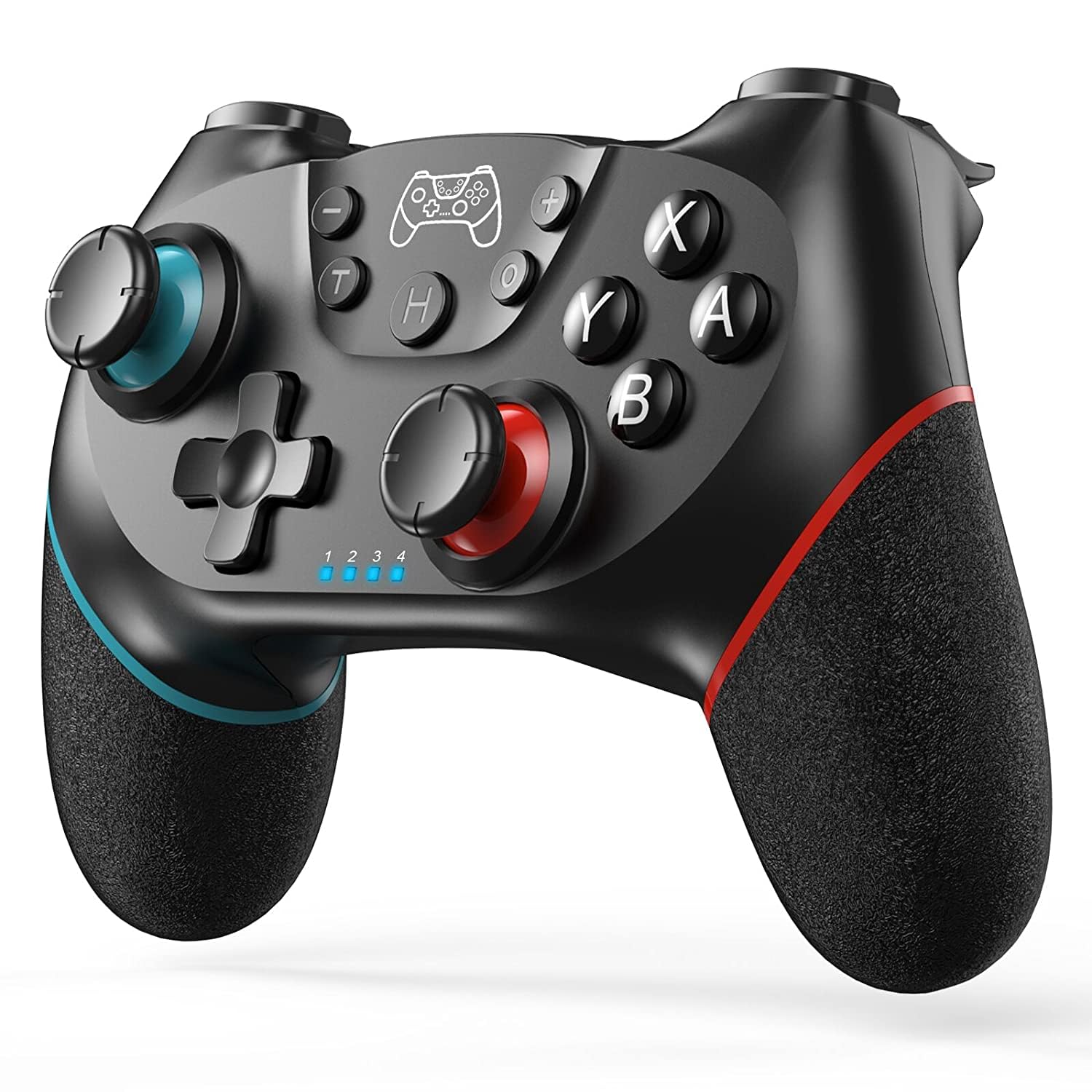
Imatge: Frontal view of the Diswoe Wireless Controller, highlighting its ergonomic design and button placement.
| Botó | Funció |
|---|---|
| Botó HOME | Powers on the controller, returns to the home screen, and initiates pairing. |
| L/R Sticks | Analog joysticks for movement and camera control. Feature Hall Effect technology for precision and durability. |
| Botons A/B/X/Y | Botons d'acció estàndard. |
| D-pad | Directional pad for precise directional input. |
| L/R/ZL/ZR Buttons | Botons d'espatlla i de gallet. |
| Botó de captura de pantalla | Captures screenshots during gameplay. |
| Botó Turbo | Activates turbo function for rapid button presses. |
| +/- Botons | Menu selection buttons. |
3.2 Característiques especials
- Vibració dual: The controller features dual vibration motors that provide excellent haptic feedback, enhancing game immersion.
- Sensor giroscòpic de 6 eixos: The built-in 6-axis gyro sensor detects the inclination of the controller, allowing for quick responses in motion-sensing games.
- Funció turbo: The Turbo button allows for rapid, continuous pressing of assigned buttons. Consult the full user manual for specific button assignment instructions.
- Funció de captura de pantalla: Press the dedicated screenshot button to capture in-game moments.

Image: Illustration of the controller highlighting the dual motor vibration feature.

Image: Diagram showing key features like wear-resistant anti-slip joysticks, engraved ABXY buttons, excellent non-slip grip, and high precision D-pad.

Image: Summary of controller features including Bluetooth connectivity, long playtime, vibration, screenshot, precise joysticks, adjustable triggers, and compatibility with Switch/Lite/OLED/Windows, and wake-up function (note: wake-up Switch 2 is not supported).
4. Manteniment
Proper maintenance ensures the longevity and optimal performance of your Diswoe Wireless Controller.
- Neteja: Feu servir un drap suau i sec per netejar el controlador. Per a la brutícia persistent, netegeu lleugerament.ampRenta el drap amb aigua. Evita utilitzar productes químics agressius, dissolvents o netejadors abrasius, ja que poden danyar la superfície i els components interns.
- Emmagatzematge: Guardeu el controlador en un lloc fresc i sec, allunyat de la llum solar directa i de temperatures extremes.
- Cura de la bateria: To preserve battery life, avoid fully discharging the controller frequently. If storing for an extended period, charge the battery to approximately 50% before storage and recharge every few months.
- Manipulació: Avoid dropping the controller or subjecting it to strong impacts, which can damage internal circuitry and external components.
5. Solució De Problemes
If you encounter issues with your Diswoe Wireless Controller, please refer to the following common solutions:
| Problema | Possible solució |
|---|---|
| El controlador no es connecta/emparella. |
|
| Desviació del joystick o entrada inexacta. |
|
| La vibració no funciona. |
|
| Controller does not wake up Switch 2. | This controller does not support the "Wake-up Switch 2" function. You must manually wake up the console. |
| No audio through controller. | This controller does not support audio functions. |
If problems persist, please contact Diswoe customer support for further assistance.
6. Especificacions
| Característica | Detall |
|---|---|
| Número de model | SW-01 |
| Marca | Diswoe |
| Compatibilitat | Switch, Switch Lite, Switch OLED, Switch 2, Windows PC (wired), Android Phone (Bluetooth) |
| Connectivitat | Wireless Bluetooth (Switch, Android), Wired USB-C (PC) |
| Tipus de bateria | Polímer de liti |
| Capacitat de la bateria | 550 mAh |
| Playtime (approx.) | 8-10 hores (després de la càrrega completa) |
| Temps de càrrega (aprox.) | 2 hores |
| abast sense fils | Fins a 8 metres (26 peus) |
| Característiques especials | Hall Effect Joysticks, Dual Vibration, 6-Axis Gyro, Turbo Function, Screenshot Function |
| Pes | 9.9 unces |
| Fabricant | Diswoe |
| País d'origen | Xina |
7. Garantia i Suport
For warranty information and customer support, please refer to the documentation included with your product or visit the official Diswoe weblloc web. Conserveu el rebut de compra com a comprovant de compra per a qualsevol reclamació de garantia.
Fabricant: Diswoe
Weblloc: Diswoe Store on Amazon
8. Vídeos de productes
The following videos provide additional information and demonstrations of the Diswoe Wireless Controller:
Video: "Wireless Controller for Switch" - An official product video from Diswoe Direct demonstrating the controller's features and usage.


