Introducció
This manual provides detailed instructions for the proper setup, operation, and maintenance of your Nobsound G2 PRO TPA3255 Hi-Fi 300W Subwoofer Power Amplificador. Llegiu atentament aquest manual abans d'utilitzar el producte per garantir un rendiment i una seguretat òptims.

Figure 1: Nobsound G2 PRO TPA3255 Hi-Fi 300W Subwoofer Power Ampmés viu.
Producte acabatview
The Nobsound G2 PRO is a versatile mono channel Class D amplifier designed for both full-frequency and subwoofer applications. It features a compact design with powerful output capabilities.
Característiques principals:
- PBTL/SUB Switch: Allows convenient switching between full-frequency amplifier mode and subwoofer amplifier mode. A dedicated SUB output is available for active subwoofers.
- Alta potència de sortida: Equipped with a TPA3255D2 amplifier chip and a 32V/5A power supply, capable of driving 320W passive speakers or subwoofers.
- Ajust de guany: Features a gain switch for 2-level output level setting (32dB/36dB) to maintain sound quality.
- SUB Frequency Adjustment: Adjustable low-pass filter from 40-300Hz for precise subwoofer integration.
- Disseny compacte: Mini-sized, durable solid aluminum chassis suitable for various audio setups.
Controls i connexions:

Figure 2: Front and Rear Panel Layout of the G2 PRO Ampmés viu.
- Panell frontal:
- Llum de potència: Indica l'estat d'alimentació.
- Interruptor ON / OFF: Toggles power for the unit.
- PBTL/SUB Switch: Selects between full-frequency (PBTL) and subwoofer (SUB) modes.

Figure 3: PBTL/SUB Mode Switch.
- SUB FREQ Knob: Adjusts the low-pass filter frequency (40-300Hz) when in SUB mode.
- Botó de VOLUM: Controla el volum de sortida general.

Figure 4: SUB FREQ and VOLUME Controls.
- Panell posterior:
- AUDIO IN (RCA): Stereo RCA inputs for connecting audio sources (e.g., phone, MP3 player, TV/Blu-ray, CD media players, PC/Mac/Computer, Echo Dot, Turntable).
- SUB OUT (RCA): Dedicated RCA output for connecting to an active subwoofer.
- SPEAKER OUT (Binding Posts): Speaker terminals for connecting passive speakers or passive subwoofers.

Figure 5: Rear Panel Output Terminals.
- DC24V-48V Power Input: Connects to the provided 32V 5A power supply.
- Panell inferior:
- Gain Setting DIP Switches (SW1, SW2): Ajusta el amplifier's gain level.

Figure 6: Bottom Panel of the G2 PRO, showing gain switches.

Figure 6a: Close-up of Gain Setting DIP Switches.
Gain Setting Table Configuració del guany SW1 SW2 36 dB ON ON 32 dB ON OFF
- Gain Setting DIP Switches (SW1, SW2): Ajusta el amplifier's gain level.
Configuració
Follow these steps to set up your Nobsound G2 PRO ampmés viu.
1. Connexió d'alimentació:
- Assegureu-vos el ampL'interruptor ON/OFF del lifiler està en la posició OFF.
- Connect the provided 32V 5A power supply to the DC24V-48V input on the rear panel of the ampmés viu.
- Connecteu la font d'alimentació a una presa de corrent adequada.
2. Audio Input Connection:
Connect your audio source (e.g., smartphone, computer, CD player) to the AUDIO IN RCA ports on the rear panel using appropriate RCA cables.
3. Speaker Output Connection:
The G2 PRO can be configured for different speaker setups:
3.1. 2.0 Channel Setup (Using two G2 PRO units for stereo):
For a stereo setup, two Nobsound G2 PRO units are required. Each unit will drive one channel (left or right) independently, minimizing mutual interference.

Figure 7: 2.0 Channel Stereo Setup Diagram.
- Connect the left channel output from your audio source to the AUDIO IN of the first G2 PRO unit.
- Connect the right channel output from your audio source to the AUDIO IN of the second G2 PRO unit.
- Connect your left passive speaker to the SPEAKER OUT terminals of the first G2 PRO unit.
- Connect your right passive speaker to the SPEAKER OUT terminals of the second G2 PRO unit.
- Ensure both G2 PRO units are set to PBTL (full-frequency) mode using the front panel switch.
3.2. 2.1 Channel Setup (with active or passive subwoofer):
The G2 PRO can be integrated into a 2.1 channel system. The diagram below illustrates two common methods.

Figure 8: 2.1 Channel Setup Diagrams (Way 1 & Way 2).
- Way 1: Using one G2 PRO for full-frequency speakers and SUB output for active subwoofer.
- Connect your audio source to the AUDIO IN of the G2 PRO.
- Connect your passive full-range speakers to the SPEAKER OUT terminals of the G2 PRO.
- Connect the SUB OUT of the G2 PRO to the input of your active subwoofer.
- Set the G2 PRO to PBTL (full-frequency) mode. The SUB output will still function.
- Way 2: Using multiple G2 PRO units for full-frequency and passive subwoofer.
This setup requires an audio switcher/splitter with multiple outputs or a DIY audio input cable to split the signal.
- Connect your audio source to an audio switcher/splitter.
- Connect the split audio signals to the AUDIO IN of two G2 PRO units for left/right full-range speakers (set to PBTL mode).
- Connect another split audio signal to the AUDIO IN of a third G2 PRO unit for the passive subwoofer (set to SUB mode).
- Connect the respective passive speakers/subwoofer to the SPEAKER OUT terminals of each G2 PRO unit.
4. Ajust de guany:
The G2 PRO has gain setting DIP switches on its bottom panel. Adjust these switches (SW1 and SW2) to select between 32dB and 36dB gain settings based on your audio source's output level and desired volume.
Refer to the "Gain Setting Table" in the "Product Overview" section for switch configurations.
Instruccions de funcionament
Once all connections are made, you can begin operating your Nobsound G2 PRO ampmés viu.
1. Encendre/apagar:
Flip the ON/OFF switch on the front panel to the "ON" position to power on the amplifier. The power light will illuminate. Flip it to "OFF" to power down.
Video 1: Demonstration of Nobsound G2 PRO setup and basic operation, including power on/off and volume adjustment.
2. Selecció del mode de funcionament:
Use the PBTL/SUB switch on the front panel to select the desired operating mode:
- PBTL (Full-Frequency) Mode: For driving full-range passive speakers. The amplifier will output the full audio spectrum.
- SUB (Subwoofer) Mode: For driving passive subwoofers. The amplifier will apply a low-pass filter, allowing only low frequencies to pass through.
Note: The dedicated SUB OUT RCA port for active subwoofers functions regardless of the PBTL/SUB switch setting, allowing simultaneous output of SUB signal and ampàudio lificat.
3. Control de volum:
Rotate the VOLUME knob clockwise to increase the volume and counter-clockwise to decrease it. Start with a low volume and gradually increase it to a comfortable listening level.
4. Subwoofer Frequency Adjustment (SUB Mode only):
Quan el amplifier is in SUB mode, use the SUB FREQ knob to adjust the crossover frequency for the subwoofer. This allows you to fine-tune the bass response and seamlessly integrate your subwoofer with your main speakers.
Manteniment
Proper maintenance ensures the longevity and optimal performance of your Nobsound G2 PRO ampmés viu.
- Neteja: Utilitzeu un drap suau i sec per netejar l'exterior ampNo utilitzeu netejadors líquids ni aerosols, ja que poden danyar l'acabat o els components interns.
- Ventilació: Assegureu-vos el amplifier is placed in a well-ventilated area to prevent overheating. Do not block any ventilation openings.
- Emmagatzematge: Si emmagatzema el ampdurant un període prolongat, desconnecteu-lo de l'alimentació i guardeu-lo en un lloc fresc i sec, allunyat de la llum solar directa i de temperatures extremes.
- Connexions: Periodically check all cable connections to ensure they are secure. Loose connections can lead to poor sound quality or intermittent operation.
Resolució de problemes
If you encounter issues with your Nobsound G2 PRO amplifier, consulteu els següents problemes i solucions habituals:
| Problema | Causa possible | Solució |
|---|---|---|
| Sense sortida de so |
|
|
| So distorsionat |
|
|
| No bass (in SUB mode) |
|
|
| La unitat se sent càlida |
|
|
Especificacions
Detailed technical specifications for the Nobsound G2 PRO ampmés viu:
| Característica | Especificació |
|---|---|
| Marca | Nobsound |
| Número de model | DZ072_UK |
| Potència de sortida | Max 300W (into 4 ohms) |
| Nombre de canals | 1 (mono) |
| AmpXip lificador | TPA3255D2 |
| Subministrament mínim Voltage | 24 volts (CC) |
| Volum de subministrament màximtage | 35 Volts (Recommended 32V/5A power supply included) |
| Corrent de subministrament | 5 Amps (with included power supply) |
| Subwoofer Frequency Adjustment | 40-300 Hz |
| Configuració de guany | 32dB / 36dB (adjustable via DIP switches) |
| Dimensions del paquet | 10.08 x 8.46 x 2.6 polzades |
| Pes de l'article | 1.1 lliures |

Figure 9: Max 300W Output Power Capability.

Figure 10: Compact Size of the G2 PRO Amplifier (Dimensions: 127*35*118mm).
Què hi ha a la caixa
The Nobsound G2 PRO package includes the following items:
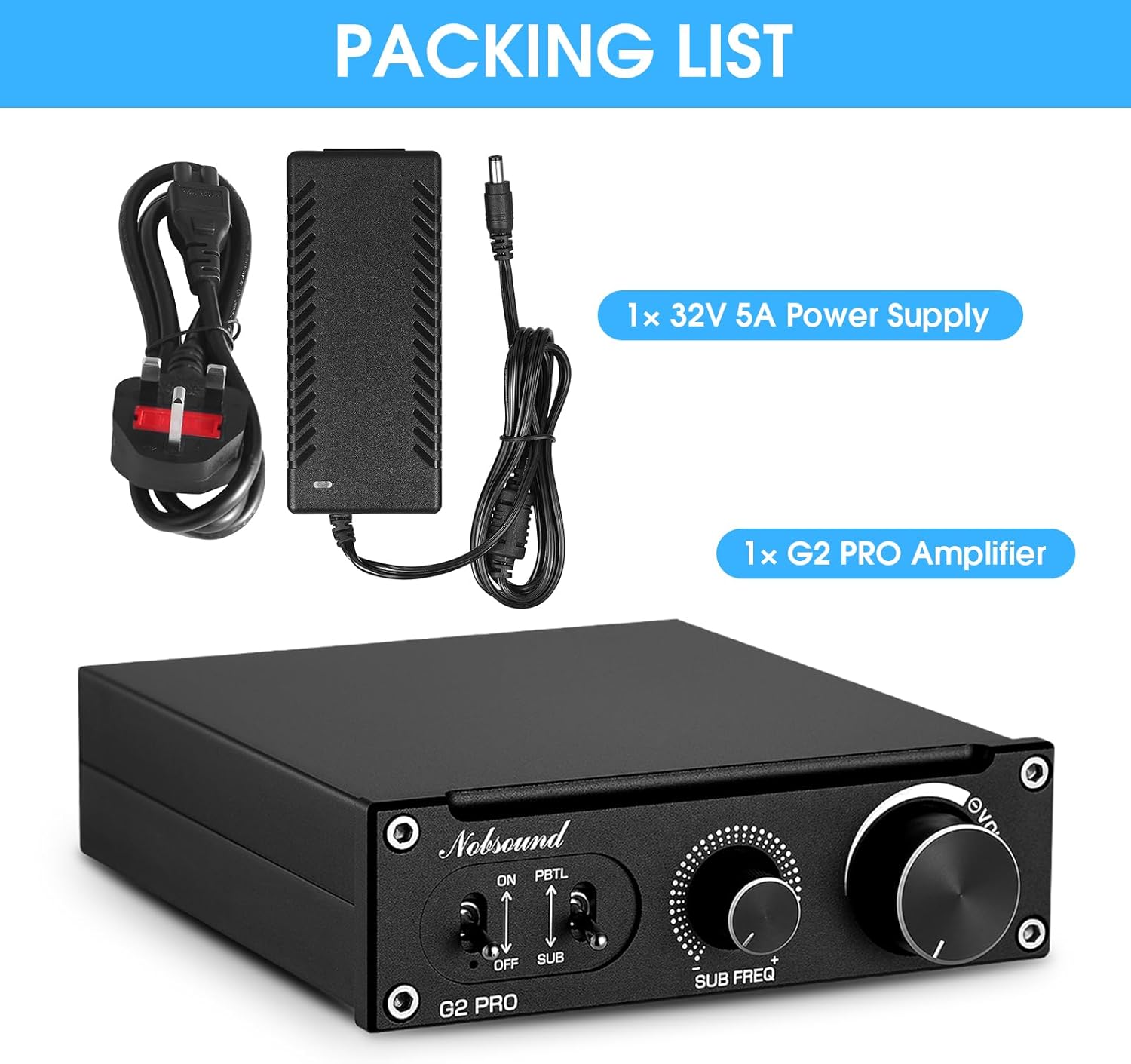
Figura 11: Contingut del paquet.
- 1 x Nobsound G2 PRO Ampmés viu
- 1 x 32V 5A Font d'alimentació
Garantia i Suport
For warranty information and technical support, please refer to the official Nobsound/Douk Audio website or contact their customer service. Contact information may also be found on the product packaging.

Figure 12: Product Packaging with Contact Information.
Oficial Weblloc: www.doukaudio.com
Correu electrònic: nobsound@doukaudio.com
Per a més ajuda, també podeu visitar el Botiga Nobsound a Amazon.


