1. Introducció
This manual provides comprehensive instructions for the installation, operation, and maintenance of your Intel 3168NGW Dual Band Wireless-AC 3168 WiFi Card. Please read this manual thoroughly before installation and use to ensure proper functionality and to prevent damage.
The Intel 3168NGW is a compact M.2 2230 form factor card designed to provide high-speed 802.11ac Wi-Fi and Bluetooth 4.2 connectivity to compatible systems.
2. Informació de seguretat
- Desconnecteu sempre l'alimentació de l'ordinador abans d'instal·lar o treure qualsevol component intern.
- Handle the card by its edges to avoid touching the gold connectors or sensitive components. Electrostatic discharge (ESD) can damage the card.
- Ensure proper grounding when working inside your computer.
- Keep the card away from moisture and extreme temperatures.
- This product is intended for installation by qualified personnel.
3. Contingut del paquet
Verifiqueu que tots els elements siguin presents al vostre paquet:
- Intel 3168NGW Dual Band Wireless-AC 3168 WiFi Card
- (Antennas and mounting screw may be included depending on retailer/kit)
4. Configuració i instal·lació
This section outlines the general steps for installing the Intel 3168NGW WiFi Card. Specific steps may vary depending on your computer's make and model.
4.1. Llista de verificació prèvia a la instal·lació
- Compatible M.2 2230 slot (Key E) on your motherboard or laptop.
- Small Phillips head screwdriver.
- Corretja de canell antiestàtica (recomanada).
- Internet access (for driver download).
4.2. Passos d'instal·lació
- Apagueu i desconnecteu: Shut down your computer completely and disconnect the power cord and any other peripherals.
- Caixa d'ordinador oberta: Open your computer's case or access panel to expose the motherboard. Refer to your computer's manual for specific instructions.
- Localitza la ranura M.2: Identify an available M.2 2230 slot (often labeled "Key E" or "WiFi").
- Insert WiFi Card: Carefully align the Intel 3168NGW card with the M.2 slot. Insert the card at a slight angle (approximately 30 degrees) and gently push it into the slot until it is fully seated.
- Assegureu la targeta: Once seated, push the card down towards the motherboard. Secure it with the small screw provided with your computer or the card (if included).
- Attach Antennas (if applicable): If your system uses external antennas, carefully connect the antenna cables to the corresponding connectors on the WiFi card (Main and Aux). Ensure a secure connection.
- Tanca la carcassa de l'ordinador: Replace the computer's access panel or close the case.
- Torneu a connectar l'alimentació: Reconnect the power cord and other peripherals.
- Encès: Enceneu l'ordinador.
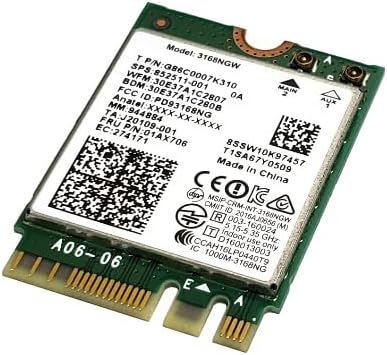
Image 1: Intel 3168NGW Dual Band Wireless-AC 3168 WiFi Card. This image displays the Intel 3168NGW WiFi card, an M.2 2230 form factor component. The card features a green PCB with a white label detailing the model number (3168NGW), part numbers (G86C0007K310, 852511-001), and regulatory information. Two small gold antenna connectors are visible at one end, labeled "MAIN" and "AUX". The M.2 connector pins are visible at the opposite end.
5. Instruccions de funcionament
5.1. Instal·lació del controlador
After physical installation, you will need to install the appropriate drivers for the WiFi and Bluetooth functionalities.
- Arrencada inicial: Upon booting your computer, the operating system may automatically detect the new hardware and attempt to install generic drivers.
- Download Latest Drivers: For optimal performance and stability, it is highly recommended to download the latest drivers directly from the official Intel support weblloc. Cerca "Intel Wireless-AC 3168 drivers" and "Intel Bluetooth 4.2 drivers".
- Instal·leu els controladors: Run the downloaded driver installation packages and follow the on-screen prompts. You may need to restart your computer after installation.
- Verifica la instal·lació: Open Device Manager (Windows) or System Information (macOS/Linux) to confirm that the Intel Wireless-AC 3168 and Bluetooth 4.2 devices are recognized and functioning correctly.
5.2. Connexió a una xarxa Wi-Fi
- Ensure Wi-Fi is enabled in your operating system settings.
- Feu clic a la icona Wi-Fi a la safata del sistema (Windows) o a la barra de menú (macOS).
- Seleccioneu la xarxa Wi-Fi desitjada de la llista de xarxes disponibles.
- Introduïu la contrasenya de xarxa (si cal) i feu clic a "Connecta".
5.3. Emparellar dispositius Bluetooth
- Ensure Bluetooth is enabled in your operating system settings.
- Poseu el dispositiu Bluetooth en mode d'emparellament (consulteu el manual del dispositiu).
- Go to your computer's Bluetooth settings and search for new devices.
- Seleccioneu el dispositiu de la llista i seguiu les instruccions que apareixen a la pantalla per completar el procés d'emparellament.
6. Manteniment
- Actualitzacions de controladors: Consulteu regularment el suport d'Intel website for updated drivers to ensure optimal performance and security.
- Inspecció física: Periodically inspect the card and antenna connections for any signs of damage or loose connections.
- Neteja: If necessary, gently clean any dust accumulation on the card using compressed air. Ensure the computer is powered off and disconnected before cleaning.
7. Solució De Problemes
7.1. Wi-Fi or Bluetooth Not Detected
- Comproveu la connexió física: Ensure the card is properly seated in the M.2 slot and secured.
- Connexions d'antena: Verify that antenna cables are securely attached to the card.
- Gestor de dispositius: Check Device Manager (Windows) for any yellow exclamation marks or unknown devices. Reinstall drivers if necessary.
- Configuració de la BIOS/UEFI: Some motherboards may have an option to enable/disable M.2 slots or wireless functionality in the BIOS/UEFI settings. Ensure it is enabled.
7.2. Poor Wi-Fi Performance or Disconnections
- Actualització del controlador: Ensure you have the latest drivers installed from Intel.
- Proximitat del router: Move closer to your Wi-Fi router or access point.
- Interferència: Other electronic devices (cordless phones, microwaves) can cause interference. Try changing your router's Wi-Fi channel.
- Col·locació de l'antena: If using external antennas, ensure they are positioned for optimal signal reception.
7.3. Problemes d'emparellament Bluetooth
- Compatibilitat del dispositiu: Ensure the Bluetooth device you are trying to pair is compatible with Bluetooth 4.2.
- Mode de sincronització: Confirm the Bluetooth device is in pairing mode.
- Restart Bluetooth Service: Try disabling and re-enabling Bluetooth in your computer's settings.
- Elimina els emparellaments existents: If you've previously paired the device, remove it from your computer's Bluetooth list and try pairing again.
8. Especificacions
| Característica | Especificació |
|---|---|
| Model | Intel 3168NGW |
| Números de part | G86C0007K310, 852511-001, 01AX706, SW10K97457, J20109-001, 84811-002, 11S01AX706, 8SSW10K97457 |
| Estàndard sense fils | 802.11a/b/g/n/ac |
| Bandes de freqüència | Doble banda (2.4 GHz i 5 GHz) |
| Velocitat de transferència de dades | Fins a 433 Mbps |
| Estàndard Bluetooth | Bluetooth 4.2 |
| Interfície | PCI-Express (M.2 2230, Key E) |
| Factor de forma | M.2 2230 |
| Dispositius compatibles | Desktop (with compatible M.2 slot) |
| Fabricant | Intel |
| Pes de l'article | 2 lliures (Note: This weight might refer to shipping weight, actual card weight is minimal) |
| UPC | 735899008645 |
9. Garantia i Suport
Per obtenir informació sobre la garantia i assistència tècnica, consulteu la pàgina oficial d'Intel website or contact your point of purchase. Intel provides comprehensive support resources, including driver downloads, troubleshooting guides, and customer service contacts.
Suport Intel Weblloc: www.intel.com/support


