Introducció
This manual provides comprehensive instructions for the operation and maintenance of your Dolphin LX-20 Dual Portable Bluetooth Waterproof Tube Speaker. Designed for robust performance, this speaker delivers high-definition sound and powerful bass, making it suitable for various environments, including outdoor use. Please read this manual thoroughly before using the device to ensure proper function and longevity.

Image: The Dolphin LX-20 speaker, showcasing el seu disseny impermeable amb esquitxades d'aigua.
Informació de seguretat
To prevent fire, electric shock, or product damage, please observe the following safety guidelines:
- No exposeu l'altaveu a temperatures extremes ni a la llum solar directa durant períodes prolongats.
- Eviteu deixar caure o sotmetre l'altaveu a forts impactes.
- No desmunteu, repareu ni modifiqueu la unitat vosaltres mateixos. Envieu totes les tasques de manteniment a personal qualificat.
- Mantingueu l'altaveu allunyat de fonts de camps magnètics forts.
- Assegureu-vos que tots els ports estiguin ben tancats quan utilitzeu l'altaveu a prop de l'aigua per mantenir la seva classificació d'impermeabilitat.
- Feu servir només el cable de càrrega i els accessoris proporcionats.
Contingut del paquet
Verifiqueu que tots els elements siguin presents al paquet:
- Dolphin LX-20 Portable Bluetooth Speaker
- Cable del carregador USB
- Cable AUX
- Manual d'usuari (aquest document)
Característiques del producte
The Dolphin LX-20 speaker is equipped with several features for an enhanced audio experience:
- High Power Audio: Features 2 x 15 watts RMS speakers for clear and loud sound.
- Connectivitat Bluetooth 5.0: Per a la transmissió d'àudio sense fil des de dispositius compatibles.
- Disseny impermeable: IPX5 rated for splash resistance, suitable for outdoor use.
- Múltiples opcions de reproducció: Supports FM Radio, USB/SD MP3 playback, and AUX input.
- Llarga vida útil de la bateria: Up to 10 hours of playtime with a 3000 mAh rechargeable battery.
- WaveSync Technology: Allows pairing of two LX-20 speakers for stereo sound.
- Controls integrats: Easy access to volume, track, mode, and power functions.

Image: An exploded diagram illustrating the internal components of the Dolphin LX-20, including its 3" full-range woofers and passive radiators.
Configuració
Càrrega inicial
Before first use, fully charge the speaker. Connect the provided USB charger cable to the speaker's charging port and the other end to a compatible USB power adapter (not included) or a computer USB port. The charging indicator lights will provide status.
Encès/Apagat
Manteniu premut el botó d'engegada (O) located on the control panel to turn the speaker on or off.

Image: A close-up of the Dolphin LX-20's control panel, highlighting the power button and other function keys.
Instruccions de funcionament
Emparellament Bluetooth
- Turn on the Dolphin LX-20 speaker. It will automatically enter Bluetooth pairing mode, indicated by a flashing Bluetooth indicator light.
- Activa el Bluetooth al teu dispositiu (telèfon intel·ligent, tauleta, etc.).
- Cerca "Dolphin LX-20" in your device's Bluetooth settings and select it to connect.
- Once connected, the Bluetooth indicator light will become solid, and you will hear a confirmation tone.
Ràdio FM
- Premeu el botó Mode (M) to switch to FM Radio mode.
- Premeu i manteniu premut el botó Reproduir/Pausa (►) to auto-scan and save available FM stations.
- Utilitza l'anterior (-) i Següent (+) botons per navegar entre les emissores desades.
USB/SD MP3 Playback
- Inseriu una unitat flash USB o una targeta SD (amb MP3 files) into the corresponding port on the speaker.
- The speaker will automatically switch to USB/SD mode and begin playing music. If not, press the Mode button (M).
- Utilitzeu el botó de reproducció/pausa (►), anterior (-), i Següent (+) botons per controlar la reproducció.
Entrada AUX
- Connect one end of the provided AUX cable to the speaker's AUX input port.
- Connecteu l'altre extrem a la presa de sortida d'àudio del vostre dispositiu extern (per exemple, reproductor MP3, ordinador).
- Premeu el botó Mode (M) to switch to AUX mode. Audio will now play through the speaker.

Image: The side panel of the Dolphin LX-20, illustrating the various input ports for USB, TF (MicroSD), and AUX connections.
WaveSync Technology (Pairing Two Speakers)
WaveSync technology allows you to wirelessly connect two Dolphin LX-20 speakers for a true stereo sound experience.
- Ensure both LX-20 speakers are powered on and not connected to any Bluetooth device.
- On one speaker (this will be the primary speaker), press and hold the WaveSync button (∞+) until you hear a pairing tone.
- The primary speaker will automatically search for and connect to the second LX-20 speaker.
- Un cop connectats, els dos altaveus reproduiran àudio en estèreo.

Image: Detail of the Dolphin LX-20's control panel, highlighting the WaveSync button for multi-speaker pairing.
Carregant la bateria
The Dolphin LX-20 is powered by a built-in 3000 mAh rechargeable Lithium Ion battery, providing up to 10 hours of playtime. When the battery is low, the speaker may indicate this with an audible prompt or flashing indicator lights.
- Connect the USB charger cable to the speaker's charging port.
- Plug the other end into a standard USB power source (e.g., wall adapter, computer USB port).
- The charging indicator lights will illuminate during charging and typically turn off or change color when fully charged.

Image: The Dolphin LX-20 speaker displaying its internal lighting, emphasizing its portability and battery life.
Manteniment
- Neteja: Feu servir un drap suau i sec per netejar la superfície de l'altaveu. Per a la brutícia persistent, netegeu lleugeramentamp cloth can be used, but ensure all ports are sealed and dry thoroughly afterward. Do not use harsh chemicals or abrasive cleaners.
- Emmagatzematge: Guardeu l'altaveu en un lloc fresc i sec, allunyat de la llum solar directa i de temperatures extremes. Si l'emmagatzemeu durant un període prolongat, carregueu la bateria aproximadament al 50% cada pocs mesos per mantenir-la en bon estat.
- Resistència a l'aigua: While waterproof, avoid submerging the speaker for prolonged periods. Always ensure the port covers are securely closed before exposure to water.
Resolució de problemes
| Problema | Causa possible | Solució |
|---|---|---|
| L'altaveu no s'encén. | La bateria està esgotada. | Carregueu l'altaveu completament. |
| Sense so. | El volum és massa baix; s'ha seleccionat un mode incorrecte; el dispositiu no està connectat. | Increase volume on speaker and connected device. Ensure correct mode (Bluetooth, AUX, USB/SD) is selected. Re-pair Bluetooth device or check AUX cable connection. |
| El dispositiu Bluetooth no pot trobar l'altaveu. | Speaker is not in pairing mode; speaker is already connected to another device; device Bluetooth is off. | Ensure speaker is in Bluetooth pairing mode (flashing indicator). Disconnect from other devices. Turn Bluetooth on your device. Move devices closer. |
| WaveSync pairing fails. | Speakers are too far apart; one speaker is already connected to a Bluetooth device. | Ensure both speakers are within close proximity. Disconnect both speakers from any other Bluetooth devices before attempting WaveSync pairing. |
Especificacions
| Característica | Detall |
|---|---|
| Nom del model | SPDALX20 (LX20) |
| Tipus d'altaveu | Altaveu Bluetooth portàtil per a exteriors |
| Potència de sortida | 30 Watts (2 x 15W RMS) |
| Connectivitat | Bluetooth, Auxiliary (AUX), USB, SD Card |
| Interval Bluetooth | Fins a 10 metres (33 peus) |
| Durada de la bateria | Fins a 10 hores |
| Capacitat de la bateria | 3000 mAh d'ions de liti |
| Resistència a l'aigua | IPX5 impermeable |
| Dimensions del producte | 14" (llargada) x 6.9" (amplada) x 5.5" (alçada) |
| Pes de l'article | 4 lliures (2.22 kg) |
| Components inclosos | USB Charger Cable, AUX Cable |
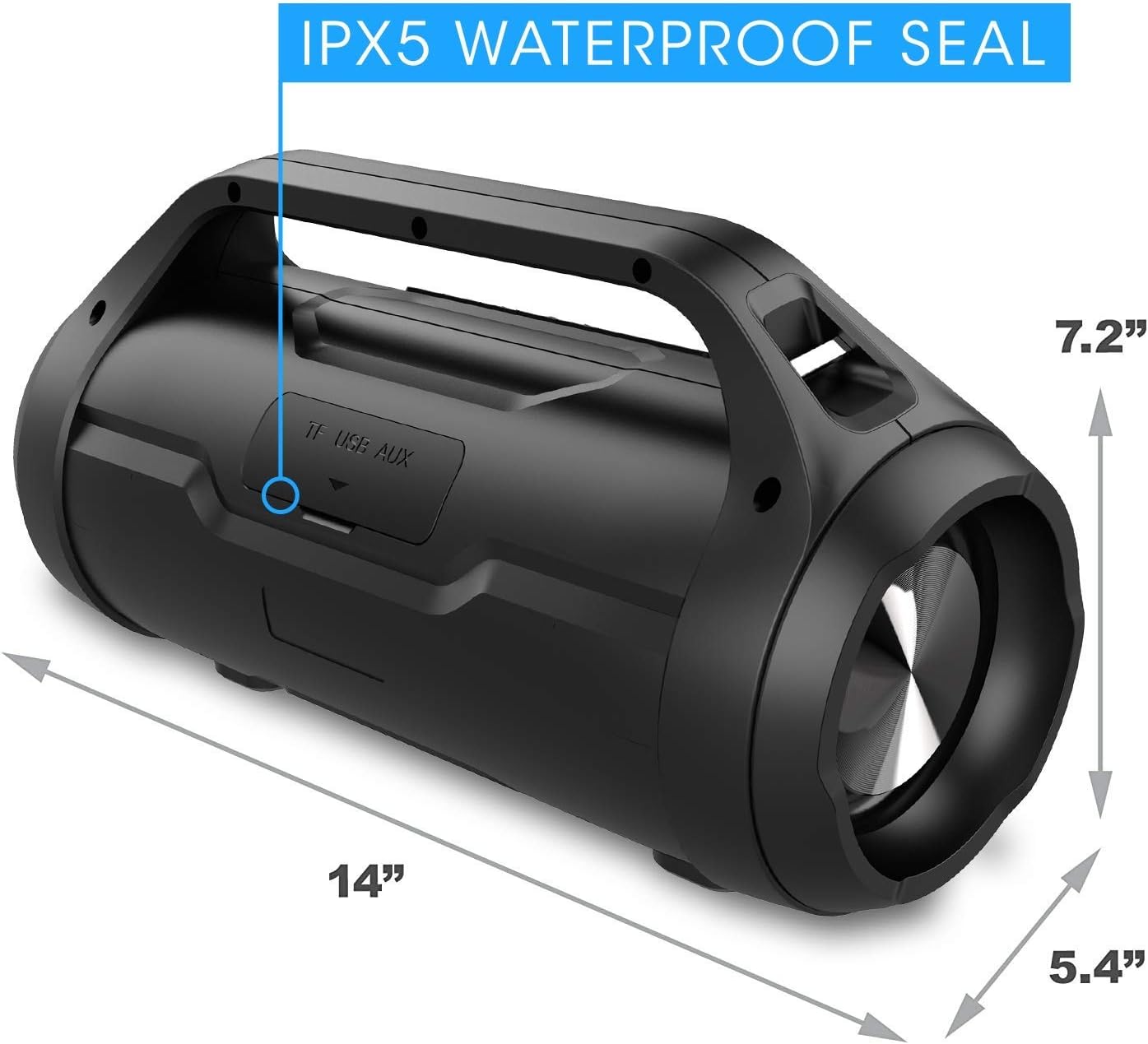
Image: The Dolphin LX-20 speaker with its physical dimensions clearly marked.
Garantia i Suport
For warranty information or technical support, please contact Dolphin customer service. Details can typically be found on the product packaging or the official Dolphin weblloc.
For the most up-to-date support resources, visit the official Dolphin store on Amazon: Dolphin Store




