1. Introducció
Thank you for choosing the Xiaomi Redmi Airdots True Wireless Earbuds. These earbuds are designed to provide a seamless audio experience with advanced Bluetooth 5.0 technology, delivering high-quality stereo sound and robust bass. With their compact design and intuitive controls, they are perfect for daily use, whether for music, calls, or activating your voice assistant.
The built-in microphone and noise cancellation features ensure clear communication, while the sweatproof design makes them suitable for various activities. This manual will guide you through the setup, operation, and maintenance of your new earbuds.
2. Contingut del paquet
Marqueu la casella per als elements següents:
- Auriculars Xiaomi Redmi Airdots (esquerra i dreta)
- Estoig de càrrega
- Puntes per a les orelles (petites, mitjanes, grans)
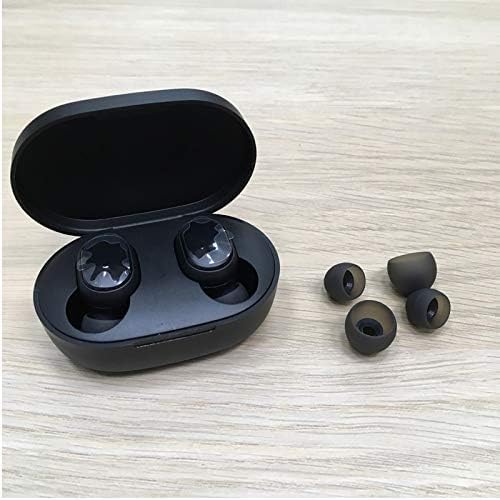
Image: Earbuds in charging case with various ear tip sizes.
3. Producte acabatview
Each earbud features a multi-function button for controlling various operations. Familiarize yourself with the button's functions:

Image: Detailed diagram of earbud controls.
4. Configuració
4.1. Càrrega dels auriculars i l'estoig
Before first use, fully charge the earbuds and the charging case. Connect the charging case to a power source using a Micro USB cable (not included). The earbuds will charge automatically when placed inside the case.
- Earbuds charging time: Approximately 1 hour for full charge.
- Charging case charging time: Approximately 2 hours for full charge.
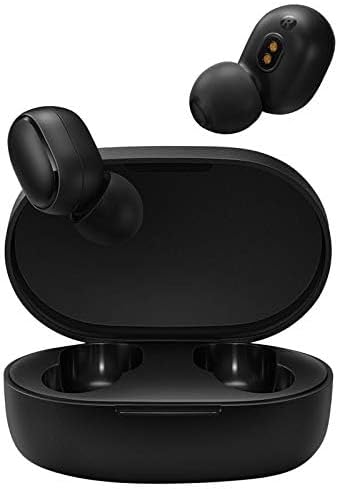
Image: Earbuds inside the charging case.
4.2. Primer emparellament
- Remove both earbuds from the charging case. They will automatically turn on.
- Al dispositiu (telèfon intel·ligent, tauleta, etc.), activeu el Bluetooth.
- Cerca available Bluetooth devices and select "Redmi Airdots" or "Mi True Wireless Earbuds Basic" from the list.
- Once connected, the earbuds are ready for use. For subsequent uses, they will automatically connect to the last paired device when removed from the case.

Image: Earbuds and charging case.
5. Instruccions de funcionament
5.1. Controls bàsics
| Acció | Funció |
|---|---|
| Single Click (during call) | Respondre/penjar la trucada |
| Single Click (music playback) | Reproduir / Pausar música |
| Fes doble clic | Activa l'Assistent de veu |
| Long Press (approx. 1 second during call) | Rebutja la trucada entrant |
5.2. Assistent de veu
Double-click the multi-function button on either earbud to activate your device's voice assistant (e.g., Google Assistant, Siri). This allows for hands-free control of navigation, calls, and other functions.
5.3. Posar-se els auriculars
Insert the earbuds gently into your ear canal and rotate them slightly to find a comfortable and secure fit. Choose the ear tips that provide the best seal for optimal sound quality and comfort.

Image: Proper way to insert an earbud.

Image: Earbud worn securely during activity.
6. Manteniment
To ensure the longevity and optimal performance of your Redmi Airdots, follow these maintenance guidelines:
- Neteja: Netegeu regularment els auriculars i l'estoig de càrrega amb un drap suau, sec i sense borrissol. No utilitzeu productes químics agressius ni materials abrasius.
- Consells per a les orelles: Traieu i netegeu les puntes de les orelles periòdicament amb aigua i sabó suau. Assegureu-vos que estiguin completament seques abans de tornar-les a col·locar.
- Emmagatzematge: Quan no els utilitzeu, guardeu els auriculars a la seva funda de càrrega per protegir-los de la pols i els danys.
- Evita els extrems: Do not expose the earbuds or case to extreme temperatures, humidity, or direct sunlight.
- Resistència a l'aigua: The earbuds are sweatproof, but not designed for submersion in water. Avoid swimming or showering with them.
7. Solució De Problemes
If you encounter issues with your Redmi Airdots, please refer to the following common solutions:
- Auriculars que no s'aparellen entre si: If only one earbud connects, try resetting both earbuds. Place them back in the case, then remove them simultaneously. If issues persist, manually re-pair them by forgetting the device on your phone and repeating the first-time pairing steps.
- Sense so o volum baix: Ensure the earbuds are properly charged and connected. Check the volume level on both your device and the earbuds. Clean any debris from the earbud speakers and charging contacts.
- Problemes de càrrega: Ensure the charging cable is securely connected to both the case and the power source. Check the charging pins inside the case and on the earbuds for any obstructions or damage. Sometimes, a charging pin might be stuck; gently adjust it if necessary.
- Connexió intermitent: Ensure you are within the Bluetooth range (up to 10 meters) of your device. Avoid environments with strong electromagnetic interference.
- L'assistent de veu no respon: Ensure your device's voice assistant is enabled and configured correctly. Double-click the multi-function button firmly.
Si aquests passos no resolen el problema, poseu-vos en contacte amb l'atenció al client.
8. Especificacions
| Característica | Detall |
|---|---|
| Número de model | TWSEJ04LS |
| Marca | XIAOMI |
| Tecnologia de connectivitat | Sense fil (Bluetooth 5.0) |
| Tipus de control | Tàctil, control per veu |
| Durada de la bateria dels auriculars | Fins a 4 hores |
| Estoig de càrrega Durada de la bateria | Extends to 12 Hours total (with case) |
| Interval Bluetooth | Fins a 10 metres |
| Pes de l'article (auriculars) | Aprox. 4.1 g per auricular |
| Nivell de resistència a l'aigua | Sweatproof (IPX4 equivalent) |
| Mida del controlador d'àudio | 7.2 mm |
| Control de soroll | Noise Cancellation Design |
| Dimensions del producte | 2.44 x 1.57 x 1.1 inches (Case) |
9. Garantia i Suport
Your Xiaomi Redmi Airdots are covered by a standard manufacturer's warranty. Please refer to the warranty card included in your original packaging for specific terms and conditions, including the warranty period and coverage details.
Per a assistència tècnica, servei o reclamacions de garantia, poseu-vos en contacte amb el servei d'atenció al client local de Xiaomi o amb el distribuïdor on vau comprar el producte. Conserveu el comprovant de compra per validar la garantia.
For more information, visit the official Xiaomi weblloc web o contacteu amb els seus canals d'assistència.


