Introducció
This manual provides detailed instructions for the safe and efficient operation, maintenance, and troubleshooting of your Roborock S6 Pure Robot Vacuum and Mop. Please read this manual thoroughly before using the product and retain it for future reference.
Informació important de seguretat
Seguiu sempre les precaucions de seguretat bàsiques quan utilitzeu aparells elèctrics per reduir el risc d'incendi, descàrrega elèctrica i lesions.
- Do not use the robot vacuum outdoors or on wet surfaces.
- No permeteu que els nens facin servir el robot aspirador.
- Assegureu-vos que la base de càrrega estigui col·locada sobre una superfície plana contra una paret.
- Remove any loose cables, small objects, or fragile items from the floor before operation.
- Do not use the robot vacuum to pick up large debris, sharp objects, or liquids.
- Only use the original charging dock and power adapter provided by Roborock.
Components del producte
Familiarize yourself with the main components of your Roborock S6 Pure.

Imatge: Superior view of the Roborock S6 Pure Robot Vacuum, showing the LiDAR sensor tower, power button, and spot cleaning button.
- LiDAR Navigation System: Per a una cartografia i navegació precises.
- Pinzell principal: Per a la neteja profunda de catifes i terres durs.
- Raspall lateral: Escombra les deixalles de les vores i les cantonades.
- Polvorí: Acumula brutícia i deixalles.
- Water Tank & Mop Cloth: For mopping functions.
- Base de càrrega: For automatic recharging.
- Botó d'encesa: To turn on/off and start/pause cleaning.
- Spot Cleaning Button: For targeted cleaning of small areas.
Guia de configuració
1. Desembalatge i col·locació
- Traieu amb cura el robot aspirador i tots els accessoris de l'embalatge.
- Choose a suitable location for the charging dock. It should be placed against a wall, on a hard, level surface, with at least 0.5 meters (1.6 feet) clear space on both sides and 1.5 meters (4.9 feet) in front.
- Connect the power adapter to the charging dock and plug it into a wall outlet. Ensure the cable is neatly tucked away to prevent entanglement.
2. Càrrega inicial
Place the robot vacuum onto the charging dock. Ensure the charging contacts on the robot align with those on the dock. The power indicator light on the robot will illuminate, indicating it is charging. Fully charge the robot before first use (approximately 3-5 hours).
3. Instal·lació i connexió de l'aplicació
For full functionality, download the Roborock app on your smartphone.
- Scan the QR code in the quick start guide or search for "Roborock" in your app store.
- Obriu l'aplicació i creeu un compte.
- Follow the in-app instructions to add your S6 Pure robot vacuum. This typically involves connecting to the robot's Wi-Fi hotspot and then connecting the robot to your home Wi-Fi network.

Image: The Roborock S6 Pure robot vacuum next to a smartphone displaying the Roborock app interface, demonstrating advanced app control capabilities.
Instruccions de funcionament
1. Starting a Clean
- Mitjançant botons de robot: Press the Power button once to start a full clean. Press it again to pause. Press and hold to turn off.
- A través de l'aplicació Roborock: Open the app, select your S6 Pure, and tap "Clean" to start. You can also select specific rooms or zones to clean.

Image: The Roborock S6 Pure robot vacuum cleaning a specific area, illustrating its selective room cleaning feature based on a mapped layout.
2. Funció de fregar
The S6 Pure can vacuum and mop simultaneously. To use the mopping function:
- Ompliu el dipòsit d'aigua amb aigua neta.
- Col·loqueu el drap de fregona al dipòsit d'aigua.
- Slide the water tank assembly into the back of the robot until it clicks into place.
- Start a cleaning cycle. The robot will automatically switch to mopping mode on hard floors.
3. Mapping and Navigation
The S6 Pure uses Precision LiDAR Navigation to create an accurate map of your home. This map is used for efficient cleaning paths, multi-floor mapping, and setting no-go zones.

Image: A visual representation of the Roborock S6 Pure utilizing LiDAR navigation to map a room, showing distance measurements and effective home-mapping.

Image: An illustration depicting a multi-story house with the Roborock S6 Pure, showing how it can map and store layouts for different floors.
4. Voice Control (Alexa)
The Roborock S6 Pure is compatible with Amazon Alexa. To enable voice control:
- Ensure your Roborock S6 Pure is connected to the Roborock app and your home Wi-Fi.
- Obriu l'aplicació Amazon Alexa.
- Go to "Skills & Games" and search for "Roborock".
- Enable the Roborock skill and link your Roborock account.
- You can now use commands like: "Alexa, ask Roborock to start cleaning." or "Alexa, ask Roborock to go home."
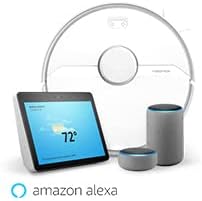
Image: The Roborock S6 Pure robot vacuum shown alongside Amazon Echo devices, illustrating its compatibility with Amazon Alexa for voice control.
Manteniment
Un manteniment regular garanteix un rendiment òptim i allarga la vida útil del teu robot aspirador.
1. Paperera i filtre
- Cubell d'escombraries buit: Després de cada cicle de neteja, obriu la coberta superior, retireu el contenidor de pols i buideu-ne el contingut.
- Neteja el filtre: Tap the filter to remove dust. The filter can also be rinsed with water; ensure it is completely dry before reinserting. Clean at least once a week, or more frequently if used often.
2. Main Brush and Side Brush
- Pinzell principal: Remove the main brush cover and the brush itself. Use the cleaning tool provided to cut and remove any tangled hair or debris. Clean weekly.
- Raspall lateral: Check for tangled hair or debris. If necessary, remove the screw holding the side brush and clean it. Replace if damaged. Clean monthly.
3. Wheels and Sensors
- Rodes: Wipe the drive wheels and omnidirectional wheel with a dry cloth to remove dust and hair. Clean monthly.
- Sensors: Gently wipe all sensors (cliff sensors, wall sensor, charging contacts) with a soft, dry cloth. Clean monthly.
4. Mop Cloth and Water Tank
- Drap de fregona: Remove the mop cloth after each use and wash it thoroughly. It can be hand-washed or machine-washed.
- Dipòsit d'aigua: Empty any remaining water from the tank after each use. Rinse the tank if necessary.
Resolució de problemes
Consulteu aquesta secció per conèixer els problemes comuns i les seves solucions.
| Problema | Causa possible | Solució |
|---|---|---|
| El robot no s'encén. | Bateria baixa o no carregada. | Col·loca el robot a la base de càrrega i assegura't que estigui completament carregat. |
| El robot no pot tornar a la base de càrrega. | Charging dock is blocked or out of range. | Ensure the charging dock has clear space around it. Move the dock to a more central location if needed. |
| El rendiment de neteja és deficient. | Dustbin full, brushes tangled, or filter clogged. | Empty the dustbin, clean the main brush and side brush, and clean or replace the filter. |
| El robot es queda encallat sovint. | Obstacles, loose cables, or dark surfaces. | Clear the cleaning area of obstacles. Use no-go zones in the app for problematic areas. |
| Problemes de connexió de l'aplicació. | Incorrect Wi-Fi password, router issues, or robot offline. | Ensure correct Wi-Fi password. Restart your router and the robot. Re-pair the robot with the app if necessary. |
Especificacions
| Característica | Detall |
|---|---|
| Nom del model | S6Pure |
| Marca | roborock |
| Dimensions del producte | 14 cm de llargada x 14 cm d'amplada x 4 cm d'alçada |
| Pes de l'article | 15.17 lliures |
| Durada de la bateria | Fins a 180 minuts |
| Tipus de filtre | Tela |
| Mètode de control | Veu, aplicació |
| Dispositius compatibles | Amazon Echo |
| Font d'alimentació | Funciona amb bateria |
| Voltage | 220 Volts |
| UPC | 606015769620 |
Garantia i Suport
Per obtenir informació sobre la garantia i assistència tècnica, consulteu la pàgina oficial de Roborock. weblloc web o contacteu directament amb el servei d'atenció al client. Conserveu el rebut de compra com a comprovant de compra per a reclamacions de garantia.
Recursos en línia: www.roborock.com
Manual d'usuari (PDF): Descarrega el manual en PDF


