1. Introducció
This manual provides essential information for the safe and efficient operation of your Artlii Q Mini Portable Projector. Please read this manual thoroughly before using the product and retain it for future reference.
2. Informació de seguretat
Observeu les següents precaucions de seguretat per evitar danys al projector i garantir la seguretat de l'usuari:
- No bloquegeu les obertures de ventilació. Assegureu-vos que hi hagi un flux d'aire adequat al voltant del projector per evitar el sobreescalfament.
- Avoid direct exposure to the projector lens light. The bright light can cause eye strain.
- Do not place the projector in unstable locations. Ensure it is on a flat, stable surface.
- Mantingueu el projector allunyat de l'aigua o altres líquids.
- Feu servir només l'adaptador de corrent que s'inclou amb el projector.
- No intenteu obrir ni reparar el projector vosaltres mateixos. Encarregueu totes les tasques de manteniment a personal qualificat.
3. Producte acabatview
The Artlii Q Mini Portable Projector is a compact and versatile device designed for various projection needs. It features a manual focus system, automatic sleep function, and supports a wide range of input sources.

Figura 3.1: Davant i superior view of the Artlii Q Mini Portable Projector, highlighting the lens and control buttons.

Figura 3.2: posterior view of the projector, illustrating the various input and output ports available for connectivity.
3.1 Característiques clau
- Disseny portàtil: Compact and lightweight, ideal for transport.
- Bateria incorporada: Offers 1-1.5 hours of operation on battery power.
- Enfocament manual: Allows for precise image clarity adjustments.
- Àmplia compatibilitat: Connects to various devices including USB sticks, PCs, Macs, and TV sticks.
- Funcionament de baix soroll: Engineered for quiet performance.

Figura 3.3: The projector's internal battery, providing portable power for extended use.

Figura 3.4: Demonstrating the projector's portability, easily fitting into a backpack.
4. Configuració
4.1 Engegada/apagada
- Connecteu l'adaptador de corrent al projector i a una presa de corrent.
- Press the power button located on the top panel of the projector to turn it on.
- To turn off, press the power button again. The projector also features an automatic sleep function.
4.2 Ajust del focus
The projector features a manual focus adjustment to ensure a clear image.
- Enceneu el projector i visualitzeu una imatge.
- Locate the focus knob near the lens.
- Rotate the focus knob clockwise or counter-clockwise until the projected image appears sharp and clear.

Figura 4.1: Diagram showing the focus knob and various projection sizes from 14 to 72 inches at different distances.
4.3 Projection Distance and Size
The projector can display images from 14 to 72 inches, depending on the distance from the projection surface. Refer to Figure 4.1 for approximate distances.
5. Instruccions de funcionament
5.1 Navegació pel menú
Use the directional buttons (up, down, left, right) and the 'OK' button on the projector's top panel or remote control to navigate through the on-screen menu. The 'Return' button allows you to go back to the previous menu.
5.2 Selecció de la font
After powering on, select your desired input source (e.g., HDMI, USB, AV) from the main menu. Ensure your external device is connected before selecting the source.
6. Connectivitat
The Artlii Q Mini Portable Projector offers a variety of connection options for different devices.
6.1 dispositius compatibles
The projector is compatible with a wide range of devices, including:
- Laptops/PCs
- Gaming Consoles (e.g., Nintendo Switch, PS5)
- Unitats flash USB
- TV Sticks (e.g., Fire TV Stick)
- Reproductors de Blu-ray
- Càmeres
- TF Cards (MicroSD)
- U Disks
- Chromecast
- Home Cinema Systems
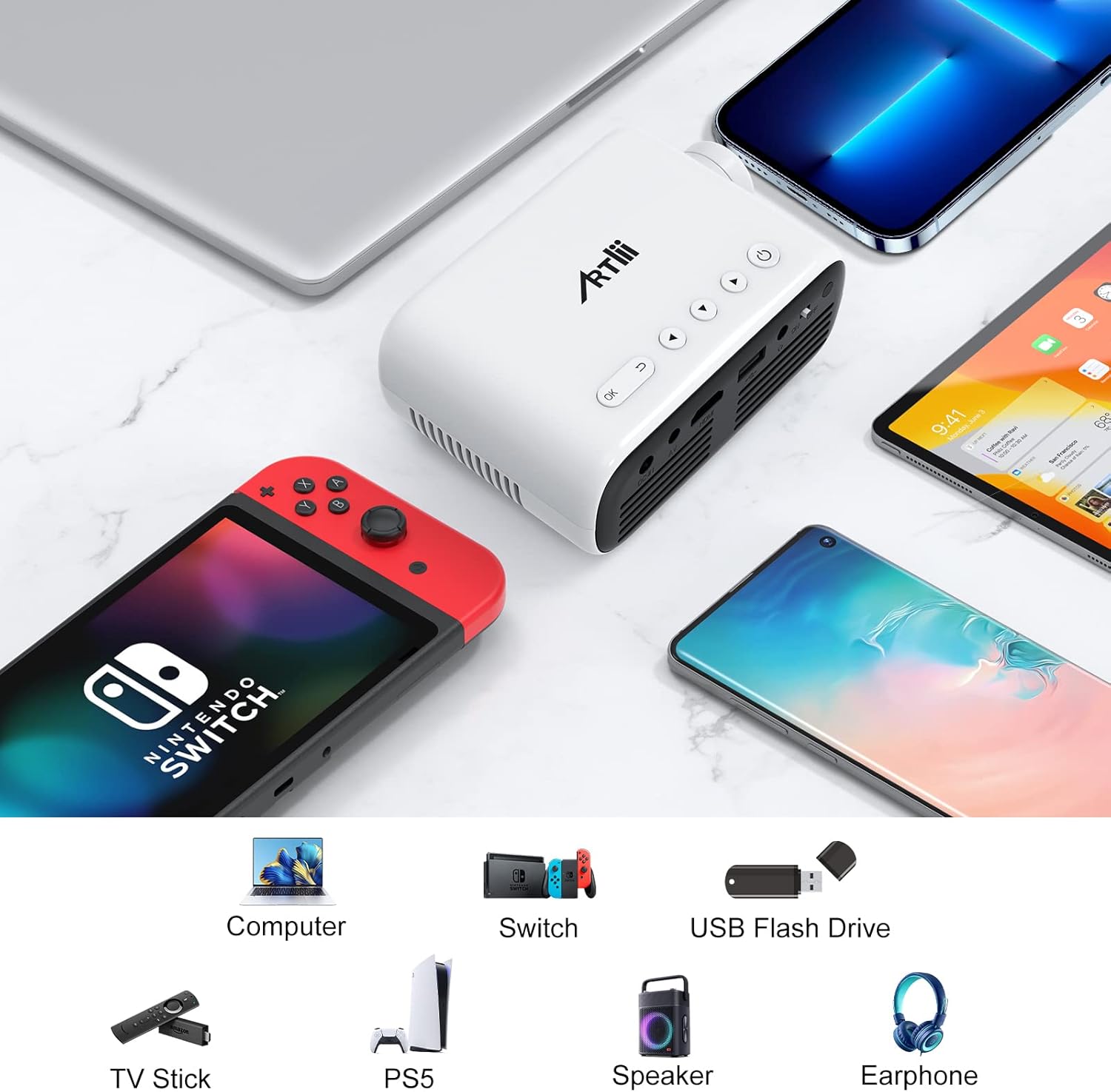
Figura 6.1: Examples of devices that can be connected to the Artlii Q Mini Portable Projector.

Figura 6.2: Further compatible devices and an illustration of connecting phones/tablets via a separate WiFi display dongle (not included).
6.2 Connecting to Phones/Tablets
To connect your phone or tablet, a separate WiFi display dongle (not included) is required. Connect the dongle to the projector's HDMI port and follow the dongle's instructions for screen mirroring.
7. Manteniment
7.1 Neteja de la lent
Feu servir un drap suau i sense borrissol dissenyat específicament per a lents òptiques per netejar suaument la lent del projector. Eviteu utilitzar productes de neteja abrasius ni força excessiva.
7.2 Neteja del cos del projector
Wipe the exterior of the projector with a soft, dry cloth. Do not use liquid or aerosol cleaners.
7.3 Emmagatzematge
Quan no l'utilitzeu durant períodes prolongats, guardeu el projector en un lloc fresc i sec, allunyat de la llum solar directa i de temperatures extremes. Feu servir l'embalatge original o una funda protectora per evitar l'acumulació de pols i els danys.
8. Solució De Problemes
Si teniu problemes amb el projector, consulteu les solucions habituals següents:
| Problema | Causa possible | Solució |
|---|---|---|
| No es mostra cap imatge | Power not connected, incorrect input source, loose cable connection | Check power cable, select correct input source, ensure all cables are securely connected. |
| La imatge és borrosa | Focus not adjusted, projector too close/far | Adjust the manual focus knob. Adjust projection distance. |
| Sense so | Volume too low, external device volume low, audio cable not connected | Increase projector volume. Increase external device volume. Ensure audio cables are connected correctly. |
| El projector es sobreescalfa | Blocked ventilation, prolonged use | Ensure ventilation openings are clear. Allow the projector to cool down. |
9. Especificacions
| Característica | Especificació |
|---|---|
| Marca | Artlii |
| Model | HD Videoprojecteur |
| Dimensions del producte | 31 x 24 x 11 cm |
| Pes de l'article | 3.34 kg |
| Interfície del maquinari | AV, HDMI, Infrared, MicroSD, USB, VGA |
| Dispositius compatibles | Laptop, Gaming Consoles, USB Sticks, TV Sticks, Blu-ray Players, Cameras, Phones/Tablets (with dongle) |
| Característiques addicionals | Large projection size, High compatibility, Lightweight and portable, Powerful and clear sound, Clear and fresh image |
| Tecnologia de pantalla | LCD |
| Mida de la pantalla | Up to 200 Inches (Optimal 14-72 inches) |
| Relació de contrast de la imatge | 3000:1 |
| Relació d'aspecte | 16:9, 4:3 |
| Resolució nativa | 1280 x 800 |
| Resolució màxima de pantalla | 1920 x 1080 (1080p supported) |
| Nivell de soroll | 40 dB |
| Tipus de connectivitat | HDMI, USB, VGA |
| Factor de forma | Portàtil |
| Tipus de muntatge | Sostre |
| Brillantor | 3400 lm |
| Color | Negre |
10. Garantia i Suport
Artlii provides a one-year warranty for this product. Additionally, a 3-month worry-free refund policy is offered. For any defective products or support inquiries, please contact Artlii customer service for a free replacement or a full refund.
Per obtenir més ajuda, visiteu el Artlii Store on Amazon.


