Introducció
This manual provides detailed instructions for the setup, operation, and maintenance of your Bewinner Mini FHD 1080P Media Player. Please read this manual thoroughly before using the device to ensure proper functionality and to maximize your viewing experience. This compact media player is designed to support a wide range of high-definition video and audio formats, offering versatile connectivity options for your home entertainment system.
Advertències de seguretat
 To avoid suffocation hazard, keep this plastic bag away from babies and children.
This warning is crucial for safe handling of packaging materials. Always dispose of plastic bags properly or store them out of reach of infants and young children.
- No exposeu el dispositiu a la pluja o la humitat.
- No desmunteu el dispositiu. Encarregueu tot el manteniment a personal qualificat.
- Assegureu-vos una ventilació adequada al voltant del dispositiu per evitar el sobreescalfament.
- Utilitzeu només l'adaptador d'alimentació subministrat.
- Mantingueu el dispositiu allunyat de la llum solar directa, de fonts de calor i de temperatures extremes.
- Eviteu deixar caure o sotmetre el dispositiu a forts impactes.
Producte acabatview
The Bewinner Mini FHD 1080P Media Player is a compact and versatile device designed for playing various media files on your television or display. It supports a wide array of video, audio, and image formats, and features multiple connectivity options for external storage and display.

Figura 1: superior view of the Bewinner Mini FHD 1080P Media Player, showing its compact design and various supported formats listed on the top panel.
Característiques principals:
- Compatibilitat forta: Supports all mainstream high-definition movies with perfect 1080p decoding and encoding up to 100 Mbps.
- Versatile Storage Support: Compatible with USB drives, portable hard drives (up to 2.5T/3.5 inch), and SD cards.
- Compact and Aesthetic Design: Small footprint, ideal for placement next to your TV.
- Rich Video Output Interfaces: Features real HDMI 1.3 digital interface, YUV component video output, and AV composite video output.
- Extensive Video Decoding: Supports RM/RMVB (real8/9/10) up to 1920x1080, H.264 (MKV, MOV, AVI, M2TS, TP, TRP, IFO, ISO) at 1080P, and WMV9/VC-1 at 1080P.
- Multi-language OSD & Subtitle Support: Offers multi-language On-Screen Display (OSD) and supports external SRT subtitles with adjustable size, position, and color.
- Reproducció de punts d'interrupció: Resumes playback from where you left off.
- Super Remote Control Reception: Effective range up to 5 meters, with a special long-range infrared remote control for reliable operation up to 12 meters without interference.
- High-Quality Power Supply: Includes a 5.4V/2A power supply capable of powering an external 2.5-inch 1TB hard drive.
Configuració
Follow these steps to set up your Bewinner Mini FHD 1080P Media Player:
1. Connexió a l'alimentació
- Locate the DC 5.4V/2A power input port on the media player.
- Connecteu l'adaptador de corrent proporcionat a aquest port.
- Plug the power adapter into a suitable electrical outlet (AC 100-240V 50/60Hz).
- The power indicator light on the device should illuminate.
2. Connecting to Your TV/Display
The media player offers multiple video output options. Choose the one that best suits your display device.
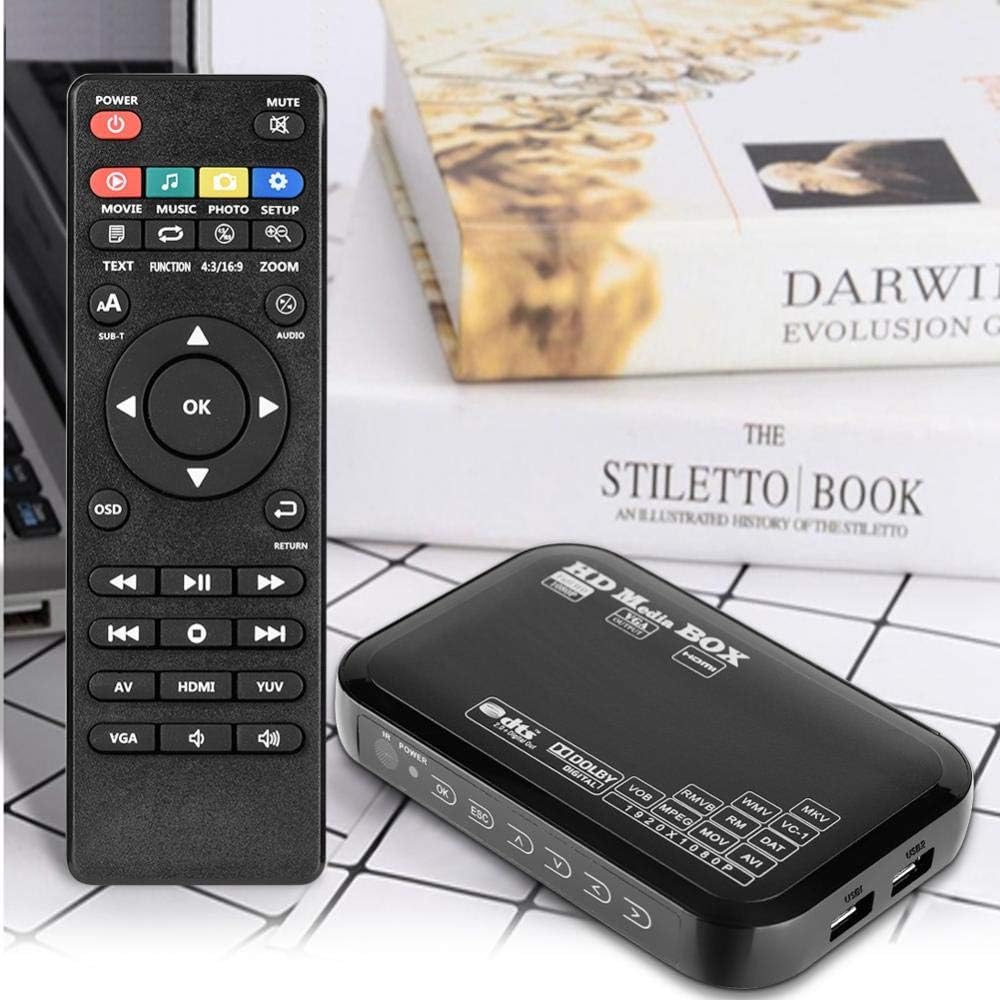
Figure 2: The media player connected to a television, demonstrating its use in a home entertainment setup.
- Connexió HDMI (recomanada per a HD):
- Connect one end of an HDMI cable (not included) to the HDMI 1.3 HD Interface port on the media player.
- Connect the other end of the HDMI cable to an HDMI input port on your TV or display.
- Select the corresponding HDMI input on your TV using its remote control.
- AV Composite Video Connection:
- Connect the AV cable (included) to the AV output ports on the media player (Yellow for video, Red for right audio, White for left audio).
- Connect the other end of the AV cable to the corresponding AV input ports on your TV.
- Seleccioneu l'entrada AV corresponent al televisor.
- Connexió VGA:
- Connect a VGA cable (not included) to the VGA output port on the media player.
- Connect the other end of the VGA cable to a VGA input port on your display.
- Note: VGA only transmits video. You will need separate audio cables for sound if using VGA.

Figura 3: Detallada view of the media player's input and output ports, including power, AV, HDMI, VGA, and USB connections.
3. Inserting Storage Media
The media player supports various external storage devices:
- USB Drives/Hard Drives: Insert your USB flash drive or external USB hard drive into one of the USB ports on the side of the player.
- SD/MMC Cards: Insert your SD or MMC card into the SD Card Slot.

Figure 4: The compact size of the media player, easily held in one hand, highlighting its portability.
Instruccions de funcionament
Once the device is connected and powered on, you can navigate its functions using the included remote control.
Funcions de control remot:

Figure 5: The remote control for the media player, showing various buttons for navigation and media playback.
- Botó d'encesa: Encén/apaga el dispositiu.
- Botons de navegació (amunt, avall, esquerra, dreta, D'acord): S'utilitza per navegar pels menús i seleccionar opcions.
- Return/ESC: Go back to the previous menu or exit current function.
- Volum +/-: Ajusta el volum de l'àudio.
- Play/Pause, Stop, Fast Forward, Rewind: Controls estàndard de reproducció multimèdia.
- Movie, Music, Photo, Setup: Direct access buttons for different media types and settings.
- OSD: Access On-Screen Display settings.
- SUB-T: Control de subtítols.
- AV/HDMI/YUV: Seleccioneu el mode de sortida de vídeo.
- MUT: Silencia/activa l'àudio.
The remote control has a super reception unit with an effective range of up to 5 meters, and can operate up to 12 meters without interference under optimal conditions.
Reproducció multimèdia:
After connecting your storage device, the player will typically display a menu allowing you to browse files. Use the navigation buttons on the remote to select the desired media type (Movie, Music, Photo) and then browse your files.
- Formats de vídeo compatibles: MKV, AVI, TS/TP, M2TS, RM/RMVB, MOV, VOB, FLV, WMV.
- Formats d'àudio compatibles: MP3, OGG, WMA, APE.
- Formats d'imatge compatibles: JPEG, GIF, PNG, BMP.
- Supported Encoding: DTS, AC3, FLAC, AAC.
- Suport de subtítols: Supports external SRT, SSA, SUB subtitle formats. You can adjust subtitle size, position, and color via the OSD menu.
- Reproducció de punts d'interrupció: The device supports resuming playback from the last stopped point.
Manteniment
Proper maintenance ensures the longevity and optimal performance of your media player.
- Neteja: Feu servir un drap suau i sec per netejar l'exterior del dispositiu. No utilitzeu netejadors líquids ni aerosols.
- Emmagatzematge: Quan no l'utilitzeu durant períodes prolongats, guardeu el dispositiu en un lloc fresc i sec, allunyat de la llum solar directa i de temperatures extremes.
- Ventilació: Ensure the device has adequate airflow around it. Do not block ventilation openings.
- Apagar: Always power off the device properly before disconnecting it from power or storage media.
Resolució de problemes
If you encounter issues with your media player, refer to the following common problems and solutions:
| Problema | Possible causa/solució |
|---|---|
| No hi ha alimentació / El dispositiu no s'encén. |
|
| Sense sortida de vídeo. |
|
| Sense sortida d'àudio. |
|
| Remote control is unresponsive or slow. |
|
| No es pot llegir la unitat USB/targeta SD. |
|
| Playback issues (stuttering, unsupported format). |
|
Especificacions
| Característica | Detall |
|---|---|
| Dimensions del producte | 14.5 x 9.5 x 2 cm; 390 grams |
| Fabricant | Guanyador |
| Número de model | Bewinnerqcro60k8g1-02 |
| Tecnologia de connectivitat | HDMI, USB |
| Tipus de connector | Component |
| Característica especial | Portàtil |
| Resolució | 1080p |
| Serveis d'Internet compatibles | Spotify (Note: This might be a misinterpretation from the source data, as a simple media player typically doesn't support streaming services directly. It's included as per source.) |
| Tipus de controlador | Control remot |
| Factor de forma | Caixa de TV |
| Color | EU (likely refers to power plug type) |
| Dispositius compatibles | Televisió |
| Entrada de potència | CA 100-240V 50/60Hz |
| Potència de sortida | DC 5.4V / 2A |
| Temperatura de funcionament | -5 °C a +50 °C |
| Sistema de TV | PAL/NTSC |
| Sortida de vídeo | 1.0+/-0.2Vp-p, 75Ω |
| Sortida d'àudio | 2.0 +/- 0.2V (RMS) |
| Ràtio senyal / soroll | ≥ 80 dB |
| Storage Media Support | USB Hard Disk, USB Disk, SD/MMC/MS Card, SDHC |
| Hard Disk Format Support | FAT16 / FAT32 / NTFS |
Nota: Les especificacions estan subjectes a canvis sense previ avís.
Garantia i Suport
Specific warranty information for the Bewinner Mini FHD 1080P Media Player is not provided within this manual. For details regarding warranty coverage, returns, or technical support, please refer to the product packaging, the retailer's website where you purchased the device, or contact Bewinner customer service directly.
You may also find additional support resources, FAQs, and updated drivers (if applicable) on the official Bewinner weblloc.
Per a consultes generals o ajuda, visiteu el Bewinner brand page on Amazon.sa.


