1. Introducció
The NEDIS VEXT3470AT HDMI Audio Extractor allows you to separate audio signals from an HDMI source and output them to an audio system, while simultaneously passing the video signal to a display. This device is designed to integrate modern HDMI sources with audio systems that may not have HDMI inputs, providing both digital (Toslink) and analog (L/R stereo) audio outputs.
It supports 3D video and amplifies the digital video signal for reliable transmission.
2. Informació de seguretat
- Llegiu atentament aquestes instruccions abans d'utilitzar-les.
- Manteniu el dispositiu allunyat de l'aigua, la humitat i les temperatures extremes.
- No intenteu obrir ni reparar el dispositiu vosaltres mateixos. Encarregueu totes les tasques de manteniment a personal qualificat.
- Feu servir només l'adaptador de corrent proporcionat. L'ús d'un adaptador incorrecte pot fer malbé el dispositiu i anul·lar la garantia.
- Assegureu-vos una ventilació adequada al voltant del dispositiu per evitar el sobreescalfament.
- Desconnecteu l'adaptador de corrent durant tempestes amb llamps o quan no l'utilitzeu durant períodes prolongats.
3. Contingut del paquet
Si us plau, comproveu el contingut del paquet per assegurar-vos que tots els articles hi són i estan en bon estat:
- NEDIS VEXT3470AT HDMI Audio Extractor
- Adaptador d'alimentació
- Manual d'usuari (aquest document)
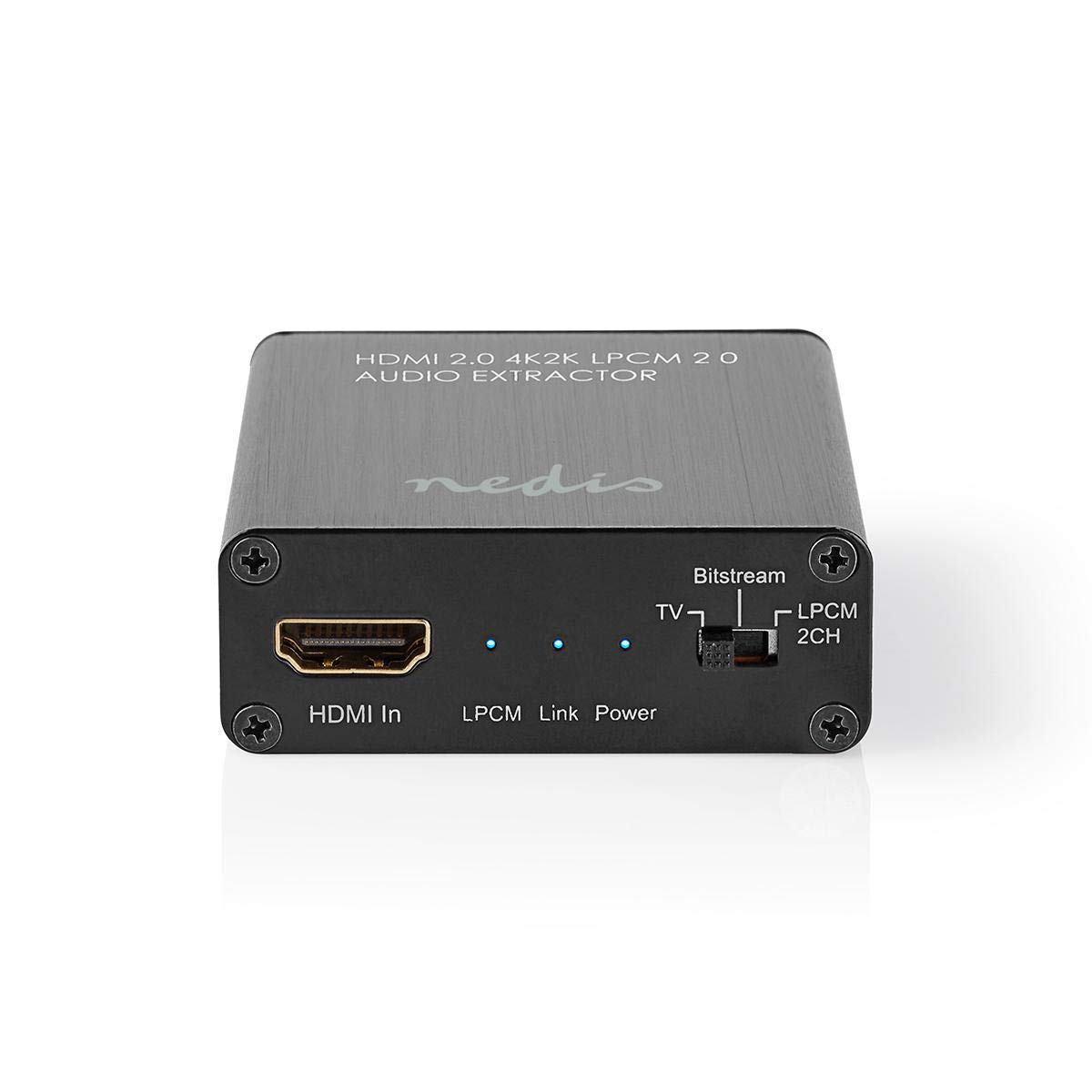
Image: The NEDIS VEXT3470AT HDMI Audio Extractor unit shown alongside its power adapter.
4. Producte acabatview
Familiarize yourself with the ports and indicators on the HDMI Audio Extractor:
4.1 Input Side
Image: Close-up of the input side of the audio extractor, showing the HDMI In port, LPCM, Link, and Power indicator LEDs, and the Audio Mode Switch.
- Entrada HDMI: Connect your HDMI source device (e.g., DVD/Blu-ray player, game console).
- LPCM LED: Indicates when LPCM audio format is detected.
- LED d'enllaç: Indicates an active HDMI connection.
- LED d'alimentació: S'il·lumina quan el dispositiu està encès.
- Audio Mode Switch:
- Bitstream: For multi-channel audio formats like Dolby Digital or DTS.
- TV: Passes audio directly from the HDMI source to the TV.
- LPCM 2CH: For 2-channel stereo audio output via L/R analog and Toslink.
4.2 Output Side

Image: Close-up of the output side of the audio extractor, showing the 5V/DC power input, Optical (Toslink) audio output, HDMI Out port, and L/R analog audio outputs.
- 5V/CC: Power input port. Connect the provided power adapter here.
- Òptic: Digital audio output (Toslink). Connect to an audio receiver or soundbar.
- Sortida HDMI: Connect to your TV or display.
- L/R: Analog stereo audio output. Connect to an amplifier or stereo system using RCA cables.
5. Instruccions de configuració
Follow these steps to connect your HDMI Audio Extractor:
- Apagueu els dispositius: Ensure all devices (HDMI source, TV, audio system) are powered off before making connections.
- Connecteu la font HDMI: Connect an HDMI cable from your source device (e.g., Blu-ray player) to the Entrada HDMI port on the audio extractor.
- Connecta la pantalla: Connect another HDMI cable from the Sortida HDMI port on the audio extractor to your TV or display.
- Connect Audio System:
- For digital audio, connect an optical Toslink cable from the Òptic el port de l'extractor al receptor d'àudio o a la barra de so.
- For analog stereo audio, connect RCA cables from the L/R ports on the extractor to your stereo amplifier o altaveus actius.
- Connectar l'alimentació: Plug the provided power adapter into the 5 V/DC port de l'extractor i, a continuació, connecteu l'adaptador a una presa de corrent. El LED d'alimentació s'hauria d'il·luminar.
- Dispositius d'encesa: Power on your TV/display, audio system, and then your HDMI source device.
6. Instruccions de funcionament
Once connected, operate the device as follows:
- Seleccioneu el mode d'àudio: Utilitza el Interruptor de mode d'àudio on the input side to select the desired audio output format:
- Bitstream: For multi-channel audio (e.g., Dolby Digital, DTS) to be passed through the Optical output. Your audio receiver must support these formats.
- TV: Passes the audio directly to the TV via HDMI. Audio extraction via Optical/L/R may be limited or unavailable in this mode, depending on the source and TV capabilities.
- LPCM 2CH: Converts multi-channel audio to 2-channel LPCM for output via Optical and L/R analog ports. This is suitable for stereo systems or when your receiver does not support Bitstream formats.
- Indicadors de verificació:
- El LED d'encesa hauria d'estar activat.
- El LED d'enllaç should be on when an active HDMI signal is detected from the source.
- El LPCM LED will illuminate if the audio signal is in LPCM format.
- Adjust Audio System: Ensure your audio receiver or soundbar is set to the correct input (Optical or Analog L/R) and volume.
7. Manteniment
Per garantir la longevitat i el rendiment òptim del vostre extractor d'àudio HDMI:
- Neteja: Feu servir un drap suau i sec per netejar el dispositiu. No utilitzeu netejadors líquids ni aerosols.
- Emmagatzematge: Guardeu el dispositiu en un lloc fresc i sec quan no l'utilitzeu.
- Manipulació: Eviteu deixar caure o sotmetre el dispositiu a forts impactes.
8. Solució De Problemes
Si teniu problemes, consulteu la guia de resolució de problemes següent:
| Problema | Possible causa/solució |
|---|---|
| Sense sortida de vídeo |
|
| Sense sortida d'àudio |
|
| El LED d'alimentació està apagat |
|
| Intermittent Audio/Video |
|
9. Especificacions
Key technical specifications for the NEDIS VEXT3470AT HDMI Audio Extractor:
- Número de model: VEXT3470AT
- Marca: NEDIS
- Entrada: 1x HDMI
- Sortida: 1x HDMI, 1x Optical (Toslink), 1x L/R Stereo (RCA)
- Versió HDMI: Compatible with HDMI 2.0 (implied by 4K2K support in product name)
- Resolució de vídeo: Up to 4K (4K2K)
- Suport 3D: Sí
- Formats d'àudio: LPCM 2.0, Bitstream (Dolby Digital, DTS pass-through)
- Font d'alimentació: 5V DC (via included adapter)
- Dimensions (L x A x A): Aproximadament 7.7 x 6.4 x 2.3 cm
- Pes: 240 grams
- Color: Anthracite (Black)
- País d'origen: Xina
10. Garantia i Suport
NEDIS products are manufactured to high quality standards. In the unlikely event of a defect during the warranty period, please contact your retailer for support. The warranty period is subject to local consumer laws and regulations.
For technical assistance or further inquiries, please refer to the support information provided by your retailer or visit the official NEDIS weblloc.


