1. Introducció
The eKids Frozen 2 Bluetooth Karaoke Machine with Light Show is designed to provide an interactive music experience. This portable device allows users to stream audio wirelessly via Bluetooth, sing along with the included wired microphone, and expand content through a USB port. It features a multi-colored LED light show and built-in memory for storing music.
2. Què hi ha a la caixa
- Bluetooth MP3 Karaoke Machine
- Micròfon per cable
- Cable de càrrega USB
3. Característiques del producte
- Connectivitat Bluetooth: Connect to any compatible Bluetooth device to stream audio wirelessly.
- Micròfon amb cable: Includes one real working wired microphone for singing along. An additional mic jack is available for a second microphone (sold separately).
- USB Audio Player: Features a USB port to play MP3 files from a USB flash drive (not included).
- Funció d'enregistrament: Record performances while singing along to streaming music. Requires a USB flash drive (not included).
- Multi-colored LED Light Show: Integrated light show to enhance the performance experience.
- Memòria integrada: Store hours of music directly on the device.
- Bateria recarregable: Portable design with a built-in rechargeable battery for on-the-go use.

Figura 1: Mésview of the Karaoke Machine's Controls and Features.

Figure 2: Bluetooth Compatibility with various devices.
4. Configuració
4.1 Engegar la unitat
The karaoke machine operates on a built-in rechargeable battery. Ensure the unit is fully charged before first use for optimal performance.
- Connect the supplied USB charging cable to the USB charging port on the back of the unit.
- Connect the other end of the USB cable to a standard USB power adapter (not included) or a powered USB port.
- The charging indicator will illuminate. Allow sufficient time for a full charge.
4.2 Connexió del micròfon
The wired microphone connects to the microphone jack on the unit.
- Locate the microphone jack on the side or back of the karaoke machine.
- Insert the microphone plug firmly into the jack.

Figure 3: Karaoke Machine with Microphone Connected.
5. Instruccions de funcionament
5.1 Encès/Apagat
Manteniu premut el botó Poder button located on the control panel to turn the unit on or off.
5.2 Vinculació Bluetooth
- Turn on the karaoke machine. The Bluetooth indicator on the display will flash, indicating it is in pairing mode.
- Al dispositiu amb Bluetooth (telèfon intel·ligent, tauleta, etc.), aneu a la configuració de Bluetooth i activeu-lo.
- Select "eKids Frozen 2 Karaoke" (or similar name) from the list of available devices.
- Once paired, the Bluetooth indicator will stop flashing and remain solid. You can now stream audio from your device.
5.3 Playing Music via USB
- Inseriu una unitat flash USB que contingui MP3 files al port USB de la unitat.
- The unit should automatically switch to USB mode and begin playing music. If not, press the Mode botó per seleccionar el mode USB.
- Utilitza el Reproduir/Pausa, Pista següent, i Pista anterior botons per controlar la reproducció.
5.4 Ús del micròfon
- Ensure the microphone is securely plugged into the mic jack.
- Premeu el botó ON / OFF del micròfon button to activate the microphone.
- Adjust the microphone volume using the dedicated volume controls if available, or the main volume controls.
5.5 Espectacle de llum
Premeu el botó Llum ON/OFF button to activate or deactivate the multi-colored LED light show.
5.6 Enregistrament d'actuacions
To record your singing, a USB flash drive (not included) must be inserted into the USB port.
- Ensure a USB flash drive is inserted.
- Start playing your desired music (via Bluetooth or USB).
- Premeu el botó REC botó per començar a gravar.
- Sing into the microphone.
- Premeu el botó REC button again to stop recording. Your performance will be saved to the USB flash drive.
6. Manteniment
- Netegeu la unitat amb un drap suau i sec. No utilitzeu productes de neteja abrasius ni dissolvents.
- Keep the unit away from direct sunlight, heat sources, and moisture.
- Store the microphone in its designated compartment on the back of the unit when not in use to prevent loss or damage.
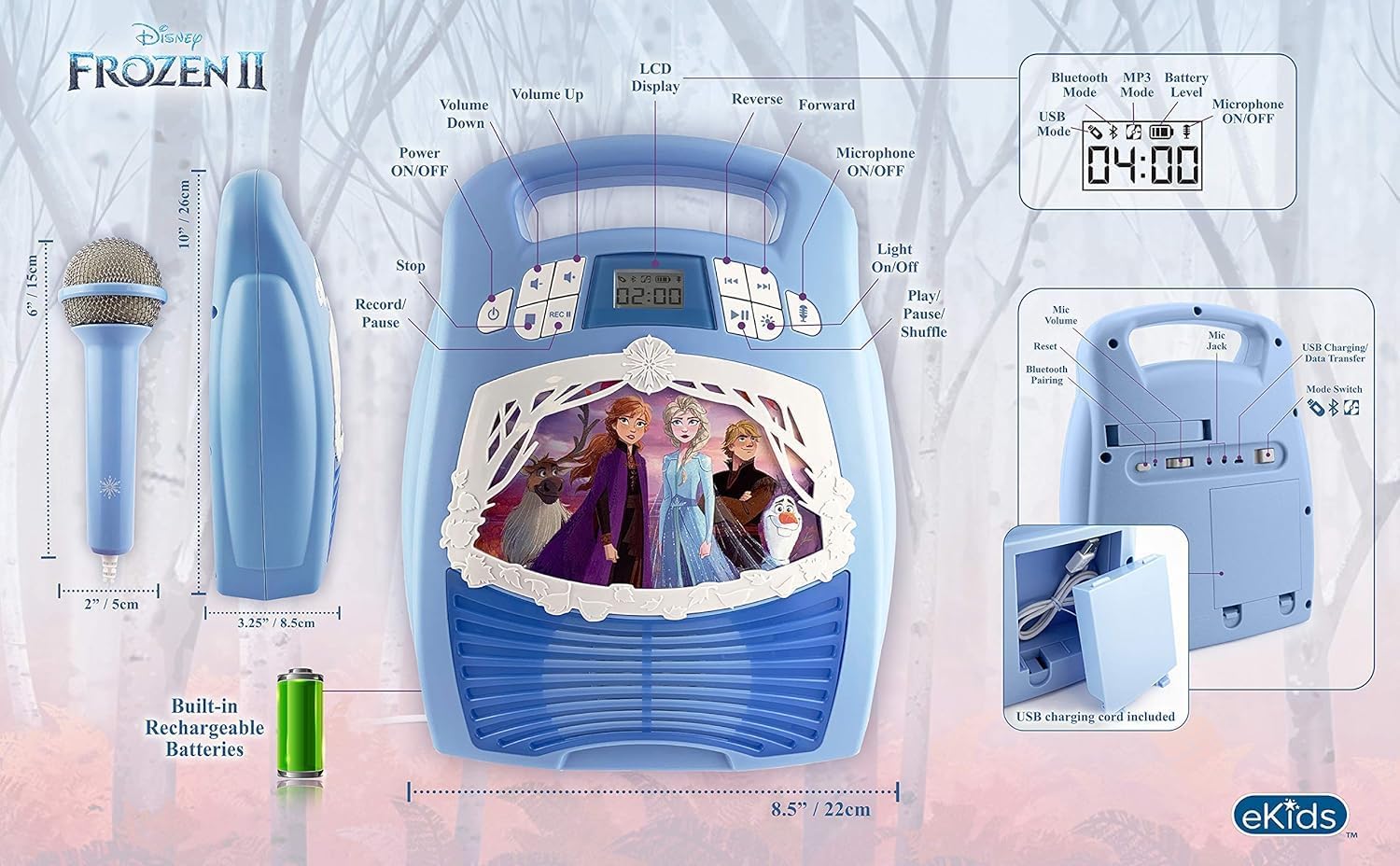
Figura 4: posterior view with microphone storage compartment.
7. Solució De Problemes
- Sense energia: Ensure the unit is charged. Connect the USB charging cable and allow it to charge.
- Sense so: Check the volume levels on both the karaoke machine and your connected Bluetooth device. Ensure the microphone is turned on if using it.
- Bluetooth no connectat: Make sure Bluetooth is enabled on your device and the karaoke machine is in pairing mode. Try restarting both devices. Ensure no other devices are currently connected to the karaoke machine.
- El micròfon no funciona: Verify the microphone is securely plugged into the correct jack and the microphone ON/OFF button is activated.
- Problemes de gravació: Ensure a compatible USB flash drive is inserted and has sufficient free space.
8. Especificacions
| Característica | Detall |
|---|---|
| Dimensions del producte | 8 x 3 x 10 polzades |
| Pes de l'article | 2.64 lliures |
| Número de model | FR-553v9M |
| Edat recomanada | 3 - 35 mesos |
| Bateries | 3 AA batteries required (included) - Note: Product description also mentions built-in rechargeable battery. Please refer to packaging for exact battery type. |
| Característica especial | Portàtil, recarregable |
| Color | Older Version |
| Fabricant | KIDdesigns |
9. Informació de seguretat
Please read and follow all safety instructions provided with the product packaging. This product is intended for use by children aged 3 and up, under adult supervision.
10. Garantia i Suport
Aquest producte ve amb un Un any de garantia limitada. For warranty claims or technical support, please refer to the contact information provided in your product packaging or visit the eKids official weblloc.
11. Vídeo del producte
Video 1: An official product video from KIDdesigns, Inc. showcasing the eKids Frozen 2 Bluetooth Karaoke Machine with Light Show, highlighting its features and design.


