1. Introducció
The Andonstar AD407 is a high-definition 3D HDMI digital microscope designed for detailed observation and precision work. Featuring a 4MP UHD camera, a 7-inch adjustable IPS LCD screen, and HDMI output, it is an ideal tool for various applications including phone repair, SMT/SMD soldering, DIY electronics, and general inspection tasks. This manual provides comprehensive instructions for setting up, operating, and maintaining your AD407 digital microscope.

Figure 1.1: Andonstar AD407 Digital Microscope with Remote Control.
This image displays the complete Andonstar AD407 digital microscope setup, including the main unit with its 7-inch LCD screen, the adjustable stand, flexible LED lights, and the wireless remote control. The microscope is positioned on its base, ready for use.
2. Informació de seguretat
Please read all safety instructions carefully before using the Andonstar AD407 digital microscope to ensure safe and proper operation.
- Font d'alimentació: Feu servir només l'adaptador de corrent proporcionat. Assegureu-vos que el volumtage matches the requirements specified for the device.
- Medi ambient: Operate the microscope in a dry, stable environment. Avoid exposure to extreme temperatures, humidity, dust, or direct sunlight.
- Manipulació: Handle the microscope with care. Avoid dropping or subjecting it to strong impacts.
- Cura de les lents: Do not touch the lens directly with your fingers. Use a soft, lint-free cloth for cleaning.
- Filtre UV: The UV filter is designed to protect the lens from heat, smoke, and dust, especially during soldering. Ensure it is properly installed.
- Ventilació: Assegureu-vos que hi hagi una ventilació adequada al voltant del dispositiu per evitar el sobreescalfament.
- Nens: Mantingueu el dispositiu fora de l'abast dels nens petits.
3. Contingut del paquet
Verifiqueu que tots els elements que s'enumeren a continuació s'inclouen al vostre paquet:
- AD407 Microscope host
- UV filter (pre-assembled in front of the lens)
- Placa base metàl·lica
- Metal Column
- Clau anglesa
- Clips metàl·lics
- Cable HDMI
- Cable de commutació
- Endoll d'alimentació
- Comandament a distància
- Manual d'instruccions

Figure 3.1: Contents of the AD407 Package.
This image illustrates all the components included in the Andonstar AD407 digital microscope package, laid out clearly for verification. It shows the microscope unit, stand components, cables, power adapter, remote control, and the instruction manual.
4. Producte acabatview
Familiarize yourself with the main components and controls of your Andonstar AD407 digital microscope.
4.1 Main Unit and Screen Controls

Figure 4.1: Adjustable Screen and Control Buttons.
This image highlights the adjustable 7-inch LCD screen of the AD407 microscope, demonstrating its range of motion. It also clearly labels the control buttons located beneath the screen: (1) Power on/off, (2) Mode/Menu, (3) Up, (4) Down, (5) OK/Start video record, (6) Picture capture, and (7) Infrared sensor for remote control.
4.2 Ports i connexions

Figure 4.2: Connectivity Ports and Power Setup.
This diagram illustrates the various ports on the microscope unit, including the Memory card (not included) port, USB port, and HDMI output. It also shows the connections for the main power supply (USB to power up the microscope) and the separate power connection for the adjustable side spotlights, along with their brightness control switch.
4.3 Control remot sense fils

Figure 4.3: Remote Control Button Functions.
This image provides a detailed layout of the wireless remote control, labeling each button with its corresponding function, such as Capture, Menu, Mode, Zoom in/out, Brightness up/down, Sharpness, Contrast, Black & White, Inverse, and file management options. This remote allows for convenient operation from a distance.
5. Configuració
Follow these steps to assemble and prepare your AD407 digital microscope for first use.
- Muntar el suport: Attach the metal column to the metal base plate using the provided wrench and screws.
- Mount the Microscope: Securely attach the microscope host to the adjustable bracket on the metal column.
- Connectar l'alimentació: Connect the USB power cable to the microscope's USB port and then to the power plug. Plug the power plug into a suitable electrical outlet. Connect the switch cable for the side lights to their respective ports and to the main power supply.
- Inseriu la targeta Micro SD (opcional): If you plan to capture photos or videos, insert a Class 10 high-speed Micro SD card (up to 64GB, not included) into the designated slot on the microscope.
- Adjust Screen Angle: The 7-inch LCD screen can be tilted and adjusted for optimal viewcomoditat.
- Position Side Lights: Adjust the flexible arms of the two metal base plate side lights to illuminate your working area effectively.
6. Instruccions de funcionament
Learn how to operate your Andonstar AD407 digital microscope for various tasks.
6.1 Engegada/apagada
Premeu el botó Encès/apagat button (1) located below the screen to turn the microscope on or off.
6.2 Adjusting Focus and Working Distance
Rotate the metal focusing wheel on the microscope body to adjust the focus. Use the bracket knob to fine-tune the working distance between the lens and the object. The adjustable stand allows for significant working space, suitable for soldering and other tasks requiring clearance.

Figure 6.1: Demonstrating Real 3D Effect and Depth of Field.
This image illustrates the microscope's capability to produce a real 3D effect with great depth of field, allowing users to observe objects with enhanced perception of their three-dimensional structure. This feature is particularly useful for intricate tasks like soldering.
6.3 Ajust dels llums LED
The AD407 features 8 intensity levels of LED lights, including two flexible side lights. Use the brightness control switch on the power cable for the side lights to adjust their intensity. The flexible arms allow you to direct light precisely onto your subject, optimizing image brightness and clarity.
6.4 Captura de fotos i vídeos
With a Micro SD card inserted, you can easily capture images and record videos:
- Captura de fotos: Premeu el botó Captura d'imatge button (6) on the screen or the 'Capture' button on the remote control to take a still image.
- Gravació de vídeo: Premeu el botó D'acord/Inicia la gravació de vídeo button (5) on the screen or the 'OK' button on the remote control to start/stop video recording.
Capturat files are saved directly to the Micro SD card.
6.5 sortida HDMI
The AD407 supports simultaneous dual-screen display via HDMI output. Connect an HDMI cable from the microscope's HDMI port to an external monitor or TV to view the microscopic world on a larger screen. Both the microscope's screen and the external display will show the image simultaneously.
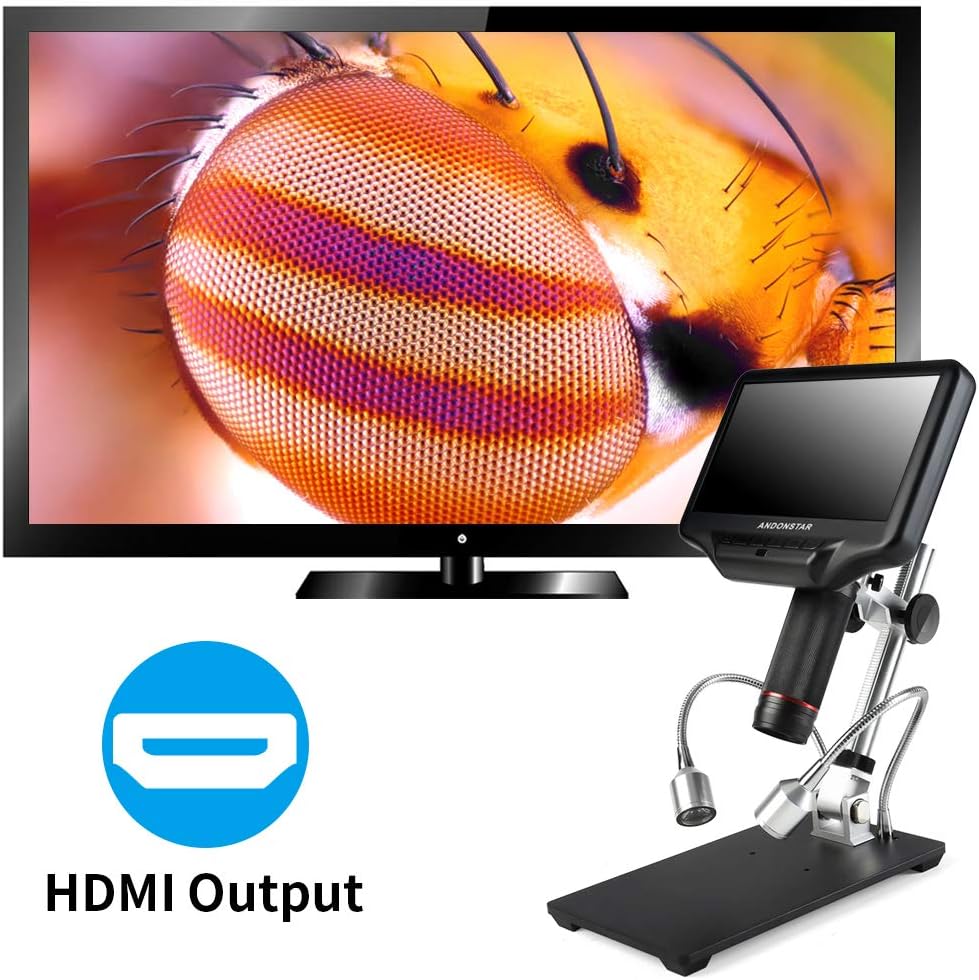
Figure 6.2: HDMI Output Functionality.
This image demonstrates the HDMI output capability of the Andonstar AD407 microscope, showing the microscope connected to an external television. The detailed image of an insect's eye is displayed on the large screen, illustrating the clarity and utility of the HDMI feature for shared viewing or larger display needs.
6.6 Ús del comandament a distància
The wireless remote control provides convenient access to various functions from a distance, minimizing device shake. Point the remote towards the infrared sensor (7) on the microscope. Functions include digital zoom, image discoloration, menu navigation, and more (refer to Figure 4.3 for button layout).
7. Manteniment
Proper care and maintenance will extend the lifespan and performance of your AD407 digital microscope.
- Neteja de la lent i la pantalla: Use a soft, lint-free cloth specifically designed for optical lenses to clean the microscope lens and LCD screen. For stubborn smudges, a small amount of lens cleaning solution can be applied to the cloth (not directly to the lens/screen).
- UV Filter Care: The unique UV filter is designed to protect the metal lens from soldering heat, smoke, and dust. Regularly inspect and clean the UV filter. If it becomes excessively dirty or damaged, it can be replaced.
- Neteja general: Wipe the microscope body and stand with a dry, soft cloth. Avoid using abrasive cleaners or solvents.
- Emmagatzematge: When not in use, store the microscope in a clean, dry place, away from direct sunlight and extreme temperatures. Consider covering it to prevent dust accumulation.

Figure 7.1: UV Filter Functionality.
This image illustrates the purpose of the UV filter located at the bottom of the microscope lens. It highlights how the filter prevents interfering lights, clears the image, and protects the lens from external elements such as smoke, heat, and dust, making it ideal for soldering and maintenance professionals.
8. Solució De Problemes
If you encounter issues with your AD407 microscope, refer to the following common problems and solutions:
| Problema | Causa possible | Solució |
|---|---|---|
| El microscopi no s'encén. | Sense corrent, connexió fluixa, adaptador defectuós. | Ensure power adapter is securely connected and plugged into a working outlet. Check the power switch. |
| La imatge està borrosa o desenfocada. | Incorrect focus, improper working distance, dirty lens. | Adjust the focusing wheel. Adjust the height of the microscope on the stand. Clean the lens and UV filter. |
| No image on external HDMI display. | HDMI cable not connected properly, incorrect input source on TV/monitor. | Ensure HDMI cable is securely connected to both microscope and display. Select the correct HDMI input source on your TV/monitor. |
| No es poden capturar fotos/vídeos. | No Micro SD card, card full, card not formatted, card error. | Insert a Micro SD card. Delete unnecessary files or use a new card. Format the card (refer to menu options). |
| El comandament a distància no funciona. | Low battery, remote not pointed at sensor, obstruction. | Replace remote control battery. Ensure remote is pointed directly at the infrared sensor on the microscope. Remove any obstructions. |
| LED lights are not working or dim. | Loose connection, brightness setting too low. | Check the connection of the light switch cable. Adjust the brightness using the switch. |
9. Especificacions
Key technical specifications for the Andonstar AD407 Digital Microscope:
| Característica | Especificació |
|---|---|
| Nom del model | AD407 |
| Número de model de l'article | AD407-JP |
| Dimensions del producte | 8.66 x 3.94 x 12.6 polzades (22 x 10 x 32 cm) |
| Pes de l'article | 3.32 lliures (1.5 kg) |
| Mida de la pantalla | LCD IPS de 7 polzades |
| Sortida de vídeo | HDMI, USB |
| Resolució de vídeo | 2160P UHD (for video record) |
| Sensor d'imatge | 4MP |
| Ampliació màxima | 270.00x |
| Tipus de font de llum | LED (8 levels adjustable) |
| Material | Plàstic, metall |
| Color | Negre |
| Entrada de potència | 5 Volts |
| Bateries | Lithium Polymer batteries required (included for remote control) |
| Dispositius compatibles | Television (via HDMI) |
| Descripció de la lent objectiva | Acromàtic |
| País d'origen | Xina |
10. Garantia i Suport
Andonstar provides professional after-sales service for its products. For warranty information, technical support, or service inquiries, please refer to the contact information provided with your product packaging or visit the official Andonstar weblloc web. Si us plau, conserveu el rebut de compra per a reclamacions de garantia.


