1. Introducció
The FSP Hydro G PRO 1000W Power Supply (Model HG2-1000) is an IEC62368 certified unit designed for stable and efficient power delivery to your computer system. This power supply features an 80 Plus Gold certification, ensuring high energy efficiency, and a full modular design for simplified cable management. It incorporates advanced safety features and a compact form factor.

Image 1.1: FSP Hydro G PRO 1000W Power Supply, front-top view.
2. Informació de seguretat
Please read and follow these safety guidelines carefully before installing or operating the power supply:
- Assegureu-vos que el subministrament d'alimentació estigui desconnectat de la presa de corrent principal abans de la instal·lació o el manteniment.
- No obriu la font d'alimentació casing. Alt volumtagHi ha elements a l'interior que poden provocar una descàrrega elèctrica.
- Instal·leu la font d'alimentació en una zona ben ventilada per evitar el sobreescalfament.
- Use only the modular cables provided with the power supply. Using incompatible cables may damage the unit or connected components.
- Eviteu exposar la font d'alimentació a la humitat o a temperatures extremes.
- Aquest producte està dissenyat per a ús amb ordinadors personals. No l'utilitzeu per a altres aplicacions.
3. Contingut del paquet
Verifiqueu que tots els elements siguin presents al paquet:
- FSP Hydro G PRO 1000W Power Supply Unit
- Modular Cable Set (including 20+4 Pin ATX, 4+4 Pin CPU, PCI-E 6+2 Pin, SATA, SATA/MOLEX, SATA/MOLEX/FLOPPY cables)
- Cable d'alimentació CA
- Cargols de muntatge
- Manual d'usuari (aquest document)

Image 3.1: Included modular cables for the FSP Hydro G PRO power supply.

Image 3.2: Cable length and connector type diagram for the 1000W model.
4. Configuració i instal·lació
Follow these steps to install your FSP Hydro G PRO power supply:
- Prepara la carcassa del teu PC: Ensure your PC case has adequate space for the power supply (dimensions: 5.91 x 5.91 x 3.39 inches / 150 x 150 x 86 mm).
- Muntar la font d'alimentació: Secure the power supply unit into the designated bay in your PC case using the provided mounting screws.
- Connecteu els cables modulars:
- Identify the necessary cables for your components (Motherboard, CPU, PCI-e, Peripherals like SATA/Molex).
- Plug the required modular cables into the corresponding ports on the power supply. The ports are clearly labeled.
- Connect the other end of each cable to your motherboard, CPU, graphics card(s), and storage devices.
- Connecteu l'alimentació de CA: Once all internal connections are secure, plug the AC power cord into the power supply's AC inlet, then connect the other end to a wall outlet or surge protector.
- Encès: Ensure the main power switch on the power supply is in the 'ON' position.

Image 4.1: Clearly labeled modular ports for easy cable connection.

Image 4.2: Fully modular design for simplified installation and cable management.
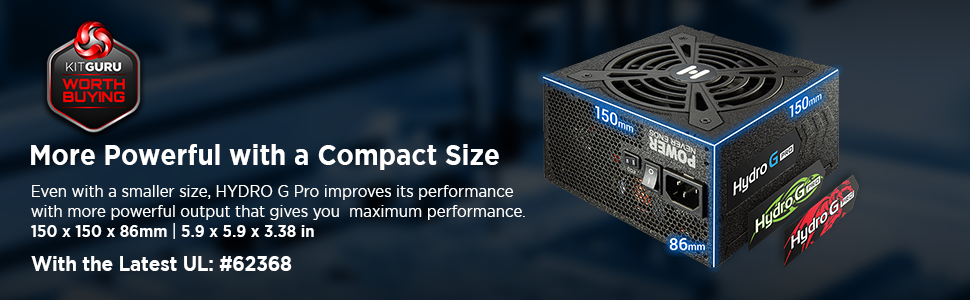
Image 4.3: Compact dimensions (150mm x 86mm x 170mm) for space-saving installation.
5. Instruccions de funcionament
5.1. ECO Fan Switch
The FSP Hydro G PRO features an ECO fan switch, allowing you to control the fan operation for quieter performance.
- ECO ON: In this mode, the fan will remain off under low load conditions (typically below 30% load) for silent operation. The fan will automatically activate when the load increases to maintain optimal temperatures.
- ECO OFF: In this mode, the fan operates continuously, adjusting its speed based on the power supply's temperature and load.

Image 5.1: ECO switch for fan control, enabling silent operation at low loads.

Image 5.2: The ECO switch allows for a quieter computing experience by stopping the fan at low power consumption.
5.2. Fluid Dynamic Bearing (FDB) Fan
The power supply is equipped with a 120mm Fluid Dynamic Bearing (FDB) fan, which provides quiet operation and extended lifespan compared to traditional fan bearings.
Video 5.1: Official FSP video demonstrating the Hydro G PRO Power Supply's features, including Off-Wet Technology and fan operation. This video highlights the product's durability and quiet performance.
6. Manteniment
Per garantir un rendiment òptim i la longevitat de la vostra font d'alimentació:
- Keep the power supply and its ventilation grilles free from dust accumulation. Use compressed air to gently clean dust from the fan and vents periodically.
- Ensure proper airflow within your PC case to prevent heat buildup.
- Do not attempt to disassemble or repair the power supply. This will void the warranty and poses a safety risk.
7. Solució De Problemes
If you encounter issues with your FSP Hydro G PRO power supply, refer to the following common problems and solutions:
| Problema | Causa possible | Solució |
|---|---|---|
| No power to components | Power cable loose, main switch off, faulty outlet, internal short. | Check AC power cord connection. Ensure power supply main switch is ON. Test outlet with another device. Verify all modular cables are securely connected. |
| System crashes or reboots | Insufficient power, overheating, faulty component. | Assegureu-vos que tot el sistema estigui aiguattage does not exceed PSU capacity. Check for proper ventilation. Monitor component temperatures. If issues persist, consult a professional. |
| Fan not spinning (ECO mode) | Normal operation under low load. | This is expected behavior in ECO ON mode. The fan will activate when the load increases. If the fan never spins even under high load, switch ECO mode OFF to force continuous fan operation. If it still doesn't spin, contact support. |
| Sorolls inusuals | Cargols solts, obstrucció del ventilador, xiulet de la bobina. | Check if the PSU is securely mounted. Ensure no cables are obstructing the fan. Minor coil whine can be normal; if it's loud or persistent, contact support. |
If troubleshooting steps do not resolve the issue, please contact FSP customer support for further assistance.
8. Especificacions
| Característica | Detall |
|---|---|
| Marca | FSP |
| Sèrie | Hydro G PRO |
| Número de model | PS-FS-HG2P1000 |
| Pes de l'article | 7.26 lliures |
| Dimensions del producte (LxWxH) | 5.91 x 5.91 x 3.39 polzades (150 x 150 x 86 mm) |
| Factor de forma | ATX |
| Potència de sortidatage | 1000 watts |
| Certificació d'eficiència | 80 més d'or |
| Disseny de fonts d'alimentació | Completament Modular |
| Mètode de refrigeració | Aire (ventilador de coixinets dinàmics de fluids de 120 mm) |
| Dispositius compatibles | Ordinador personal |
| Tipus de connector | ATX |
| Estàndard ATX | ATX12V V2.52 |
| Condensadors | Full Japanese electrolytic capacitors |

Image 8.1: The 80 Plus Gold certification ensures high power efficiency.
9. Garantia i Suport
The FSP Hydro G PRO 1000W Power Supply comes with a 10 anys de garantia, providing long-term assurance for your investment.
For technical support, warranty claims, or further inquiries, please visit the official FSP weblloc web o poseu-vos en contacte amb el seu departament d'atenció al client. Conserveu el comprovant de compra per validar la garantia.

Image 9.1: FSP provides 10-year support for the Hydro G PRO series.


