1. Introducció
This manual provides essential instructions for the safe and effective operation of your Goopow H11 Kids Digital Camera. Please read this manual thoroughly before using the product and retain it for future reference.
2. Contingut del paquet
Verifiqueu que tots els elements que s'enumeren a continuació s'inclouen al vostre paquet:
- Goopow H11 Kids Digital Camera (with soft silicone cover)
- Cable de càrrega USB
- Targeta Micro SD de 32 GB
- Corda
- Manual d'usuari
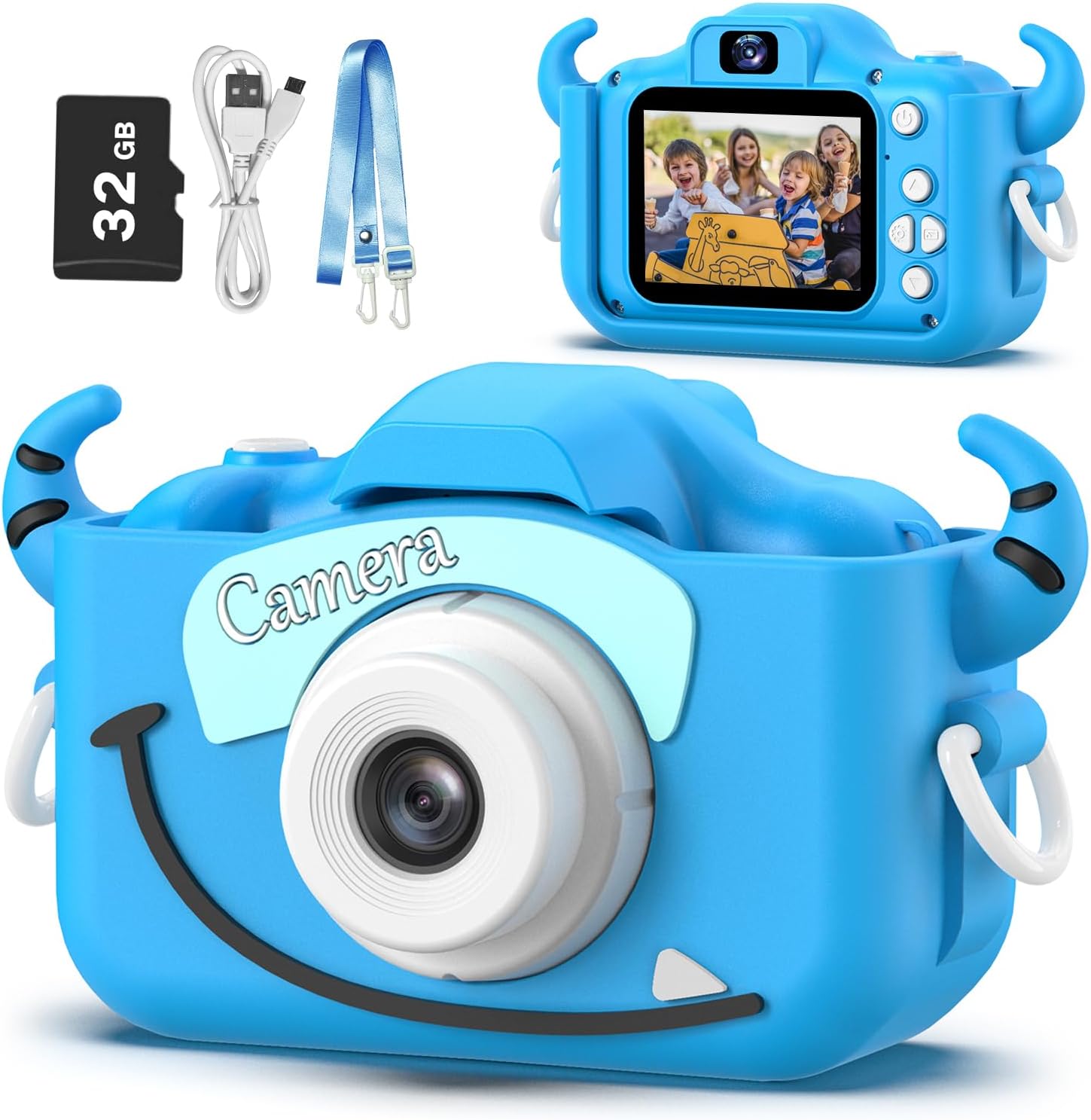
Image: Goopow H11 Kids Digital Camera, 32GB SD card, USB cable, and lanyard.
3. Producte acabatview
The Goopow H11 is a compact digital camera designed for children, featuring a durable soft silicone cover. It supports photo capture, video recording, playback, and includes built-in games.

Image: Dimensions of the Goopow H11 Kids Digital Camera, highlighting its compact size.
Característiques principals:
- Pantalla LCD d'2.0 polzades: Per viewfent fotos i vídeos.
- 1080P Video Recording: Capture clear video moments.
- Zoom digital 8X: For capturing distant subjects.
- Mode selfie: Front-facing camera for self-portraits.
- Funcions múltiples: Photo capture, video recording, playback, games, time-lapse, and various scene selections/frames.
- Funda de silicona duradora: Provides protection against drops and bumps.
- Bateria recarregable incorporada: 3.7V Lithium battery, USB rechargeable.
- Targeta SD de 32 GB inclosa: Ampemmagatzematge per a fotos i vídeos.
Vídeo: Un vídeo promocionalasing the Goopow Kids Camera, highlighting its design, various colors, and features like selfie mode, digital zoom, and fun filters.
4. Configuració
4.1. Càrrega de la càmera
Before first use, fully charge the camera. Connect the provided USB charging cable to the camera's charging port and a compatible USB power adapter (not included) or computer USB port. The charging indicator light will illuminate during charging and turn off when fully charged.
Important: Use a charger with an output of no more than 1A. Avoid fast chargers, as they can damage the battery. Charging should be supervised by an adult.
4.2. Inserting/Removing the SD Card
The camera comes with a 32GB Micro SD card pre-installed. If you need to remove or insert the card:
- Gently lift the silicone cover to expose the SD card slot.
- To insert, push the Micro SD card into the slot until it clicks into place.
- To remove, gently push the card again until it pops out.
4.3. Fixació del cordó
Attach the provided lanyard to the camera for easy carrying and to prevent accidental drops. Thread the lanyard through the designated loops on the camera's silicone cover.
5. Instruccions de funcionament
5.1. Encendre/apagar
Press and hold the power button (usually located on the top or side) for a few seconds to turn the camera on or off.

Image: The Goopow H11 Kids Digital Camera displaying its main menu with icons for camera, video, playback, settings, games, and music.
5.2. Navegació
Use the directional buttons (up, down, left, right) to navigate through the menu options. Press the "OK" or shutter button to select an option.
5.3. Fer fotos
- From the main menu, select the camera icon.
- Enquadra la teva foto amb la pantalla LCD.
- Press the shutter button (top right) to take a picture.
- To switch to selfie mode, use the appropriate button (refer to the camera's button layout).

Image: The Goopow H11 Kids Digital Camera in selfie mode, showing three children smiling on the screen.
5.4. Gravació de vídeos
- From the main menu, select the video camera icon.
- Premeu el botó de l'obturador per iniciar la gravació. Torneu-lo a prémer per aturar-lo.

Image: The Goopow H11 Kids Digital Camera recording video, with a scene of children at a birthday party displayed on the screen.
5.5. Reproducció
Select the playback icon from the main menu to view your captured photos and videos. Use the directional buttons to browse through them.
5.6. Característiques especials
- Frames and Filters: Access various fun frames and filters from the camera menu to add creative effects to your photos.
- Zoom digital: Use the zoom buttons (if available) to adjust the 8X digital zoom.
- Jocs: The camera includes multiple puzzle games for entertainment.

Image: The Goopow H11 Kids Digital Camera displaying various funny frames and filters that can be applied to photos.

Image: The Goopow H11 Kids Digital Camera demonstrating its 8X digital zoom capability, showing a child's face at different zoom levels.
6. Manteniment
- Mantingueu la càmera neta netejant-la amb un drap suau i sec.
- Avoid exposing the camera to extreme temperatures or direct sunlight for extended periods.
- Ensure the charging port and SD card slot are free from dust and debris.
7. Solució De Problemes
| Problema | Solució |
|---|---|
| La càmera no s'encén. | Assegureu-vos que la bateria estigui carregada. Connecteu-la a un carregador i torneu-ho a provar. |
| No es poden fer fotos/vídeos. | Check if the SD card is inserted correctly and has sufficient storage space. |
| Mala qualitat d'imatge. | Ensure adequate lighting. Clean the camera lens if it's dirty. |
| La càmera es congela. | Press the reset button (if available, refer to product diagram) or hold the power button for 10 seconds to force a restart. |
8. Especificacions
- Model: H11
- Marca: Goopow
- Dimensions del producte: 1.3 x 7.52 x 4.45 polzades
- Pes de l'article: 3.7 unces
- Bateria: 1 bateria de polímer de liti (inclosa)
- Zoom òptic: 8x
- Màxim WebResolució d'imatge de càmera: 12 MP
- Admet File Format: JPEG
- Estabilització d'imatge: Digital
9. Garantia i Suport
For warranty information or technical support, please refer to the contact details provided with your purchase or visit the official Goopow weblloc web. Conserveu el comprovant de compra per a reclamacions de garantia.


