Introducció
This manual provides essential information for the safe and efficient operation of your ZTE Vodafone 4G Mobile Broadband Hotspot (Model R219z). Please read this manual thoroughly before using the device to ensure proper setup, usage, and maintenance. Keep this manual for future reference.
Contingut del paquet
Verifiqueu que tots els elements siguin presents al paquet del producte:
- ZTE Vodafone 4G Mobile Broadband Hotspot (Model R219z)
- Carregador de xarxa
- Guia d'inici ràpid (si s'inclou)
- Informació de seguretat (si s'inclou)
Producte acabatview
The ZTE Vodafone 4G Mobile Broadband Hotspot is a portable device designed to provide high-speed internet access via a 4G mobile network. It allows multiple devices to connect wirelessly to the internet.
Disseny del dispositiu
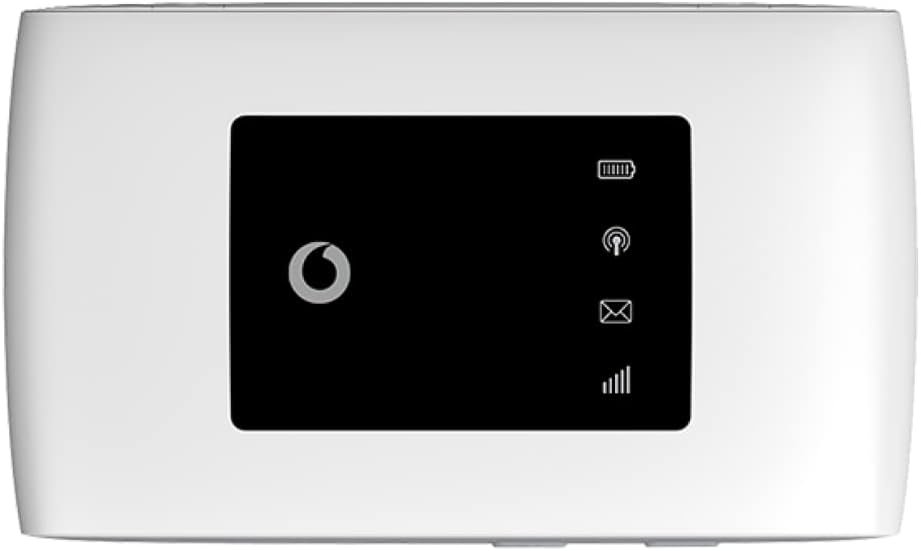
Figura 1: Davant view of the ZTE Vodafone 4G Mobile Broadband Hotspot. The screen displays icons for signal strength, Wi-Fi status, new messages, and battery level.
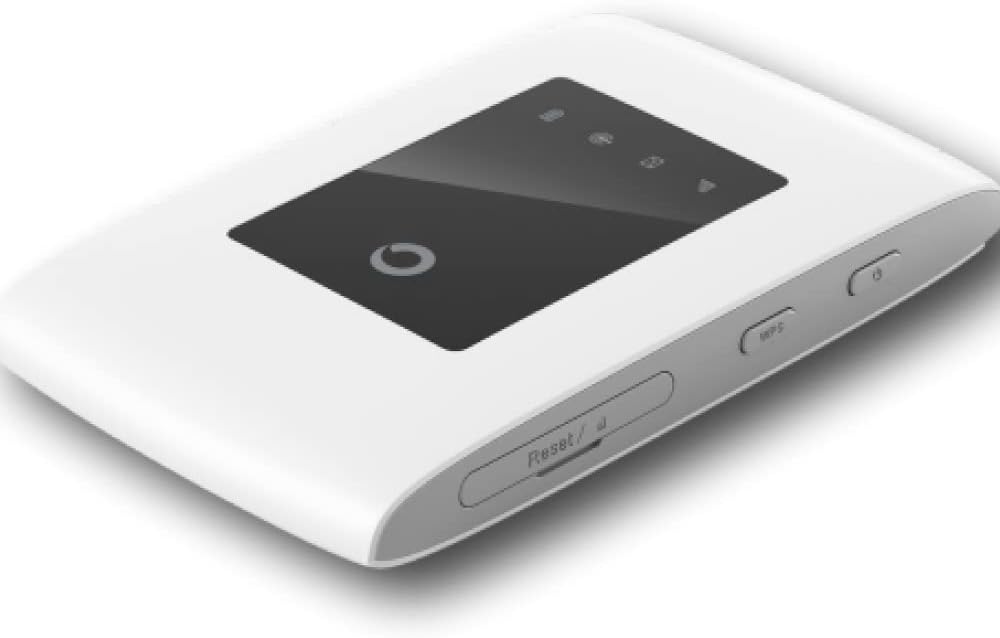
Figura 2: En angle view of the hotspot, highlighting the power button and the WPS (Wi-Fi Protected Setup) button on the side. A small reset pinhole is also visible.

Figura 3: A baix view of the device, showing the micro USB port used for charging the hotspot.
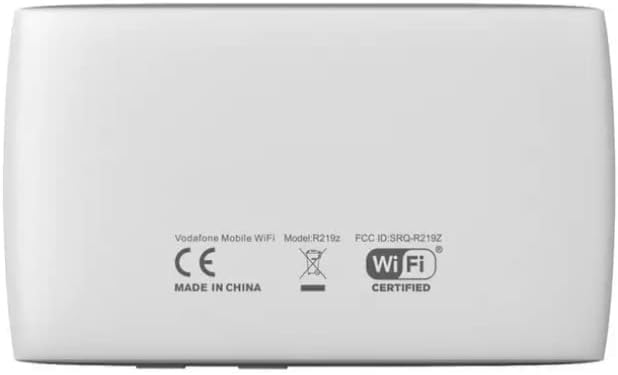
Figura 4: Enrere view of the hotspot, displaying the product label with regulatory information, including the model number R219z and FCC ID.
Característiques principals:
- 4G connectivity with speeds up to 150 Mbps.
- Supports WPA2 encryption for secure Wi-Fi connections.
- Operates on Wifi 2.4 GHz frequency.
- Offers approximately 8 hours of battery life during active use and 250 hours on standby.
- Permet connectar fins a 10 dispositius simultàniament.
Configuració
Inserció de la targeta SIM i la bateria
- Assegureu-vos que el dispositiu estigui apagat.
- Traieu la coberta posterior del punt d'accés.
- Insert your 4G compatible SIM card into the SIM card slot with the gold contacts facing down and the notched corner aligned correctly.
- Introduïu la bateria al seu compartiment, assegurant-vos que els contactes estiguin alineats.
- Torneu a col·locar la coberta posterior fins que encaixi al seu lloc.
Càrrega del dispositiu
- Connect the provided mains charger to the micro USB port on the hotspot (refer to Figure 3).
- Connecteu el carregador a una presa de corrent.
- The battery indicator on the screen will show charging status. Allow the device to fully charge before first use.
Instruccions de funcionament
Encès/Apagat
- To power on: Press and hold the Power button (refer to Figure 2) until the screen illuminates.
- Per apagar: premeu i manteniu premut el botó d'engegada fins que el dispositiu s'apagui.
Connecting Devices to the Hotspot
- Ensure the hotspot is powered on and has a stable 4G signal.
- On your Wi-Fi enabled device (e.g., smartphone, tablet, laptop), open the Wi-Fi settings.
- Cerca available Wi-Fi networks. The hotspot's network name (SSID) and password (Wi-Fi Key) are typically found on a label inside the battery compartment or on the device's packaging.
- Select the hotspot's SSID from the list.
- Enter the Wi-Fi Key when prompted.
- El dispositiu ara hauria d'estar connectat a Internet a través del punt d'accés.
Ús de WPS (Wi-Fi Protected Setup)
WPS allows for a quick connection without manually entering the password:
- On the hotspot, press the WPS button (refer to Figure 2) for a few seconds until the WPS indicator on the screen starts blinking.
- Within two minutes, activate WPS on your client device (e.g., by pressing the WPS button on a router, or selecting the WPS option in your device's Wi-Fi settings).
- Els dispositius es connectaran automàticament.
Manteniment
- Neteja: Feu servir un drap suau i sec per netejar el dispositiu. No utilitzeu netejadors líquids ni aerosols.
- Emmagatzematge: Guardeu el dispositiu en un lloc fresc i sec, allunyat de la llum solar directa i de temperatures extremes.
- Cura de la bateria: Per allargar la durada de la bateria, eviteu descarregar-la completament amb freqüència. Carregueu el dispositiu regularment, fins i tot si no l'utilitzeu durant períodes prolongats.
- Actualitzacions de programari: Periodically check for firmware updates through the device's web interface (if available) to ensure optimal performance and security.
Resolució de problemes
| Problema | Causa possible | Solució |
|---|---|---|
| Sense connexió a Internet | No SIM card, incorrect APN settings, no network signal, data limit reached. | Ensure SIM card is inserted correctly. Check network signal strength. Verify APN settings via the web interface. Contact your service provider. |
| No es pot connectar a la Wi-Fi | Incorrect Wi-Fi password, device too far from hotspot, Wi-Fi disabled on client device. | Verify Wi-Fi password. Move closer to the hotspot. Ensure Wi-Fi is enabled on your device. |
| Hotspot not powering on | Low battery, faulty battery, power button issue. | Charge the device. Try a different charger. If problem persists, contact support. |
| Velocitat d'internet lenta | Weak signal, network congestion, too many connected devices. | Move to an area with better signal. Disconnect unnecessary devices. |
Especificacions
| Característica | Detall |
|---|---|
| Marca | ZTE |
| Nom del model | R219z |
| Dimensions del producte | 11 x 6.3 x 1.2 cm |
| Pes | 222 g |
| Bateries | 1 bateria de ions de liti (inclosa) |
| Tecnologia de connectivitat | Wi-Fi |
| Comunicació sense fils estàndard | Radiofreqüència de 2.4 GHz |
| Classe de banda de freqüència | Doble banda |
| Característica especial | WPS |
| Dispositius compatibles | Personal Computer, Tablet, Smart Television |
| Usos recomanats | Llar, Negocis |
| Components inclosos | Carregador de xarxa |
Garantia i Suport
For warranty information and technical support, please refer to the warranty card included with your product or visit the official ZTE or Vodafone support weblloc web. Conserveu el comprovant de compra per a reclamacions de garantia.
If you encounter issues not covered in the troubleshooting section, please contact the manufacturer's customer service or your service provider for assistance.


