
Acabatview
The KanDao Meeting 360 Video Conference Camera is an all-in-one solution designed to enhance remote meeting experiences. It captures comprehensive 360-degree panoramic views at 8K resolution, delivering clear 1080P output. Equipped with advanced AI technology, it features smart auto speaker tracking, ensuring that the active speaker is always in focus. The device integrates powerful audio capabilities with 8 omnidirectional microphones for wide voice pickup and dual 10W speakers for clear sound output, effectively minimizing background noise and echo. Its plug-and-play functionality ensures easy setup and broad compatibility with popular video conferencing platforms.
Què hi ha a la caixa
- KanDao Meeting 360 Device
- Adaptador d'alimentació
- Cable USB-C
- Manual d'instruccions
- Targeta de garantia
Configuració
Connexió inicial
The KanDao Meeting 360 camera is designed for simple plug-and-play operation. To begin, connect the device to a power source using the provided adapter. Then, connect the camera to your PC or Mac using the supplied USB-C cable. No complex driver installations are typically required. Once connected, the camera is ready for use with your preferred video conferencing software.

Image: A visual guide demonstrating the simple plug-and-play setup, showing the camera connected to a laptop and ready for a meeting.
Video Demonstration: Setup and Features
Video: An official product video demonstrating the setup process and key features of the KanDao Meeting 360 camera, including its ease of use and various functionalities.
Operating Your KanDao Meeting 360 Camera
Panoràmica de 360 graus View and Dynamic Focus
The KanDao Meeting 360 captures the entire meeting room, ensuring all participants are visible. Its 8K capturing capability provides high-definition video, which is then outputted at 1080P for clear streaming. The camera dynamically adjusts to keep everyone engaged and in view.

Image: A graphic illustrating the 360-degree panoramic capture capability of the KanDao Meeting 360 camera, highlighting its 8K capture and 1080P output.
AI Smart Auto Speaker Tracking
Leveraging advanced AI technology, the camera automatically identifies and focuses on the active speaker in the room. This intelligent tracking ensures a natural and intuitive meeting experience, making remote participants feel more connected.

Imatge: Una imatge superior view of a meeting room with the KanDao Meeting 360 camera at the center, showing a blue circle representing the audio pickup range and a highlighted image of an active speaker, demonstrating the AI auto-tracking feature.
Audio Features: Microphones and Speakers
The KanDao Meeting 360 is equipped with 8 omnidirectional microphones capable of picking up voices from up to 18 feet away. These microphones work in conjunction with noise-cancelling and echo-cancellation technology to ensure clear audio input. Dual 10W full-duplex speakers provide crisp and powerful sound output, allowing all participants to hear clearly.
Imatge: Un retall view of the KanDao Meeting 360 camera highlighting its 8-microphone array and dual 10W speakers, emphasizing noise reduction and echo cancellation capabilities.
Multi-Conference Modes
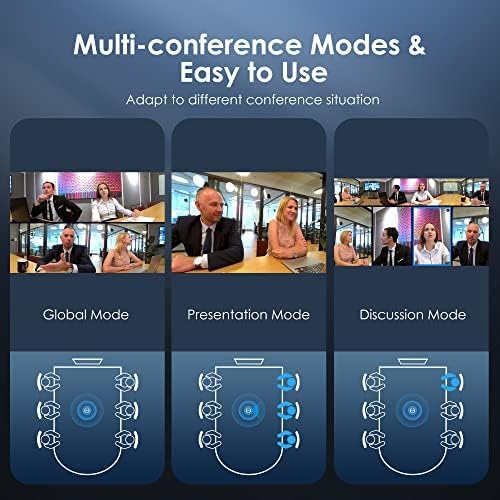
The camera offers various display modes to suit different meeting scenarios:
- Mode global: Displays two panoramic videos to show all attendees, providing a comprehensive view de l'habitació.
- Mode de presentació: The camera focuses on and delivers an exclusive shot of whoever is speaking, ideal for presentations.
- Discussion Mode: Highlights speakers in turn, with a 360-degree view on top to show the entire room context.

Image: Three panels illustrating the different multi-conference modes (Global, Presentation, Discussion) available on the KanDao Meeting 360 camera, showing how the view adapts to different meeting dynamics.
Compatibilitat
The KanDao Meeting 360 camera is widely compatible with most major video conferencing software and platforms, including but not limited to:
- Zoom
- Google Meet
- GoToMeeting
- Skype
- Microsoft Teams
- Blue Jeans
- Faux
- Polycom
Manteniment
To ensure optimal performance and longevity of your KanDao Meeting 360 camera, follow these general maintenance guidelines:
- Neteja: Use a soft, dry cloth to wipe the exterior of the device. For the camera lenses, use a lens cleaning cloth and solution specifically designed for optical surfaces. Avoid abrasive materials or harsh chemicals.
- Emmagatzematge: Quan no la feu servir, guardeu la càmera en un lloc fresc i sec, allunyat de la llum solar directa i de temperatures extremes.
- Manipulació: Handle the device with care to prevent drops or impacts that could damage internal components or the pop-up camera mechanism.
- Escut de privadesa: Utilize the pop-up design to shield the camera lenses when not in use for privacy and to protect the lenses from dust.
Resolució de problemes
Problemes comuns i solucions
- No Video Output / Camera Not Detected:
- Assegureu-vos que el cable USB estigui connectat correctament tant a la càmera com a l'ordinador.
- Proveu de connectar-vos a un altre port USB de l'ordinador.
- Restart your computer and the conferencing software.
- Verify that the camera is selected as the video input device within your conferencing software settings.
- Ensure the camera's pop-up mechanism is fully extended and the lenses are not shielded.
- Microphone/Sound Input Issues (e.g., feedback, no sound):
- Check that the KanDao Meeting 360 is selected as the audio input device in your conferencing software and operating system settings.
- Adjust microphone sensitivity settings within your software.
- Ensure there are no physical obstructions blocking the microphones on the device.
- Minimize other audio sources or devices that might cause interference or feedback.
- Speaker Output Issues (e.g., low volume, no sound):
- Verify that the KanDao Meeting 360 is selected as the audio output device in your conferencing software and operating system settings.
- Increase the volume on the device itself (if applicable) and within your computer's sound settings.
- Ensure the speakers are not muted.
- Problemes d'actualització del firmware:
- Refer to the official KanDao website for the latest firmware and detailed update instructions.
- Ensure a stable power supply and internet connection during updates.
Especificacions tècniques
| Nom de marca | KanDao |
| Número de model de l'article | WL0308 |
| Pes de l'article | 4.84 lliures |
| Dimensions del producte | 4.96 x 4.96 x 11.2 polzades |
| Nom del color | Negre |
| Tecnologia de connectivitat | USB |
| Resolució de captura de vídeo | 1080p, 8K |
| Tecnologia del sensor fotogràfic | CMOS |
| Format d'àudio compatible | PCM (16bit/Mono Audio/16KHz) |
| Característiques especials | AI-Powered Framing & Speaker Tracking, 360 Degree Wide-Angle Full Room Coverage, Wide Compatibility, Plug and Play |
Garantia i Suport
The KanDao Meeting 360 Video Conference Camera comes with a 1-year (12-month) warranty. For any technical assistance, product inquiries, or warranty claims, please contact the KanDao Official Store or visit their support channels. Purchasing from the official store ensures swift support from their professional global customer service team.
For additional information and resources, you may refer to the official User Guide PDF: KanDao Meeting 360 User Guide (PDF)

Image: An icon representing quick response customer support, indicating available assistance.


