1. Introducció
The STEELPLAY HP51 Gaming Headset is designed to provide an immersive audio experience for gamers across multiple platforms. Featuring 3D sound, a flexible omnidirectional microphone, and versatile connectivity options, this headset enhances communication and gameplay. This manual provides instructions for setup, operation, and maintenance of your HP51 headset.

Imatge 1.1: Frontal view of the STEELPLAY HP51 Gaming Headset, showcasing its black design with red accents and attached flexible microphone.
2. Contingut del paquet
Si us plau, verifiqueu que tots els elements que s'enumeren a continuació siguin presents al vostre paquet:
- STEELPLAY HP51 Gaming Headset
- Flexible Omnidirectional Microphone (pre-attached or detachable)
- Integrated cable with 3.5mm Jack and USB connectors, featuring in-line controls

Image 2.1: The retail packaging for the STEELPLAY HP51 Gaming Headset, displaying product features and compatibility.
3. Característiques
- Immersive 3D Sound: Delivers clear and rich audio with depth and distance effects for enhanced gaming.
- High-Quality Omnidirectional Microphone: Flexible and detachable microphone for clear communication.
- Comfortable and Durable Design: Lightweight, comfortable ear cushions and an adjustable, padded metal headband for extended gaming sessions.
- Compatibilitat multiplataforma: Connects to PS4, Xbox One, Nintendo Switch, PC, Mac, Laptops, and Smartphones.
- Connectivitat dual: Features both a 3.5mm jack and a USB connector for versatile plug-and-play use.
- Controls en línia: Conveniently located controls on the braided cable for volume adjustment and microphone mute.
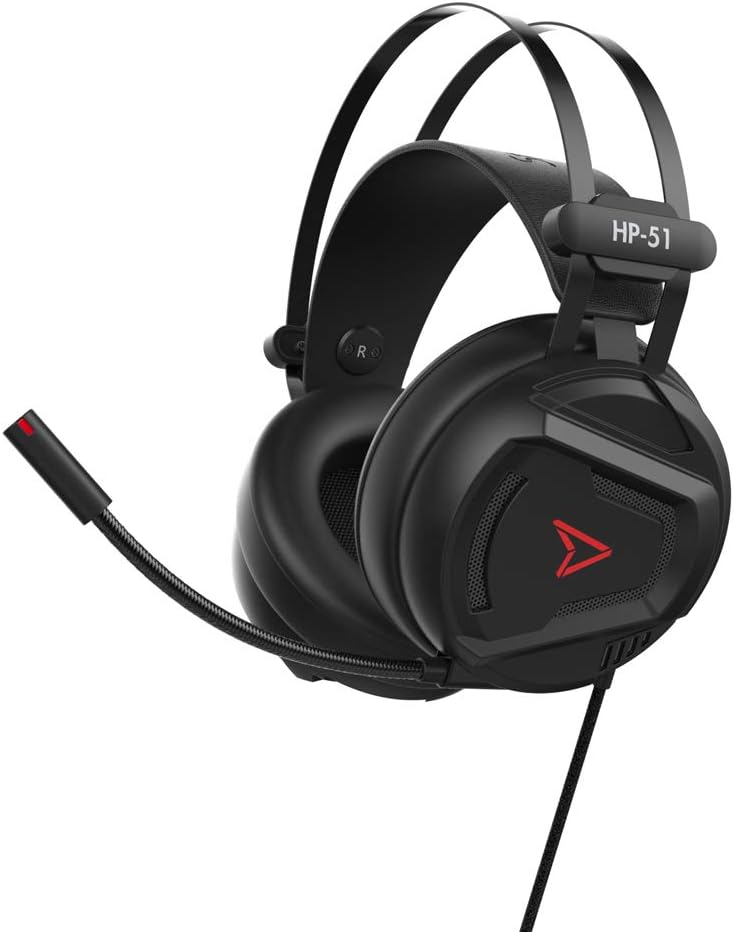
Imatge 3.1: Lateral view of the STEELPLAY HP51 Gaming Headset, highlighting the adjustable headband and the flexible microphone with a red indicator light.
4. Configuració
4.1 Connexió del micròfon
If your microphone is detachable, gently insert the microphone jack into the designated port on the left earcup until it clicks into place. Ensure it is securely connected for optimal voice pickup.
4.2 Connecting to Gaming Consoles (PS4, Xbox One, Nintendo Switch)
- Locate the 3.5mm audio jack on your console's controller.
- Plug the 3.5mm connector from the HP51 headset cable into the controller's audio jack.
- Adjust audio settings on your console if necessary to ensure the headset is recognized as the primary audio input/output device.
4.3 Connecting to PC, Mac, or Laptop
- For audio and microphone functionality, plug the 3.5mm connector into your computer's combined audio jack (if available). If separate ports are present, you may need an adapter (not included).
- Alternatively, for power (e.g., LED lighting, if applicable) and potentially enhanced audio features, plug the USB connector into an available USB port on your computer.
- Verify audio input and output settings in your operating system's sound preferences to select the HP51 headset.
4.4 Connecting to Smartphones
Plug the 3.5mm connector directly into your smartphone's audio jack. If your smartphone does not have a 3.5mm jack, a compatible adapter (not included) will be required.

Image 4.1: Close-up of the STEELPLAY HP51 headset's braided cable, showing the 3.5mm jack, USB connector, and the in-line control unit for volume and microphone.
5. Instruccions de funcionament
5.1 Com portar els auriculars
Adjust the headband to fit comfortably over your head. The earcups should fully enclose your ears for optimal sound isolation and comfort. The flexible microphone can be positioned near your mouth for clear voice pickup or moved away when not in use.

Imatge 5.1: Part superior view of the STEELPLAY HP51 Gaming Headset, showing the padded headband with the "Steelplay" logo and the overall robust construction.
5.2 Ús de controls en línia
- Control de volum: Use the scroll wheel or slider on the in-line control unit to increase or decrease the audio volume.
- Silència del micròfon: Flip the switch on the in-line control unit to mute or unmute the microphone. Ensure the microphone is unmuted when you wish to communicate.
6. Manteniment
- Neteja: Use a soft, dry cloth to clean the headset. Do not use abrasive cleaners or solvents.
- Emmagatzematge: Guardeu els auriculars en un lloc fresc i sec, allunyat de la llum solar directa i de temperatures extremes. Eviteu col·locar objectes pesats a sobre dels auriculars.
- Cura del cable: Eviteu doblegar el cable bruscament o estirar-lo massa per evitar danys.
7. Solució De Problemes
| Problema | Possible solució |
|---|---|
| No hi ha so dels auriculars |
|
| El micròfon no funciona |
|
| La qualitat del so és deficient |
|
8. Especificacions
| Característica | Detall |
|---|---|
| Número de model | JVAMUL00110 |
| Connectivitat | Jack de 3.5 mm, USB |
| Tipus de micròfon | Omnidirectional, Flexible, Detachable |
| Característiques de so | 3D Sound, Immersive Audio |
| Dimensions (L x A x A) | 23 x 11 x 23.5 cm |
| Pes | 236 grams |
| Compatibilitat | PS4, Xbox One, Nintendo Switch, PC, Mac, Laptop, Smartphone |
9. Garantia i Suport
The STEELPLAY HP51 Gaming Headset comes with a manufacturer's warranty. Please refer to the warranty card included with your product or visit the official Steelplay website for detailed warranty terms and conditions. For technical support or further assistance, please contact Steelplay customer service through their official channels.
Actualment no es proporciona informació sobre la disponibilitat de peces de recanvi.


