1. Introducció
This manual provides detailed instructions for the setup, operation, and maintenance of your Targus M610 AKM610AP Wireless Mouse and Keyboard Combo. This combo offers a reliable 2.4GHz wireless connection, a full-sized keyboard, and a high-definition 1600 DPI optical mouse for efficient and comfortable use.

Figure 1: Targus M610 AKM610AP Wireless Mouse and Keyboard Combo. This image shows the full-sized black wireless keyboard and the matching black wireless mouse.
2. Contingut del paquet
Verifiqueu que tots els elements siguin presents al vostre paquet:
- Targus Wireless Keyboard
- Ratolí sense fil Targus
- Receptor USB
- 1 AA Battery (for mouse, included)

Figure 2: The wireless mouse shown alongside its compact USB receiver. The receiver enables wireless connectivity for both the mouse and keyboard.
3. Instruccions de configuració
Follow these steps to set up your Targus Wireless Mouse and Keyboard Combo:
- Instal·leu les bateries:
- For the mouse: Open the battery compartment cover on the underside of the mouse. Insert the provided AA battery, ensuring correct polarity (+/-). Close the cover.
- For the keyboard: Open the battery compartment cover on the underside of the keyboard. Insert the required batteries (typically AAA, not included for keyboard based on JSON). Ensure correct polarity (+/-). Close the cover.
- Connecteu el receptor USB:
Locate an available USB port on your computer. Insert the USB receiver firmly into the USB port. Your computer should automatically detect and install the necessary drivers. This is a plug-and-play device, requiring no additional software installation.

Figura 3: Un primer pla view of the compact USB receiver, which facilitates the wireless connection for both the keyboard and mouse.
- Encès:
Ensure the power switch on both the mouse and keyboard (if present) is in the "ON" position. The devices should now be ready for use.
4. Instruccions de funcionament
4.1. Ús del teclat
The Targus M610 keyboard features a full-sized layout for comfortable typing.
- Mecanografia estàndard: Feu servir les tecles alfanumèriques per introduir text.
- Tecles de funció (F1-F12): These keys may have secondary multimedia functions (e.g., volume control, media playback) accessible by pressing the Fn tecla simultàniament.
- Teclat numèric: The dedicated numeric keypad on the right provides quick entry for numbers and calculations.
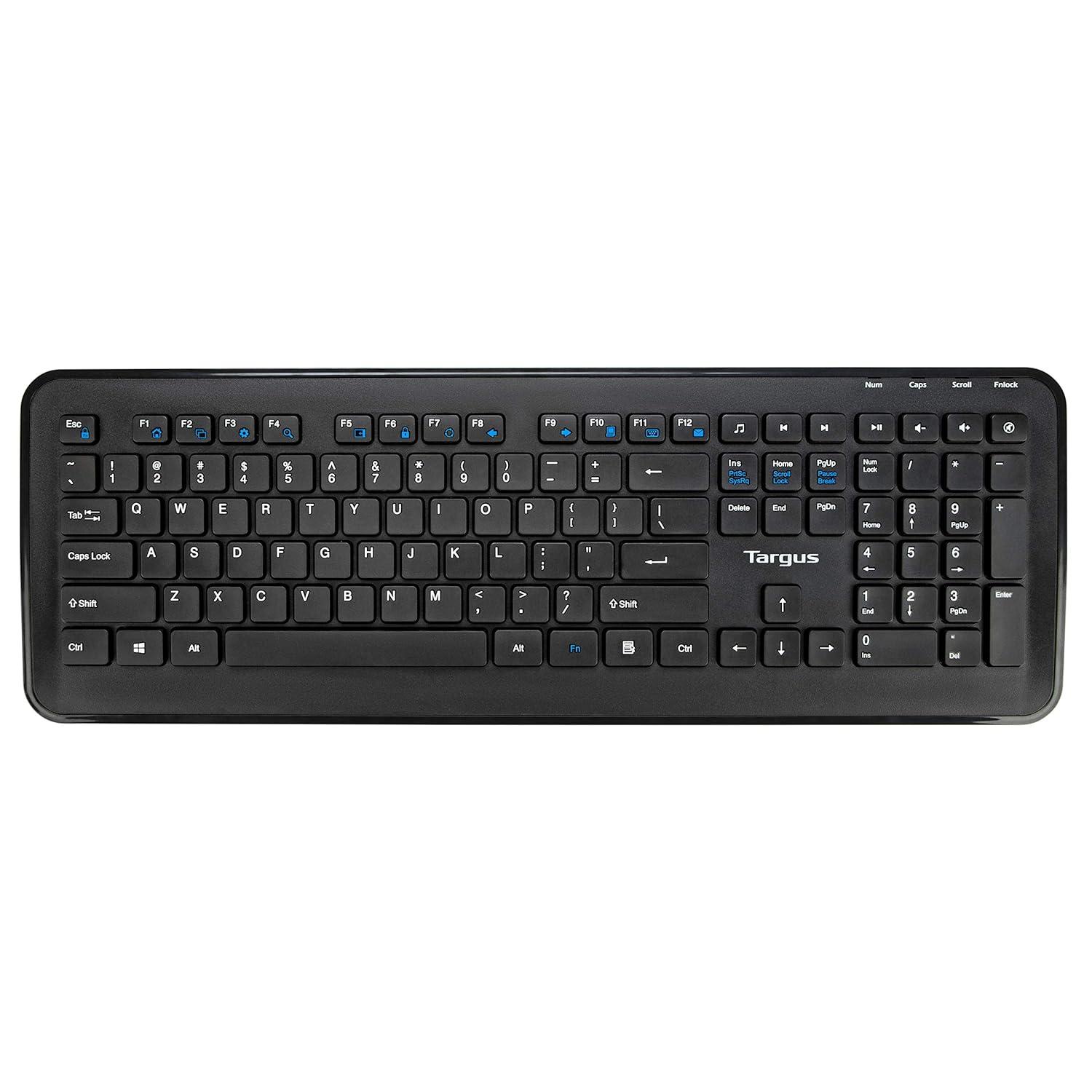
Figura 4: De dalt a baix view of the full-sized Targus wireless keyboard, highlighting its layout and function keys.
4.2. Ús del ratolí
The Targus M610 mouse is equipped with a high-definition 1600 DPI optical sensor for precise tracking.
- Botó esquerre del clic: Selecció i activació primàries.
- Botó del botó dret: Accedeix als menús contextuals.
- Roda de desplaçament: Navega verticalment pels documents i web pages. Can also function as a middle-click button.
- DPI Sensor: The 1600 DPI optical sensor provides accurate and responsive cursor movement.

Figura 5: superior view of the Targus wireless mouse, showing the left and right click buttons and the scroll wheel.
5. Manteniment i cura
To ensure the longevity and optimal performance of your Targus Wireless Combo, follow these maintenance guidelines:
- Neteja: Feu servir un drap suau i sec per netejar les superfícies del teclat i el ratolí. Per a la brutícia persistent, netegeu lleugerament.ampNetegeu el drap amb aigua o una solució de neteja suau. Eviteu productes químics agressius o materials abrasius.
- Substitució de la bateria: Replace batteries when performance degrades or the low battery indicator (if present) illuminates. Always use fresh, high-quality batteries of the specified type (AA for mouse, typically AAA for keyboard).
- Emmagatzematge: When not in use for extended periods, store the combo in a cool, dry place. Consider removing batteries to prevent leakage.
- Eviteu líquids: Mantingueu el teclat i el ratolí allunyats de líquids per evitar danys als components interns.
6. Solució De Problemes
If you encounter issues with your Targus Wireless Combo, refer to the following common solutions:
| Problema | Solució |
|---|---|
| El teclat o el ratolí no responen. |
|
| Connexió intermitent o retard. |
|
| El cursor del ratolí és erràtic o no es mou suaument. |
|
7. Especificacions
Detailed technical specifications for the Targus M610 AKM610AP Wireless Mouse and Keyboard Combo:
| Característica | Detall |
|---|---|
| Marca | Targus |
| Número de model | AKM610AP |
| Tecnologia de connectivitat | 2.4GHz Wireless, USB Receiver |
| Color | Negre |
| Sensor del ratolí | Sensor òptic de 1600 DPI |
| Tipus de teclat | Full-sized with Multimedia Keys |
| Dispositius compatibles | Personal Computer, Laptop, Television, Projector |
| Font d'alimentació | Funciona amb bateria |
| Piles necessàries | 1 AA battery (for mouse, included) |
| Dimensions del producte (teclat) | Approximately 45.5 cm (Width) x 15.7 cm (Height) |
| Dimensions del producte (ratolí) | Approximately 6.6 cm (Length) x 3.8 cm (Width) x 1.1 cm (Height) |
| Pes de l'article | 611 g (total combo weight) |

Figure 6: Diagram illustrating the approximate dimensions of the Targus wireless keyboard, including its width and height, and highlighting the 12 multimedia keys.

Figure 7: Diagram illustrating the approximate dimensions of the Targus wireless mouse (length, width, height) and indicating the high-precision nano receiver.
8. Garantia i Suport
The Targus M610 AKM610AP Wireless Mouse and Keyboard Combo comes with a 3 anys de garantia.
For warranty claims, technical support, or further assistance, please contact Targus customer service through their official website or the retailer where the product was purchased. Keep your proof of purchase for warranty validation.
For more information, visit the official Targus weblloc: www.targus.com


