Introducció
This manual provides detailed instructions for the setup, operation, maintenance, and troubleshooting of your Retro-Bit Sega Genesis 2.4 GHz Wireless Controller. This controller is designed for compatibility with Sega Genesis, Sega Genesis Mini, PC, Mac, PlayStation 3, and Nintendo Switch systems, offering a versatile gaming experience.

Image: The Retro-Bit Sega Genesis 2.4 GHz Wireless Controller, its retail packaging, and the two included wireless receivers (one for Sega Genesis port, one USB).
Configuració
Contingut del paquet
Verifiqueu que tots els elements siguin presents al paquet:
- Retro-Bit Sega Genesis 2.4 GHz Wireless Controller
- Sega Genesis Port Receiver
- USB Port Receiver
- Cable de càrrega de 3.3 peus
- Estoig d'emmagatzematge

Image: The Retro-Bit controller, both receivers, and the charging cable neatly organized within the included storage case.
Carregant el controlador
The controller features a built-in 550 mAh rechargeable battery. Before initial use, fully charge the controller using the provided 3.3ft charging cable. Connect the micro-USB end of the cable to the controller's charging port and the USB-A end to a compatible USB power source (e.g., computer USB port, USB wall adapter).

Image: The bottom edge of the controller, highlighting the micro-USB charging port and the red LED indicator light, which illuminates during charging.
Connexió a dispositius
The controller utilizes 2.4 GHz wireless technology for connection. Select the appropriate receiver for your system.
Sega Genesis / Genesis Mini
1. Insert the Sega Genesis Port Receiver into a controller port on your Sega Genesis or Sega Genesis Mini console.
2. Power on your console.
3. Press the START button on the wireless controller to power it on. The controller will automatically attempt to pair with the receiver. A solid LED on both the controller and receiver indicates a successful connection.
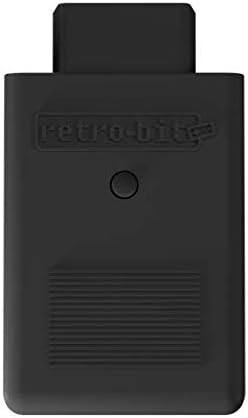
Image: The Sega Genesis Port Receiver, a black dongle designed to plug directly into a Sega Genesis controller port.
PC / Mac / Nintendo Switch / PS3
1. Insert the USB Port Receiver into an available USB port on your PC, Mac, Nintendo Switch dock, or PlayStation 3 console.
2. Enceneu el dispositiu.
3. Press the START button on the wireless controller to power it on. The controller will automatically attempt to pair with the receiver. A solid LED on both the controller and receiver indicates a successful connection.
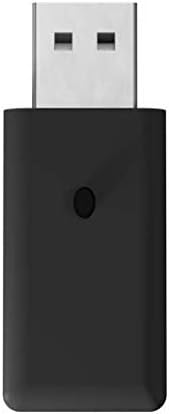
Image: The USB Port Receiver, a black USB dongle compatible with various modern systems.

Image: A compatibility chart illustrating which systems are supported by the 2.4 GHz wireless controller, including Mac, PC, Nintendo Switch, PS3, and Sega Genesis Mini.
Instruccions de funcionament
Disseny de botons
The controller features an 8-button arcade pad layout, including a D-pad, START, SELECT/HOME, and six face buttons (A, B, C, X, Y, Z), along with two shoulder buttons (L, R).

Imatge: Una clara view of the controller's face, detailing the directional pad, START button, SELECT/HOME button, and the six action buttons (A, B, C, X, Y, Z).
Encès/Apagat
- Per encendre: premeu el botó COMENÇA button. The LED indicator will light up.
- Per apagar: premeu i manteniu premut el botó COMENÇA button for approximately 3 seconds until the LED indicator turns off.
Mode de repòs
The controller is equipped with an automatic sleep mode feature. If there is no activity for 5 minutes, the controller will enter sleep mode to conserve battery life. To wake the controller, press any button.
Gaming Range
The 2.4 GHz wireless connection provides a gaming range of up to 30 feet (approximately 9 meters) from the receiver. Optimal performance is achieved within this range without significant obstructions.
Manteniment
Neteja
Per netejar el controlador, feu servir un drap suau i sec. Per a la brutícia resistent, feu servir un drap lleugerament sec.amp cloth can be used, followed by immediate drying. Avoid using harsh chemicals, abrasive cleaners, or excessive moisture, as these can damage the controller's finish and internal components.
Cura de la bateria
To prolong the life of the internal lithium-ion battery:
- Eviteu descarregar completament la bateria amb freqüència.
- Guardeu el controlador en un lloc fresc i sec quan no l'utilitzeu durant períodes prolongats.
- Charge the controller periodically if stored for a long time to prevent deep discharge.
Resolució de problemes
- El controlador no es connecta:
Ensure the correct receiver is plugged into the device. Verify the controller is charged. Try pressing the START button to initiate pairing. If issues persist, try unplugging and re-plugging the receiver, then restarting the controller. - Input lag or dropped connection:
Ensure the controller is within the 30-foot operating range of the receiver. Minimize physical obstructions between the controller and receiver. Avoid strong electromagnetic interference from other wireless devices. - El comandament no es carrega:
Check that the charging cable is securely connected to both the controller and the power source. Try a different USB port or power adapter. Ensure the charging port on the controller is free of debris. - Els botons no responen:
Power cycle the controller and reconnect it. If specific buttons are consistently unresponsive, contact customer support.
Especificacions
| Número de model | 849172011007 |
| Connectivitat | Sense fil de 2.4 GHz |
| Dispositius compatibles | Sega Genesis, Sega Genesis Mini, PC, Mac, PlayStation 3, Nintendo Switch |
| Tipus de bateria | 1 ió de liti (inclòs) |
| Capacitat de la bateria | 550 mAh |
| abast sense fils | Fins a 30 peus (9 metres) |
| Pes de l'article | 10.4 unces |
| Color | Negre |
Garantia i Suport
For information regarding product warranty, technical support, or service, please refer to the official Retro-Bit website or contact their customer service department. Details are typically available on the manufacturer's packaging or official product pages.