Introducció
This manual provides comprehensive instructions for the safe and efficient installation, operation, and maintenance of your LogiLink BP0074 Dual Monitor Desk Mount. Please read this manual thoroughly before beginning installation to ensure correct setup and to prevent damage to the product or injury. Keep this manual for future reference.
Informació de seguretat
- Assegureu-vos que tots els components siguin presents i no estiguin danyats abans del muntatge. No utilitzeu el producte si hi falta alguna peça o si és defectuosa.
- Verify that the desk surface can support the combined weight of the mount and two monitors.
- Do not exceed the maximum load capacity of 6 kg (13.22 lbs) per arm.
- Use appropriate tools and follow all steps carefully. Improper installation may result in product failure or personal injury.
- Mantingueu els nens i les mascotes allunyats durant la instal·lació.
Contingut del paquet
Please check the package to ensure all items listed below are included:
- 1 x Dual Monitor Desk Mount Assembly
- 2 x VESA Monitor Plates
- 1 x Escriptori Clamp Assemblea
- 1 x Hardware Kit (screws, washers, spacers, Allen keys)
- 1 x manual d'instruccions
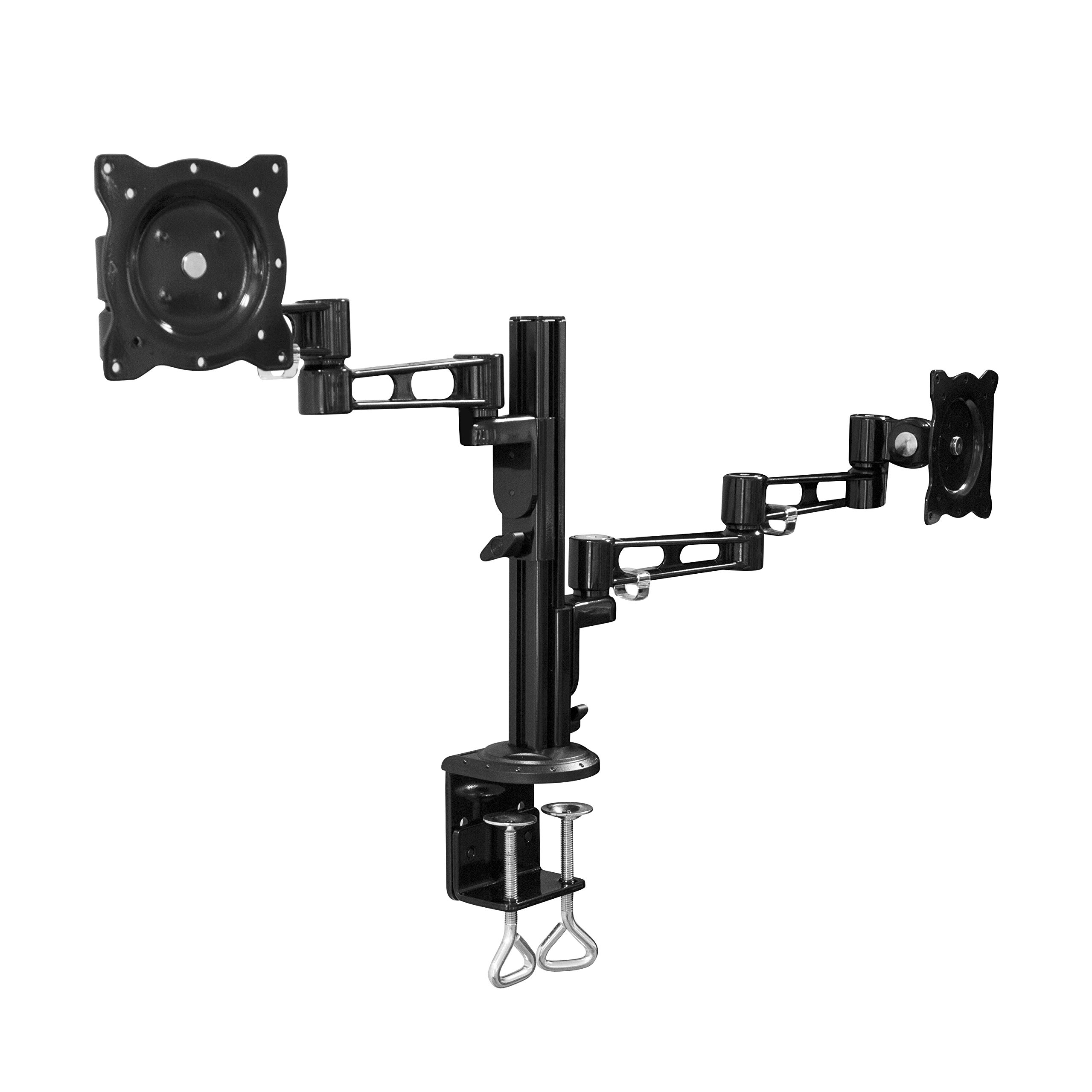
Image: All components of the LogiLink BP0074 Dual Monitor Desk Mount.
Instruccions de configuració
Step 1: Attach Desk Clamp a l’escriptori
Col·loca l'escriptori clamp assembly on the edge of your desk. Tighten the clamp screws securely until the mount is stable. Ensure the clamp is flush with the desk surface for maximum stability.
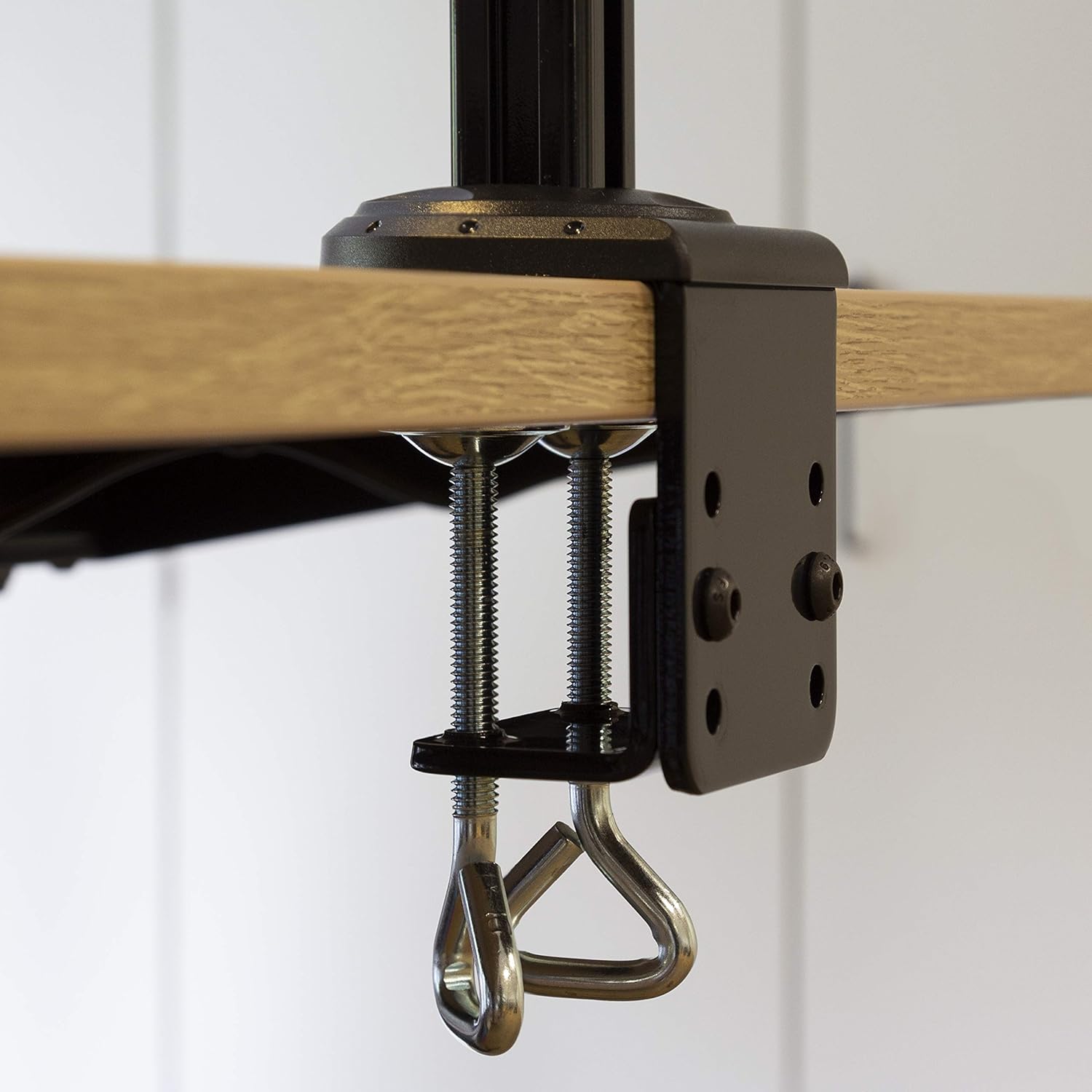
Image: Close-up of the desk clamp mechanism securely attached to a desk.
Step 2: Assemble Monitor Arms
Slide the monitor arms onto the main pole of the desk clamp assembly. Adjust their height to your desired position and secure them using the provided locking mechanisms. Ensure both arms are at a similar height for ergonomic viewing.
Pas 3: connecteu les plaques VESA als monitors
Align the VESA monitor plates with the mounting holes on the back of your monitors. Use the appropriate screws, washers, and spacers from the hardware kit to secure the plates to each monitor. Ensure the screws are tightened firmly but do not overtighten.

Image: VESA plate attached to the back of a monitor.
Pas 4: Muntar els monitors als braços
Carefully slide the monitors (with VESA plates attached) onto the ends of the monitor arms. Secure them in place using the quick-release or locking mechanisms on the arms. Ensure both monitors are firmly attached before releasinels g.

Image: Two monitors mounted on the LogiLink BP0074 desk mount.
Instruccions de funcionament
Ajust de la posició del monitor
The LogiLink BP0074 mount offers full motion capabilities:
- Inclinació: Adjust the monitor vertically (up/down) to reduce glare and optimize viewangles d'ajust.
- Girar: Rotate the monitor horizontally (left/right) to share your screen or change viewdirecció.
- Rotació: Gireu el monitor 360 graus per canviar entre l'orientació horitzontal i vertical.
Loosen the adjustment screws slightly with the provided Allen key before making adjustments, then tighten them once the desired position is achieved.

Image: Demonstrating the flexible positioning of monitors on the mount.
Gestió de cables
Utilize the integrated cable management clips on the monitor arms to route and organize your cables. This helps maintain a tidy workspace and prevents cable damage.

Image: Cable management clips on the monitor arm.

Image: Detail of cables routed through the clips for organization.
Manteniment
Regular maintenance ensures the longevity and safe operation of your monitor mount:
- Neteja: Netegeu la muntura amb un drap suauamp drap. Eviteu productes de neteja o dissolvents abrasius.
- Comprovar l'estanquitat: Periodically check all screws and bolts, especially the desk clamp and VESA plate attachments, to ensure they remain tight. Retighten if necessary.
- Lubricació: No lubrication is typically required for this type of mount.
Resolució de problemes
Si teniu problemes, consulteu els següents problemes i solucions habituals:
| Problema | Causa possible | Solució |
|---|---|---|
| Monitor is unstable or sags | Screws are loose; monitor weight exceeds capacity | Tighten all connection screws. Verify monitor weight is within 6 kg per arm. |
| Dificultat per ajustar la posició del monitor | Adjustment screws are too tight | Slightly loosen the relevant adjustment screws with the Allen key. |
| Mount slides on desk | Escriptori clamp is not tight enough | Assegureu-vos que l'escriptori clamp is fully tightened and flush against the desk surface. |
Especificacions
| Característica | Detall |
|---|---|
| Número de model | BP0074 |
| Mida de pantalla compatible | 13 - 26 inches (per monitor) |
| Nombre de monitors | 2 |
| Capacitat de càrrega màxima | 6 kg (13.22 lbs) per arm |
| Compatibilitat VESA | 75x75mm, 100x100mm |
| Interval de moviment | Full Motion (Tilt, Swivel, Rotation) |
| Material | Metall |
| Dimensions del producte (LxWxH) | 55.3 x 79.2 x 11.6 cm (overall package/product dimensions) |
| Pes de l'article | 4.1 kg |
| Longitud del braç | Each 358 mm |

Image: Technical drawing showing key dimensions and VESA patterns.
Garantia i Suport
LogiLink products are designed for reliability and performance. For warranty information or technical support, please refer to the contact details provided with your purchase documentation or visit the official LogiLink weblloc web. Si us plau, conserveu el comprovant de compra per a reclamacions de garantia.


