1. Introducció
Gràcies per la compraasing the DELUX M618MINI Ergonomic Vertical Mouse. This device is designed to provide a comfortable and natural hand position, reducing wrist and hand fatigue during extended use. It features versatile connectivity options, customizable DPI settings, and a rechargeable battery for enhanced productivity.
2. Característiques del producte
- Disseny ergonòmic: The mouse is shaped to fit the hand naturally, minimizing strain and promoting a comfortable grip for long-term use. This design helps alleviate wrist and hand fatigue.
- Connectivitat multimodal: Offers three connection modes: wired, 2.4G wireless, and Bluetooth. It utilizes improved Bluetooth 5.0 and 2.4Ghz wireless transmission for precise tracking and fast response, ensuring a strong and stable wireless connection. (Note: Bluetooth 5.0 is specifically for Windows 8+ systems).
- Il·luminació RGB: Integrated RGB lighting provides an ambient atmosphere, enhancing your workspace with both practical and aesthetic value.
- Silent Buttons: Equipped with silent click buttons that reduce over 90% of noise, allowing you to focus on your work without disturbing others in quiet environments.
- USB-C recarregable: Features a built-in 1000mAh rechargeable battery. It can be easily charged using the included USB-C cable. The energy-saving mode allows for up to 2 weeks of use on a full charge, even with RGB lighting active. The mouse can be used while charging.
- Àmplia compatibilitat: Compatible with Windows XP/Vista/7/8/10/Android, PC, laptops, computers, notebooks, mobile phones, and MacBooks. (Note: On Mac OS, the back/forward buttons and custom drivers are not supported).
3. Contingut del paquet
The DELUX M618MINI package includes the following items:
- DELUX M618MINI Ergonomic Vertical Mouse
- Cable de càrrega USB-C
- 2.4GHz USB Receiver (stored in the mouse's bottom compartment)
- Manual d'usuari

Image: Contents of the DELUX M618MINI retail box.
4. Configuració
4.1 Encès/Apagat
Locate the ON/OFF switch on the bottom of the mouse. Slide it to the 'ON' position to power on the mouse. Slide it to 'OFF' when not in use to conserve battery.
4.2 Connexió del ratolí
The M618MINI offers three connection methods:
- Mode per cable: Connect the included USB-C cable to the mouse and the other end to an available USB port on your computer. The mouse will function immediately.
- Mode sense fil de 2.4 GHz:
- Remove the 2.4GHz USB receiver from its storage slot on the bottom of the mouse.
- Connecteu el receptor USB a un port USB disponible de l'ordinador.
- Slide the mode switch on the bottom of the mouse to the '2.4G' position. The mouse should connect automatically.
- Mode Bluetooth:
- Feu lliscar l'interruptor de mode a la part inferior del ratolí fins a la posició "BT".
- Press and hold the Bluetooth pairing button (usually located near the mode switch) until the indicator light on the mouse starts blinking, indicating it's in pairing mode.
- On your computer or device, go to Bluetooth settings and search for new devices. Select 'DELUX M618MINI' (or similar) from the list to pair.
- For Bluetooth 5.0, ensure your system is Windows 8 or newer for optimal performance.

Image: Bottom of the mouse with power and mode switches.

Image: Multi-system compatibility and connection options.
5. Instruccions de funcionament
The DELUX M618MINI mouse features standard buttons and additional ergonomic controls:
- Botons de clic esquerre/dret: Standard mouse functions. Designed for silent clicks.
- Roda de desplaçament: Per a desplaçament vertical.
- Botons Endavant/Enrere: Located on the side for easy navigation in web navegadors i file explorers. (Note: These buttons may not be functional on Mac OS without third-party software).
- Botó DPI: Located near the scroll wheel, used to adjust the mouse sensitivity.
5.1 Ajust de DPI
Press the DPI button to cycle through different sensitivity levels. The M618MINI supports multiple DPI settings up to 4000 DPI, allowing you to choose the speed that best suits your needs (e.g., 800, 1200, 1600, 2400, 4000 DPI). An indicator light may change to show the current DPI setting.

Image: DPI adjustment and RGB lighting.
Il·luminació RGB 5.2
The mouse features integrated RGB lighting. The lighting is designed to be ambient and can be a decorative element for your workspace. Specific controls for RGB lighting (if any) are usually integrated with the DPI button or through software (check manufacturer's website for software availability).
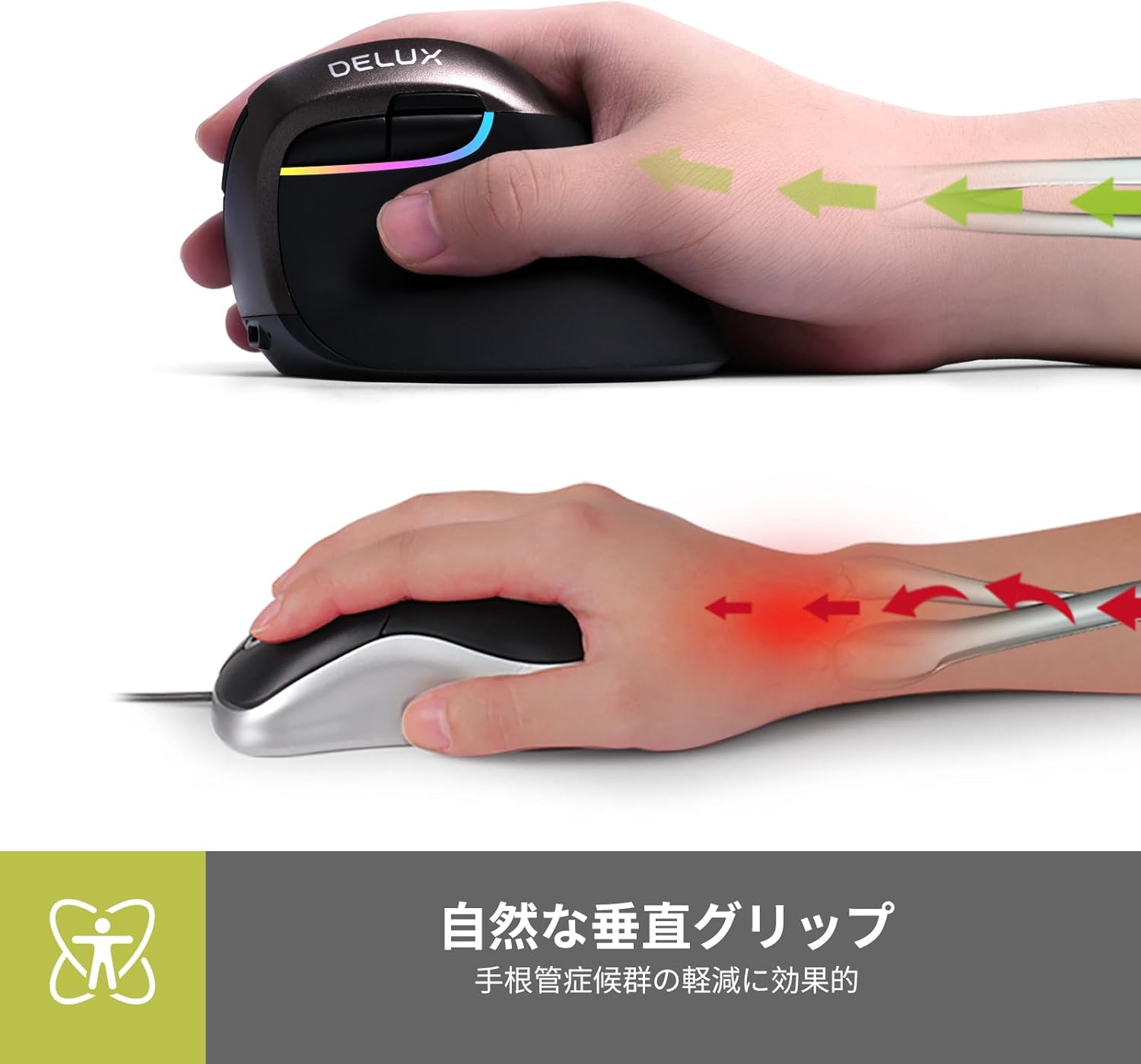
Image: Natural vertical grip for reduced wrist strain.

Image: Comparison of traditional vs. natural vertical grip.

Image: Comfortable thumb and pinky rest.

Image: Rubber lacquer finish for enhanced grip.

Image: Button layout diagram.
6. Càrrega
The DELUX M618MINI mouse has a built-in 1000mAh rechargeable battery. To charge the mouse:
- Connect the included USB-C cable to the charging port on the front of the mouse.
- Connecteu l'altre extrem del cable USB-C a una font d'alimentació USB (per exemple, un port USB de l'ordinador o un adaptador de paret USB).
- The mouse can be used while charging. A full charge provides up to 2 weeks of use in energy-saving mode, even with RGB lighting active.
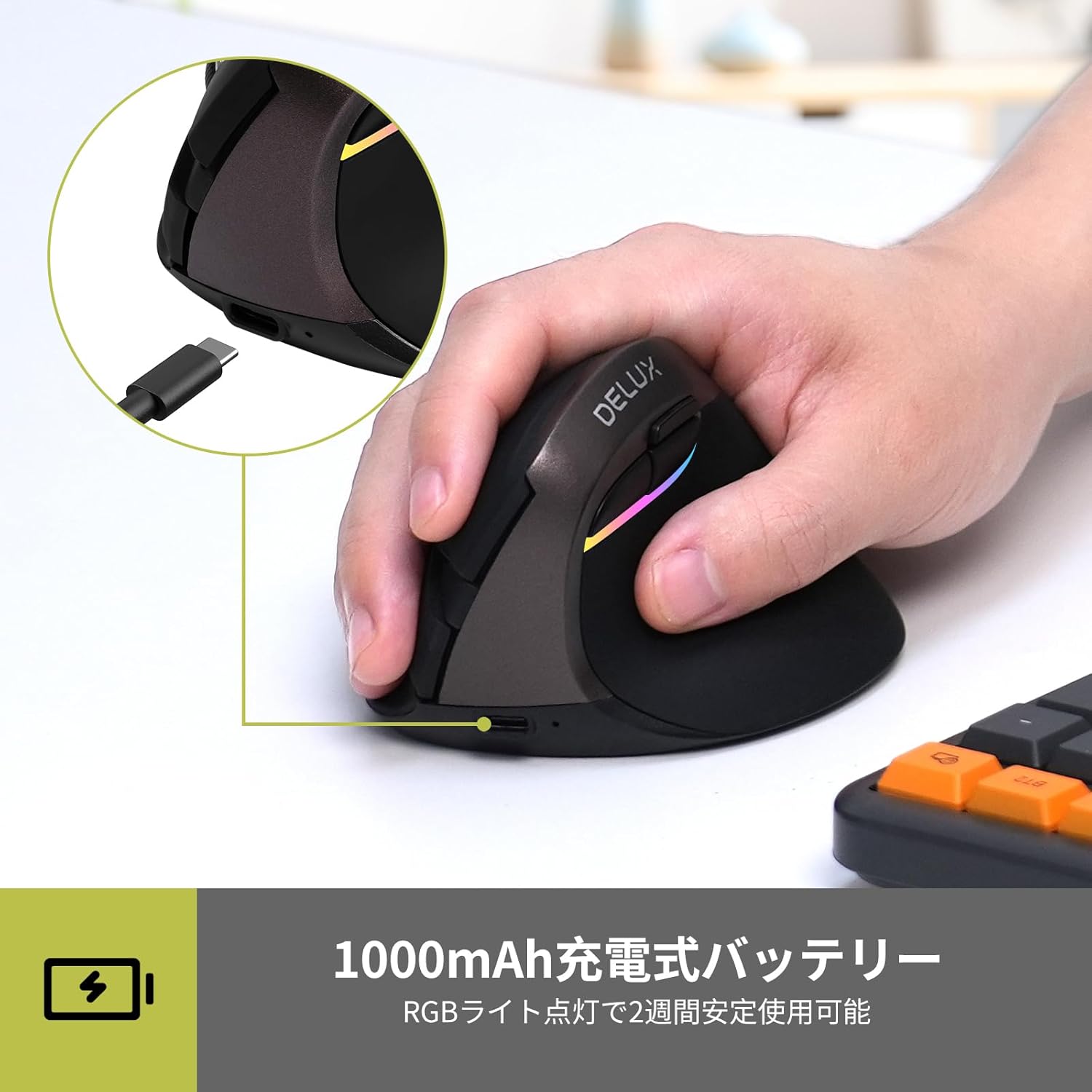
Image: USB-C charging port.

Image: 1000mAh rechargeable battery and USB-C charging.
7. Manteniment
To ensure the longevity and optimal performance of your DELUX M618MINI mouse:
- Mantingueu el ratolí net netejant-lo amb un drap suau i sec.
- Avoid exposing the mouse to extreme temperatures, humidity, or direct sunlight.
- Do not disassemble the mouse, as this may void the warranty.
8. Solució De Problemes
8.1 El ratolí no respon
- Ensure the mouse is powered on (ON/OFF switch on the bottom).
- Check the battery level. If low, connect the USB-C charging cable.
- For 2.4GHz wireless: Ensure the USB receiver is securely plugged into a working USB port and the mode switch is set to '2.4G'.
- For Bluetooth: Ensure the mouse is in BT mode, paired correctly, and your device's Bluetooth is enabled. Try re-pairing if necessary.
- If using wired mode, ensure the USB-C cable is securely connected to both the mouse and the computer.
- Try connecting the mouse to a different USB port or a different computer to rule out port or computer issues.
8.2 Cursor Movement is Erratic or Slow
- Netegeu el sensor òptic de la part inferior del ratolí amb un drap suau.
- Adjust the DPI setting using the DPI button to a more suitable level.
- Assegureu-vos que feu servir el ratolí sobre una superfície adequada (es recomana una estora de ratolí).
8.3 Silent Buttons Not Working
- The silent click feature refers to reduced audible click noise, not a complete absence of sound or tactile feedback.
- If buttons are completely unresponsive, refer to "Mouse Not Responding" section.

Image: Silent buttons for quiet operation.

Image: Noiseless structure with silent buttons.
9. Especificacions
| Característica | Detall |
|---|---|
| Marca | DELUX |
| Model | M618MINI |
| Connectivitat | Cablejat (USB-C), sense fil de 2.4 GHz, Bluetooth 5.0 |
| Configuració de DPI | Up to 4000 DPI (Adjustable: 800/1200/1600/2400/4000) |
| Detecció de moviment | Òptic |
| Bateria | 1000mAh Rechargeable Lithium Battery (Built-in) |
| Durada de la bateria | Up to 2 weeks (with RGB lighting, in energy-saving mode) |
| Port de càrrega | USB-C |
| Característiques especials | Ergonomic Design, RGB Lighting, Silent Buttons |
| Compatibilitat | Windows XP/Vista/7/8/10, Android, PC, Laptops, MacBooks |
| Dimensions | 10.5 x 9.3 x 8.2 cm |
| Pes | 180 g |

Imatge: Dimensions del producte.
10. Vídeos de productes
10.1 DELUX M618MINI Features Overview
Video: This video demonstrates the ergonomic design, USB receiver setup, real-time battery display, DPI adjustment, multi-device switching capabilities, and USB-C charging of the DELUX M618MINI vertical mouse.
10.2 Vertical Mouse Ergonomics and Operation
Video: This video showcases the ergonomic benefits of the vertical design, comfortable thumb rest, multi-device connectivity, and charging process of a vertical wireless mouse.
11. Garantia i Suport
All DELUX products are covered by a 12 mesos de garantia from the date of purchase. Additionally, DELUX provides assistència tècnica gratuïta de per vida per aquest producte.
If you encounter any issues or require assistance, please contact DELUX customer support through your retailer or the official DELUX website. Please have your product model (M618MINI) and purchase information ready when contacting support.


