Introducció
Gràcies per la compraasing the Rockville RPM45 1800W Powered Soundboard Mixing Console. This manual provides essential information for the safe and efficient operation of your device. Please read it thoroughly before use and retain it for future reference.
Instruccions importants de seguretat
- To reduce the risk of electric shock, do not open the unit. There are no user-serviceable parts inside. Refer service to an authorized Rockville service center.
- Do not expose this unit to any type of moisture.
- Assegureu-vos una ventilació adequada. No bloquegeu les obertures de ventilació.
- Substituïu els fusibles només amb el mateix tipus i capacitat.
- Connecteu sempre a una presa de corrent amb connexió a terra.
Producte acabatview
The Rockville RPM45 is a powerful 4-channel mixer designed for versatile audio applications. It features a robust 1800W output, built-in effects, phantom power, and various input/output options for microphones, instruments, and external audio sources.

Figura 1: Frontal view of the Rockville RPM45 Powered Soundboard Mixing Console.
Guia de configuració
1. Connexió dels altaveus
The RPM45 features dual 1/4" speaker outputs (8-ohm). Ensure your speakers' impedance matches the mixer's output requirements. For optimal performance, connect speakers with 8-ohm impedance.
Video: Learn how to set up a subwoofer to your RPM45 mixer. This video demonstrates the connection process for expanding your audio system.
2. Connexió de micròfons i instruments
The mixer provides 4 balanced XLR inputs for microphones and 4 1/4" TRS inputs for instruments. Each channel has individual controls for level, high, low, and DSP/FX.
- Entrades XLR: Use XLR cables for microphones.
- 1/4" TRS Inputs: Use 1/4" cables for instruments like guitars, keyboards, or line-level devices.
- Potència fantasma: For condenser microphones, activate the +15V phantom power switch located on the main control panel.
- PAD -20dB: If the input signal is too hot (clipping), engage the PAD button on the respective channel to reduce the input level by 20dB.
Video: Detailed instructions on how to connect microphones and instruments to your RPM45 mixer, including proper cable usage and input selection.
Instruccions de funcionament
1. Controls de canal
Each channel on the RPM45 features dedicated controls for precise audio shaping:
- High/Low EQ: Adjust the high and low frequencies for each channel to fine-tune the tone of your microphone or instrument.
- DSP/FX: Use this knob to apply internal digital effects or external effects to the channel.
- Nivell: Controls the overall output level of the channel.
2. Digital Signal Processor (DSP) Effects
The RPM45 includes a 32-bit dual engine DSP with 24 built-in effects, including various reverbs, delays, chorus, flanger, and more. Use the PROGRAM knob to select an effect and the PARAMETER knob to adjust its dry/wet ratio. The DSP TO MAIN knob controls the overall level of the selected effect sent to the main mix.
Video: A comprehensive walkthrough of the DSP effects available on the RPM45, demonstrating how to select and adjust various effects for your audio.
3. External FX Loop
For users who prefer external effects processors, the RPM45 features a 1/4" Effect loop input/output (Send/Return). Connect the Send output to your external effect's input and the external effect's output to the Return input on the mixer. Use the FX LOOP RTRN knob to control the level of the returned effect.
4. 7-Band Graphic Equalizer
The master section includes a 7-band graphic equalizer, allowing you to fine-tune the overall frequency response of your main mix. Adjust the sliders for specific frequency bands (63Hz, 160Hz, 400Hz, 1kHz, 2.5kHz, 6.3kHz, 16kHz) to shape your sound.
5. USB/Bluetooth Digital Controller
The built-in digital controller supports USB playback and Bluetooth connectivity. Use the control buttons (Play/Pause, Stop, Skip, Mode) to manage your audio. The MP3 LEVEL knob controls the volume of the USB/Bluetooth audio.
- Entrada USB: Plug in a USB thumb drive with MP3 files per a reproducció directa.
- Bluetooth: Switch to Bluetooth mode using the MODE button. On your device (smartphone/tablet), search for "Rockville" and connect. Adjust volume via the MP3 LEVEL knob on the mixer and your device's volume controls.
6. RCA L/R AUX Input
Connect external audio players (CD players, record players, older MP3 players) using RCA cables to the RCA L/R AUX input. Control the volume with the AUX INPUT LEVEL knob.
7. Interfície de PC
The PC INTERFACE USB port allows you to connect the mixer to a computer for recording. Use a USB B to USB A cable (or USB B to USB C for newer devices) to connect. This enables recording of the main mix directly to your computer.
8. RCA L/R Rec Output
Use the RCA L/R Rec output to send the main mix signal to an external recording device or to expand your setup by connecting to other mixers, powered speakers, or subwoofers.
9. Sortida de telèfons
A 1/4" headphone output is available for monitoring the main mix. Adjust the headphone volume using the PHONES knob.
Connexions acabadesview

Figura 2: Detallada view of the RPM45's front control panel, showing all channels, EQ, effects, and digital media controls.
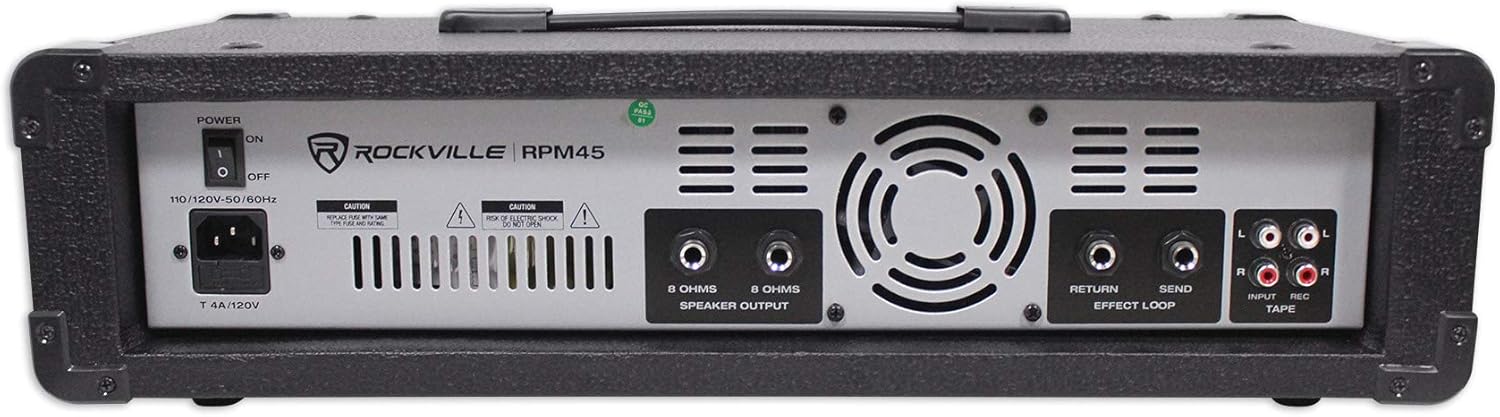
Figura 3: posterior view of the RPM45, highlighting power input, speaker outputs, and auxiliary connections.
Especificacions
- Potència de sortida RMS: 225W x 2 @ 8 Ohm (Parallel mono)
- Potència de sortida del programa: 450W x 2 @ 8 Ohm (Parallel mono)
- Potència màxima de sortida: 1800W
- Nombre de canals: 4
- Tecnologia de connectivitat: USB, Bluetooth
- Font d'alimentació: Elèctric amb cable
- Pes de l'article: 18 lliures
- Dimensions del producte: 5.75 "P x 19.44" W x 9.5" H
- Potència fantasma: +15V
- Sistema de refrigeració: Sistema de refrigeració del ventilador
Manteniment
To ensure the longevity and optimal performance of your RPM45 mixer, follow these maintenance guidelines:
- Mantingueu la unitat neta netejant-la amb un drap suau i sec. Eviteu utilitzar productes químics agressius o netejadors abrasius.
- Ensure proper ventilation by keeping the fan vents clear of obstructions.
- Guardeu la batedora en un lloc fresc i sec, allunyat de la llum solar directa i de temperatures extremes.
- Comproveu regularment totes les connexions dels cables per assegurar-vos que estiguin ben ajustades i que no presentin signes de desgast.
Resolució de problemes
If you encounter any issues with your Rockville RPM45, please refer to the following common troubleshooting steps:
- Sense so: Check all power connections, speaker connections, and input levels for each channel and the master volume. Ensure the correct input source is selected on the digital controller.
- So distorsionat: Reduce input levels (use PAD button if necessary) and master volume. Check speaker impedance.
- Problemes de connectivitat Bluetooth: Ensure the mixer is in Bluetooth mode and your device's Bluetooth is enabled. Try forgetting the device on your phone and re-pairing.
- No Phantom Power: Verify the +15V phantom power switch is engaged for condenser microphones.
For further assistance, please contact Rockville customer support.
Garantia i Suport
Rockville products are designed for reliability and performance. For any questions, comments, or concerns regarding your RPM45 mixer, please do not hesitate to contact our customer support team.
- Suport telefònic: 1-646-758-0144 (Open 24/7)
- Suport per correu electrònic: sales@rockvilleaudio.com


