1. Introducció
Thank you for choosing the LoraTap Smart Roller Shutter Switch. This device allows you to control your motorized roller shutters, blinds, or curtains via Wi-Fi using a smartphone application, an RF remote control, or voice commands through smart assistants like Amazon Alexa and Google Home. It also features a programmable timer function for automated operation. Please read this manual thoroughly before installation and use to ensure proper functionality and safety.
2. Informació de seguretat
- Instal·lació elèctrica: La instal·lació només l'ha de dur a terme un electricista qualificat o una persona amb coneixements profunds de cablejat elèctric.
- Desconnexió d'alimentació: Desconnecteu sempre l'alimentació a l'interruptor automàtic abans de realitzar qualsevol treball elèctric.
- Voltage: Assegureu-vos que el vol operatiutage of your motor matches the switch's specifications (240 Volts).
- Compatibilitat del motor: This switch is compatible only with 4-wire motors (Live, Neutral, Up, Down). A neutral wire is required for operation.
- Capacitat de càrrega: No supereu la capacitat de càrrega màxima de 600 watts.
- Només per a ús interior: This device is designed for indoor use in dry environments.
3. Contingut del paquet
- LoraTap Smart Roller Shutter Switch (Model HU-XI-179)
- RF Remote Control (battery included)
- Cargols de muntatge
- Terminal
- Manual d'usuari
4. Especificacions
| Model de referència | HU-XI-179 |
| Marca | LoraTap |
| Color | Blanc |
| Material | Vidre temperat |
| Vol. Operatiutage | 240 Volts |
| Valoració actual | 10 A |
| Potència de càrrega màxima | 600 watts |
| Tipus de canvi | Touch, 1-way |
| Mode de funcionament | ON-ON-OFF |
| Connectivitat | Wi-Fi (2.4GHz only), RF |
| Compatibilitat del motor | 4-wire motors (Live, Neutral, Up, Down) |
| Dimensions (Switch) | 86 mm x 86 mm x 30 mm (aprox.) |
| Bateria (remot) | 1 C Lithium metal (included) |
5. Configuració
5.1. Electrical Installation and Wiring
Important: Ensure power is disconnected at the main circuit breaker before starting any wiring. This switch requires a neutral wire for operation.

Figura 5.1: Diagrama de cablejat
Follow this wiring diagram carefully for correct installation. The switch requires connection to a 4-wire motor (Live, Neutral, Up, Down).
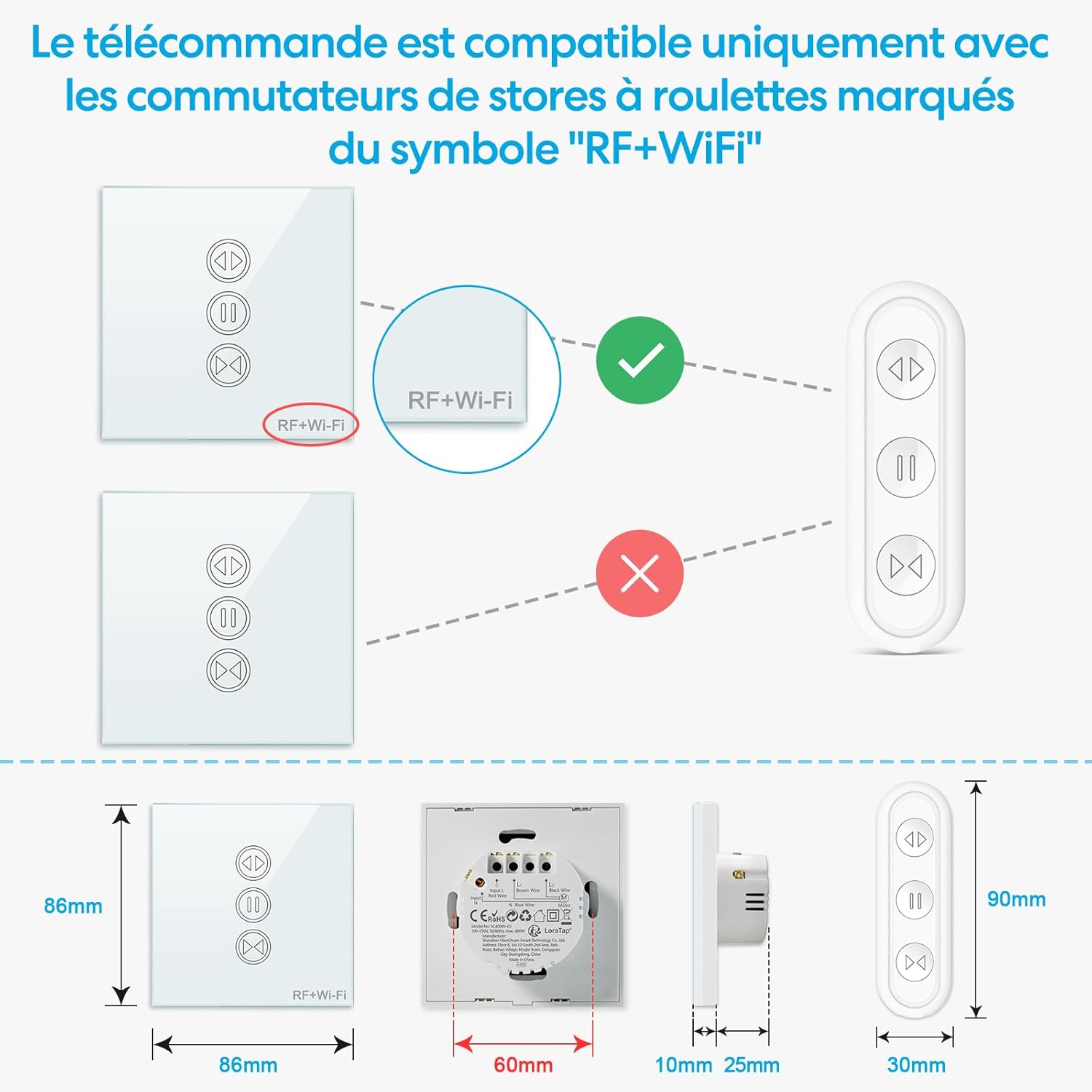
Figure 5.2: Motor Compatibility Note
This switch is compatible only with motors that have 4 wires (Live, Neutral, Up, Down). A neutral wire is essential for operation. Maximum load capacity is 600W.
- Desconnecteu l'alimentació principal al vostre interruptor automàtic.
- Remove your existing switch (if any).
- Connect the wires to the LoraTap switch according to the wiring diagram (Figure 5.1):
- L (Input Live): Connect to your household live wire.
- N (Input Neutral): Connect to your household neutral wire.
- L1 (Output Up): Connect to the motor's 'Up' wire.
- L2 (Output Down): Connect to the motor's 'Down' wire.
- N (Output Neutral): Connect to the motor's neutral wire.
- Mount the switch securely into the wall box.
- Resta l'alimentació al disjuntor.
5.2. Wi-Fi Network Requirements
The LoraTap Smart Roller Shutter Switch operates on a 2.4GHz Wi-Fi network. It is not compatible with 5GHz Wi-Fi networks or combined 2.4GHz/5GHz networks unless your router allows for separate 2.4GHz configuration.

Figure 5.3: Wi-Fi Signal Range
For optimal Wi-Fi performance, ensure the switch is installed within 10 meters of your 2.4GHz Wi-Fi router.
5.3. App Pairing (Smart Life / Tuya App)
To enable smart control features, you need to pair the switch with the Smart Life or Tuya app.

Figure 5.4: Easy Pairing Process
Follow these steps to pair your switch with the Smart Life or Tuya app.
- Download the "Smart Life" or "Tuya Smart" app from the App Store (iOS) or Google Play Store (Android).
- Registreu-vos o inicieu sessió al vostre compte.
- Assegureu-vos que el vostre telèfon intel·ligent estigui connectat a una xarxa Wi-Fi de 2.4 GHz.
- On the app's home screen, tap the "+" icon (or "Add Device").
- Select "Curtain Switch" or similar device type from the list.
- Follow the in-app instructions to put the switch into pairing mode (usually by pressing and holding a button on the switch until an indicator light flashes rapidly).
- Confirm the indicator light is flashing rapidly in the app.
- Introduïu la contrasenya de la xarxa Wi-Fi de 2.4 GHz.
- Wait for the device to connect. Once successfully added, you can rename the device.
6. Instruccions de funcionament
6.1. Manual Touch Control
The switch features a responsive touch panel for direct control.

Figure 6.1: Touch Panel and RF Remote Control
Operate the switch using the responsive touch panel directly or via the included RF remote control.
- Fletxa cap amunt: Touch to open the roller shutter.
- Fletxa avall: Touch to close the roller shutter.
- Botó de pausa: Touch to stop the roller shutter at its current position.
6.2. Control remot per radiofreqüència
The included RF remote control provides convenient wireless operation.

Figure 6.2: Remote Compatibility and Dimensions
The RF remote is compatible only with LoraTap switches featuring the 'RF+Wi-Fi' marking. Dimensions of the switch and remote are provided for installation planning.
- The remote is typically pre-paired with the switch. If not, refer to the pairing instructions in the remote's separate manual or contact support.
- Use the Up, Down, and Pause buttons on the remote to control the roller shutter.
6.3. App Control (Smart Life / Tuya App)
After successful pairing, you can control your roller shutters from anywhere using the app.

Figura 6.3: Control remot mitjançant l'aplicació
Control your roller shutters remotely from anywhere using the Smart Life or Tuya application on your smartphone.
- Open the Smart Life or Tuya app and select your roller shutter switch.
- Use the virtual buttons to open, close, or pause the roller shutter.
- Partial Opening/Closing: The updated switch allows you to set the motor's running time in the app to achieve partial opening or closing (e.g., 30% or 50%). Adjust this setting in the device's control interface within the app.
6.4. Voice Control (Alexa / Google Home)
Integrate your switch with Amazon Alexa or Google Home for hands-free control.

Figura 6.4: Integració del control per veu
Integrate with Amazon Alexa or Google Home for convenient voice control of your roller shutters.
- In the Smart Life/Tuya app, go to the device settings and link your Amazon Alexa or Google Home account.
- Discover new devices in your Alexa or Google Home app.
- Utilitzeu ordres de veu com ara:
"Alexa, obre [Nom del dispositiu]"
"Ei Google, tanca [Nom del dispositiu]"
"Alexa, stop [Device Name]"
6.5. Funció de temporitzador
Automate your roller shutters by setting schedules in the app.

Figure 6.5: Timer Function Setup
Set custom schedules and timers through the app to automatically open or close your roller shutters at specific times.
- In the Smart Life/Tuya app, select your device and navigate to the "Schedule" or "Timer" section.
- Add new schedules, specifying the time, action (open/close), and repetition days.
7. Manteniment
- Neteja: Wipe the glass panel with a soft, dry cloth. Do not use abrasive cleaners or solvents.
- Connexions: Periodically check electrical connections for tightness, especially after initial installation.
- Actualitzacions de firmware: Keep the Smart Life/Tuya app updated to receive the latest features and security patches for your device.
- Bateria remota: Replace the remote control battery (Type C Lithium metal) when its performance degrades.
8. Solució De Problemes
- L'interruptor no respon:
- Comproveu si la font d'alimentació principal està connectada.
- Verifiqueu que totes les connexions de cablejat siguin segures i correctes segons el diagrama.
- Ensure the motor is a 4-wire type and a neutral wire is connected.
- Problemes de connexió Wi-Fi:
- Confirm your Wi-Fi network is 2.4GHz. The switch does not support 5GHz.
- Ensure the switch is within 10 meters of your Wi-Fi router.
- Check your Wi-Fi password for accuracy during pairing.
- Try restarting your Wi-Fi router and the switch.
- If pairing fails, try resetting the switch (refer to app instructions for specific reset procedure, usually holding a button for several seconds until indicator flashes differently).
- El comandament a distància RF no funciona:
- Comproveu la pila del comandament a distància i substituïu-la si cal.
- Ensure the switch has the "RF+Wi-Fi" marking for compatibility.
- If the remote was previously working, it might need re-pairing. Refer to the remote's manual for pairing instructions.
- El control per veu no funciona:
- Verify that the Smart Life/Tuya account is correctly linked to your Alexa or Google Home account.
- Ensure the device is discovered and enabled in your smart assistant app.
- Use the exact device name configured in the Smart Life/Tuya app.
9. Garantia i Suport
The LoraTap Smart Roller Shutter Switch comes with a 3 any de garantia des de la data de compra. Aquesta garantia cobreix els defectes de fabricació i garanteix que el producte no presenta defectes de materials ni de fabricació en condicions d'ús normal.
For technical support, troubleshooting assistance, or warranty claims, please contact LoraTap customer service through the retailer where you purchased the product or visit the official LoraTap weblloc per obtenir informació de contacte.
Certificacions: This product is CE and RoHS certified, ensuring compliance with European safety, health, and environmental protection requirements.


