1. Introducció
Thank you for choosing the DiamondBoxx M3 Bluetooth Speaker. This manual provides essential information for the safe and efficient operation of your device. Please read it thoroughly before use and retain it for future reference.
2. Producte acabatview
2.1 Característiques clau
- Bluetooth 5.0 with TWS aptX HD: For high-quality wireless audio streaming and True Wireless Stereo pairing.
- Sortida d'àudio potent: 200 Watts RMS, 400 Watts Max amppotència de lificació.
- Controladors premium: Features 4-inch Aluminum Cone Woofers and 1-inch Titanium Dome Tweeters.
- Resposta de freqüència àmplia: 50Hz - 22kHz @+/-3dB for clear and balanced sound.
- Temps de joc llarg: Equipped with a 115Wh battery for extended use.
- Construcció duradora: Enclosed in a wood cabinet.
2.2 Contingut del paquet
- DiamondBoxx M3 Bluetooth Speaker
- Bateria (preinstal·lada o inclosa per separat)
- Adaptador de corrent (no apareix explícitament a la llista, però sí que s'implica per a la càrrega)
- Manual d'usuari (aquest document)
2.3 Identificació de components
Refer to the images below for identification of the speaker's controls and ports.

Figura 1: Davant view of the DiamondBoxx M3 speaker, showing the main control panel with Treble, Volume, and Bass knobs (orange), Power and TWS buttons, AUX IN port, and speaker grilles.
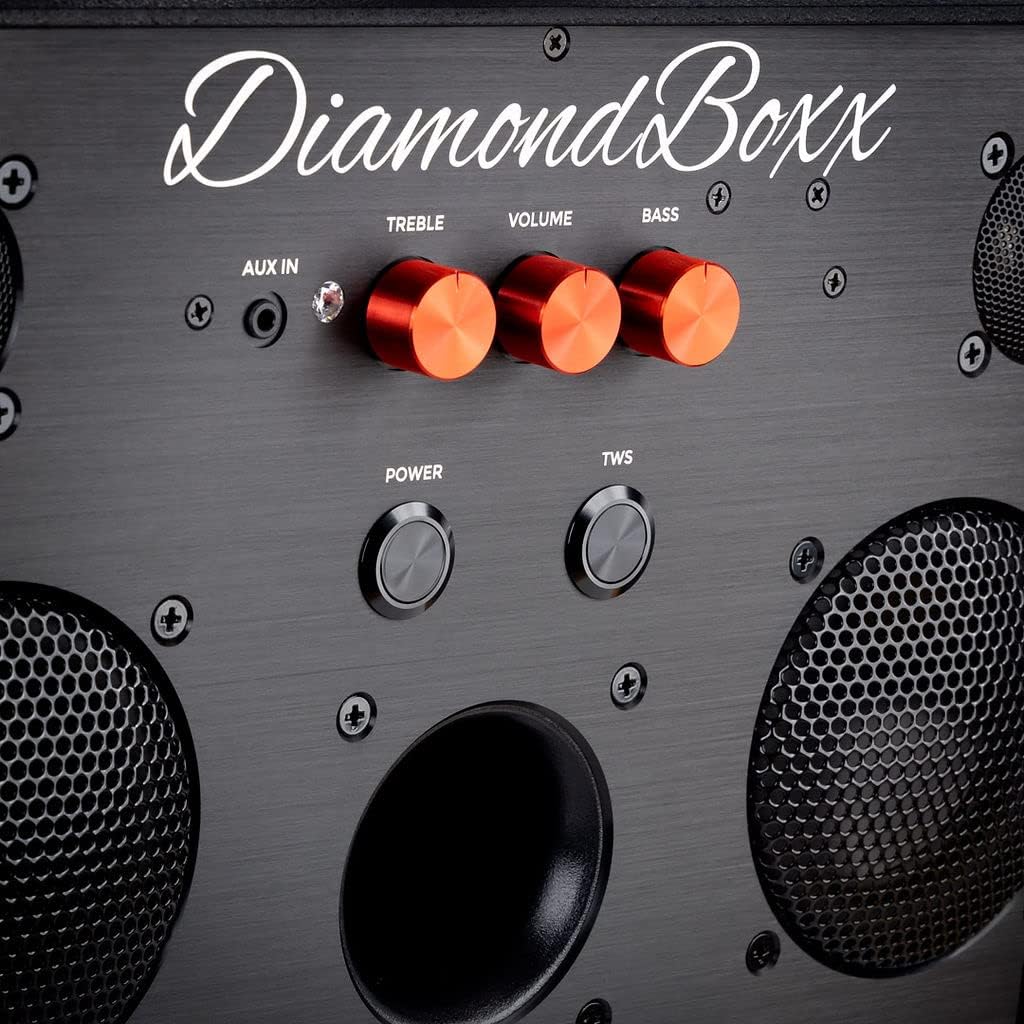
Figura 2: Detallada view of the control panel, highlighting the orange Treble, Volume, and Bass adjustment knobs, along with the Power and TWS buttons and AUX IN port.

Figura 3: Angled close-up of the DiamondBoxx M3 control panel, showing the texture of the speaker's surface and the layout of the controls.
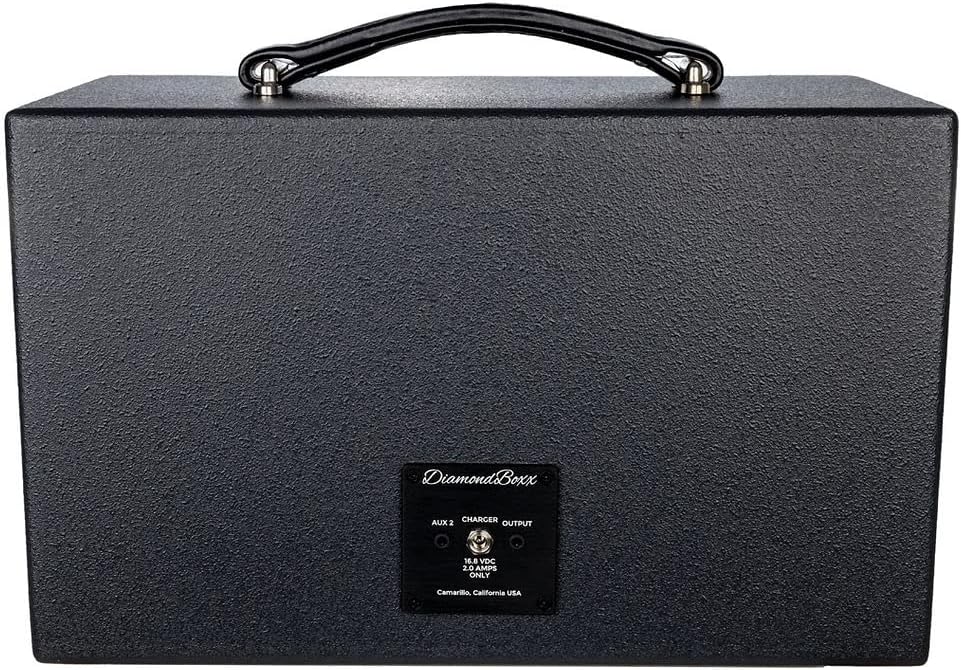
Figura 4: posterior view of the DiamondBoxx M3 speaker, displaying the AUX 2 input, Charger port, and Output port, along with the manufacturer's label.
3. Configuració
3.1 Càrrega de la bateria
- Connect the provided power adapter to the "Charger" port on the rear of the speaker (refer to Figure 4).
- Connecteu l'adaptador d'alimentació a una presa de corrent estàndard.
- The charging indicator (if available, not specified in data) will illuminate. A full charge takes approximately 3 hours.
- Disconnect the charger once fully charged or when not in use.
3.2 Engegada/apagada
- Per encendre, premeu i manteniu premut PODER button located on the front panel (refer to Figure 2) until the indicator light illuminates.
- Per apagar-lo, manteniu premut el botó PODER button again until the indicator light turns off.
4. Instruccions de funcionament
4.1 Vinculació Bluetooth
- Ensure the DiamondBoxx M3 is powered on.
- The speaker will automatically enter Bluetooth pairing mode, indicated by a flashing Bluetooth LED (location not specified in data, assume near power button).
- On your compatible device (smartphone, tablet, laptop), enable Bluetooth and search for available devices.
- Select "DiamondBoxx M3" from the list.
- Once paired, the Bluetooth LED will become solid, and you will hear an audible confirmation.
4.2 Emparellatge estèreo sense fil veritable (TWS)
TWS allows you to connect two DiamondBoxx M3 speakers for a stereo sound experience.
- Ensure both DiamondBoxx M3 speakers are powered on and not connected to any Bluetooth device.
- En un altaveu (aquest serà l'altaveu principal), premeu el botó TWS button (refer to Figure 2). The TWS indicator will flash.
- Al segon altaveu, premeu el botó TWS button. Both speakers will attempt to connect to each other.
- Once successfully paired, the TWS indicator on both speakers will become solid, and you will hear an audible confirmation.
- Now, connect your Bluetooth device to the primary speaker as described in section 4.1. Audio will play in stereo across both speakers.
4.3 Controls d'àudio
- Pom de volum: Gira el VOLUM knob (orange, center) clockwise to increase volume and counter-clockwise to decrease it.
- Pom treble: Gira el AGUTS knob (orange, left) to adjust high-frequency sounds.
- Pom de baix: Gira el BASS knob (orange, right) to adjust low-frequency sounds.
4.4 Auxiliary Input (AUX IN)
The DiamondBoxx M3 features two auxiliary inputs for wired connections.
- AUX IN (Front): Connect an audio source using a 3.5mm audio cable to the AUX IN port on the front panel (refer to Figure 2).
- AUX 2 (Rear): Connect an audio source using a 3.5mm audio cable to the AUX 2 port on the rear panel (refer to Figure 4).
- When an audio cable is connected, the speaker will automatically switch to the auxiliary input. Disconnect the cable to return to Bluetooth mode.
4.5 Vídeo oficial del producte
Vídeo 1: An official video from DiamondBoxx showcasing the M3 speaker's design, features, and manufacturing process. This video provides a visual guide to the product's quality and capabilities.
5. Manteniment
- Neteja: Use a soft, dry cloth to clean the speaker's exterior. Do not use liquid cleaners or aerosols.
- Emmagatzematge: Guardeu l'altaveu en un lloc fresc i sec, allunyat de la llum solar directa i de temperatures extremes.
- Cura de la bateria: For optimal battery life, avoid fully discharging the battery frequently. Charge the speaker regularly, even if not in use for extended periods.
- Resistència a l'aigua: The DiamondBoxx M3 is NO waterproof. Avoid exposure to water or moisture.
6. Solució De Problemes
| Problema | Causa possible | Solució |
|---|---|---|
| L'altaveu no s'encén. | La bateria està descarregada. | Connect the speaker to the power adapter and charge for at least 30 minutes before attempting to power on. |
| No es pot emparellar per Bluetooth. | Speaker is already paired to another device or device's Bluetooth is off. | Ensure the speaker is in pairing mode (flashing LED). Turn off Bluetooth on previously connected devices. Restart your device's Bluetooth. |
| Sense so. | Volume is too low, audio source paused, or incorrect input selected. | Increase speaker and device volume. Check if audio is playing on your source device. Ensure no AUX cable is connected if using Bluetooth. |
| L'emparellament TWS falla. | Speakers are too far apart or already connected to a Bluetooth device. | Ensure both speakers are within close proximity (e.g., 1 meter). Disconnect any Bluetooth devices from both speakers before initiating TWS pairing. |
7. Especificacions
| Nom del model: | M3_115 |
| Marca: | DiamondBoxx |
| AmpPotència més viva: | 200 Watts RMS, 400 Watts Max |
| Woofers: | 4 inch Aluminum Cone (2x) |
| Tweeters: | 1 inch Titanium Dome (2x) |
| Resposta de freqüència: | 50Hz - 22kHz @+/-3dB |
| Versió Bluetooth: | 5.0 with TWS aptX HD |
| Rang Bluetooth: | Fins a 100 metres (330 peus) |
| Bateria: | 1 Lithium Ion (115Wh) |
| Temps de càrrega: | Aproximadament 3 hores |
| Temps de joc: | Up to 20 hours (depending on volume and content) |
| Dimensions del producte: | 8.25 "P x 14.75" W x 9.5" H |
| Pes de l'article: | 12 lliures |
| Material: | Fusta |
| Impermeable: | No |
| Mètode de control: | App, Physical Knobs/Buttons |
| Connectivitat: | Wireless (Bluetooth), Wired (AUX IN) |
| Mode de sortida d'àudio: | estèreo |
8. Garantia i Suport
The DiamondBoxx M3 Bluetooth Speaker comes with a Limited Warranty. For specific warranty terms and conditions, please refer to the warranty card included with your product or visit the official DiamondBoxx website. For technical support, troubleshooting assistance, or service inquiries, please contact DiamondBoxx customer support.
Fabricant: DiamondBoxx LLC
Weblloc: DiamondBoxx Store on Amazon (per a informació general de la marca)


