1. Introducció
The TechniSat TECHNIRADIO RDR is a portable digital and FM radio designed for on-the-go listening. It features DAB+ digital radio reception for clear, noise-free audio, as well as traditional FM radio with RDS. The device supports MP3 playback from USB storage devices and includes an AUX-IN interface for connecting external audio sources. Its compact design, replaceable battery, and integrated LED torch make it a versatile companion for various environments.
2. Què hi ha a la caixa
- TechniSat TECHNIRADIO RDR Portable Radio
- Cable de càrrega mini USB
- Rechargeable Lithium-Ion Battery (3.7 V / 800 mAh)
- Manual d'instruccions
3. Característiques del producte
- Ràdio digital DAB+: Enjoy a wide range of digital radio programs with robust, noise-free reception.
- Ràdio FM amb RDS: Tune into traditional FM stations and receive broadcast information via RDS.
- Pantalla LCD: A two-line LCD provides information about the current radio program and settings.
- Favorite Memory: Store up to 20 DAB+ and 20 FM stations for quick access.
- Direct Dial Buttons: Four freely assignable buttons for instant access to preferred stations.
- Reproducció USB: Reprodueix música MP3 files directly from a connected USB data carrier.
- AUX-IN Interface: Connect external audio sources like smartphones or MP3 players.
- Auriculars Jack: Per a una escolta privada.
- Integrated LED Torch: Proporciona il·luminació en ambients foscos.
- Changeable and Rechargeable Battery: Offers up to 10 hours of portable music enjoyment.
- Disseny compacte i portàtil: Easy to carry with dimensions of 12.7 cm x 2.3 cm x 5.8 cm and a weight of 124g.
4. Controls i connexions
Controls del panell frontal

Imatge: Frontal view of the TechniSat TECHNIRADIO RDR. This image displays the LCD screen, the speaker grille on the left, and the control buttons on the right. Buttons include navigation arrows (<, OK, >), numbered direct dial buttons (1-4), and function buttons (MOD, M, I, LED).
- Pantalla LCD: Mostra informació de l'estació, l'hora i les opcions del menú.
- Ponent: Sortida d'àudio.
- < / > Buttons: Navigate menus, change stations, or adjust settings.
- Botó D'acord: Confirmeu les seleccions.
- 1-4 botons: Direct access to preset favorite stations.
- MOD (Mode) Button: Switch between DAB+, FM, USB, and AUX modes.
- M (Menu/Memory) Button: Access menu options or save/recall presets.
- I (Info) Button: Display additional information (e.g., RDS data).
- Botó LED: Activate/deactivate the LED torch.
Side and Rear Connections

Imatge: Anglesa view of the TechniSat TECHNIRADIO RDR, highlighting the side panel. This image shows the USB port, AUX-in jack, and headphone jack. The wrist strap attachment point is also visible.
- USB Port (Type-A): For connecting USB storage devices to play MP3 files.
- Presa d'entrada auxiliar (3.5 mm): Connecteu dispositius d'àudio externs.
- Presa d'auriculars (3.5 mm): For private audio listening.
- Mini-USB Port (DC 5V): Per carregar la bateria interna.
- Compartiment de la bateria: Located on the rear, for the replaceable Li-ion battery.
5. Configuració
5.1. Instal·lació i càrrega de la bateria
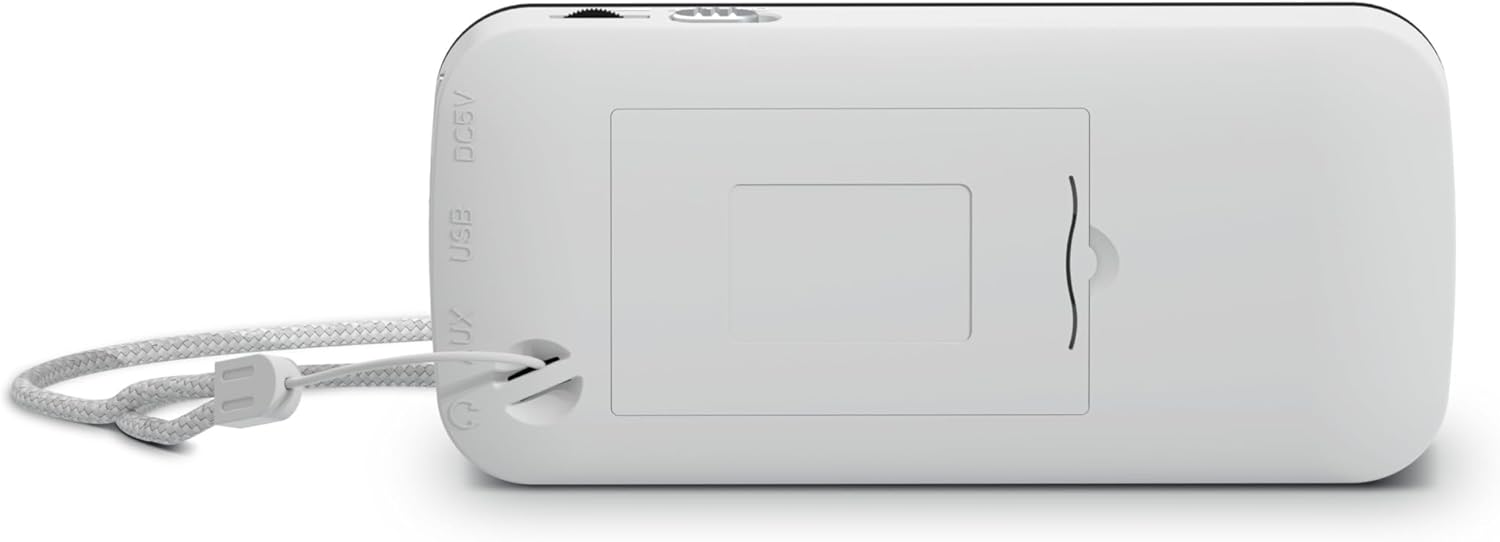
Imatge: Part posterior view of the TechniSat TECHNIRADIO RDR. This image shows the battery compartment cover, which can be opened to insert or replace the rechargeable Lithium-Ion battery. The DC 5V and USB labels are also visible on the side.
- Localitzeu el compartiment de la bateria a la part posterior del dispositiu.
- Obriu la tapa del compartiment de la bateria.
- Insert the provided Lithium-Ion battery, ensuring correct polarity.
- Tanqueu bé la tapa del compartiment de la bateria.
- Connect the mini USB charging cable to the mini-USB port on the side of the radio and to a suitable USB power adapter (not included) or a computer USB port.
- L'indicador de la bateria a la pantalla mostrarà l'estat de càrrega. Una càrrega completa sol trigar diverses hores.
5.2. Engegada inicial
- After charging, disconnect the USB cable.
- Press and hold the power button (usually integrated with the MOD button or a dedicated button, refer to specific button layout if available) to turn on the radio.
- Upon first use, the radio may automatically initiate a DAB+ scan.
6. Instruccions de funcionament
6.1. Selecció de mode
Premeu el botó MOD button repeatedly to cycle through available modes: DAB+, FM, USB, and AUX.
6.2. Funcionament de la ràdio DAB+
- Canvieu al mode DAB+ utilitzant el botó MOD botó.
- If it's the first time or if stations need to be updated, perform a full scan:
- Premeu el botó M Botó (Menú).
- Utilitza el </> buttons to navigate to "Full Scan" and press OK.
- The radio will scan for available DAB+ stations and store them.
- To select a station, use the </> buttons to browse the station list. Press OK per confirmar.
- Per desar una emissora preferida:
- Sintonitza l'emissora desitjada.
- Manteniu premut el botó M fins que aparegui "Preset Store".
- Ús </> to select a preset number (1-20) and press OK.
- To recall a favorite station, briefly press the M botó, ús </> to select the preset, and press OK. Alternatively, use the direct dial buttons 1-4 if assigned.
- Premeu el botó I (Info) button to cycle through different information displays (e.g., program type, signal strength).
6.3. Funcionament de la ràdio FM
- Canvieu al mode FM utilitzant el botó MOD botó.
- To auto-scan for stations:
- Manteniu premut el botó < or > button to automatically search for the next available station.
- Per sintonitzar manualment, premeu breument el botó < or > button to adjust the frequency step by step.
- To save a favorite station, follow the same procedure as DAB+ (press and hold M, select preset, OK).
- To recall a favorite station, briefly press M, select preset, OK, or use direct dial buttons 1-4.
- The radio supports RDS (Radio Data System), which displays station name and other information. Press the I (Info) button to cycle through available RDS data.
6.4. USB MP3 Playback
- Insert a USB storage device (e.g., USB stick) containing MP3 files into the USB Type-A port.
- Canvieu al mode USB mitjançant el MOD botó.
- The radio will automatically detect and start playing MP3 files.
- Utilitza el </> botons per saltar pistes.
- El OK button may function as Play/Pause.
6.5. AUX-IN Usage
- Connect an external audio device (e.g., smartphone, MP3 player) to the AUX-IN jack using a 3.5mm audio cable (not included).
- Canvieu al mode AUX utilitzant el botó MOD botó.
- Controla la reproducció i el volum directament des del dispositiu extern connectat.
6.6. LED Torch Function
Premeu el botó LED button to turn the integrated LED torch on or off.
7. Informació de la bateria
- The TECHNIRADIO RDR uses a replaceable 3.7V / 800 mAh Lithium-Ion battery.
- A fully charged battery provides up to 10 hours of operation, depending on usage and volume level.
- Charge the battery using the supplied mini USB cable connected to a 5V USB power source.
- To prolong battery life, avoid fully discharging the battery frequently and store the device with a partial charge if not used for extended periods.
- If the battery needs replacement, use only genuine TechniSat replacement batteries or compatible alternatives with the same specifications.
8. Manteniment
- Neteja: Feu servir un drap suau i sec per netejar l'exterior de la ràdio. No utilitzeu productes de neteja abrasius, ceres ni dissolvents.
- Emmagatzematge: Guardeu la ràdio en un lloc fresc i sec, allunyat de la llum solar directa i de temperatures extremes.
- Exposició a l'aigua: Aquest dispositiu no és impermeable. Eviteu l'exposició a l'aigua o a una humitat elevada.
- Cura de la bateria: Refer to Section 7 for battery maintenance guidelines.
9. Solució De Problemes
| Problema | Possible causa/solució |
|---|---|
| No hi ha alimentació / El dispositiu no s'encén. |
|
| No DAB+ stations found. |
|
| Mala recepció d'FM / estàtica. |
|
| La reproducció per USB no funciona. |
|
| No sound from AUX-IN. |
|
10. Especificacions
General
- Nom del model: TECHNIRADIO RDR
- Número de model: 0001/3922
- Marca: TechniSat
- Color: Blanc
- Tipus de visualització: LCD (Two-line)
Àudio
- Potència RMS: 1 watts
- Speaker Output Channel Quantity: 1 (mono)
- Headphone Connectivity: 3.5 mm Jack
Sintonitzador
- Tecnologia del sintonitzador: DAB + / FM
- Bandes de ràdio admeses: DAB+, UKW (FM)
- Característiques: RDS (Radio Data System) for FM, Favourite Memory (20 DAB+/20 FM)
Connectivitat
- Connectivitat USB: Yes (USB Type-A for MP3 playback, Mini-USB for charging)
- Entrada AUX: Yes (3.5 mm Jack)
- Ports USB totals: 1 (Type-A for media, Mini-USB for power)
Poder
- Font d'alimentació: Funciona amb bateria
- Tipus de bateria: Lithium Ion (3.7 V / 800 mAh)
- Bateries incloses: Sí
- Bateria recarregable: Sí
- Temps de funcionament: Fins a 10 hores (aprox.)
Física
- Dimensions del producte (L x P x A): 12.7 cm x 2.3 cm x 5.8 cm
- Pes de l'article: 124 grams
- Característiques especials: Torxa LED
11. Garantia i Suport
Per obtenir informació sobre la garantia i assistència tècnica, consulteu la targeta de garantia inclosa amb el producte o visiteu el lloc web oficial de TechniSat. weblloc web. Conserveu el comprovant de compra per a qualsevol reclamació de garantia.


