1. Introducció
This manual provides comprehensive instructions for the TechniSat DIGITRADIO 4 C digital stereo radio. It covers setup, operation, maintenance, and troubleshooting for its various functionalities, including DAB+, FM, Bluetooth audio streaming, and AUX input. Please read this manual thoroughly before using the device to ensure proper operation and to maximize your listening experience.
Contingut del paquet
- DIGITRADIO 4 C unit
- Antena telescòpica
- F-plug tool (for removable antenna)
- Comandament a distància
- Adaptador de corrent
- Manual d'usuari
2. Configuració
2.1 Desembalatge i col·locació
Carefully remove all components from the packaging. Place the radio on a stable, flat surface away from direct sunlight, heat sources, and moisture. Ensure adequate ventilation around the unit.
2.2 Connexió de l'antena
The DIGITRADIO 4 C comes with a telescopic antenna for DAB+ and FM reception. Extend the antenna fully for optimal signal reception. For areas with weak reception, an external antenna can be connected to the F-type connector on the rear of the unit. Use the provided F-plug tool if necessary to secure the connection.
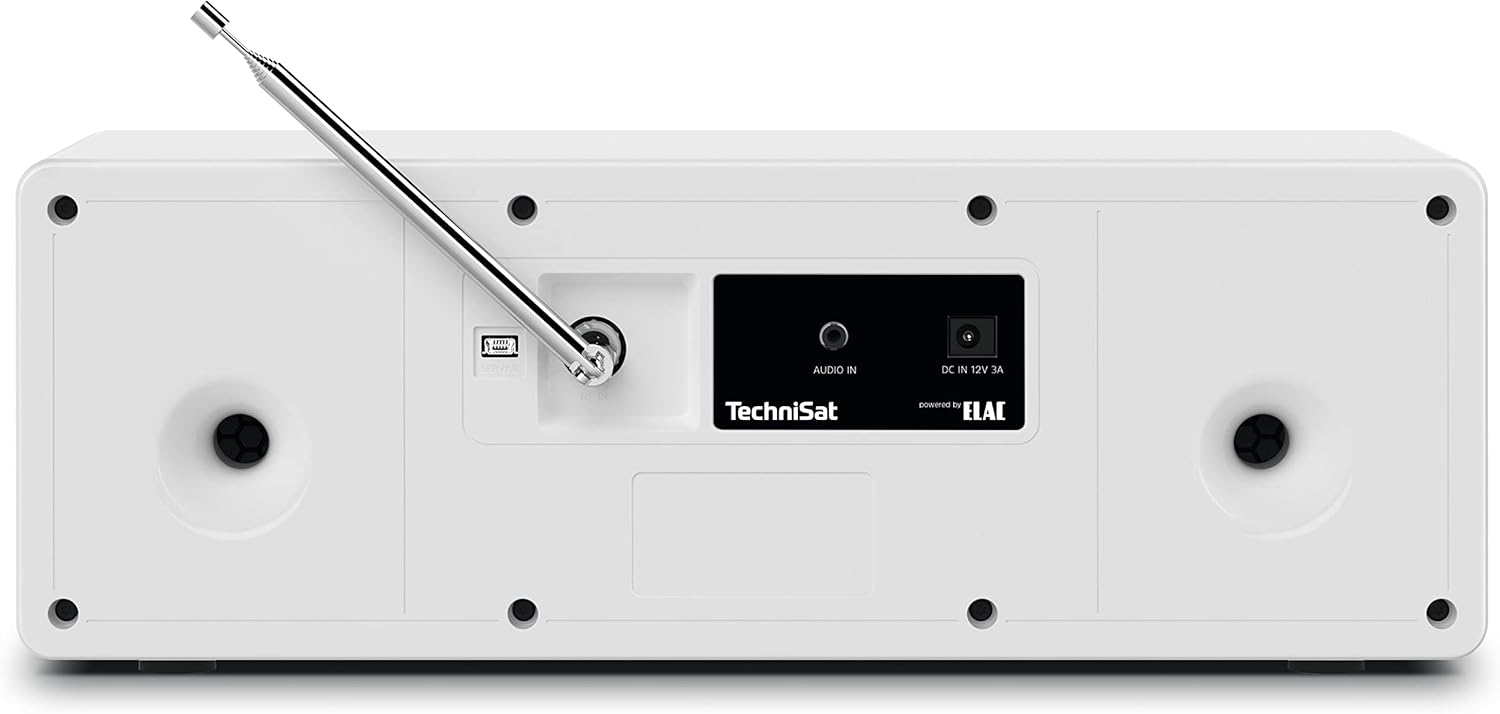
Imatge 2.2.1: Rear panel connections, including the F-type antenna connector, AUX IN, and DC power input.
2.3 Connexió d'alimentació
Connect the supplied power adapter to the DC IN 12V 3A port on the rear of the radio. Plug the adapter into a suitable wall outlet. The unit will enter standby mode.
2.4 Initial Power On and Scan
Premeu el botó VOL / STANDBY knob to turn on the radio. Upon first use, the radio may automatically initiate a scan for available DAB+ stations. This process can take a few minutes. Once complete, the radio will tune to the first available station.
3. Instruccions de funcionament

Imatge 3.0.1: El panell frontal a sobreview showing the display, controls, and headphone jack.
3.1 Controls bàsics
- VOL / STANDBY Knob: Rotate to adjust volume. Press to switch between ON and Standby mode.
- SELECT / SNOOZE Knob: Rotate to navigate menus or change stations. Press to confirm selections or activate snooze during an alarm.
- Botó MODE: Press to switch between DAB+, FM, Bluetooth, and AUX input modes.
- Botó MENÚ: Press to access the main menu for settings and options.
- Botó FAV: Press to access or save favorite stations.
- Navigation Buttons (◀◀, ▶▶, ■, ►►): Used for track control in Bluetooth mode or navigating lists.
3.2 Funcionament de la ràdio DAB+
In DAB+ mode, the radio receives digital broadcasts. The 2.8-inch color display shows station information, program details, and potentially album art.

Imatge 3.2.1: The 2.8-inch TFT color display showing current DAB+ broadcast information.
- Premeu MODE until DAB+ is selected.
- If a scan is needed, navigate to "Full Scan" in the menu and press SELECCIONA.
- Gira el SELECCIONA knob to browse available stations. Press to select a station.
- To save a favorite station, press and hold the FAV i, a continuació, utilitzeu el botó SELECCIONA knob to choose a preset number (1-20) and press to confirm.
3.3 Funcionament de la ràdio FM
In FM mode, the radio receives analog broadcasts. RDS (Radio Data System) information may be displayed if available.
- Premeu MODE until FM is selected.
- Gira el SELECCIONA knob to manually tune to a frequency.
- Per cercar automàticament la següent emissora disponible, manteniu premut el botó SELECCIONA perilla.
- To save a favorite station, press and hold the FAV i, a continuació, utilitzeu el botó SELECCIONA knob to choose a preset number (1-20) and press to confirm.
Transmissió d'àudio Bluetooth 3.4
The DIGITRADIO 4 C can receive audio from Bluetooth-enabled devices such as smartphones or tablets.

Imatge 3.4.1: Bluetooth audio streaming from a smartphone to the radio.
- Premeu MODE until Bluetooth is selected. The display will show "Pairing" or "Waiting for connection".
- On your mobile device, enable Bluetooth and search for "DIGITRADIO 4 C".
- Select "DIGITRADIO 4 C" from the list of available devices to pair.
- Once paired, you can play audio from your device, and control playback (play/pause, skip tracks) using the radio's navigation buttons.
3.5 Entrada AUX
Connect external audio devices (e.g., MP3 players, CD players) using a 3.5mm audio cable to the AUX IN port on the rear of the radio.
- Connect your external device to the AUX IN port.
- Premeu MODE until AUX is selected.
- Control playback from your external device. The radio's volume control will still function.
3.6 Despertador i temporitzador de son
The radio includes an alarm clock and a sleep timer function.
- Alarma: Accediu a la configuració de l'alarma mitjançant MENÚ button. You can set multiple alarms, choose the alarm source (buzzer, DAB+, FM), and adjust volume. Press SELECT / SNOOZE to snooze an active alarm.
- Temporitzador de son: Set a sleep timer from the MENÚ per apagar automàticament la ràdio després d'un temps especificat.
3.7 Equalitzador
Ajusta el professional del sofile using the built-in equalizer. Access equalizer settings through the MENÚ to select from preset modes or customize bass and treble levels.

Imatge 3.7.1: The radio features two 10W stereo speakers, optimized for sound quality.
4. Manteniment
4.1 Neteja
To clean the radio, disconnect it from the power supply. Use a soft, dry cloth to wipe the surfaces. For stubborn marks, a slightly damp cloth can be used, followed by a dry cloth. Do not use abrasive cleaners, solvents, or chemical sprays, as these can damage the finish.
4.2 Antenna Care
Handle the telescopic antenna with care to prevent bending or breakage. When not in use, it can be retracted. If using an external antenna, ensure its connection is secure and the cable is not damaged.
5. Solució De Problemes
| Problema | Causa possible | Solució |
|---|---|---|
| Sense poder | Power adapter not connected; power outlet not active. | Assegureu-vos que l'adaptador de corrent estigui connectat correctament a la ràdio i a una presa de corrent que funcioni. |
| Mala recepció DAB+/FM | Antena no estesa; zona de senyal feble; interferències. | Fully extend the telescopic antenna. Reposition the radio. Consider connecting an external antenna. |
| Error de vinculació de Bluetooth | Bluetooth not enabled on device; radio not in pairing mode; device too far. | Ensure Bluetooth is enabled on your device and the radio is in Bluetooth mode. Move device closer to the radio. Try re-pairing. |
| Sense so | Volume too low; mute activated; incorrect input mode. | Increase volume. Check if mute is active. Ensure correct input mode (DAB+, FM, Bluetooth, AUX) is selected. |
| El comandament a distància no funciona | Batteries depleted; obstruction between remote and radio. | Replace remote control batteries (2x AAA). Ensure no obstructions are blocking the signal path. |
6. Especificacions
| Característica | Detall |
|---|---|
| Marca | TechniSat |
| Número de model | 0001/3937 |
| Tecnologia de connectivitat | Auxiliary, Bluetooth, External Antenna Connection (F-type) |
| Bandes de ràdio compatibles | DAB+, FM (with RDS and PLL) |
| Mostra | 2.8-inch TFT Color Display (dimmable) |
| Sortida d'àudio | 2 x 10W RMS stereo speakers (Powered by ELAC), Headphone jack (3.5mm) |
| Característiques especials | Bluetooth audio streaming (reception), Equalizer, Favorite memory (20 for DAB+, 20 for FM), Alarm clock, Sleep timer, Snooze function |
| Font d'alimentació | Adaptador de corrent extern |
| Dimensions del producte (L x A x A) | 38 cm x 16.5 cm x 13.5 cm (14.96 polzades x 6.5 polzades x 5.31 polzades) |
| Bateries de comandament a distància | 2 x AAA (not included with main unit, typically for remote) |
7. Informació de la garantia
The TechniSat DIGITRADIO 4 C comes with a Garantia del fabricant de 2 anys. Please retain your proof of purchase for warranty claims. For detailed terms and conditions, refer to the warranty card included with your product or visit the official TechniSat weblloc.
8. Suport
For further assistance, technical support, or to download the latest version of this manual, please visit the official TechniSat weblloc:
You may also contact TechniSat customer service directly. Contact details can typically be found on the manufacturer's weblloc o a l'embalatge del producte.


