1. Introducció
This manual provides detailed instructions for the installation, operation, and maintenance of your Walfront THC30A Digital Timer Switch. This device is designed to automatically control the power supply to various electrical equipment based on user-defined schedules, offering convenience and energy efficiency. Please read this manual thoroughly before installation and use to ensure proper function and safety.
2. Informació de seguretat
Avís: Electrical installation should only be performed by qualified personnel. Incorrect wiring can lead to electric shock, fire, or damage to the device and connected equipment. Always disconnect power at the circuit breaker before performing any installation or maintenance.
- Ensure the power supply matches the timer switch's rated voltage (110 V).
- Do not exceed the maximum load capacity of 30A.
- Mantingueu el dispositiu allunyat de l'aigua i d'ambients amb molta humitat.
- No intenteu obrir ni reparar el dispositiu vosaltres mateixos. Poseu-vos en contacte amb personal de servei qualificat.
3. Producte acabatview
The Walfront THC30A is a digital programmable timer switch featuring a high-precision industrial-grade chip for accurate timing control. It offers 16 ON/OFF settings per day/week and includes a built-in backup power source to maintain settings during power outages.
Característiques principals:
- Automatic ON/OFF control based on user-set times.
- Strong anti-interference performance for stable operation.
- Built-in high-performance battery for power-off memory (180 days or more).
- High-precision industrial-grade chip for accurate timing.
- Versatile application for various electrical equipment.
Components:

- Pantalla digital: Shows current time, day, and programming status.
- Botons de control: Used for setting time, programming, and manual override (specific buttons like 'CR', 'Manual' are typically present).
- Terminals de cablejat: Screw terminals for connecting input power and output load.
- Punts de muntatge: Designed for screw mounting or DIN rail mounting.
4. Especificacions
| Paràmetre | Valor |
|---|---|
| Vol. Operatiutage | AC 110V (as per model) |
| Capacitat de commutació | 30 A |
| Nombre de configuracions | 16 ON/OFF (daily/weekly) |
| Configuració de l'interval de temps | 1 minute - 168 hours |
| Error de temps | ±1s/24h |
| Apagueu la memòria | ≥180 days (built-in battery) |
| Mètode de muntatge | Screw mounting or DIN rail mounting |
| Dimensions | 86 x 36 x 66 mm (aprox. 3.39 x 1.42 x 2.60 polzades) |
| Pes | Aprox. 145 g (5.1 oz) |
5. Instal·lació i configuració
Important: Ensure power is disconnected at the main circuit breaker before beginning installation. This device is intended for indoor use only.
Muntatge:
The THC30A timer switch supports both screw mounting and DIN rail mounting. Choose the method appropriate for your installation environment.
- Muntatge de cargols: Secure the device to a flat surface using appropriate screws through the designated mounting holes.
- Muntatge en carril DIN: Attach the device to a standard 35mm DIN rail by snapping it into place.
Diagrama de cablejat:
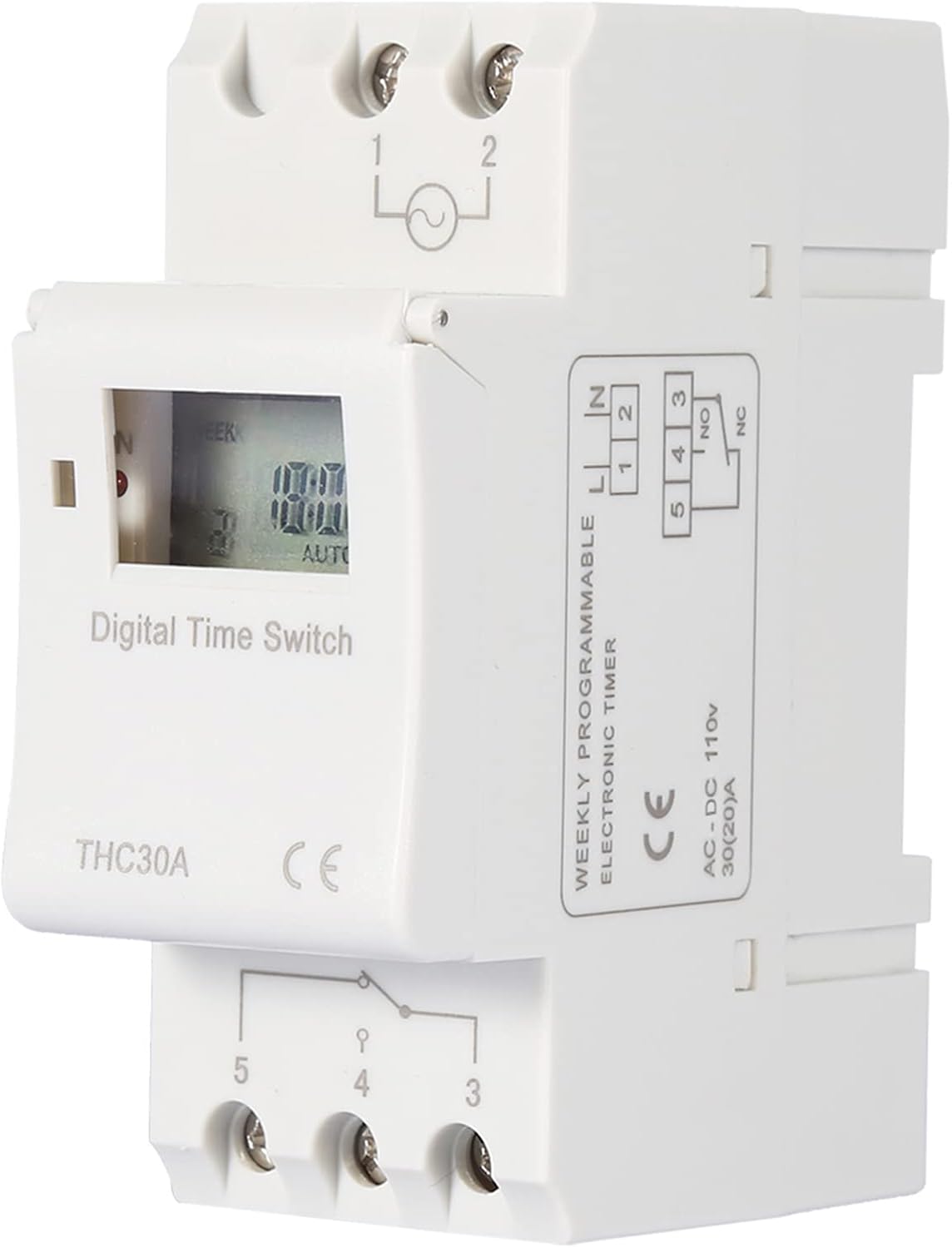
Refer to the diagram below for correct wiring connections. It is crucial to connect the Live (FireWire) and Neutral (Zero Line) correctly to the input terminals, and the load to the output terminals.

- Potència d'entrada (110 V CA):
- Connect the Live (FireWire) to terminal 1.
- Connect the Neutral (Zero Line) to terminal 2.
- Connexió de càrrega de sortida:
- Terminal 3: Common (C) for the switch output.
- Terminal 4: Normally Closed (NC) contact. The circuit is closed when the timer is OFF.
- Terminal 5: Normally Open (NO) contact. The circuit is closed when the timer is ON.
- For a typical switched load, connect one side of the load to the Live wire (or a jumper from terminal 1 to 3), and the other side of the load to terminal 5 (NO). The Neutral wire of the load should connect to the main Neutral line (terminal 2).
6. Instruccions de funcionament
Upon initial power-up, the display may be blank. Press the 'C/R' button to clear any previous settings and activate the display. The internal battery will charge once power is applied.
6.1. Setting Current Time and Day:
- Premeu el botó RELOJ button and hold it.
- Mentre aguanta RELOJ, premeu D+ botó per configurar el dia actual de la setmana.
- Mentre aguanta RELOJ, premeu H+ botó per configurar l'hora actual.
- Mentre aguanta RELOJ, premeu M+ botó per configurar el minut actual.
- Allibera el RELOJ botó. L'hora ja està configurada.
6.2. Programming ON/OFF Schedules (16 Settings):
The timer allows for up to 16 ON and 16 OFF programs. Each program can be set for a specific day or combination of days.
- Premeu el botó PROG premeu el botó una vegada. La pantalla mostrarà "1 ON".
- Premeu D+ to select the desired day(s) for this ON event. Options include individual days, weekdays, weekends, or all days.
- Premeu H+ to set the hour for the "1 ON" event.
- Premeu M+ to set the minute for the "1 ON" event.
- Premeu PROG de nou. La pantalla mostrarà "1 OFF".
- Repeat steps 2-4 to set the day(s), hour, and minute for the "1 OFF" event.
- Continueu prement PROG to cycle through "2 ON", "2 OFF", up to "16 ON", "16 OFF". Repeat steps 2-4 for each desired program.
- Per sortir del mode de programació, premeu RELOJ botó.
6.3. Anulació manual:
El MANUAL button allows you to temporarily override the programmed settings.
- Premeu MANUAL repeatedly to cycle through modes: AUTO ON, AUTO DESACTIVAT, i ON, OFF.
- AUTO ON: The timer will follow its programmed schedule, and the output is currently ON.
- APAGAT AUTOMÀTIC: The timer will follow its programmed schedule, and the output is currently OFF.
- ACTIVITAT: The output is forced ON, overriding any programmed OFF events. It will remain ON until manually changed or a programmed OFF event occurs if it returns to AUTO mode.
- DESACTIVAT: The output is forced OFF, overriding any programmed ON events. It will remain OFF until manually changed or a programmed ON event occurs if it returns to AUTO mode.
6.4. Restablir el dispositiu:
To clear all settings and reset the timer to its factory default state, press the C/R button using a pointed object (like a pen tip). This will erase all programmed schedules and reset the clock.
7. Manteniment
The Walfront THC30A Digital Timer Switch requires minimal maintenance.
- Neteja: Wipe the exterior with a soft, dry cloth. Do not use abrasive cleaners or solvents. Ensure the device is powered off before cleaning.
- Bateria interna: The built-in battery is designed for long-term power-off memory. It recharges automatically when the device is powered. No user maintenance is required for the battery.
- Inspecció: Reviseu periòdicament les connexions del cablejat per assegurar-vos que estiguin ben fixades.
8. Solució De Problemes
- La pantalla està en blanc:
- Ensure the device is receiving power (110V AC).
- Premeu el botó C/R button to activate the display or clear any potential errors.
- Timer is not switching the load ON/OFF as programmed:
- Comproveu si el temporitzador està activat AUTO ON or AUTO DESACTIVAT mode. If it's forced ON or OFF, premeu MANUAL until "AUTO" appears on the display.
- Verify that the programmed times and days are correct. Re-enter programs if necessary.
- Ensure the current time and day are set accurately.
- Check wiring connections, especially to terminals 3, 4, and 5, to ensure the load is connected to the correct NO (Normally Open) or NC (Normally Closed) terminal as desired.
- Confirm the load does not exceed the 30A switching capacity.
- La configuració es perd després d'un tall d'alimentaciótage:
- The internal backup battery may be depleted. Allow the device to remain powered for several hours to recharge the battery. The power-off memory is rated for 180 days or more once fully charged.
- Els botons no responen:
- Premeu el botó C/R button to unlock the keypad or reset the device.
9. Garantia i Suport
For warranty information or technical support, please contact your retailer or the manufacturer, Walfront, directly. Keep your purchase receipt as proof of purchase. Do not attempt to repair the device yourself, as this may void the warranty and pose safety risks.
For further assistance, please refer to the contact information provided with your purchase or visit the official Walfront weblloc.

