Introducció
This manual provides comprehensive instructions for the operation and maintenance of your RCA 11 Delta Pro 2-in-1 tablet. The RCA 11 Delta Pro operates on Android 9 Pie and features an 11.6-inch high-definition touchscreen. It is powered by a 1.3GHz quad-core processor, designed for efficient application and task management. The device includes a detachable keyboard with a built-in trackpad, allowing for versatile use as a tablet or a laptop. Bluetooth functionality enables connectivity with other compatible devices.

Figure 1: RCA 11 Delta Pro tablet with its detachable keyboard. The tablet is shown separated from the keyboard, displaying its home screen with various app icons. The keyboard base is positioned below the tablet.
Configuració
Càrrega inicial
Before first use, fully charge the tablet using the provided AC adapter. Connect the adapter to the DC jack on the tablet and plug it into a power outlet. The charging indicator light will illuminate.
Col·locació del teclat
To use the tablet in laptop mode, align the tablet with the magnetic connector on the detachable keyboard. Gently push the tablet down until it securely clicks into place. The tablet can be docked in multiple positions to suit your viewangle de ing.
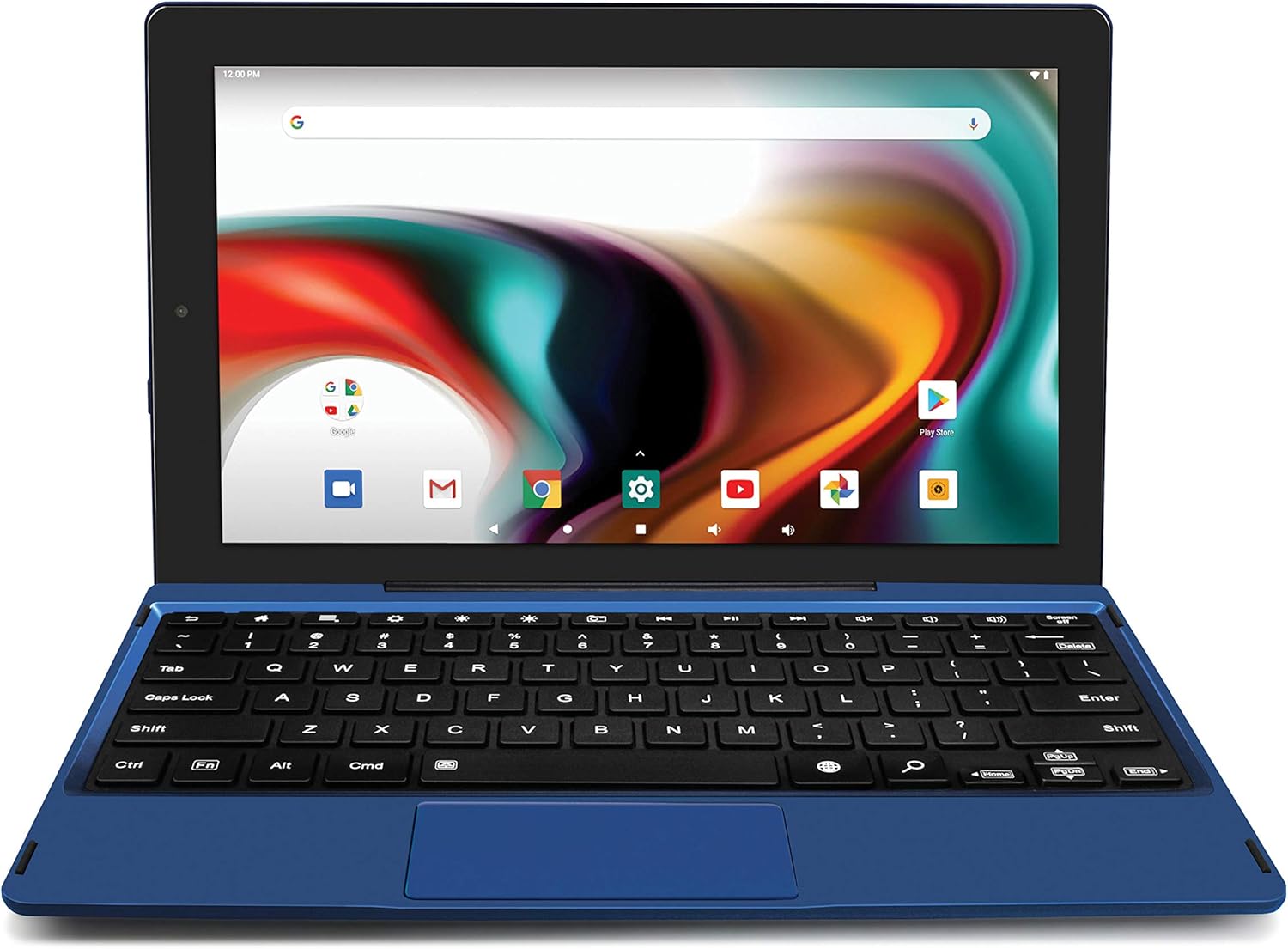
Figure 2: The RCA 11 Delta Pro tablet attached to its keyboard, forming a laptop-like configuration. The screen displays the Android home interface.
Encès/Apagat
To power on, press and hold the power button located on the side of the tablet until the screen illuminates. To power off, press and hold the power button, then select "Power off" from the options that appear on the screen.
Configuració inicial d'Android
Upon first power-on, follow the on-screen prompts to complete the initial Android 9 Pie setup, including language selection, Wi-Fi connection, and Google account sign-in.
Instruccions de funcionament
Ús de la pantalla tàctil
- Toca: Lightly touch the screen with your finger to select an item or open an application.
- Mantén premut: Touch and hold an item to reveal additional options or move icons.
- Llisca: Arrossegueu el dit per la pantalla per desplaçar-vos per pàgines o llistes.
- Pessiga per fer zoom: Col·loca dos dits a la pantalla i separa'ls per ampliar-la o ajunta'ls per allunyar-la.
Using the Detachable Keyboard and Trackpad
When the keyboard is attached, you can use it for typing and the trackpad for navigation, similar to a traditional laptop. The trackpad supports multi-touch gestures.

Figure 3: The RCA 11 Delta Pro tablet configured in a stand mode, with the keyboard folded back to support the screen. This allows for hands-free viewing.
Tablet Orientation
The tablet supports both landscape and portrait orientations. The display will automatically adjust based on how you hold the device, unless screen rotation is locked in settings.

Figure 4: The RCA 11 Delta Pro tablet displayed in portrait orientation, detached from its keyboard. This mode is ideal for reading or browsing content vertically.
Connexió a Wi-Fi
- Vés a Configuració.
- Seleccioneu Xarxa i Internet.
- Toqueu Wi-Fi i enceneu-lo.
- Seleccioneu la xarxa desitjada de la llista i introduïu la contrasenya si se us demana.
Connectivitat Bluetooth
Per emparellar-se amb dispositius Bluetooth:
- Vés a Configuració.
- Seleccioneu Dispositius connectats.
- Toqueu Vincula un dispositiu nou.
- Ensure your Bluetooth device is in pairing mode and select it from the list.
Ús de les càmeres
The tablet features dual 2MP front and rear cameras. Open the Camera application to take photos or record videos.
Manteniment
Neteja del dispositiu
Use a soft, lint-free cloth to clean the screen and exterior of the tablet. For stubborn smudges, slightly dampNetegeu el drap amb aigua o una solució de neteja específica per a pantalles. Eviteu utilitzar productes químics agressius o materials abrasius.
Cura de la bateria
To prolong battery life, avoid exposing the tablet to extreme temperatures. It is recommended to fully charge the device before it completely drains.
Actualitzacions de programari
Periodically check for system updates to ensure optimal performance and security. Go to Configuració > Sistema > Avançat > Actualització del sistema.
Resolució de problemes
| Problema | Possible solució |
|---|---|
| El dispositiu no s'encén. | Ensure the battery is charged. Connect the AC adapter and try again. If unresponsive, press and hold the power button for 10-15 seconds to force a restart. |
| Problemes de connexió Wi-Fi. | Check if Wi-Fi is enabled in settings. Restart your router and the tablet. Ensure you are within range of the Wi-Fi signal. |
| El teclat no respon. | Ensure the tablet is securely docked to the keyboard. Detach and reattach the keyboard. Restart the tablet. |
| La pantalla no respon. | Restart the tablet. If the issue persists, perform a factory reset (data will be lost, back up important files). |
| Les aplicacions són lentes o es bloquegen. | Close unused applications. Clear app caches in Settings > Apps & notifications > App info. Ensure sufficient storage space is available. |
Especificacions
- Model: RCT6613W23PH6-Blue
- Sistema operatiu: Android 9 Pie
- Visualització: 11.6 Inches IPS Touchscreen, 1366 x 768 Resolution
- Processador: Quad-core d'1.3 GHz
- RAM: 2 GB DDR_SDRAM
- Emmagatzematge: 32 GB Flash Memory (MicroSD-expandable up to 128GB)
- Càmeres: Dual 2MP Front/Rear
- Connectivitat: Wi-Fi, Bluetooth
- Ports: Micro USB, USB complet, ranura per a targetes MicroSD, presa per a auriculars de 3.5 mm, micròfon, presa de CC
- Durada de la bateria: Fins a 6 hores (mitjana)
- Dimensions: 34.5 x 22.9 x 8.3 cm
- Pes: 671.32 g

Figure 5: An informational graphic highlighting the 11.6" Delta Pro Android 2-in-1 tablet's key specifications, including Android 9.0 Pie, 11.6" HD Display, Detachable Keyboard with Trackpad, Quad-core, 2GB RAM, and available colors (Charcoal, Blue, Purple, Pink).

Figure 6: A display of the RCA 11 Delta Pro tablet available in various color options, including purple, pink, blue, and charcoal, each shown with its detachable keyboard.

Figura 7: Detall view of the tablet's rear panel, indicating the model number RCT6613W23 and other regulatory information. This image helps in identifying the specific model.
Garantia i Suport
Per obtenir informació sobre la garantia i assistència tècnica, consulteu la documentació inclosa amb la compra o visiteu el lloc web oficial d'assistència de RCA. weblloc.
Fabricant: Alco Electronics Ltd.
For further assistance, you may contact RCA customer service.


