Introducció
The VSN Twin Looper Pedal (Model LTL02) is a versatile stereo guitar effect pedal designed for looping and rhythm accompaniment. It features 11 types of play, 10 minutes of looping time, unlimited overdubs, and undo/redo functionality. This manual provides detailed instructions for setup, operation, and maintenance to ensure optimal performance.
Característiques clau
- Multifunció: 11 types of play, stereo input and output, with individually adjustable left and right channel volumes. Offers Hi-Fi sound with no noise, true-bypass, analog dry-through, and high-quality audio.
- Long Looping Time: Provides 10 minutes of looping time, unlimited overdubs, and undo/redo function.
- Construcció sòlida: Features a small size, heavy-duty footswitch, true bypass, and a full metal sturdy case.
- Creative Capabilities: Combines essential looper functionalities, allowing for subtle performances or dynamic shows.
- Operació senzilla: Enables playing loops in reverse, speeding them up, or slowing them down.
- Interfície USB: Connects to a computer via USB cable for user software operation, supporting WINDOWS/MAC versions for importing/exporting audio. (Note: USB jack is not for power input).
Contingut del paquet
- 1x VSN Twin Looper Pedal
- 1x cable USB
- 1 x manual d'usuari
Note: A 9V DC power adapter (center negative) is not included and must be purchased separately.
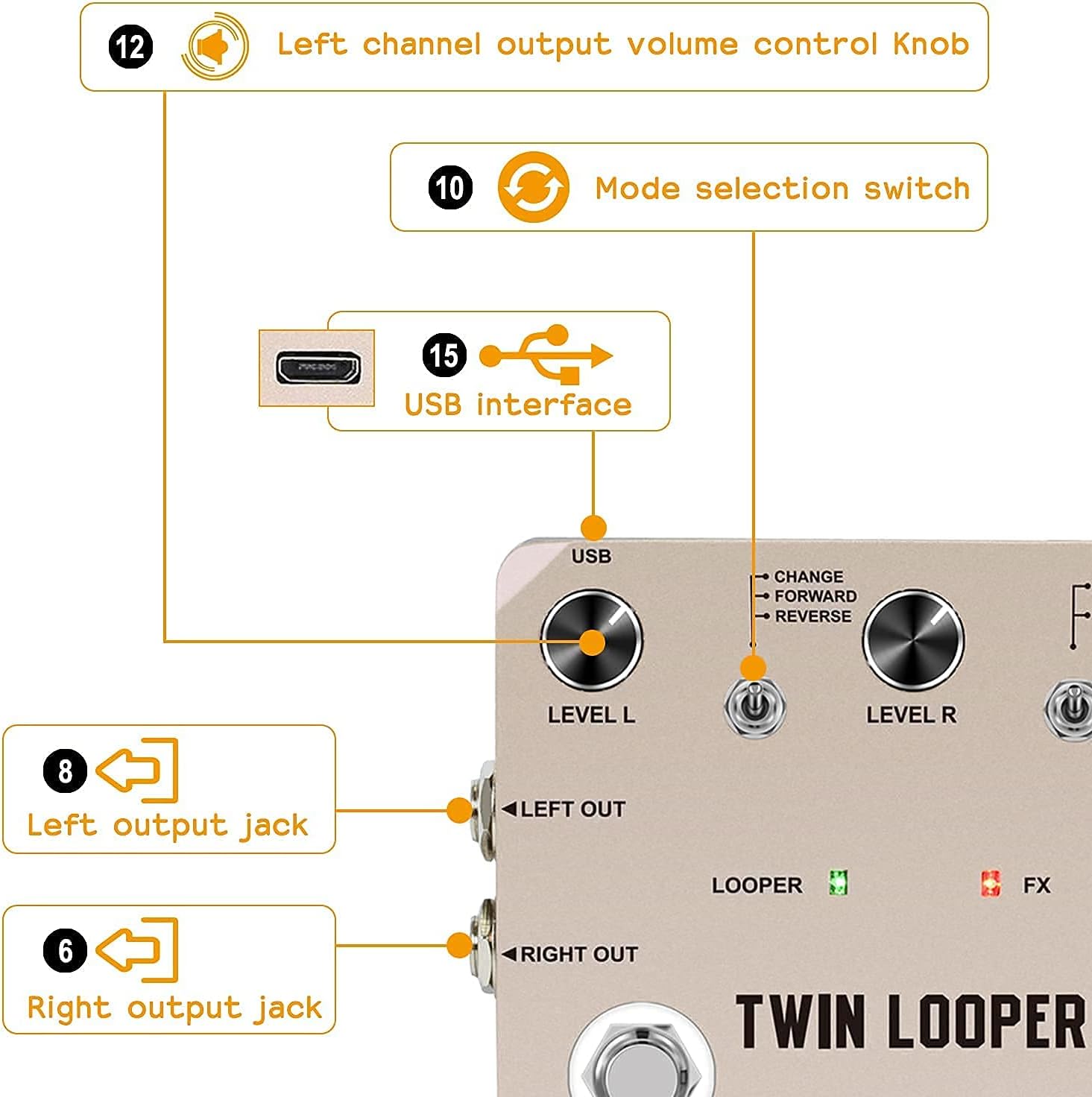
Figure 1: Package contents of the VSN Twin Looper Pedal, showing the pedal, USB cable, and user manual. A separate 9V DC power adapter is required.
Controls i connexions
The VSN Twin Looper Pedal features intuitive controls and versatile connection options.

Figura 2: global view of the VSN Twin Looper Pedal.
Controls del panell frontal

Figure 3: Front panel controls of the VSN Twin Looper Pedal.
- LEVEL L Knob: Adjusts the output volume of the left channel.
- LEVEL R Knob: Adjusts the output volume of the right channel.
- Controlador de VELOCITAT: Controls the playback speed of the loop (Fast/Normal/Slow).
- CHANGE/FORWARD/REVERSE Switch: Toggles between changing, forward, and reverse playback modes for the loop.
- STOP/FX Switch: Selects between stopping the loop or activating FX mode.
- Pedal LOOPER: Initiates recording, playback, and overdubbing. Hold to undo/redo/erase.
- FX Footswitch: Activates or deactivates the selected effect.
- LOOPER LED (Green): Indicates looper status (recording, playing, overdubbing).
- FX LED (Red): Indicates FX status (on/off).
Connexions del panell lateral

Figure 4: Connection points on the VSN Twin Looper Pedal.
- LEFT IN Jack: Left channel audio input.
- RIGHT IN Jack: Right channel audio input.
- LEFT OUT Jack: Sortida d'àudio del canal esquerre.
- RIGHT OUT Jack: Sortida d'àudio del canal dret.
- Entrada DC 9V: Power input for a 9V DC center-negative adapter (not included).
- Port USB: Connects to a computer for data transfer (import/export audio) and software updates.
Configuració
- Connexió d'alimentació: Connect a 9V DC center-negative power adapter (not included) to the DC 9V input jack.
- Connexió de l'instrument: Connect your instrument(s) to the LEFT IN and/or RIGHT IN jacks using standard 1/4-inch instrument cables.
- Amplifier/Output Connection: Connect the LEFT OUT and/or RIGHT OUT jacks to your amplifier(s) or audio interface.
- Connexió USB (opcional): For computer interaction, connect a USB cable from the pedal's USB port to your computer.
Modes de funcionament
Looping Functionality
The looper allows for recording, playback, and overdubbing of audio.
- Registre: Tap the LOOPER footswitch once to start recording. The LOOPER LED will turn red.
- Reproducció: Tap the LOOPER footswitch again to stop recording and begin playback. The LOOPER LED will turn green.
- Sobregrabació: While playing back, tap the LOOPER footswitch to start overdubbing. The LOOPER LED will blink red/green. Tap again to stop overdubbing and continue playback.
- Desfer/Refer: During playback, hold the LOOPER footswitch for 2 seconds to undo the last recorded layer. Hold again for 2 seconds to redo the layer.
- Esborra: Double-tap the LOOPER footswitch to stop playback. Then, hold the LOOPER footswitch for 2 seconds to erase the current loop.
- Reverse/Forward Playback: Use the CHANGE/FORWARD/REVERSE switch to alter the playback direction of your loop.
- Ajust de velocitat: Use the SPEED knob to adjust the playback speed of the loop (Fast, Normal, Slow).
Drum Machine Functionality
The pedal includes a drum machine with various patterns.
- Activate Drum: Press the FX footswitch to activate the drum machine.
- Select Pattern: Use the SELECT knob (often combined with the BPM knob) to browse through different drum patterns (Rock, Metal, Pop, etc.).
- Adjust BPM: Use the BPM knob to set the tempo of the drum pattern.
- Adjust Drum Volume: Use the VOLUME knob to control the drum machine's output level.
Video 1: Demonstrates how to quickly master the use of the Twin Looper pedal, including basic looping and effects.
Video 2: Shows the Twin Looper Electric Guitar Effect Pedal in action, highlighting its core looping capabilities.
Video 3: Explores the 11 types of play available on the VSN Twin Looper Electric Guitar Effect Pedal.
Video 4: Provides a comprehensive overview of the VSN Twin Looper Electric Guitar Effect Pedal Loop Station's features and functions.
Resolució de problemes
- Sense energia: Ensure a 9V DC center-negative power adapter is correctly connected. Check the power source.
- Sense so: Verify all cables are securely connected. Check instrument and amplifier volume levels. Ensure the pedal is not in bypass mode if an effect is desired.
- Distortion/Noise: Check input levels to prevent clipping. Ensure proper grounding. Use a regulated power supply.
- Loop Not Recording/Playing: Ensure the LOOPER footswitch is pressed correctly to initiate recording or playback. Check memory slots.
- Problemes de connexió USB: Ensure the correct USB cable is used and drivers (if any) are installed on your computer.
Especificacions
| Item | Detall |
|---|---|
| Model | LTL02 |
| Marca | VSN |
| Pes de l'article | 1.08 lliures |
| Dimensions del producte | 3.54 x 1.38 x 4.57 polzades |
| Material del cos | Aliatge d'alumini |
| Font d'alimentació | Electric (9V DC, center negative, not included) |
| Looping Time | 10 minuts |
| Qualitat d'àudio | 44.1 kHz/24 bits |
| Entrada/sortida | Stereo (Left/Right 1/4-inch jacks) |
| Connectivitat | USB |
Garantia i Suport
Per obtenir informació sobre la garantia i assistència tècnica, consulteu el lloc web oficial del fabricant. weblloc o poseu-vos en contacte amb el seu servei d'atenció al client.


