1. Introducció
Gràcies per la compraasing the Douk Audio 120W Mini Bluetooth 5.0 Power Amplifier. This compact and versatile audio amplifier is designed to deliver high-fidelity stereo sound for your home speaker system. Featuring multiple input options including Bluetooth 5.0, AUX, USB, and TF card, it offers flexible connectivity for various audio sources. This manual provides detailed instructions for setup, operation, and maintenance to ensure optimal performance and longevity of your device.

Figura 1.1: Frontal view of the Douk Audio 120W Mini Bluetooth 5.0 Power Ampmés viu.
2. Informació de seguretat
- Llegiu atentament totes les instruccions abans d'utilitzar el dispositiu.
- Mantingueu el dispositiu allunyat de l'aigua, la humitat i la llum solar directa.
- No bloquegeu les obertures de ventilació. Assegureu-vos que hi hagi un flux d'aire adequat al voltant de la unitat.
- Use only the provided power adapter. Using an incorrect power supply may damage the device and void the warranty.
- No intenteu desmuntar ni reparar la unitat vosaltres mateixos. Encarregueu tot el manteniment a personal qualificat.
- Avoid exposing the device to extreme temperatures or high humidity.
- Disconnect the power adapter from the wall outlet if the unit is not going to be used for a long period.
3. Contingut del paquet
Si us plau, reviseu el paquet acuradament per assegurar-vos que tots els articles hi són i estan en bon estat.
- 1x Douk Audio 120W Mini Bluetooth Power Ampmés viu
- 1x adaptador de corrent de 19 V
- 1 cable AUX de 3.5 mm
- 1x 1:2 RCA Cable
- 1x 2:2 RCA Cable
- 1x cable USB

Figure 3.1: Included accessories and ampunitat més viva.
4. Producte acabatview
4.1 Tauler frontal

Figure 4.1: Front Panel Layout.
- Botó Cançó anterior: Short press to go to the previous track (U-disk/TF card mode).
- Botó Reproduir/Pausa: Short press to play or pause (U-disk/TF card mode).
- Botó de la següent cançó: Short press to go to the next track (U-disk/TF card mode).
- Input Selection Button (M): Short press to cycle through input modes (Bluetooth, AUX, TF, USB).
- Pantalla digital: Shows current input mode and playback information.
- TF IN: Slot for TF (Micro SD) card.
- ENTRADA USB: USB-A port for U-disk (USB flash drive).
- AUX IN: 3.5mm audio input jack.
- Control de volum/alimentació: Rotate to adjust volume. Long press to power on/off.
- Indicador LED: Indicates power status and mode.
4.2 Panell posterior
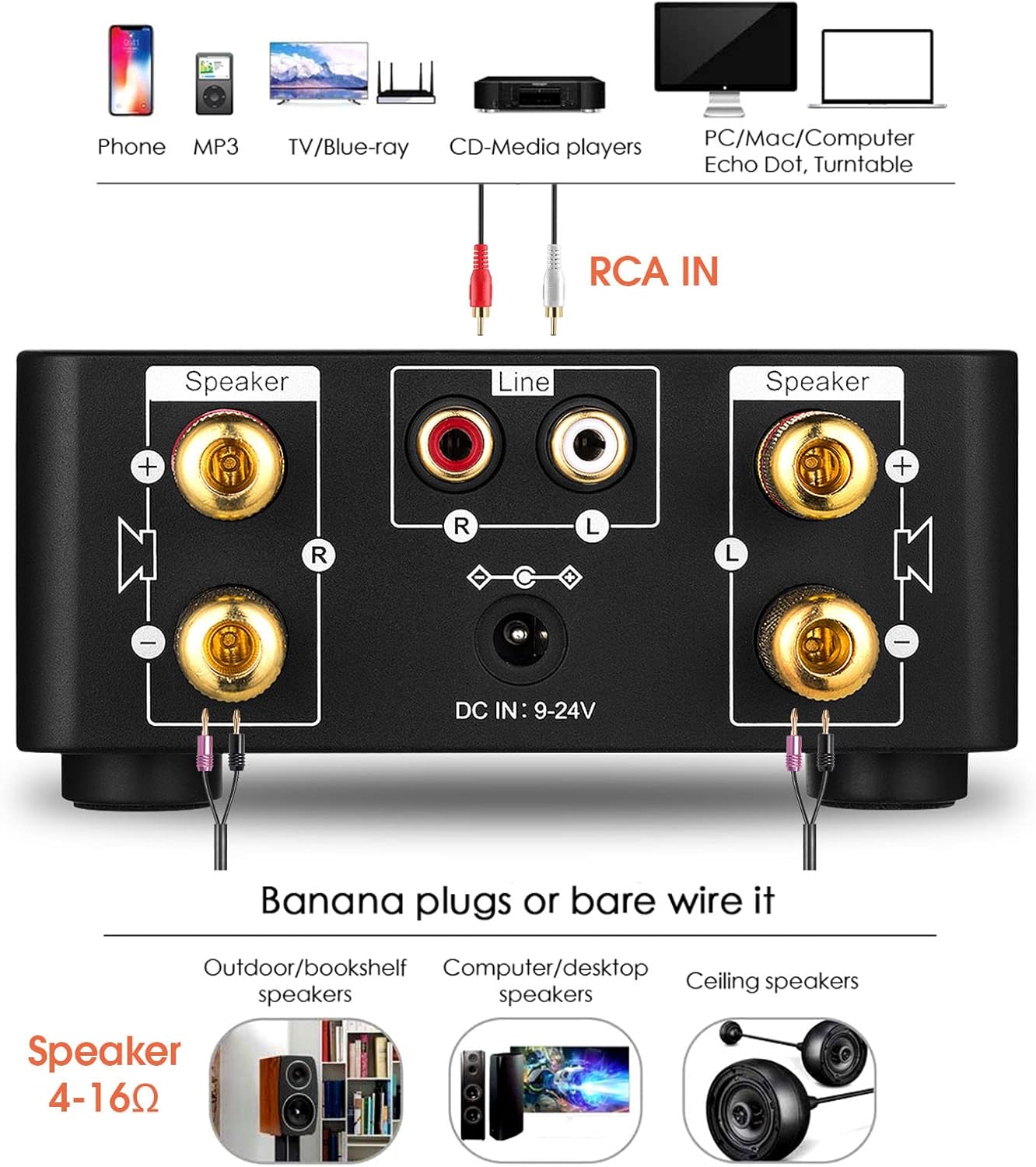
Figure 4.2: Rear Panel Layout.
- Speaker Outputs (Left & Right): Connect passive speakers (4-16Ω impedance). Supports banana plugs or bare wire.
- RCA IN (Line): Entrada RCA estèreo per a dispositius d'àudio externs.
- Entrada de CC (9-24 V): Power input jack.
5. Configuració
Follow these steps to set up your Douk Audio ampmés viu:
- Connectar els altaveus: Connect your passive speakers to the speaker output terminals on the rear panel. Ensure correct polarity (+ to + and - to -) for each speaker. The amplifier supports speakers with 4-16Ω impedance. You can use banana plugs or bare speaker wire.

Figure 5.1: Speaker and RCA connections.
- Connecta la font d'àudio:
- For RCA Input: Connect your audio source (e.g., CD player, TV, turntable with pre-amp) to the RCA IN ports on the rear panel using an RCA cable.
- For AUX Input: Connect your audio source (e.g., smartphone, tablet, computer) to the AUX IN port on the front panel using a 3.5mm audio cable.
- For USB Input: Insert a U-disk (USB flash drive) containing audio files into the USB IN port on the front panel.
- For TF Card Input: Insert a TF (Micro SD) card containing audio files into the TF IN slot on the front panel.
- For Bluetooth Input: No physical connection needed. You will pair your device later during operation.
- Connectar l'alimentació: Insert the DC plug of the provided 19V power adapter into the DC IN port on the rear panel of the amplifier. Then, plug the power adapter into a wall outlet.
- Encès: Long press the Volume/Power knob on the front panel to turn on the amplificador. La pantalla digital s'il·luminarà.
6. Instruccions de funcionament
6.1 Selecció del mode d'entrada
Premeu breument M (Mode) button on the front panel to cycle through the available input modes: Bluetooth (BT), AUX, TF Card (TF), and USB. The digital display will indicate the currently selected mode.

Figure 6.1: Multiple input options for versatile connectivity.
6.2 Funcionament Bluetooth
- Canvia el amplifier to Bluetooth mode using the M button. The display will show "BT" and the Bluetooth indicator will flash, indicating it's in pairing mode.
- Al dispositiu mòbil (telèfon intel·ligent, tauleta, etc.), activeu el Bluetooth i cerqueu els dispositius disponibles.
- Select "Douk Audio" or "Nobsound" (device name may vary slightly) from the list of found devices to pair.
- Once successfully paired, the Bluetooth indicator on the amplifier will stop flashing and remain solid. You can now play audio from your device wirelessly.
Reproducció de targetes USB/TF de 6.3
When a U-disk or TF card is inserted and the corresponding input mode is selected, the amplifier will automatically begin playing supported audio files.
- Formats admesos: WAV, APE, FLAC, MP3.
- Utilitza el Cançó anterior, Reproduir/Pausa, i Següent Cançó buttons on the front panel to control playback.

Figure 6.2: TF card and USB input options.
6.4 Control de volum
Gira el gran Volum/Potència knob on the front panel clockwise to increase volume and counter-clockwise to decrease volume.
7. Manteniment
- Neteja: Utilitzeu un drap suau i sec per netejar l'exterior amplifier. Do not use liquid cleaners or aerosols.
- Emmagatzematge: If not in use for an extended period, disconnect the power and store the amplifier in a cool, dry place.
- Ventilació: Ensure the ventilation holes are not obstructed to prevent overheating.
8. Solució De Problemes
| Problema | Causa possible | Solució |
|---|---|---|
| Sense sortida de so. |
|
|
| L'aparellament de Bluetooth ha fallat. |
|
|
| La targeta USB/TF no funciona. |
|
|
| La unitat s'apaga de manera inesperada. |
|
|
9. Especificacions
| Model | GFJ782_US |
| Potència de sortida | 120W (Max, likely peak power) |
| Canals | 2.0 Channel (Stereo) |
| Versió Bluetooth | 5.0 |
| Interfícies d'entrada | Bluetooth, AUX (3.5mm), USB (U-disk), TF Card |
| Interfície de sortida | Speaker Outputs (Banana plug / Bare wire) |
| Impedància de l'altaveu | 4-16Ω |
| Font d'alimentació | DC 9-24V (19V recommended) |
| Supported Audio Formats (USB/TF) | WAV, APE, FLAC, MP3 |
| Dimensions (L x A x A) | Aprox. 110 mm x 90 mm x 50 mm (4.33 x 3.54 x 1.97 polzades) |
| Pes de l'article | Aprox. 0.76 kg (1.67 lliures) |
10. Garantia i Suport
This product comes with a standard manufacturer's warranty. For specific warranty terms and conditions, please refer to the documentation included with your purchase or contact the seller directly.
For technical support, troubleshooting assistance, or any inquiries regarding your Douk Audio amplifier, please contact the customer support team of Nobsound (the manufacturer) or your retailer.
You may also find additional resources and FAQs on the official Nobsound weblloc: Nobsound Official Store.


