1. Introducció
Gràcies per la compraasing the Vordon AC-5201 Kent Car Radio. This manual provides essential information for the safe installation, operation, and maintenance of your new car multimedia system. Please read this manual thoroughly before using the product and keep it for future reference.
2. Informació de seguretat
Observe the following safety guidelines to prevent accidents and damage to the unit:
- No feu servir la unitat de manera que us distregui de la conducció. Prioritzeu sempre la seguretat viària.
- Ensure proper installation by a qualified professional to avoid electrical shorts or damage to your vehicle.
- Do not disassemble or modify the unit. This may cause electric shock, damage, or fire.
- Mantingueu el volum a un nivell que us permeti sentir els sons del trànsit exterior.
- Eviteu exposar la unitat a temperatures extremes, llum solar directa o humitat.
- Use only accessories and parts approved by Vordon.
3. Contingut del paquet
Si us plau, comproveu que tots els elements siguin presents al paquet:
- Vordon AC-5201 Car Radio Unit
- Arnès de cablejat d'alimentació i altaveus
- Suports i cargols de muntatge
- Control remot
- Manual d'usuari (aquest document)
- External Microphone (if included with your model)
4. Producte acabatview
4.1 Panell frontal i pantalla
The Vordon AC-5201 features a retractable 7-inch touchscreen display and a standard 1 DIN chassis. The front panel includes essential controls and input ports.
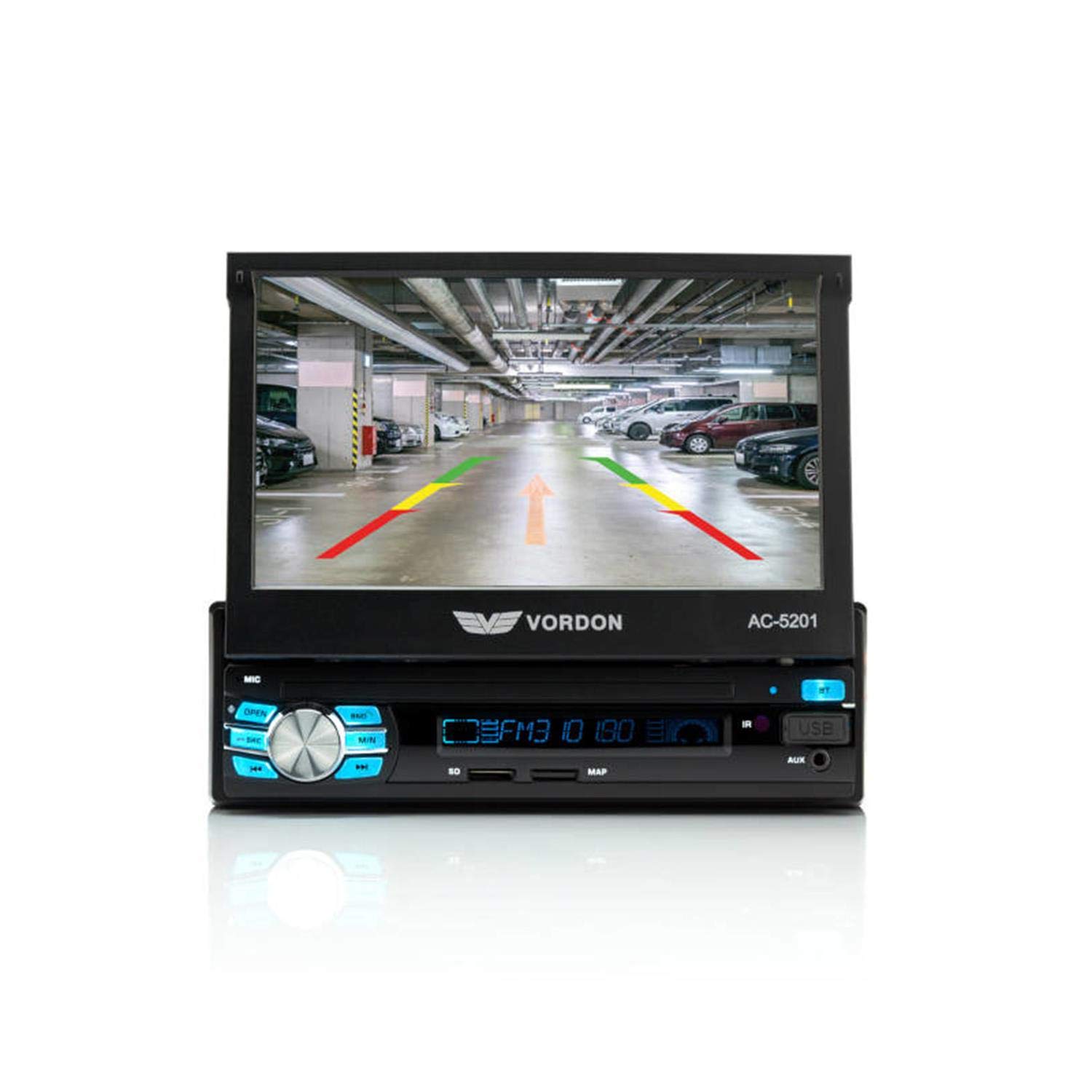
Imatge: Frontal view of the Vordon AC-5201 car radio with the 7-inch LCD touchscreen extended, displaying a simulated reversing camera view with parking guidelines. The main unit below the screen shows control buttons, a rotary knob, USB port, and AUX input.
- 7-inch TFT LCD Touchscreen: Retractable display for multimedia playback and system control.
- Control de potència/volum: Premeu per encendre/apagar, gireu per ajustar el volum.
- Botó de mode: Switches between radio, USB, SD, AUX, and Bluetooth modes.
- Port USB: Connecteu dispositius d'emmagatzematge USB per a la reproducció de contingut multimèdia.
- Ranura per a targeta SD: Inseriu targetes SD per a la reproducció multimèdia.
- AUX-IN (3.5mm Jack): Connecteu dispositius d'àudio externs.
- Micròfon (MIC): Built-in for hands-free calling.
- Botó de restabliment: Small button to reset the unit (requires a pointed object).
4.2 Control remot
The included remote control allows for convenient operation of the car radio from a distance.

Image: The Vordon AC-5201 car radio unit with its 7-inch screen extended, shown alongside its black remote control. The remote has various buttons for media control, volume, and mode selection.
4.3 Connexions posteriors
The rear panel of the unit contains various connectors for power, speakers, and external devices:
- Connector ISO: For power supply and speaker connections.
- Entrada d'antena: Connect your car's radio antenna.
- RCA Audio Outputs: Per connectar externs ampaixecadors.
- Video Output (V-OUT): Per connectar monitors externs.
- Video Input (V-IN): For connecting a reversing camera or other video sources.
- AUX Audio Input (RCA): Additional audio input.
- Entrada de control del volant: For connecting to compatible steering wheel controls.
5. Configuració i instal·lació
Installation of this unit requires technical knowledge. It is highly recommended to have it installed by a professional car audio technician.
5.1 Diagrama de cablejat (directrius generals)
Consulteu el diagrama de cablejat que s'inclou amb la unitat per a les connexions específiques. Les connexions generals inclouen:
- Cable groc (12V constants): Connect to a constant 12V power source (battery).
- Red Wire (Accessory 12V): Connect to a switched 12V power source (ignition).
- Cable negre (terra): Connect to a good chassis ground point.
- Cable blau (antena/Amp Remote): Connecteu-vos a l'antena elèctrica o ampEncenedor remot del lificador.
- Cables de l’altaveu: Connect to your vehicle's speakers (e.g., White/White-Black for Front Left, Grey/Grey-Black for Front Right, Green/Green-Black for Rear Left, Purple/Purple-Black for Rear Right). Ensure correct polarity.
- Cable de marxa enrere: Connect to the vehicle's reverse light circuit for automatic camera display.
5.2 Muntatge de la unitat
The AC-5201 is designed for a standard 1 DIN opening. Use the supplied mounting sleeve and brackets to secure the unit in your vehicle's dashboard. Ensure the unit is firmly in place to prevent vibration and damage.
6. Funcionament
6.1 Controls bàsics
- Encès/apagat: Premeu el botó de volum.
- Ajust de volum: Rotate the volume knob.
- Selecció del mode: Press the MODE button to cycle through available sources (Radio, USB, SD, AUX, Bluetooth).
- Screen Retraction: Use the OPEN/CLOSE button to retract or extend the screen.
6.2 Radio Tuner (AM/FM)
In Radio mode, use the touchscreen or physical buttons to:
- Escaneig: Automatically search for and store strong stations.
- Sintonització: Manually adjust the frequency.
- Estacions preseleccionades: Store and recall up to 18 FM stations.
6.3 Connectivitat Bluetooth
Pair your mobile phone for hands-free calling and audio streaming.
- Turn on the unit and select Bluetooth mode.
- Enable Bluetooth on your mobile phone and search for devices.
- Select "Vordon AC-5201" from the list of available devices.
- Confirma l'emparellament en tots dos dispositius si se't demana.
Reproducció USB/SD de 6.4"
Insert a USB drive or SD card into the respective slot. The unit will automatically switch to USB/SD mode and begin playing compatible media files (AVI, MP3, MP4, MP5, FLV, RMVB).
6.5 Entrada AUX
Connect an external audio device (e.g., MP3 player, smartphone) to the front 3.5mm AUX-IN jack or the rear RCA AUX inputs. Select AUX mode to play audio from the connected device.
6.6 Trucades de mans lliures
Once paired via Bluetooth, you can make and receive calls directly through the car radio. Use the touchscreen to dial numbers, answer, or end calls. The built-in microphone captures your voice, and audio plays through your car speakers.
6.7 MirrorLink (Android, iOS)
The unit supports MirrorLink functionality, allowing you to mirror your smartphone's screen (Android or iOS) onto the car radio display. Refer to your phone's specific MirrorLink instructions for connection details.
6.8 Reversing Camera (V-IN)
If a reversing camera is connected to the V-IN port and the reverse gear wire is properly installed, the display will automatically switch to the camera view quan el vehicle es posa en marxa enrere.
7. Manteniment
Proper care ensures the longevity of your Vordon AC-5201:
- Neteja de la pantalla: Use a soft, lint-free cloth to wipe the touchscreen. Do not use abrasive cleaners or solvents.
- Neteja general: Netegeu l'exterior de la unitat amb un drap suau i sec.
- Eviteu líquids: No permetre que entrin líquids a la unitat.
- Temperatura: Avoid leaving the unit in extreme hot or cold conditions for extended periods.
8. Solució De Problemes
Si teniu problemes, consulteu la taula següent per veure els problemes i les solucions més habituals:
| Problema | Causa possible | Solució |
|---|---|---|
| Sense poder | Cablejat incorrecte; fusible fundit | Check power connections (Yellow, Red, Black wires). Inspect and replace fuse if necessary. |
| Sense so | Cables d'altaveu desconnectats; Volum massa baix; Silenciament activat | Check speaker connections. Increase volume. Deactivate mute function. |
| Bluetooth no connectat | Bluetooth not enabled; Device not in pairing mode; Incorrect pairing code | Ensure Bluetooth is on for both devices. Put unit in pairing mode. Re-enter pairing code if required. |
| L'USB/SD no es reprodueix | Incompatible file format; suports corruptes; mode incorrecte seleccionat | Assegureu-vos files are compatible (AVI, MP3, MP4, MP5, FLV, RMVB). Try a different USB/SD card. Select USB/SD mode. |
| La pantalla no es retreu/s'estén | Obstruction; Mechanical issue | Check for any physical obstructions. If issue persists, contact support. |
9. Especificacions tècniques
Key technical details for the Vordon AC-5201 car radio:
| Característica | Detall |
|---|---|
| Número de model | AC-5201 |
| Mostra | 7-inch TFT LCD Touchscreen (800 x 480 pixels, 16:9) |
| Potència de sortida | 4 x 60 watts |
| Connectivitat | Bluetooth, USB, SD Card, AUX (3.5mm Jack, RCA), RCA Video Input (V-IN), RCA Video Output (V-OUT) |
| Formats d'àudio compatibles | MP3, MP4, MP5 |
| Formats de vídeo compatibles | AVI, FLV, MP4, MP5, RMVB |
| Sintonitzador de ràdio | AM/FM (18 preset stations) |
| Característiques especials | Hands-free calling, MirrorLink (Android, iOS), Reversing Camera Support, RDS |
| Dispositius compatibles | Smartphone |
| Mode de sortida d'àudio | estèreo |
| Nombre de canals | 5 |
10. Garantia i Suport
Vordon products are manufactured to high-quality standards. For information regarding warranty coverage, please refer to the warranty card included with your product or visit the official Vordon website. If you require technical assistance or have questions not covered in this manual, please contact Vordon customer support.


