1. Instruccions de seguretat importants
Llegiu atentament totes les instruccions de seguretat i funcionament abans d'utilitzar aquest televisor. Conserveu aquestes instruccions per a futures consultes.
- No exposeu el televisor a la pluja o la humitat.
- No bloquejar les obertures de ventilació.
- Assegureu-vos una correcta connexió a terra per a la seguretat elèctrica.
- Desendolleu el televisor durant tempestes o quan no l'utilitzeu durant períodes prolongats.
- Demaneu tot el servei a personal de servei qualificat.
2. Contingut del paquet
Verifiqueu que tots els elements siguin presents al paquet:
- ONIDA 32HAF 32-inch LED Smart TV
- Moble per a TV (2 peces)
- Control remot
- Manual d'usuari (aquest document)
- Cable d'alimentació
- Cargols per al muntatge del suport

Imatge 1: Frontal view of the ONIDA 32HAF 32-inch LED Smart TV. The screen displays a city skyline at night. The TV has a slim black bezel and two stand feet at the bottom corners.

Image 2: The black remote control for the ONIDA Smart TV. It features various buttons including power, source, HDMI, volume, channel, navigation keys, and number pad.
3. Configuració
3.1 Fixació del suport de TV
- Col·loqueu amb cura el televisor cara avall sobre una superfície suau i neta per evitar que es facin malbé la pantalla.
- Alineeu cada peça del suport amb les ranures corresponents de la part inferior del televisor.
- Fixeu els suports amb els cargols proporcionats. Assegureu-vos que estiguin ben ajustats.
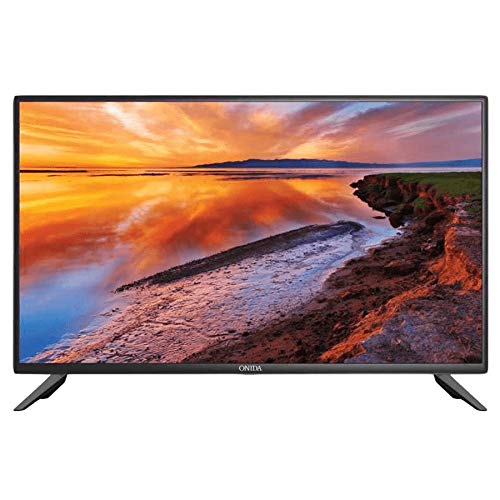
Image 3: The ONIDA 32HAF TV displayed with its stand attached, showing a scenic landscape on the screen. This illustrates the TV ready for placement on a flat surface.
3.2 Muntatge a la paret (opcional)
If you choose to wall mount your TV, please consult a professional installer. The TV supports standard VESA wall mounts. Refer to the wall mount kit instructions for proper installation.
3.3 Connexió de perifèrics
- Potència: Connecteu el cable d'alimentació a l'entrada d'alimentació del televisor i després a una presa de corrent.
- HDMI: Use HDMI cables to connect external devices like set-top boxes, gaming consoles, or Blu-ray players.
- USB: Inseriu unitats USB per a la reproducció de contingut multimèdia o les actualitzacions de programari.
- Antena/cable: Connecteu l'antena o el cable de televisió a l'entrada RF.
3.4 Engegada inicial i assistent de configuració
- Connecteu el televisor i premeu el botó d'engegada del comandament a distància.
- Follow the on-screen instructions to select your language, country, and network settings (Wi-Fi or Ethernet).
- Complete the channel scan for DVB-T/DVB-T2 signals if using an antenna.
4. Com fer funcionar el televisor intel·ligent
4.1 Funcions de control remot
Familiarize yourself with the remote control buttons for easy navigation and control.
- Potència: Encén o apaga el televisor.
- Font: Selecciona les fonts d'entrada (HDMI, USB, TV).
- Volum +/-: Ajusta el nivell de volum.
- Canal +/-: Canvia els canals de televisió.
- Navigation (Arrow) Keys & OK: Navega pels menús i confirma les seleccions.
- Menú: Accedeix al menú principal de configuració.
- Tornar/Sortir: Torna a la pantalla anterior o surt d'un menú.
4.2 Funcions de Smart TV (sistema operatiu Android)
Your ONIDA 32HAF TV runs on Android OS, providing access to various smart features:
- App Store: Download and install applications for streaming, news, and more.
- Navegador: Accedeix a Internet directament des del teu televisor.
- Reproducció multimèdia: Play videos, music, and view photos from connected USB devices.
- Connectivitat sense fils: Connect to your home Wi-Fi network for internet access.
4.3 Configuració d'imatge i so
Access the TV's menu to customize picture and sound settings:
- Mode d'imatge: Standard, Dynamic, Movie, User.
- Brillantor, contrast, color: Fine-tune display characteristics.
- Mode de so: Estàndard, Música, Pel·lícula, Usuari.
- Equalitzador: Adjust audio frequencies for personalized sound.
- So envoltant: Enable or disable 5.1 surround sound output.

Image 4: A visual representation demonstrating the 178-degree wide viewing angle of the ONIDA TV. Multiple panels show the same image of camels in a desert, maintaining consistent color and clarity from various side angles.

Image 5: A side-by-side comparison illustrating the superior performance of an ADS Panel versus a conventional panel. The ADS Panel on the right shows better color reproduction and clarity when touched, indicating improved display technology.
5. Manteniment
- Neteja de la pantalla: Gently wipe the screen with a soft, lint-free cloth. For stubborn marks, use a screen cleaner specifically designed for LED TVs. Do not spray cleaner directly onto the screen.
- Neteja de l'armari: Feu servir un drap suau i sec per netejar el moble del televisor. Eviteu utilitzar productes de neteja o dissolvents abrasius.
- Ventilació: Assegureu-vos que les obertures de ventilació de la part posterior del televisor no estiguin bloquejades per evitar el sobreescalfament.
- Actualitzacions de programari: Periodically check for software updates through the TV's settings menu to ensure optimal performance and access to new features.
6. Solució De Problemes
| Problema | Causa possible | Solució |
|---|---|---|
| Sense poder | Cable d'alimentació desconnectat; no hi ha corrent a la presa de corrent. | Comproveu la connexió del cable d'alimentació; proveu la presa de corrent amb un altre dispositiu. |
| No hi ha imatge, però hi ha so | Font d'entrada incorrecta seleccionada; problema de retroiluminació. | Press the "Source" button on the remote to select the correct input. |
| No hi ha so, però hi ha imatge | Volum silenciat o massa baix; configuració de sortida d'àudio incorrecta. | Unmute or increase volume; check audio settings in the menu. |
| El comandament a distància no funciona | Piles esgotades; obstrucció entre el comandament a distància i el televisor. | Replace batteries; ensure clear line of sight to the TV's IR sensor. |
| No es pot connectar a la Wi-Fi | Contrasenya incorrecta; problemes amb el router; televisor massa lluny del router. | Verifiqueu la contrasenya del Wi-Fi; reinicieu l'encaminador; acosteu el televisor a l'encaminador o utilitzeu Ethernet. |
7. Especificacions
| Característica | Detall |
|---|---|
| Marca | onida |
| Nom del model | 32HAF |
| Any model | 2019 |
| Sistema operatiu | Android |
| Tipus de visualització | LED |
| Resolució | HD Ready (1366 x 768 píxels) |
| Mida de la pantalla | 81 cm (32 polzades) |
| Viewangle ing | 178 graus |
| Mode de sortida d'àudio | Envoltant |
| Configuració dels altaveus | So envoltant de 5.1 canals |
| Connectivitat | Wired, Wireless (Wi-Fi), USB, HDMI |
| Tecnologia del sintonitzador | DVB-T, DVB-T2 |
| Tipus de muntatge | Wall Mount, Table Top (with included stand) |
| Pes de l'article | 9 kg |
| Dimensions del paquet | 54 x 30 x 21 cm |