Introducció
This manual provides detailed instructions for the safe and efficient use of your FONESTAR DOTS-N Bluetooth TWS Speaker. Please read this manual thoroughly before operating the device and retain it for future reference.
The FONESTAR DOTS-N is a portable Bluetooth TWS speaker featuring Bluetooth 4.2 and NFC connectivity. It offers powerful sound with enhanced bass, playback controls, and hands-free calling. Equipped with a rechargeable Li-Ion battery providing up to 10 hours of autonomy, it also includes a 3.5mm auxiliary input. Its compact design makes it suitable for home use.
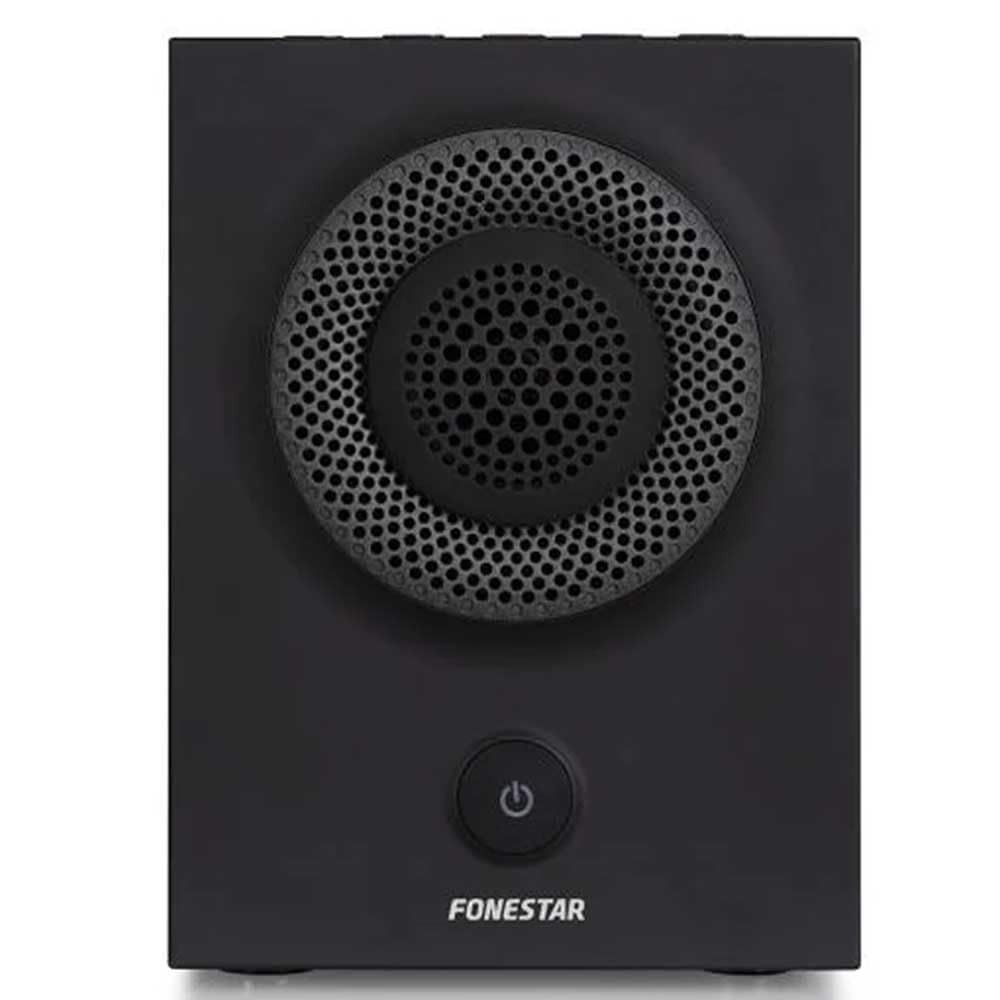
Figura 1: Frontal view of the FONESTAR DOTS-N Bluetooth TWS Speaker.
Configuració
1. Desembalatge
Traieu amb cura tots els components de l'embalatge. Assegureu-vos que hi hagi tots els elements que s'enumeren a continuació:
- FONESTAR DOTS-N Bluetooth TWS Speaker
- Cable de càrrega USB a Micro USB
- Cable d'àudio estèreo de 3.5 mm
- Manual d'usuari (aquest document)
2. Carregant l’altaveu
Before first use, fully charge the speaker. Connect the Micro USB end of the charging cable to the speaker's charging port and the USB-A end to a compatible USB power adapter (not included) or a computer's USB port.
- El llum indicador de càrrega s'il·luminarà durant la càrrega.
- El temps de càrrega és d'aproximadament 3 hores per a una càrrega completa.
- El llum indicador canviarà o s'apagarà un cop finalitzada la càrrega.
3. Encès / apagat
To power on the speaker, press and hold the power button (usually indicated by a ⏻ symbol) for a few seconds until you hear an audible prompt or see an indicator light. To power off, repeat the process.
Instruccions de funcionament
1. Emparellament Bluetooth
The speaker supports Bluetooth 4.2 for wireless audio streaming.
- Ensure the speaker is powered on and in pairing mode (usually indicated by a flashing LED). If not, press the Bluetooth pairing button or power button briefly to enter pairing mode.
- Al telèfon intel·ligent, la tauleta o un altre dispositiu compatible amb Bluetooth, aneu a la configuració de Bluetooth.
- Cerca available devices and select "FONESTAR DOTS-N" from the list.
- Once paired, the speaker will emit an audible confirmation, and the LED indicator will typically become solid.
2. Emparellament NFC (comunicació de camp proper)
For devices with NFC, pairing can be done quickly:
- Ensure NFC is enabled on your device and the speaker is powered on.
- Tap your NFC-enabled device gently against the NFC area on the speaker (refer to product diagram for exact location, if available).
- Confirma la sol·licitud d'emparellament al teu dispositiu.
3. Funció estèreo sense fil veritable (TWS)
The TWS function allows you to pair two FONESTAR DOTS-N speakers together for a stereo sound experience.
- Ensure both DOTS-N speakers are powered on and not connected to any other Bluetooth device.
- On one speaker (this will be the primary speaker), press and hold the TWS button (if available) or a designated button for TWS pairing.
- L'altaveu principal cercarà l'altaveu secundari. Un cop connectat, tots dos altaveus emetran un so de confirmació.
- Now, connect your Bluetooth device to the primary speaker as described in the "Bluetooth Pairing" section. Audio will play in stereo through both speakers.
4. Entrada auxiliar (AUX)
For non-Bluetooth devices, use the included 3.5mm stereo audio cable.
- Connect one end of the 3.5mm audio cable to the AUX-in port on the speaker.
- Connecteu l'altre extrem a la presa d'auriculars o a la sortida d'àudio del dispositiu.
- The speaker will automatically switch to AUX mode or may require manual selection via a mode button.
5. Playback Control and Hands-Free Calls
The speaker features integrated controls for music playback and managing calls:
- Reproduir/pausa: Press the Play/Pause button (often combined with the power button or a dedicated button).
- Pujar/baixar el volum: Feu servir els botons de volum (+ / -) on the speaker.
- Seguiment anterior / següent: Long press or double-press the volume buttons, or use dedicated track skip buttons if present.
- Respondre/Finalitzar la trucada: Press the Play/Pause button during an incoming call to answer, and again to end the call.
- Rebutja la trucada: Mantingueu premut el botó Reproduir/Pausa durant una trucada entrant.
Manteniment
1. Neteja
- Always power off the speaker before cleaning.
- Feu servir un drap suau, sec i sense borrissol per netejar les superfícies exteriors.
- No utilitzeu netejadors abrasius, ceres o dissolvents, ja que poden danyar l'acabat.
- Eviteu que entri humitat a cap obertura.
2. Emmagatzematge
- Guardeu l'altaveu en un lloc fresc i sec, allunyat de la llum solar directa i de temperatures extremes.
- Si l'emmagatzemeu durant un període prolongat, carregueu la bateria aproximadament al 50% cada pocs mesos per mantenir-la en bon estat.
3. Cura de la bateria
- Do not expose the battery to excessive heat, fire, or direct sunlight.
- Eviteu descarregar completament la bateria amb freqüència, ja que això pot reduir-ne la vida útil.
- Only use the provided charging cable or a certified equivalent.
Resolució de problemes
| Problema | Causa possible | Solució |
|---|---|---|
| L'altaveu no s'encén. | La bateria està esgotada. | Carregueu l'altaveu amb el cable USB proporcionat. |
| No es pot emparellar per Bluetooth. | L'altaveu no està en mode d'emparellament; el dispositiu és massa lluny; interferències. | Ensure speaker is in pairing mode. Move device closer (within 10m). Turn off other Bluetooth devices. |
| Sense so o amb un volum baix. | Volume too low on speaker or source device; incorrect input mode. | Increase volume on both speaker and source device. Check if the correct input (Bluetooth/AUX) is selected. |
| L'emparellament TWS falla. | Speakers are already paired to another device; incorrect TWS pairing procedure. | Ensure both speakers are disconnected from other devices. Follow TWS pairing steps carefully. |
| Distorsió del so. | Volume too high; low battery; poor signal. | Reduce volume. Charge the speaker. Move source device closer to the speaker. |
Especificacions tècniques

Figure 2: Dimensions of the FONESTAR DOTS-N Bluetooth TWS Speaker.
| Nom del model | DOTS-N |
| Marca | FONESTAR |
| Tecnologia de connectivitat | Bluetooth 4.2, NFC, 3.5mm AUX |
| abast sense fils | Fins a 10 metres (33 peus) |
| Mode de sortida d'àudio | Estèreo (amb TWS) |
| Tipus d'altaveu | 3" Coaxial Woofer with Tweeter, 3" Subwoofer, 4" Passive Radiator |
| Potència màxima de sortida de l'altaveu | RMS de 12 Watts |
| Resposta de freqüència | 80 - 20,000 Hz |
| Ràtio senyal / soroll | ≥ 75 dB |
| Font d'alimentació | Alimentat per bateria (Li-ion recarregable) |
| Capacitat de la bateria | 2200 mAh, 7.4 V |
| Autonomia de la bateria | Fins a 10 hores (amb un 50% de volum) |
| Temps de càrrega | Aproximadament 3 hores |
| Mètode de control | Tactile (Touch) |
| Característiques especials | High-res audio, Bluetooth, Integrated microphone, USB port (for charging) |
| Dispositius compatibles | Smartphones, tauletes |
| Ús recomanat | For home |
| Color | Negre |
| Dimensions (A x A x P) | 125 x 175 x 158 mm (aprox. 4.9 x 6.9 x 6.2 polzades) |
| Pes de l'article | 1.82 kg (aprox. 4.01 lliures) |
| Impermeable | No |
Note: Specifications are subject to change without prior notice. Battery autonomy may vary depending on usage, volume level, and music type.
Informació de la garantia
FONESTAR products are designed and manufactured to the highest quality standards. This product is covered by a limited warranty against manufacturing defects from the date of purchase. The specific terms and duration of the warranty may vary by region and retailer.
Please retain your proof of purchase (receipt or invoice) as it will be required for any warranty claims. The warranty does not cover damage caused by misuse, accident, unauthorized modification, or normal wear and tear.
For detailed warranty terms and conditions, please refer to the warranty card included with your product or contact your local FONESTAR distributor or retailer.
Atenció al client
If you encounter any issues that are not resolved by the troubleshooting guide, or if you require further assistance, please contact FONESTAR customer support or your authorized retailer.
When contacting support, please be prepared to provide the following information:
- Product Model: FONESTAR DOTS-N
- Data de compra
- Descripció del problema
- La teva informació de contacte
For the most up-to-date support information, including contact details and FAQs, please visit the official FONESTAR weblloc.


