Introducció
This manual provides essential instructions for the setup, operation, maintenance, and troubleshooting of your TCL 32S312 Smart TV. Please read this manual thoroughly before operating your television and retain it for future reference.
The TCL 32S312 is a 32-inch HD Smart TV designed to provide an immersive viewing experience with integrated smart features, allowing access to various streaming services and applications.
Informació de seguretat
Per garantir un funcionament segur i evitar danys, observeu les precaucions següents:
- No bloquejar les obertures de ventilació.
- No col·loqueu el televisor a prop de fonts de calor ni sota la llum solar directa.
- Eviteu que el cable d'alimentació sigui trepitjat o pessigat.
- Utilitzeu només accessoris/accessoris especificats pel fabricant.
- Desendolleu el televisor durant tempestes o quan no l'utilitzeu durant períodes prolongats.
- Demaneu tot el servei a personal de servei qualificat.
Contingut del paquet
Verifiqueu que tots els elements siguin presents al paquet:
- TCL 32S312 Smart TV
- Comandament a distància (amb piles)
- Moble per a TV (2 peces)
- Screws for Stand Attachment
- Cable d'alimentació
- Quick Start Guide (this manual provides detailed instructions)
Configuració
1. Fixació del suport de TV
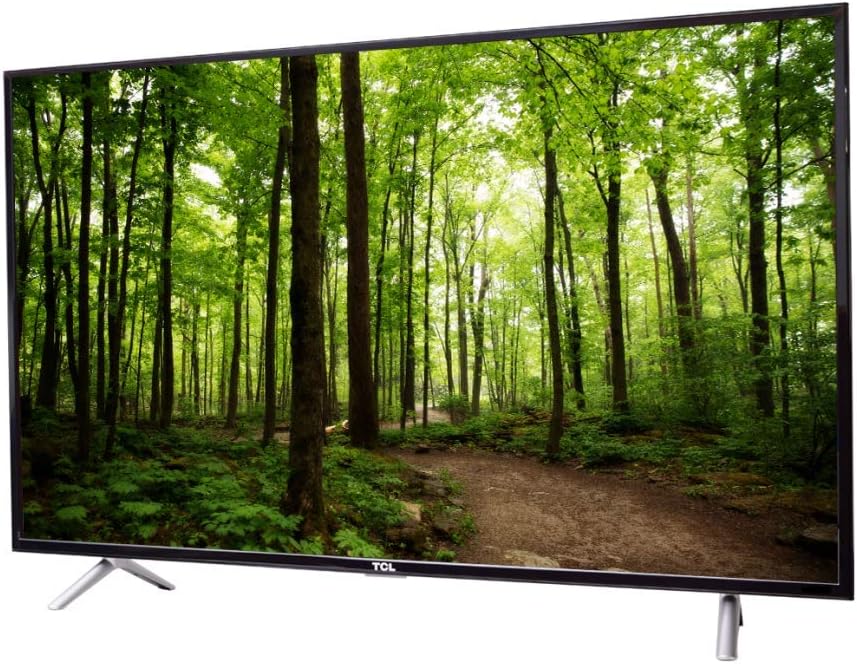
Carefully place the TV face-down on a soft, clean surface to prevent screen damage. Align each stand piece with the corresponding slots on the bottom of the TV. Secure the stands using the provided screws.

Imatge: Frontal view of the TCL 32S312 Smart TV with its two-piece stand securely attached, ready for placement.
2. Potència de connexió
Plug the power cord into the TV's power input, then plug the other end into a wall outlet. Ensure the connection is secure.
3. Connexió de dispositius externs
The TCL 32S312 supports various external devices via HDMI and USB ports. Connect your devices (e.g., game consoles, Blu-ray players, USB drives) to the appropriate ports on the TV.
- HDMI: Per a àudio i vídeo d'alta definició.
- USB: Per a la reproducció multimèdia des de dispositius d'emmagatzematge USB.
Imatge: Costat esquerre view of the TCL 32S312 Smart TV, illustrating the placement of various input ports such as HDMI and USB.
4. Assistent d'encesa inicial i configuració
Press the power button on the remote control or the TV. The TV will guide you through the initial setup wizard, including language selection, time zone, and channel scanning (if applicable).
5. Network Connection (Smart TV Features)
To access Smart TV features, connect your TV to the internet. Navigate to the network settings menu and select your Wi-Fi network. Enter the password if prompted. A stable internet connection is required for optimal Smart TV performance.
En funcionament
Control remot acabatview
The TCL 32S312 comes with a Bluetooth remote control. Ensure batteries are correctly inserted. The remote allows control over power, volume, channel selection, input source, and navigation within the Smart TV interface.
Note: Specific button functions may vary slightly depending on the operating system version.
Funcions bàsiques
- Encès/apagat: Premeu el botó Poder botó.
- Control de volum: Utilitza el Pujar/Bajar el volum botons.
- Selecció de canals: Utilitza el Canal amunt/avall buttons or number pad.
- Font d'entrada: Premeu el botó Entrada or Font button to switch between HDMI, USB, and other inputs.
Funcions de Smart TV
Access the Smart TV home screen to browse and launch applications such as streaming services, web browser, and other installed apps. Navigation is typically done using the directional pad and OK/Enter button on the remote.
Ensure your TV is connected to the internet for full Smart TV functionality.
Manteniment
Neteja de la pantalla
Netegeu suaument la pantalla amb un drap suau i sense borrissol. Per a marques difícils, netegeu suaument.ampen the cloth with water or a specialized screen cleaner. Avoid using harsh chemicals, abrasive materials, or excessive moisture.
Atenció General
- Keep the TV in a well-ventilated area.
- Eviteu col·locar objectes pesats al televisor.
- No exposeu el televisor a temperatures o humitat extremes.
Resolució de problemes
If you encounter issues with your TCL 32S312 Smart TV, refer to the following common solutions:
Sense poder
- Assegureu-vos que el cable d'alimentació estigui ben connectat tant al televisor com a la presa de corrent.
- Comproveu si la presa de corrent funciona connectant-hi un altre dispositiu.
- Proveu una presa de corrent diferent.
Sense imatge o mala qualitat d'imatge
- Verifiqueu que s'ha seleccionat la font d'entrada correcta.
- Comproveu si totes les connexions dels cables (HDMI, antena) estan soltes o danyats.
- Ajusteu la configuració de la imatge (brillantor, contrast, nitidesa) al menú del televisor.
- Si feu servir una antena, torneu a escanejar els canals.
Sense so
- Increase the volume on both the TV and any connected external devices.
- Comproveu si el televisor està silenciat.
- Verifiqueu les connexions del cable d'àudio.
- Comproveu la configuració de la sortida d'àudio al menú del televisor.
Problemes de connexió de xarxa
- Assegureu-vos que el vostre encaminador Wi-Fi estigui encès i funcioni correctament.
- Reinicieu el router i el mòdem.
- Re-enter your Wi-Fi password in the TV's network settings.
- Move the TV closer to the router or consider a Wi-Fi extender.
Restabliment de fàbrica
If problems persist, a factory reset may resolve them. This will erase all personalized settings and installed apps. Consult the TV's on-screen menu for the exact steps to perform a factory reset (usually found under System or Device Preferences).
Especificacions
| Característica | Descripció |
|---|---|
| Marca | TCL |
| Nom del model | TCL 32S312 |
| Mida de la pantalla | 32 polzades |
| Tecnologia de visualització | LED-LCD |
| Relació d'aspecte | 16:9 |
| Tecnologia de connectivitat | Bluetooth |
| Tecnologia de control remot | Bluetooth |
| Serveis d'Internet compatibles | Smart TV |
| Entrada d'àudio | HDMI, USB |
| Tipus de muntatge | Suport de taula |
| Color | Negre |
| Dispositius compatibles | Laptop, Game Console, Speaker, Tablet |
Garantia i Suport
Your TCL 32S312 Smart TV is covered by a limited warranty. Please refer to the warranty card included with your product for specific terms and conditions, including coverage duration and service procedures.
For technical support, service inquiries, or additional information, please visit the official TCL support weblloc web o poseu-vos en contacte amb el seu servei d'atenció al client. Podeu trobar més informació a TCL Electronics Store.