1. Introducció
The Okaysou AirMic4S Air Purifier is designed to provide clean and fresh air in your home or office. It features an advanced filtration system to capture and reduce airborne particles, odors, and harmful gases, contributing to a healthier indoor environment.

Figure 1.1: Okaysou AirMic4S Air Purifier, illustrating its capability to filter various airborne contaminants including dust, pollen, dander, smoke, and VOCs.
This manual provides detailed instructions for the setup, operation, maintenance, and troubleshooting of your AirMic4S Air Purifier. Please read it thoroughly before use and keep it for future reference.
2. Informació de seguretat
Per reduir el risc d'incendi, descàrrega elèctrica o lesions, observeu les següents precaucions de seguretat:
- Desendolleu sempre el purificador d'aire abans de moure, netejar o substituir els filtres.
- No feu servir la unitat amb un cable o un endoll danyats.
- Mantingueu el cable d'alimentació lluny de superfícies escalfades.
- No bloquegeu les obertures d'aire ni col·loqueu la unitat sobre una superfície tova on les obertures puguin estar bloquejades.
- No submergiu la unitat en aigua ni altres líquids.
- Aquest aparell no està pensat per ser utilitzat per persones (inclosos nens) amb capacitats físiques, sensorials o mentals reduïdes, o amb manca d'experiència i coneixements, tret que hagin rebut la supervisió o instruccions sobre l'ús de l'aparell per una persona responsable de la seva seguretat. .
- Use only genuine Okaysou replacement filters to maintain optimal performance and warranty.
3. Producte acabatview
The Okaysou AirMic4S features a compact design with powerful air purification capabilities. It utilizes a multi-stage filtration system to effectively clean the air.

Figura 3.1: Frontal view of the Okaysou AirMic4S Air Purifier, showcasing el seu disseny elegant.
3.1 Components clau
- Reixa d'entrada d'aire: Located on the lower section, designed to capture hair and large particles.
- Tauler de control: Top-mounted touch panel for all functions.
- Sortida d'aire: Reixa superior per a l'alliberament d'aire purificat.
- Compartiment del filtre: Houses the multi-stage filtre.
3.2 Sistema de filtració
The AirMic4S employs an advanced 3-stage H13 True HEPA filtration system:
- Prefiltre rentable: The first defense, capturing large particles like hair and fur.
- Filtre HEPA veritable H13: Captures pollen, dander, dust, smell, and smoke particles as small as 0.3 microns.
- Filtre de carbó actiu: Effectively absorbs stubborn and unwanted odors, harmful gases, and VOCs.

Figure 3.2: Illustration of the advanced 3-stage H13 True HEPA filtration system, detailing the washable pre-filter, H13 True HEPA filter, and active carbon filter.
4. Configuració
Follow these steps to set up your Okaysou AirMic4S Air Purifier:
- Desempaquetar la unitat: Traieu amb cura el purificador d'aire del seu embalatge.
- Eliminar l'embalatge del filtre: Before first use, unscrew the bottom cover (twist counter-clockwise) and remove the plastic packaging from the filter.
- Reinstal·la el filtre: Place the filter back into the unit, ensuring it is seated correctly.
- Secure Bottom Cover: Torneu a col·locar la coberta inferior i gireu-la en sentit horari per fixar-la.
- Col·locació: Place the air purifier on a firm, level surface. Ensure there is adequate space around the unit for proper airflow (at least 6 inches from walls or furniture).
- Connectar: Connecteu el cable d'alimentació a una presa de corrent adequada.
5. Instruccions de funcionament
The AirMic4S features an intuitive touch control panel for easy operation.

Figure 5.1: The control panel of the AirMic4S, showing buttons for power, fan speed, timer, filter reset, and night light/sleep mode.
5.1 Funcions del tauler de control
- Botó d'engegada (⑁): Premeu per encendre o apagar la unitat.
- Fan Speed Button (✴): Cycles through fan speeds (Low, Medium, High).
- Timer Button (⌛): Sets the operating timer for 2, 4, or 8 hours. The unit will automatically turn off after the selected time.
- Night Light Mode (🌙): Activates or deactivates the night light feature.
- Sleep Mode (🌛): Activates a quiet operation mode (as low as 24dB) for undisturbed sleep.
- Filter Reset Indicator (📄): S'il·lumina quan és hora de substituir el filtre. Premeu i manteniu premut per reiniciar després de substituir el filtre.
5.2 Funcionament general
- Encès: Press the Power button to start the air purifier. It will typically start on a low fan speed.
- Ajustar la velocitat del ventilador: Press the Fan Speed button repeatedly to cycle through the desired fan speeds (Low, Medium, High).
- Estableix el temporitzador: Press the Timer button to select 2H, 4H, or 8H. The corresponding indicator will light up.
- Activa el mode de repòs: Press the Sleep Mode button to enter ultra-quiet operation. The night light may dim or turn off in this mode.
- Control Night Light: Use the Night Light button to toggle the light on or off independently.
- Apagar: Press the Power button again to turn off the unit.
6. Manteniment
Un manteniment regular garanteix un rendiment òptim i allarga la vida útil del purificador d'aire.
6.1 Substitució del filtre
The filter replacement indicator will illuminate when it's time to change the filter. Filter lifespan varies based on usage and air quality.
- Desendolleu el purificador d'aire de la presa de corrent.
- Turn the unit upside down and twist the bottom cover counter-clockwise to remove it.
- Traieu el filtre antic.
- Insert a new genuine Okaysou filter into the unit.
- Torneu a col·locar la coberta inferior i gireu-la en sentit horari per fixar-la.
- Plug in the unit. With the unit powered on, press and hold the Filter Reset button for 3-5 seconds until the indicator light turns off.
Okaysou offers 4 optional replacement filters tailored to specific needs:
- Original Filter: Best for general use, absorbing odors, dander, pollen, smoke.
- Customized Blue Filter (G-Defense Filter): Best for humid environments to absorb harmful substances.
- Customized Green Filter (Toxin Absorber Filter): Best for areas with high levels of toxins, vehicle exhaust, VOCs.
- Yellow Odor Remover Filter: Best for powerfully reducing odors from ash, wildfire, cooking.

Figure 6.1: Various optional replacement filters available for the AirMic4S, each designed for specific air purification needs.
6.2 Neteja de la unitat
- Netegeu l'exterior del purificador d'aire amb un drap suau i sec.
- The washable pre-filter can be gently cleaned with a soft brush or vacuum cleaner to remove large dust and hair particles. Ensure it is completely dry before reinstallation.
- No utilitzeu netejadors abrasius ni dissolvents.
7. Solució De Problemes
If you encounter issues with your AirMic4S Air Purifier, refer to the following table for common problems and solutions:
| Problema | Causa possible | Solució |
|---|---|---|
| La unitat no s'encén. | No connectat; apagadatage; filtre no instal·lat correctament. | Ensure unit is securely plugged in. Check power supply. Verify filter is unwrapped and correctly seated, and bottom cover is secured. |
| El flux d'aire és feble o sorollós. | Filter is dirty or clogged; air inlets/outlets blocked. | Clean or replace the filter. Ensure nothing is obstructing the air inlets or outlets. |
| L'olor persisteix. | Cal canviar el filtre; forta font d'olor externa. | Replace the filter, especially if using the Original filter for strong odors. Consider using an Odor Remover filter. Ensure the room is adequately ventilated. |
| Filter Reset light remains on after replacement. | El reinici del filtre no s'ha realitzat correctament. | With the unit powered on, press and hold the Filter Reset button for 3-5 seconds until the light turns off. |
If the problem persists after trying these solutions, please contact Okaysou customer support.
8. Especificacions
| Característica | Detall |
|---|---|
| Número de model | AirMic 4S |
| Dimensions del producte | 8.7 "P x 8.7" W x 11.89" H |
| Pes | 6.6 lliures |
| Potència nominal | 25 watts |
| Nivell de soroll | 24 dB (mode de repòs) |
| Àrea de cobertura | Up to 300 sq. ft. (5x per hour in 150 sq.ft, 3x per hour in 300 sq.ft, 2x per hour in 580 sq.ft) |
| Tipus de filtració | H13 True HEPA (3-Stage) |
| Sense ozó | 100% lliure d'ozó |
| Certificacions | CARB, CE, RoHS, ETL Listed |
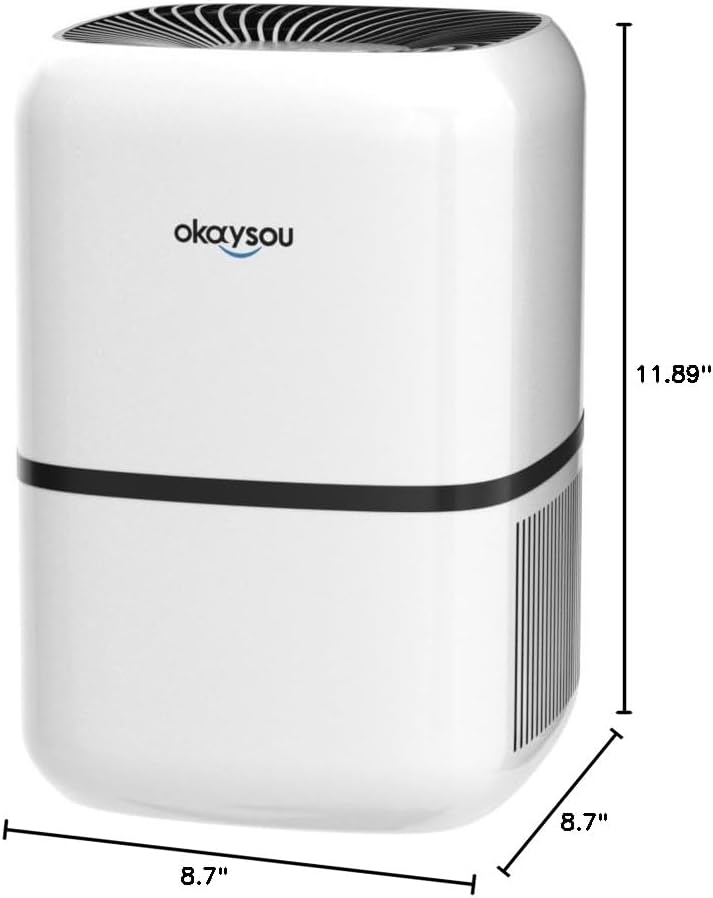
Figura 8.1: Dimensional view of the Okaysou AirMic4S Air Purifier, showing its height, depth, and width.
9. Garantia i Suport
The Okaysou AirMic4S Air Purifier comes with a 5 any de garantia. Okaysou also provides lifetime US-based customer support.
For warranty claims, technical assistance, or any questions regarding your product, please contact Okaysou customer support through their official channels or refer to the contact information provided with your purchase.
You can also visit the official Okaysou store on Amazon for more information and support: Okaysou Amazon Store


